


 Login
Planning with Live OEE DataProduction planning is on our roadmap. Planners can use live line data now.
Fabrico does not build or schedule your plan. It shows what the lines can do.
- Live OEE by line and shift
- Web, iOS and Android
- ISO/IEC 27001
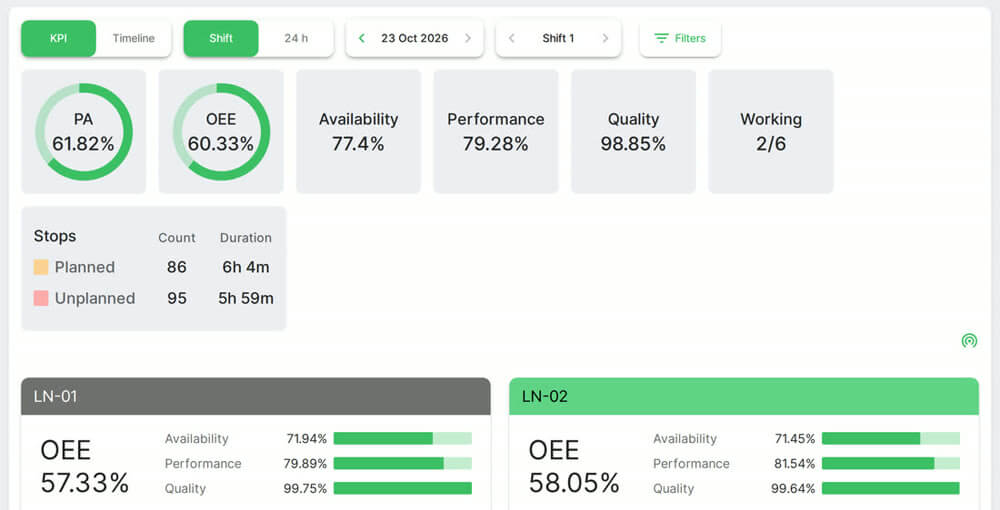 Plant and line OEE. Real Fabrico screen, sample data.
Trusted by manufacturing groups








Stop causes explain a missed target
Stops on connected machines, with the cause the operator tagged.
See downtime tracking
The planning module is only planned
It is meant to plan on machine availability and actual speed. Scope may change.
Today: live OEE and stops
Today: plan in your tool
Roadmap: planning module
Your plan stays in your own tool
Fabrico works alongside your ERP or planning sheet.
SAP, scoped per customer
Dynamics or Oracle, custom
REST API, Excel export
See how it works in a live demo.
FAQs
When will production planning be available?
We have no release date to share. If it matters for your plant, contact us and tell us how you plan today.
Does Fabrico do production scheduling?
No. Fabrico does not create, schedule or dispatch production orders today. It is the monitoring and OEE layer that a planning tool or an ERP can draw on.
Can planners see maintenance windows before they plan?
Yes. Maintenance is built in, so a machine booked for service shows on the calendar before you commit a date.
More detail
What planners can use in Fabrico today
Live OEE as Availability x Performance x Quality for each machine and line, on a real-time dashboard, with data from PLC connectivity or IoT sensors. Which machines are running or stopped right now. Downtime by cause, plus micro-stops. See the machine monitoring page for how machines connect.
ERP integration for production planning
Fabrico connects to other systems through a REST API and webhooks. A one-way or two-way connection to SAP PM or SAP S/4HANA can be scoped per customer with your SAP team. Dynamics, Oracle and other ERPs connect through a custom integration. Any list exports to Excel or CSV, for example for your own planning sheet.
Find out what your losses cost. Recover the output you already own.
See how losses get a price tag in a live demo.