


 Login
Work Orders and Task Management for Maintenance TeamsA stop gets fixed when someone owns it. Put each work order on a person's day.
OEE software shows where the line lost time. Work orders sit in the same system, each with a person and a priority.
- Drag and drop
- Warning over 8 hours
- ISO/IEC 27001
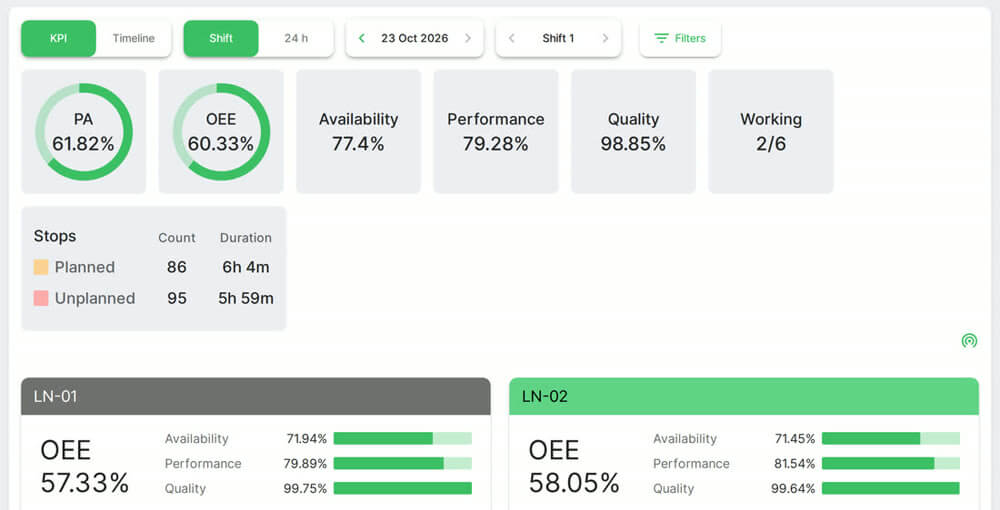 Plant and line OEE. Real Fabrico screen, sample data.
Trusted by manufacturing groups







Drag the job to the right person
Drag an unassigned card to a person. The technician gets a notification.

See overload before it happens
Each task carries a time estimate. Fabrico warns when someone goes over 8 hours.
Busy 2h of 8h
Busy 6h of 8h
Over 8h: warning
Week or month, in one calendar
Upcoming, missed and unplanned tasks, by week or month.

Open a work order from the stop
A technician or supervisor creates it for the stop, linked to the line.
See emergency repairs
See a team's day in a live demo.
FAQs
Can technicians work from a phone?
Yes. Each technician sees their own tasks in the iOS or Android app.
Can a task carry photos and files?
Yes. Add a photo, a description and files, so the technician has what the job needs.
Can jobs repeat on a schedule?
Yes, through recurring templates. See preventive maintenance.
More detail
Ways to create and track a task
Create a fast task or a detailed one. Tasks move through a status workflow, with approval steps and work shifts where you need them, and a timer records the work.
Where this sits in Fabrico
Work orders are part of Fabrico's CMMS software. Parts used go to spare parts inventory.
Find out what your losses cost. Recover the output you already own.
See how losses get a price tag in a live demo.