


 Login
CMMS built into OEE software Maintenance that starts from the stop on the line.
Maintenance in Fabrico lives inside the OEE and light MES platform, next to computer vision. A work order opens from the stop on the line in one tap, or by itself for the stop reasons you choose, and every stop carries its cost, so the team can fix the most expensive technical stops first.
- Work orders from a stop
- Stops priced in money
- QR codes on machines
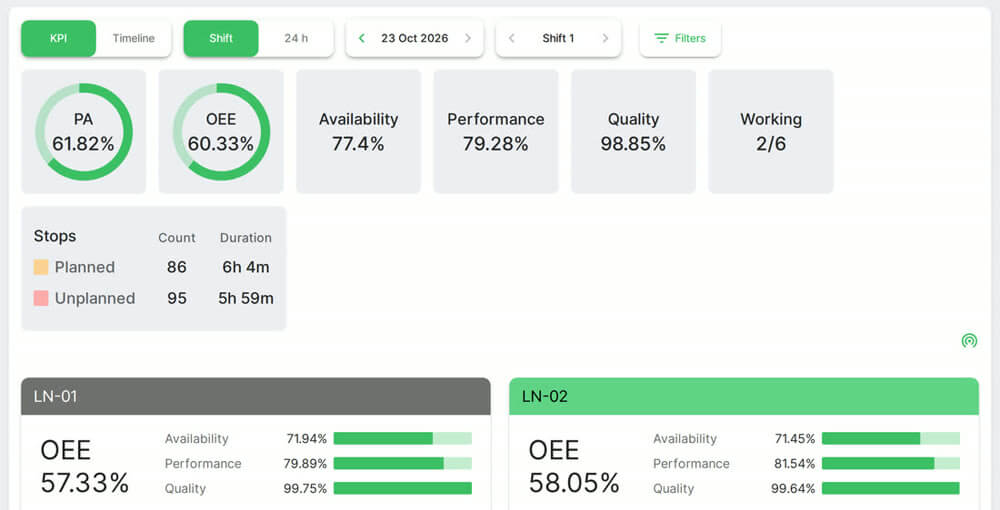 Plant and line OEE. Real Fabrico screen, sample data.
Trusted by manufacturing groups







A stopped filler at 02:10, and what happens next
The filler on line 3 stops. The operator gets the "line is down" screen and picks "Mechanical problem". That reason is set to create a maintenance task, so Fabrico creates it as soon as the reason is logged, either by itself or as a pre-filled form the operator saves.
The technicians are notified under the plant's notification rules. One opens the task in the app and scans the QR code on the filler to see past repairs. In the morning, the maintenance manager sees what that stop cost next to the week's other technical stops.
From stop to work order to fix, in seven steps
The path of one technical stop, all in one system.
- The line stops. Fabrico records it from the machine signal, or the operator starts it in manual mode on a line without sensors.
- The operator gives the reason: the machine, then the reason from the plant's own list.
- A work order opens. For stop reasons you choose, Fabrico creates it when that reason is logged. Otherwise someone taps Task, with machine, location and stop reason pre-filled and high priority while the line is down.
- The right people hear about it by push, in-app or email, following the plant's rules.
- The technician works the task: checklist, signatures, files and photos, and a timer for the hours.
- Parts are booked against the task, so stock goes down and the task cost includes them.
- The task is closed, with a confirmation step if wanted. The repair joins the machine history, the task costs and MTTR and MTBF.

Who works in the maintenance module, and when
| Person | When | What they do in Fabrico |
|---|---|---|
| Operator | The moment the line stops | Gives the stop reason and opens a task from the line screen |
| Technician | During the repair | Works the task, checks the machine history, books parts and hours |
| Maintenance supervisor | Start of each shift | Balances work on the work cards, where each person shows as "Busy 3h of 8h", and drags tasks on the calendar |
| Maintenance manager | Weekly review | Looks at task costs, MTTR, MTBF and planned against completed preventive work |
| Plant manager | When choosing what to fix | Sees which technical stops cost the most |
What the maintenance module covers today
All of this is available now. Fabrico runs on the web and has apps for iOS and Android.
- Work orders: fast or detailed creation, recurring templates, a status workflow, approvals and a drag-and-drop calendar. Tasks can be one-off, urgent, periodic or triggered by meter readings. See work order management.
- Preventive work: an annual plan and a report of scheduled against completed work. See preventive maintenance software.
- Urgent repairs: a flow that records the reaction time. Any task can also carry a permit to work. See emergency repairs.
- Machines and parts: a machine registry with files and service history, QR codes, and spare parts with minimum levels, stocktakes and consumption per work order. See spare parts inventory.

Four situations where maintenance and OEE meet
1. Two breakdowns, one technician
Fabrico prices every stop from the selling price and gross margin of each product, so the technician goes first to the stop that loses more money.
2. A stop reason that keeps coming back
The repair history and task costs on that machine show what was done each time, and what it cost in parts, hours and downtime.
3. Preventive work that keeps slipping
The scheduled against completed report shows which categories fall behind, and the machine schedule shows a slot when the line is not planned to run.
4. A head office that wants one maintenance number
Plants in one group compare MTTR, MTBF and downtime site by site. See multi-site management.
MTBF by site
MTTR by site
Downtime by site
Separate CMMS vs maintenance inside Fabrico
What changes when maintenance and production data live in one platform.
| Question | Separate CMMS, spreadsheet or paper | Maintenance inside Fabrico |
|---|---|---|
| How does a repair request start? | A call, a radio message or a note, typed in later | From the stop itself, automatically for chosen reasons or with one tap |
| Which machine and which stop? | Retyped by hand, often from memory | Pre-filled from the line: machine, location and stop reason |
| Which repair to do first? | Whoever asks first or loudest | The technical stop that costs the most money |
| MTTR and MTBF | Built by hand from two exports | Reported in the maintenance analytics |
What it runs on, and what it does not do
| It runs on | It does not |
|---|---|
| Stops recorded in Fabrico, from machine signals or manual mode | Run without a network: there is no offline mode |
| Stop reasons the operators give, from the plant's own list | Give a formal root cause analysis workflow: it holds the records an investigation needs |
| Prices and gross margins you enter per product, for the cost of each stop | Reorder spare parts on its own: it alerts at minimum stock, and suppliers are a listing only |
| Technicians who record parts, hours and notes on each task | Offer predictive maintenance as a packaged feature today: it is built only as a custom AI module for a client |
| A phone with the Fabrico app, or the web platform | Send SMS: alerts are push, in-app and email |
Built into OEE and light MES, not bolted on
The base of Fabrico is OEE software and light MES: stops, causes, output and OEE by machine, line and shift. Maintenance uses the same machines and stops, so a repair raised from a stop does not have to be matched to the downtime later.
The stops come from downtime tracking software, and the tasks feed manufacturing analytics and reporting. Read more on OEE and CMMS integration, or how to reduce MTTR with integrated OEE and CMMS.
Your questions on maintenance inside Fabrico
Can a stop create a work order automatically?
Yes, for the stop reasons you choose. When an operator logs one of those reasons, Fabrico creates the task. For any other stop, a task can be raised from the line screen with the machine, location and stop reason filled in.
Does it work on a phone?
Yes. Fabrico has an iOS and an Android app, plus the web platform. The app needs a network connection, because there is no offline mode.
How are MTTR and MTBF calculated?
MTBF counts only urgent and one-off tasks. MTTR is reported next to it in the maintenance analytics.
Does Fabrico reorder spare parts?
No. It alerts when a part falls below its minimum quantity, and books parts against each work order. Ordering stays with your team; suppliers are kept as a listing only.
Does Fabrico do root cause analysis?
Fabrico has no formal root cause analysis workflow. It holds the records an investigation needs: machine history, stops with the causes operators entered, parts used per work order, and MTTR and MTBF.
Does Fabrico offer predictive maintenance?
Not as a packaged feature today. It can be built as a custom AI module for a client.
Can it connect to our ERP?
Yes. Fabrico has a REST API and webhooks. A one-way or two-way connection to SAP PM or SAP S/4HANA can be scoped per customer with your SAP team. Other ERPs, such as Dynamics or Oracle, connect through a custom integration.
Book a demo to follow one stop from the line to a closed work order, and to see what that stop cost.