If you are running a factory, you don't have "9-to-5" assets. You have high-speed machinery that runs 24/7, degrades with usage, and costs thousands of dollars for every minute of downtime.
Using a generic "Facility Management" app to run a factory is a mistake.
You don't need to track which lightbulb was changed; you need to track why Line 4 stopped for 20 minutes during the night shift.
Factory Maintenance Software is distinct because it integrates the Production Reality (OEE, Shifts, Speed) into the Maintenance Workflow.
We reviewed the top 5 tools that can handle the intensity of the factory floor.
1. Fabrico (Best for The Connected Factory)
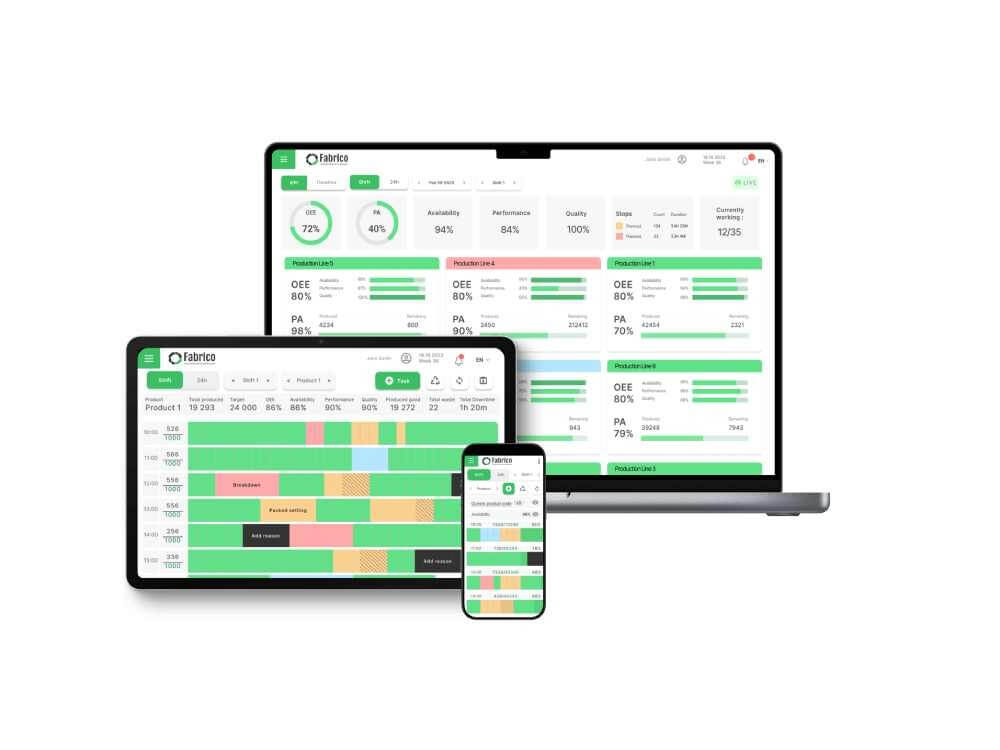
The Verdict: The only platform that combines Maintenance Execution, OEE Monitoring, and Computer Vision into one app.
Fabrico is "Factory-First." It understands that the goal of maintenance is Production. Unlike generic tools, it connects to the machine's PLC to read cycles and speed. Its "Digital Shift Handover" feature ensures that the morning crew knows exactly what the night crew fixed. Plus, its "Inefficiencies Zoom-In" uses cameras to show technicians video proof of why a machine stopped.
Key Factory Features:
-
Native OEE: Real-time visibility of Availability, Performance, and Quality losses.
-
Digital Shift Handovers: Structured forms for crews to pass critical info (Safety, Issues, Production Counts) between shifts.
-
Video Diagnosis: Cameras capture breakdown events, allowing technicians to "replay" the jam or failure.
-
Condition-Based PMs: Triggers maintenance based on actual production cycles, not just calendar dates.
Best For: Discrete and Hybrid manufacturers who want to close the gap between Production and Maintenance.

2. UpKeep (Best for Light Assembly & Facilities)
The Verdict: A mobile-first powerhouse that is great for maintenance teams who manage both the factory floor and the building infrastructure.
UpKeep is famous for its usability. If your factory has a lot of manual assembly stations and facility assets (HVAC, Forklifts, Lighting), UpKeep is a great choice. It handles parts inventory well via QR codes. However, it lacks the deep integration with machine PLCs and OEE data found in more specialized factory tools.
Pros:
-
Excellent Inventory Management (Parts counting).
-
Request Portal is very easy for operators to use.
-
Strong mobile app for technicians on the move.
Cons:
Best For: Maintenance teams managing a mix of production equipment and facility assets.
3. Limble CMMS (Best for Job Shops)
The Verdict: The most user-friendly CMMS for organizing work orders and PM schedules in high-mix environments.
Limble is fantastic at organizing the chaos of a Job Shop. If you have 50 CNC machines running different parts every day, Limble helps keep the PMs organized. Its custom dashboard allows you to see exactly who is working on what. It gets you off paper quickly, but like UpKeep, it treats maintenance as an island separate from production data.
Pros:
-
Very intuitive drag-and-drop calendar.
-
"I’m working on this" timer tracks exact wrench time.
-
Custom fields allow for flexible asset tracking.
Cons:
Best For: Job shops and small-to-mid-sized factories moving from Excel to Software.
4. Redzone (Best for Workforce Productivity)
The Verdict: A "Productivity & Culture" platform that focuses on Operator Huddles and OEE, but is expensive and less focused on "Hard Maintenance."
Redzone is different. It is not a traditional CMMS. It focuses on the people—coaching, huddles, and high-fives. It is incredible at driving OEE through cultural change. However, for the "Hard Maintenance" side (Spare Parts, intricate PM planning, Asset Lifecycle), it is often paired with a separate system or lacks the depth of a dedicated engineering tool.
Pros:
-
Incredible for driving shop floor culture and engagement.
-
Real-time OEE visibility for operators.
-
Chat/Collaboration features are top-tier.
Cons:
Best For: High-volume Food & Beverage plants focused on culture and productivity.
5. MaintainX (Best for Shop Floor Communication)
The Verdict: A chat-based platform that replaces radios and clipboards with a smartphone interface.
MaintainX is the modern replacement for the "Walkie-Talkie." It excels at connecting the shop floor. If a machine breaks, the operator texts the photo to the group chat. It handles digital procedures (SOPs) very well. It is agile and fast, but relies on human input rather than machine data triggers.
Pros:
-
Zero learning curve (looks like a chat app).
-
Digital Procedures with e-signatures.
-
Free version available for very small teams.
Cons:
Best For: Factories that need better communication between operators and technicians.
Comparison Matrix: The 2026 Landscape
| Feature |
Fabrico |
UpKeep |
Limble |
Redzone |
MaintainX |
| Primary Focus |
Unified Factory (OEE+Maint) |
Facilities / General |
PM Scheduling |
Culture / OEE |
Communication |
| Native OEE |
✅ Yes |
❌ No |
❌ No |
✅ Yes |
❌ No |
| Video Diagnosis |
✅ Zoom-In |
❌ No |
❌ No |
❌ No |
❌ No |
| Shift Handovers |
✅ Digital Log |
⚠️ Custom Workaround |
❌ No |
✅ Huddles |
✅ Via Chat |
| Cost Model |
Agile SaaS |
Agile SaaS |
Agile SaaS |
Premium |
Freemium / SaaS |
Conclusion: Don't Run a Factory with Office Software
If you want to build culture, buy Redzone. If you want to fix lights and toilets, buy UpKeep.
But if you want to run a High-Performance Factory—where Maintenance and Production work together to hit targets—Fabrico is the only tool that connects the machine data to the maintenance action.
Sync your shop floor.
[Request a Demo] and see how Fabrico handles the factory reality.


 Login
Login
 Blog
Blog