"We bought a faster robot for Line 1, but total factory output didn't change. Why?"
The answer is almost always: You didn't fix the bottleneck.
Increasing the speed of a non-bottleneck machine just creates more inventory (WIP) that sits waiting at the bottleneck. To increase throughput, you must laser-focus on the one constraint limiting your flow.
But finding the bottleneck in a complex, shifting factory is hard. Is it the machine with the most downtime? Not necessarily. Is it the one with the slowest cycle time? Maybe.
In 2026, Bottleneck Analysis Software takes the guesswork out of the Theory of Constraints (TOC). It analyzes flow, stops, and starvation/blocking states to tell you exactly where to focus your resources.
Here are the 5 best tools to help you uncork your factory.
The Comparison Matrix (2026)
| Software |
Best For... |
Analysis Method |
Real-Time Detection? |
Root Cause Visuals |
| 1. Fabrico |
Dynamic Real-Time Analysis |
OEE + AI Agent |
Yes (Live) |
Video "Zoom-In" |
| 2. Vorne XL |
Visual Production Lines |
Takt vs Actual |
Yes (Scoreboard) |
No |
| 3. Simul8 |
Planning / Design Phase |
Digital Twin Simulation |
No (Predictive) |
N/A |
| 4. MachineMetrics |
CNC / Machining |
Spindle Utilization |
Yes |
Data Charts |
| 5. Tulip |
Manual Assembly |
Station Cycle Times |
Yes |
Digital Apps |
1. Fabrico: The "Dynamic" Bottleneck Hunter
Verdict: The best choice for operating factories that need to spot shifting bottlenecks in real-time.
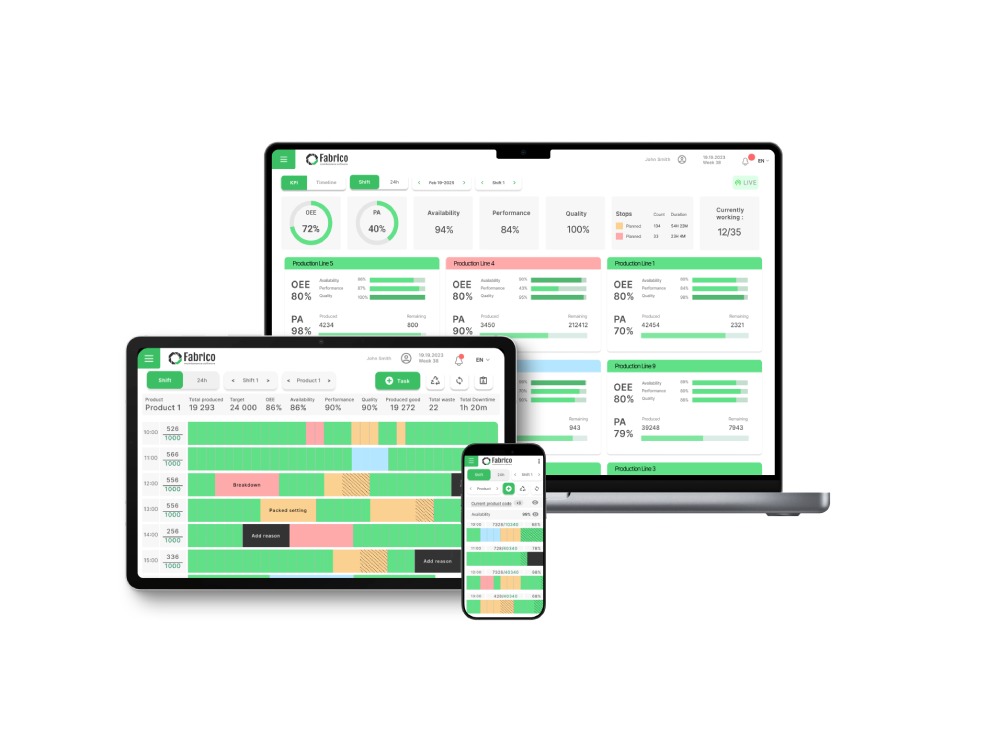
Fabrico treats the factory as a unified organism. By monitoring the OEE and Cycle Time of every asset simultaneously, it highlights which machine is currently holding back the line.
Why It Wins on Throughput:
-
Fabrico Agent (AI): The AI engine analyzes historical flow data to identify patterns. It can tell you, "Line 3 is bottlenecked at the Filler between 2 PM and 4 PM due to micro-stops."
-
Starve/Block Detection: Fabrico can detect if a machine is down (Failure) or if it is simply waiting (Starved) or full (Blocked). This distinction is critical for finding the upstream or downstream culprit.
-
Inefficiencies Zoom-In: Once the bottleneck is found, Fabrico uses Computer Vision to capture video of the stoppages. You don't just know where the bottleneck is; you see why it's stopping.
Best For: High-speed lines and high-mix plants where constraints move frequently.
2. Vorne XL: The "Takt Time" Pacer
Verdict: The industry standard for simple, visual bottleneck management on continuous lines.
Vorne’s strength is identifying the "Pace Setter." By placing sensors at key points on the line, it visualizes the flow rate.
Pros:
-
Visual Clarity: The giant LED scoreboard makes it obvious to everyone if the bottleneck machine is running slower than target.
-
Simplicity: Excellent for identifying the "Six Big Losses" at the constraint.
Cons:
-
Hardware Dependent: You need to wire sensors to the bottleneck. Moving them is a hassle if the bottleneck shifts.
-
No Predictive Logic: It reports what is happening now, but doesn't simulate future bottlenecks based on the schedule.
Best For: Dedicated, high-volume production lines.
3. Simul8: The "Digital Twin" Simulator
Verdict: The best tool for designing a line to avoid bottlenecks before you build it.
Simul8 isn't an execution system; it's a simulation engine. You build a "Digital Twin" of your factory and run "What If" scenarios.
Pros:
-
Scenario Planning: "What happens to the bottleneck if we add a second fork truck?" Simul8 tells you the answer without spending a dime.
-
Risk Free: You can crash the virtual factory as many times as you want to find the limits.
Cons:
Best For: Process Engineers planning new lines or major upgrades.
4. MachineMetrics: The CNC Utilization Tracker
Verdict: The best for finding bottlenecks in a job shop environment.
In a machine shop, the bottleneck is often the machine with the longest queue. MachineMetrics tracks Spindle Utilization to show which machines are overloaded.
Pros:
-
Load Balancing: It makes it easy to see that "Lathe A is at 95% capacity" while "Lathe B is at 40%," allowing you to re-route work.
-
Tooling Analysis: Identifies if tool changes are the cause of the bottleneck.
Cons:
Best For: Precision machine shops and fabrication.
5. Tulip Interfaces: The "Manual" Process Analyzer
Verdict: The best for identifying bottlenecks in human-driven assembly cells.
When the bottleneck is a person (e.g., a complex assembly step), machine sensors are useless. Tulip uses app interactions to measure step times.
Pros:
-
Step-by-Step Granularity: It shows that "Step 4 (Wiring)" takes 3x longer than "Step 3 (Screwing)," highlighting exactly where to train or improve.
-
Balance Charts: Visualizes the work content per station to help with Line Balancing.
Cons:
Best For: Manual assembly lines (Electronics, Medical Devices).
Conclusion: Focus on the Constraint
You cannot fix everything at once. You must fix the bottleneck.
-
If you are Designing a new process, use Simul8.
-
If your bottleneck is a CNC Machine, use MachineMetrics.
-
If you need a Real-Time System that detects, visualizes, and helps you fix moving bottlenecks using AI and Video, Fabrico is the 2026 solution.


 Login
Login
 Blog
Blog