"What is the standard cycle time for Part X?"
If you answer "45 seconds," but the reality is that it varies between 40 and 60 seconds depending on the operator, you have a Cycle Time Visibility problem.
In manufacturing, Consistency is King. A fast cycle is good, but a stable cycle is better.
For decades, engineers stood behind operators with stopwatches (Time & Motion studies). But the moment the engineer walks away, the pace changes. This is the "Hawthorne Effect."
In 2026, the best Cycle Time Tracking software digitizes this process. It records every single cycle, 24/7/365.
It highlights Speed Loss—one of the Six Big Losses of OEE—so you can see exactly where money is leaking from your process.
Here are the 5 best tools to help you master your tempo.
The Comparison Matrix (2026)
| Software |
Best For... |
Tracking Method |
Manual Station Support |
Speed Loss Analysis |
| 1. Fabrico |
Unified (Auto + Manual) |
PLC + Computer Vision |
Yes (Video Analysis) |
Deep (OEE Performance) |
| 2. MachineMetrics |
CNC Machining |
High-Freq Data |
Limited |
Excellent |
| 3. Tulip |
Manual Assembly |
App-based Timers |
Yes (User Tap) |
Good |
| 4. Vorne XL |
Visual Pacing |
Hardware Sensors |
No (Sensor only) |
Basic |
| 5. Drishti |
AI Video Analytics |
Computer Vision |
Yes (Focus) |
Advanced |
1. Fabrico: The "Total Process" Timer
Verdict: The best choice for factories that have a mix of automated machines and manual assembly stations.
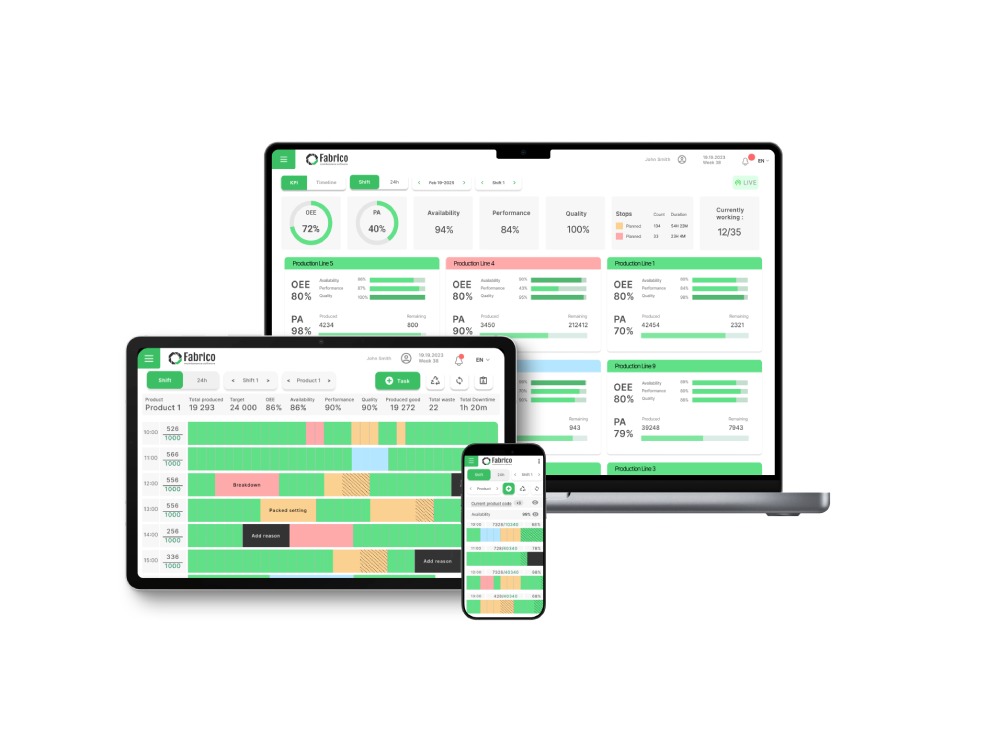
Fabrico recognizes that cycle time isn't just a number; it's a diagnostic tool. By connecting directly to the PLC, Fabrico captures the exact start/stop time of every machine cycle.
But Fabrico’s killer feature is Computer Vision. For manual stations where there is no PLC, Fabrico uses cameras to "see" the cycle. It tracks when the operator picks up the part and when they place it down, giving you automated cycle times for human work without a stopwatch.
Why It Wins on Speed:
-
Speed Loss Visualization: Fabrico compares Actual Cycle Time vs. Ideal Cycle Time in real-time. It visualizes "Slow Cycles" in red, helping you identify micro-bottlenecks.
-
Video Validation: If a cycle took 2 minutes instead of 45 seconds, you can click "Zoom-In" to watch the video. Did the operator drop a tool? Was the material bent? You get the answer instantly.
-
Live Takt Time: It displays the pacing on the shop floor dashboard, helping operators stay in rhythm with demand.
Best For: High-mix assembly and packaging lines needing deep cycle analysis.
2. MachineMetrics: The Spindle Tracker
Verdict: The industry standard for CNC cycle time analysis.
MachineMetrics pulls data directly from the CNC controller (Fanuc, Haas, etc.). It knows exactly when the spindle is cutting air vs. cutting metal.
Pros:
-
Load Analysis: It correlates cycle time with tool load. If a tool is getting dull, the cycle might slow down—MachineMetrics sees this.
-
Part Counting: Extremely accurate part counting based on macro execution.
Cons:
Best For: Precision machine shops (CNC, Lathes, Mills).
3. Tulip Interfaces: The "Digital Stopwatch"
Verdict: Excellent for digitizing manual assembly stations and guiding operator pace.
Tulip replaces paper work instructions with digital apps. As the operator clicks "Next Step" on the screen, Tulip records the time for that specific step.
Pros:
-
Granularity: You can track cycle time per step (e.g., "Screw insertion took 5 seconds," "Labeling took 3 seconds").
-
Guidance: If a step is taking too long, the screen can flash a warning or offer a help video.
Cons:
-
Active Input: It requires the operator to interact with the screen. If they forget to click "Next," the data is skewed.
-
Setup Time: You have to build the app for every product variant.
Best For: Complex manual assembly with many steps.
4. Vorne XL: The "Pacer"
Verdict: A simple, effective hardware tool for keeping a line on Takt Time.
Vorne displays "Target Rate" vs "Actual Rate" on a big LED board. It’s a psychological tool as much as a software tool.
Pros:
Cons:
-
Aggregate Data: It tells you the average cycle time for the hour, but it makes it hard to drill down into individual slow cycles to find the root cause.
-
No Video: You can't see why the line slowed down.
Best For: Continuous high-speed lines needing a visual pacer.
5. Drishti: The "Motion Study" AI
Verdict: A specialized AI platform that uses video to analyze human motion in extreme detail.
Drishti is pure Computer Vision. It analyzes every movement of an operator's hands to measure cycle time and detect deviations from the standard process.
Pros:
Cons:
-
Privacy Concerns: Some workforces push back against having AI analyze their every body movement.
-
Niche: It is a specialized tool for manual assembly optimization, not a full factory management system.
Best For: Automotive assembly and highly repetitive manual tasks.
Conclusion: Speed is Money
Every second of "Speed Loss" is a second of revenue you never get back.
-
If you need to optimize CNC Spindles, buy MachineMetrics.
-
If you need to analyze Human Motion in detail, buy Drishti.
-
If you want a Unified System that uses PLC Data for machines and Computer Vision for manual steps to optimize the whole line, Fabrico is the 2026 standard.


 Login
Login
 Blog
Blog