"How can I calculate OEE if I don't have a machine controller?"
This is the most common question in high-mix sectors like Electronics, Medical Devices, and Automotive Sub-assembly.
On a manual line, the "Machine" is a human. The "Cycle Time" is human motion. The "Downtime" is often just a conversation or a bathroom break.
Legacy solutions involved Paper Tick Sheets (useless for real-time data) or Physical Buttons (which operators forget to press).
In 2026, Manual OEE Software has transformed. It no longer relies on the operator to self-report. Instead, it uses Computer Vision and IoT Buttons to digitize human work.
Here are the 5 best tools to bring OEE to your manual stations.
The Comparison Matrix (2026)
| Software |
Best For... |
Tracking Method |
Operator Burden |
Root Cause Analysis |
| 1. Fabrico |
Unified (Vision + App) |
Computer Vision |
Zero (Passive) |
Video "Zoom-In" |
| 2. Drishti |
Deep Motion Analysis |
AI Vision |
Zero (Passive) |
High (Motion Study) |
| 3. Tulip |
Digital Work Instructions |
Touchscreen App |
High (Must click) |
Medium |
| 4. Vorne XL |
Visual Pacing |
Hardware Button |
Medium (Button press) |
Basic |
| 5. Countroll |
Simple Counting |
Retrofit Sensor |
Low |
Low |
1. Fabrico: The "Passive" OEE Tracker
Verdict: The best choice for factories that want to track manual OEE without slowing down the operator or invading their privacy.
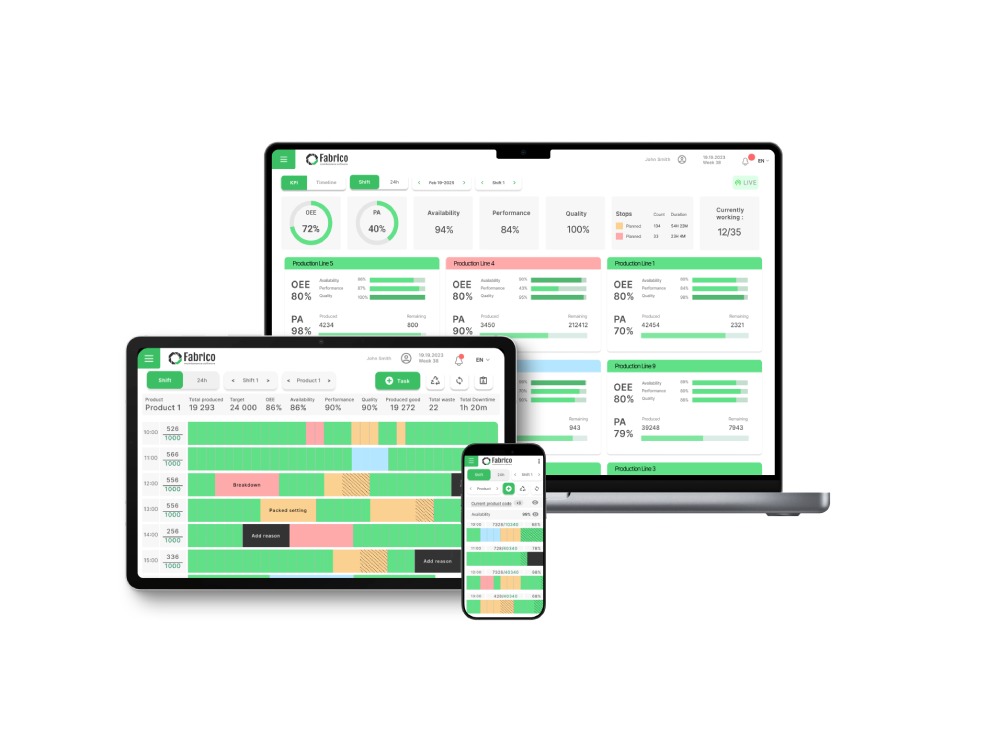
Fabrico uses Inefficiencies Zoom-In (Computer Vision) to bridge the gap. You place a camera above the manual station. The AI is trained to recognize "Part Finished."
-
Availability: Did the operator step away? (Camera sees empty station).
-
Performance: How fast is the cycle? (Camera times the hand movements).
-
Quality: Did the visual inspection pass? (Camera checks for missing components).
Why It Wins on Manual Lines:
-
No "Clicking": The operator just works. They don't have to tap a screen or press a button to count. The data is 100% accurate because it’s passive.
-
Privacy-First: Unlike some tools that track the person, Fabrico tracks the process (the hands and the part).
-
Hybrid Ready: If you have a line that is 50% robot and 50% human, Fabrico can mix PLC data and Vision data in one dashboard.
Best For: Hybrid assembly lines and packaging stations.
2. Drishti: The "Motion" Scientist
Verdict: The world leader in analyzing the ergonomics and sequence of manual work.
Drishti focuses entirely on the human. Its AI analyzes every joint movement. It can tell if an operator used their left hand instead of their right, or if they performed Step 3 before Step 2.
Pros:
Cons:
-
Cost: It is a premium, specialized solution.
-
Data Overload: For a simple OEE score, it might be "too much" detail. It is a Continuous Improvement tool more than a daily management tool.
Best For: Complex, high-liability manual assembly (e.g., Cardiac pacemakers).
3. Tulip Interfaces: The "App-Based" Tracker
Verdict: The best for guiding the operator through complex steps while tracking time in the background.
Tulip replaces paper instructions with an interactive app. As the operator follows the guide ("Pick up screw," "Torque to 5Nm"), the app records the time.
Pros:
-
Quality Assurance: It forces the operator to confirm each step, preventing skipped tasks.
-
IoT connectivity: It connects to smart torque drivers to verify work.
Cons:
-
Active Input: The operator must interact with the screen. If they memorize the steps and stop looking at the screen, the timing data becomes inaccurate.
-
Slower Cycles: Interacting with an app can sometimes slow down a fast operator.
Best For: High-mix, low-volume assembly where instructions change frequently.
4. Vorne XL: The "Button" Scoreboard
Verdict: The simplest, most rugged way to count parts on a manual bench.
Vorne provides a "Tactical Button" or a photo-eye sensor. The operator creates a part, and the sensor counts it. The scoreboard shows "Target vs. Actual."
Pros:
-
Simplicity: No IT required. Plug it in, set the target time, and go.
-
Motivation: The red/green light puts immediate psychological pressure (in a good way) on the pacing.
Cons:
-
Downtime Context: If the operator stops, they have to manually scan a barcode to say "Waiting for Material." They often forget, leading to "Unknown Time."
-
Cheating: It is very easy to press the button twice to make your numbers look good.
Best For: Simple, repetitive manual tasks (e.g., packing boxes).
5. Countroll: The "Retrofit" Sensor
Verdict: A clever wireless sensor that turns manual rollers and conveyors into smart counters.
Countroll attaches to the rollers on your manual conveyor line. When a box rolls over it, it counts.
Pros:
Cons:
Best For: Manual packaging and logistics lines.
Conclusion: Lighting Up the Dark Factory
Manual assembly doesn't have to be a "data black hole."
-
If you need Step-by-Step Guidance, choose Tulip.
-
If you need Deep Motion Analysis, choose Drishti.
-
If you want to track OEE Automatically using Computer Vision without slowing down your operators, Fabrico is the unified solution.


 Login
Login
 Blog
Blog