n most factories, the Production Schedule is a fantasy.
The Planner builds a schedule in Excel assuming 100% capacity. Meanwhile, the Maintenance Manager schedules a 4-hour Preventive Maintenance (PM) task in their separate CMMS. Tuesday morning arrives, the machine is shut down for the PM, and the Production Schedule instantly fails.
This happens because your Production Scheduling Software with Maintenance Integration is non-existent. You are running two factories: the one in the spreadsheet and the one in reality.
To hit your On-Time In-Full (OTIF) targets in 2026, you need a "Unified Planning Board" where capacity, material availability, and maintenance downtime are visible in one place. Here are the 5 best tools to achieve this alignment.
Why You Need Production Scheduling Software with Maintenance Integration
Legacy scheduling tools (like Excel or standalone APS) look at orders and materials. They often treat machine availability as a constant.
But in the real world, machine availability fluctuates due to:
-
Planned Maintenance: Scheduled PMs that block capacity.
-
Unplanned Downtime: Breakdowns that require immediate schedule shuffling.
-
Performance Loss: If a machine is running at 80% OEE (due to micro-stops), your schedule is 20% wrong before you start.
Integrated Scheduling Software solves this by linking the CMMS (Maintenance) directly to the APS (Scheduling). If a technician books a repair, that time slot is "blocked" on the production board instantly.
Top 5 Production Scheduling Software Tools with Maintenance Integration (Ranked)
1. Fabrico
Best For: Real-Time OEE & Maintenance Scheduling.
The "Unified Timeline" Advantage:
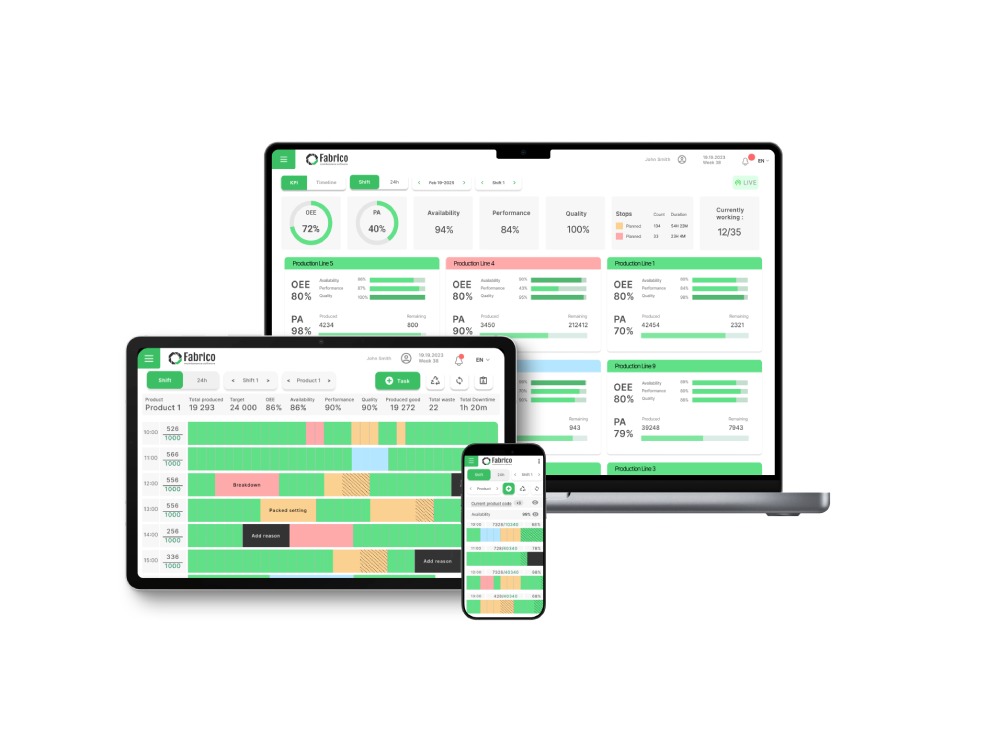
Fabrico is distinct because it is not just a CMMS or just an OEE tool—it includes a native Interactive Planning Board that bridges the gap.
Unlike ERP modules that are rigid and hard to update, Fabrico’s planning board is a drag-and-drop interface designed for the shop floor reality. It integrates Production Orders (imported from your ERP) with Maintenance Constraints in real-time.
How the Integration Works:
-
Hard Blocking: If Maintenance schedules a PM for Line 1 on Tuesday at 2 PM, Fabrico visualizes this block on the Planning Board. You physically cannot drag a production order into that slot.
-
OEE-Adjusted Capacity: Fabrico uses historical OEE Data to adjust the schedule. If Line 1 typically runs at 85% performance, Fabrico schedules the order duration based on actual speed, not theoretical max speed.
-
Dynamic Reaction: If a machine breaks down (Unplanned Downtime), the schedule highlights the conflict immediately, allowing the planner to drag-and-drop the order to an alternative line.
Pros:
-
Native Integration: No APIs or complex IT projects needed to link Ops and Maintenance.
-
Visual Clarity: "Tetris-style" board makes gaps and conflicts obvious.
-
BOM & Routing: Understands which lines can run which products.
Cons:
2. PlanetTogether
Best For: Complex Constraint Logic (APS).
Overview:
PlanetTogether is a dedicated Advanced Planning and Scheduling (APS) platform. It is a powerhouse for factories with incredibly complex routing rules (e.g., "If Product A runs, Product B cannot run on the adjacent line due to heat").
Key Integration Features:
-
Constraint Modeling: Can model labor, tooling, and maintenance availability.
-
What-If Scenarios: Run simulations ("What if we move maintenance to Saturday?") to see the impact on delivery dates.
Pros:
-
Incredibly powerful algorithm for complex constraints.
-
Integrates with most major ERPs (SAP, Microsoft Dynamics).
Cons:
-
Cost: Very expensive enterprise software.
-
Separate System: It is a scheduling tool only. You still need a separate CMMS for the actual maintenance execution, requiring an integration project.
3. Plex (Rockwell Automation)
Best For: ERP-Level Integrated Planning.
Overview:
Plex is a cloud-based Smart Manufacturing Platform that combines ERP, MES, and Maintenance. Because it is a "Single Database" architecture, the schedule naturally sees everything.
Key Integration Features:
-
Finite Scheduling: schedules based on exact machine capacity.
-
Maintenance Module: Native maintenance module feeds directly into the schedule.
-
Material Availability: Checks inventory levels before scheduling.
Pros:
Cons:
4. Siemens Opcenter (Preactor)
Best For: Heavy Industry & Engineering.
Overview:
Formerly known as Preactor, Siemens Opcenter APS is the industry standard for heavy manufacturing scheduling. It is highly customizable and often used in environments like aerospace or automotive assembly where schedules are fixed weeks in advance.
Key Integration Features:
-
Sequence Optimization: Optimizes the order of jobs to minimize changeovers (e.g., Light to Dark paint).
-
Maintenance Calendars: Can import maintenance calendars from external EAM systems (like SAP PM or Maximo).
Pros:
Cons:
5. Limble CMMS + API Integration
Best For: Maintenance-First Teams.
Overview:
Limble CMMS is fantastic for maintenance management, but it does not have a native production scheduling board. However, it is included here because its API is robust enough to "push" maintenance blocks to your existing scheduler (like Excel or Outlook).
Key Integration Features:
-
Open API: Allows you to build a connection to your ERP/Scheduler.
-
PM Calendar: Visualizes maintenance, but not production orders.
Pros:
Cons:
Comparison Matrix: Scheduling & Integration
| Feature |
Fabrico |
PlanetTogether |
Plex |
Siemens Opcenter |
Limble CMMS |
| Primary Function |
Integrated OEE/CMMS/Sched |
Advanced Scheduling (APS) |
Cloud ERP/MES |
Heavy APS |
CMMS |
| Native Planning Board |
Yes (Interactive) |
Yes (Advanced) |
Yes |
Yes |
No (Maint Only) |
| Maintenance Blocking |
Native |
Configurable |
Native |
Import Required |
API Required |
| OEE-Adjusted Plan |
Yes (Real-Time) |
No |
Yes |
No |
No |
| Ease of Use |
High (Drag & Drop) |
Low (Expert) |
Medium |
Low (Expert) |
High |
Conclusion
The era of the "Siloed Schedule" is over.
-
If you need mathematical optimization for complex constraints and have a large budget, choose PlanetTogether.
-
If you are ready to replace your entire ERP for a single platform, choose Plex.
-
If you want to align Operations and Maintenance using a visual, drag-and-drop board that reacts to real-time OEE and Maintenance data—without replacing your ERP—Fabrico is the best Production Scheduling Software with Maintenance Integration.
Stop the scheduling conflicts. See Fabrico’s Interactive Planning Board in action.


 Login
Login
 Blog
Blog