If you run a high-speed packaging or assembly line, your biggest enemy isn't the 4-hour motor failure. It's the 30-second jam.
These are Micro-Stops. They are too short to trigger a major alarm, but frequent enough to drag your OEE (Overall Equipment Effectiveness) down from 85% to 60%.
The problem is that traditional "Downtime Tracking" fails here. Operators don't have time to write down "Jam at Infeed" every 5 minutes.
They just clear it and hit start. Maintenance never gets a Work Order, so the root cause, a loose guide rail or a dirty sensor—never gets fixed.
To crush micro-stops in 2026, you need software that detects them automatically and reveals the root cause visually. Here are the 5 best tools for the job.
Why Micro-Stops are Harder to Fix Than Breakdowns
Fixing a broken shaft is easy: replace the shaft. Fixing a micro-stop is hard because the evidence disappears.
-
The "Reset" Reflex: Operators are trained to keep the line running. They clear the jam instantly. By the time an engineer arrives, the machine is running perfectly.
-
Data Blindness: Most MES systems filter out stops under 1 minute. You literally cannot see the problem in your data.
-
The Solution: You need Direct Connectivity (to catch the stop signal) and Context (Video or Data) to understand what happened in those 30 seconds.
Top 5 Software Tools to Reduce Manufacturing Micro-Stops (Ranked)
1. Fabrico
Best For: Visual Root Cause Analysis (Video).
The "Inefficiencies Zoom-In" Advantage:
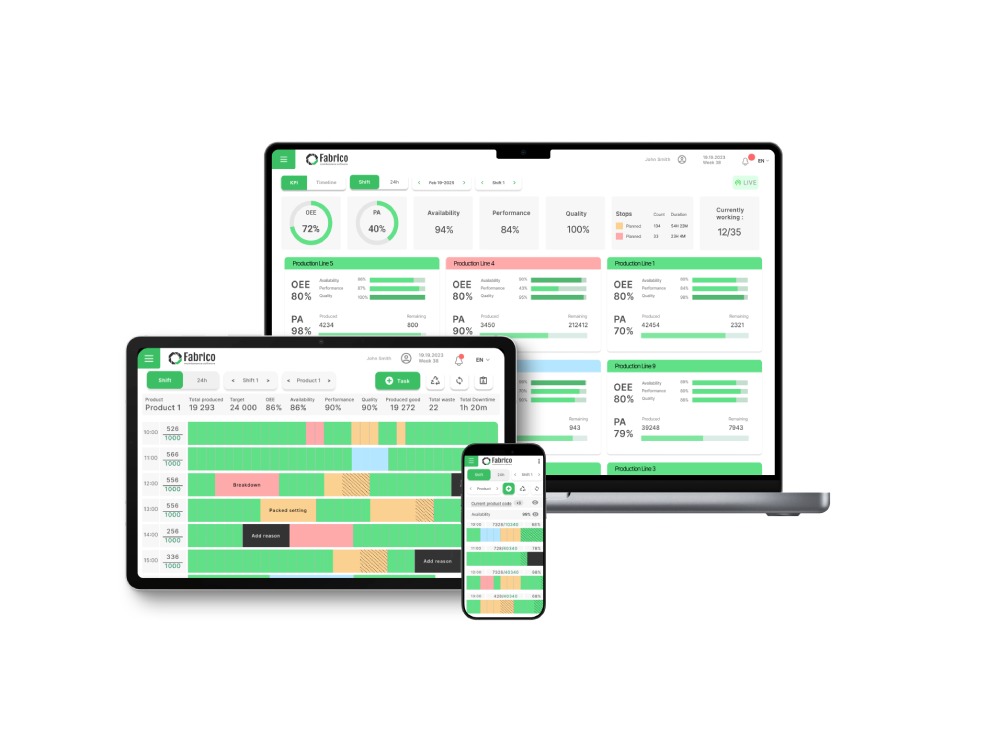
Fabrico is the only platform on this list that treats Computer Vision as a standard part of downtime reduction. It understands that you cannot fix a physical jam with digital data alone.
How It Solves Micro-Stops:
-
Automated Detection: Fabrico connects to the PLC. When the machine state changes to "Stop" (even for 5 seconds), it logs the event.
-
Video Replay: Simultaneously, the Inefficiencies Zoom-In feature captures a video clip of the event from an overhead camera.
-
The Fix: The engineer watches the clip. They see the bottle tip over because the gate closed too fast. They adjust the timing. The micro-stop is gone forever.
Pros:
-
Indisputable Evidence: No more arguing with operators about what happened. The video shows the truth.
-
Unified Data: Links the Micro-Stop event directly to the Maintenance Work Order to fix it.
-
Cost-Effective: Uses standard cameras and existing PLCs.
Cons:
2. Vorne XL
Best For: Real-Time Operator Scoreboarding.
Overview:
Vorne XL is a legendary hardware solution—the "Red/Green/Yellow" LED scoreboards you see in factories worldwide. It is incredibly effective at the detection side. It counts every second of downtime with extreme precision.
Key Features:
-
The Scoreboard: Displays "Down Time" in huge numbers, motivating operators to react fast.
-
Barcode Scanning: Operators can scan a "Reason Code" quickly to log the stop.
-
Granular Data: Captures every single stop, no matter how short.
Pros:
Cons:
3. MachineMetrics
Best For: High-Frequency Data Analysis.
Overview:
MachineMetrics connects directly to the "Brain" of the machine (CNC Control or PLC). It excels at detecting micro-stops caused by Machine Stress (e.g., Load, Temperature, Torque).
If a CNC machine pauses for 10 seconds between cycles, MachineMetrics can analyze the data to tell you it was caused by a "Tool Change" or a "Feed Hold," automatically categorizing the micro-stop without human input.
Key Features:
-
High-Frequency Data: Millisecond-level visibility.
-
Load Monitoring: Detects if a stop was caused by resistance/jamming.
-
Automated Categorization: Uses logic to guess the reason code.
Pros:
Cons:
4. LineView
Best For: High-Speed Bottleneck Analysis.
Overview:
LineView is specialized software for high-speed beverage and packaging lines (Canning/Bottling). Its core strength is "Causal Loss" analysis. On a line with 20 machines, if the Filler stops, LineView calculates if it was actually the Filler's fault or if it was blocked by the Capper downstream.
Key Features:
-
V-Curve Analysis: Visualizes speed loss and bottlenecks.
-
True Causal Analysis: automatically identifies which machine caused the line stop.
-
Playback: Digital "replay" of line status (using data, not video).
Pros:
Cons:
5. Braincube
Best For: Process Parameter Optimization.
Overview:
Braincube is an IIoT (Industrial Internet of Things) platform that uses AI to find correlations. It is great for Continuous Process manufacturing (Paper, Steel, Chemicals). It helps you understand if micro-stops are correlated with specific process settings (e.g., "The web breaks every time humidity is > 50%").
Key Features:
-
Digital Twin: Models the entire production process.
-
Cross-Parameter Search: Finds hidden links between variables and stops.
-
Live Cockpit: Real-time recommendations for operators.
Pros:
Cons:
Comparison Matrix: Micro-Stop Reduction Features
| Feature |
Fabrico |
Vorne XL |
MachineMetrics |
LineView |
Braincube |
| Primary Root Cause Tool |
Video Replay |
Operator Input |
PLC Data |
Bottleneck Logic |
AI Correlation |
| Automated Detection |
Yes |
Yes |
Yes |
Yes |
Yes |
| Visual Evidence |
Inefficiencies Zoom-In |
No |
Data Charts |
Digital Replay |
Data Models |
| Hardware Required |
Cameras / IoT |
Scoreboard |
Edge Device |
Server |
Server |
| Best For |
Visual Jams/Assembly |
Operator Motivation |
CNC/Machining |
Bottling/Canning |
Continuous Process |
The "Pareto" Strategy for Micro-Stops
You cannot fix every micro-stop at once. Use your software to build a Pareto Chart:
-
Capture Data: Let Fabrico (or Vorne) run for a week.
-
Identify Top 3: Find the three specific causes (e.g., "Infeed Jam," "Sensor Dirty," "Cap Missed") that account for 50% of the lost time.
-
Zoom In: Watch the video clips for those top 3 issues.
-
Kaizen: Implement a permanent fix.
Conclusion
-
If you need to motivate operators to work faster, get Vorne XL.
-
If you need to analyze complex bottling lines, get LineView.
-
If you want to see the root cause of every jam and fix it permanently using video evidence, Fabrico is the best tool for reducing micro-stops.
See what you've been missing. Watch a Fabrico "Inefficiencies Zoom-In" Demo.


 Login
Login
 Blog
Blog