The most powerful software in the world is useless if your team refuses to use it.
For decades, Maintenance Managers have bought "Enterprise" systems like SAP PM or IBM Maximo, only to watch them become expensive digital graveyards.
Why? Because Tom (the Technician) is busy. He has grease on his hands. He is standing on a ladder. He does not have the time or patience to navigate 15 screens just to close a Work Order.
If the software isn't easier than pen and paper, Tom will go back to pen and paper.
We call this "Technician Adoption." It is the single most important metric for CMMS success.
Here are the 6 most user-friendly CMMS tools on the market, rated by how quickly a new user can get to work.
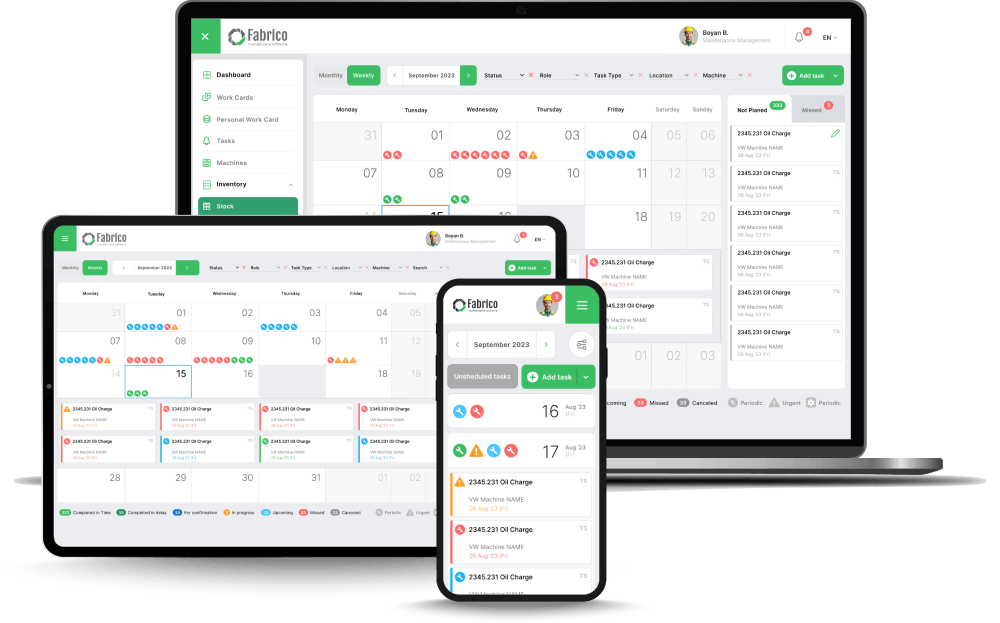
1. Fabrico (Best for "Smart" Usability & GenAI)
Fabrico takes usability a step further than just "Big Buttons." We use Intelligence to simplify the workflow.
Most "Simple" CMMS tools force you to search for information. Fabrico brings the information to you.
With the Fabrico Assistant (Generative AI), a technician doesn't need to know where the manual is stored or how to navigate the folder tree.
They simply ask the app: "How do I reset the error on this drive?" and the system delivers the answer instantly.
Key Usability Features:
-
The Two-Tap Interface: Scan a QR code -> Tap "Report Fault." That’s it. No mandatory fields that block quick reporting.
-
Voice-to-Text: Technicians hate typing on glass. Fabrico’s robust voice dictation allows them to speak their repair notes, which the system transcribes and tags automatically.
-
Visual Context: Instead of reading a text description of a failure, the "Inefficiencies Zoom-In" feature shows a video clip of the breakdown. Watching is faster than reading.
-
Zero-Training Onboarding: The UI is designed so that a new hire can complete their first route with zero formal classroom training.
Best For: Manufacturing teams that want high adoption without sacrificing deep engineering data.

2. Limble CMMS (Best for Interface Simplicity)
Limble was built by a maintenance tech who hated clunky software.
Their interface is legendary for its simplicity. It uses a Card-Based (Kanban) view that makes maintenance look like a Trello board.
It removes all the "Database" clutter. You see your task, you click it, you do it.
Why Technicians Like It:
-
Asset Card View: All information about an asset is on one screen. No tabbing through menus.
-
I'm Bored Button: A feature that automatically serves up the next highest priority task, removing decision fatigue.
Best For: Teams moving from Excel/Paper who are intimidated by technology.
3. MaintainX (Best for Chat-Based Workflow)
MaintainX realized that most maintenance teams run on WhatsApp or Text Messages.
So, they built a CMMS that looks exactly like a chat app.
The "Work Order" lives inside a chat thread. This familiarity makes adoption almost instant, especially for younger workforces.
Why Technicians Like It:
-
Familiarity: If you can send a text, you can use MaintainX.
-
Photo Annotation: Very easy to snap a photo and draw a red circle around the broken part directly in the chat.
Best For: Teams that value communication speed over complex asset hierarchies.
4. UpKeep (Best for Mobile Polish)
UpKeep is a "Mobile-First" company. Their desktop version was actually built after their mobile app.
Because of this, the mobile experience is extremely polished. It feels like a consumer app (like Instagram or Uber).
It handles Inventory particularly well on mobile, allowing for a "Point of Sale" style checkout of parts.
Why Technicians Like It:
-
Speed: The app is native, so it loads fast and feels snappy.
-
Parts Scanning: Very intuitive barcode scanning for checking out parts.
Best For: Facility managers and mobile technicians covering large campuses.
5. Fracttal One (Best for Modern Design)
Fracttal is a newer player that has won awards for its design language.
It creates a very modern, clean workspace. It uses "NFC Tag" integration natively, allowing you to tap your phone to a machine (like Apple Pay) to open the asset record.
Why Technicians Like It:
-
NFC Tap: Faster than scanning a QR code (requires line of sight) if your environment is dirty.
-
Customizable Dashboard: Users can hide buttons they don't use, keeping the screen clean.
Best For: Tech-forward teams comfortable with IoT and modern interfaces.
6. Coast (Best for Card-Based Task Lists)
Coast is the simplest tool on this list. It is essentially a digital task board.
It doesn't have deep asset hierarchy or inventory costing logic. It just tracks "To Do" and "Done."
For very small shops or specific crews (e.g., a landscaping crew), this is perfect. It has zero learning curve.
Why Technicians Like It:
Best For: Very small teams or non-technical crews.
Comparison: The Adoption Test
How fast can a new hire get to work?
| Feature |
Fabrico |
Limble |
MaintainX |
UpKeep |
Coast |
| Primary UX Concept |
Smart Assistant (AI) |
Kanban Board |
Chat Thread |
Social Feed |
Task Cards |
| Training Time |
< 15 Minutes |
< 15 Minutes |
< 10 Minutes |
< 30 Minutes |
< 5 Minutes |
| Data Depth |
High (OEE/Eng) |
Medium |
Low/Medium |
Medium |
Low |
| Input Method |
Voice/AI/QR |
Click/Type |
Chat/Text |
Type |
Click |
| Searchability |
GenAI Search |
Text Search |
Filter |
Filter |
Filter |
Conclusion: Simplicity is a Feature
You can have the best predictive analytics engine in the world, but if Tom doesn't log the repair, the engine has no data.
Adoption is the prerequisite for intelligence.
If you need a simple list, Coast or Limble are great starting points.
But if you want the Simplicity of a consumer app combined with the Power of an industrial data platform, Fabrico allows you to have it both ways. We use AI to hide the complexity, so Tom just sees the solution.
Ready to see the Two-Tap workflow?
Let your technicians try Fabrico and see the difference.
Book a Demo with Fabrico Today


 Login
Login
 Blog
Blog