

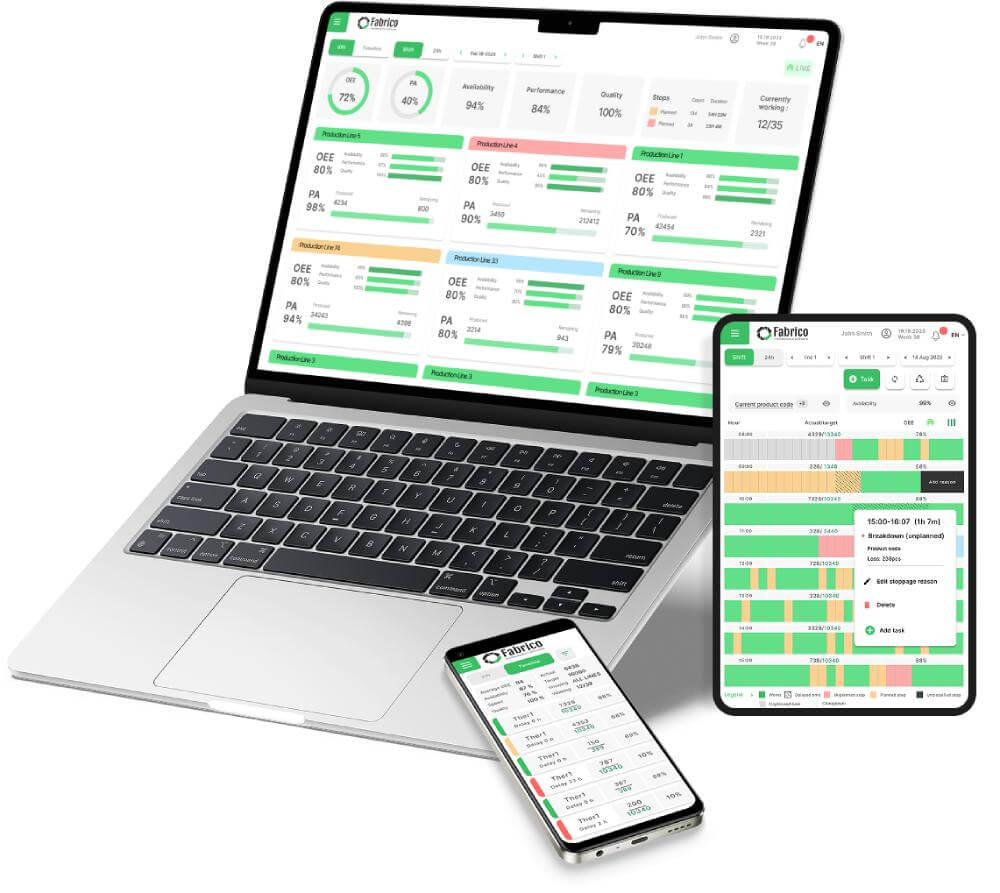

The "Black Box" Problem: In many factories, you can't tell if a machine is running or broken just by looking at it. Data is hidden in databases or logbooks.
The "Glass Wall" Standard: A Visual Factory makes the status of every asset, order, and metric visible to everyone in real-time.
The Top 7: We review Fabrico, Tulip, Vorne, and others to help you turn your shop floor into a transparent, data-driven environment.
See how Fabrico unifies OEE and maintenance in one platform.
Book a demoThe Visual Factory is a core Lean Manufacturing concept.
The rule is simple: "Any person should be able to walk onto the floor and understand the status of production within 5 seconds."
In the past, this meant whiteboards, Andon lights, and taped floors.
In 2026, this means Digital Signage and Mobile Dashboards.
If your data is hidden inside a computer in the manager's office, you do not have a Visual Factory. You have a "Black Box."
To drive accountability and speed, you need software that broadcasts the truth to the people who can act on it.
Here are the 7 Best Visual Factory Software Tools for 2026.
Best For: Manufacturers who want to visualize Maintenance Health and OEE on a single map.
Fabrico brings the Visual Factory to life by creating a digital representation of your production lines. It doesn't just show numbers; it shows context.
The Visual Asset Tree: Instead of a spreadsheet list of assets, Fabrico uses a hierarchical tree. You can drill down from "Factory" -> "Line" -> "Machine" -> "Motor" visually.
Real-Time Status Broadcasting: Fabrico pushes OEE data (Red/Green status) to TV screens on the shop floor and tablets in technicians' pockets. Everyone knows the score.
Visual Work Orders: Technicians don't just read text. They see photos, diagrams, and digital markups of the breakdown. "See it, fix it."
The "Andon" Link: When an operator triggers a digital Andon alert in Fabrico, it visualizes the call for help on the dashboard, showing exactly where the bottleneck is physically located.
The Verdict: If you want to see your factory's pulse in real-time, Fabrico is the modern standard.
Best For: Custom shop floor apps and interfaces.
Tulip is a "No-Code" platform that lets you build your own visual interfaces.
Pros: You can build a "Digital Shadow Board" or a custom interactive map of your facility. You can overlay live data onto a photo of the machine.
Cons: It requires design effort. You are building the visualization from scratch. It is not a "plug-and-play" solution for maintenance management.
The Niche: DIY Engineering teams.
Best For: The "Big Red Scoreboard."
Vorne is the classic hardware solution for Visual Factories.
Pros: Unmatched physical visibility. A giant LED sign showing "Target vs. Actual" is the ultimate visual cue. It requires no interaction to be effective.
Cons: It is limited to production counts. It doesn't visualize maintenance backlogs, spare parts locations, or detailed failure modes.
The Niche: High-volume production lines.
Best For: Dispatch visualization.
L2L excels at visualizing the "Flow of Work."
Pros: Their "CloudDISPATCH" screen shows a live feed of problems and who is fixing them. It’s like an "Air Traffic Control" screen for the factory floor.
Cons: The interface can be dense. It is focused on dispatching people rather than visualizing asset health.
The Niche: Large, multi-team facilities.
Best For: CNC machine status monitoring.
If you run a machine shop, MachineMetrics provides the best visualization of spindle status.
Pros: Color-coded timelines show exactly when a machine was cutting, idle, or in setup. The "Load Meter" visualizations are excellent for operators.
Cons: It focuses on the machine controller data. It doesn't visualize the broader factory context (safety, facilities, manual assembly) as well as a broader platform.
The Niche: Precision Machining.
Best For: Social visualization and team huddles.
Redzone uses visuals to drive culture.
Pros: The "Huddle Board" feature replaces the physical whiteboard. It shows team wins, trends, and actions in a format designed for group meetings.
Cons: It is expensive. It visualizes people performance more than asset reliability.
The Niche: Workforce engagement.
Best For: Digitizing "Lean Rooms" and whiteboards.
iObeya essentially puts sticky notes on a giant touchscreen.
Pros: If you love your physical Kanban board or SQDIP board but want it digital, this is the direct replacement. Great for morning meetings.
Cons: It is disconnected from the equipment. It doesn't pull live data from the PLC; humans have to move the digital sticky notes.
The Niche: Digital War Rooms.
| Feature | Fabrico | Tulip | Vorne | L2L | iObeya |
| Live Machine Data | ✅ Native | ✅ Custom | ✅ Native | ✅ Native | Varies |
| Interactive | ✅ Yes | ✅ Yes | Varies | ✅ Yes | ✅ Yes |
| Maintenance Link | ✅ Deep | Varies DIY | Varies | ✅ Dispatch | Varies |
| Setup Speed | Fast | Slow | Fast | Medium | Fast |
| Cost | Value | High | Hardware | High | Mid |
A problem hidden in a database is a problem that won't get fixed.
Choose Vorne if you just want a scoreboard.
Choose iObeya if you just want a digital whiteboard.
Choose Fabrico if you want a Live Operating Picture. If you want to see OEE drops, maintenance tickets, and safety alerts on a single visual platform that drives action, Fabrico is the integrated choice.
Turn the lights on.
[Book a Demo with Fabrico] to see how our Visual Factory tools expose waste and improve response times.
Curious what honest, real-time OEE looks like on your floor?
Watch a 15-min demoA plant where the current state is readable at a glance, without asking anyone or opening a report. Andon lights, floor markings, shadow boards and live performance screens are all versions of the same idea: make the abnormal obvious.
No. A dashboard is one expression of it, and often the weakest, because a screen nobody stands in front of changes nothing. Visual management is about putting the signal where the decision is made, which is usually at the machine.
Current state against expected state, and the gap between them. A screen showing output alone is a scoreboard. A screen showing output against target, with the reason for the gap, is a prompt to act.
OEE gives the number, visual management makes it visible where it can still be influenced. Showing availability, performance and quality live at the line is what turns the metric into a shift level decision. See the OEE guide.
Too many screens, too much on each, and data slow enough that the team stops trusting it. Start with one signal per area that people actually act on, and only add once that one is being used. Book a demo to see a live line view.




















 Login
Login
 Blog
Blog