





Key Takeaways: Digital twin software creates a living virtual model of a machine, line, or plant that updates with real operational data. The platforms that lead the category in 2026 come from the large industrial software vendors, and the single biggest success factor is not the modeling tool itself.
It is the quality of the shop-floor data feeding the twin. A twin built on incomplete downtime and performance data reproduces the same blind spots as the spreadsheets it replaced.
A digital twin is a virtual representation of a physical asset or process that stays synchronized with its real-world counterpart through live data. In manufacturing, twins are used to simulate line changes before committing capital, predict the effect of maintenance decisions, train operators on virtual equipment, and test what-if scenarios without stopping production.
Digital twin software provides the modeling environment, the data connections, and the simulation engine. It sits on top of your operational systems: sensors, PLCs, production monitoring platforms, and the CMMS that records what maintenance actually happened.
All of these are capable platforms. The right choice depends far more on your existing technology stack, in-house skills, and use case than on any feature checklist.
The most common reason manufacturing twins disappoint is not the modeling software. It is that the operational data feeding the twin does not reflect what actually happens on the floor. Unlogged micro-stops, misattributed downtime, and manual workarounds never make it into the model, so the twin simulates a cleaner factory than the one you run.
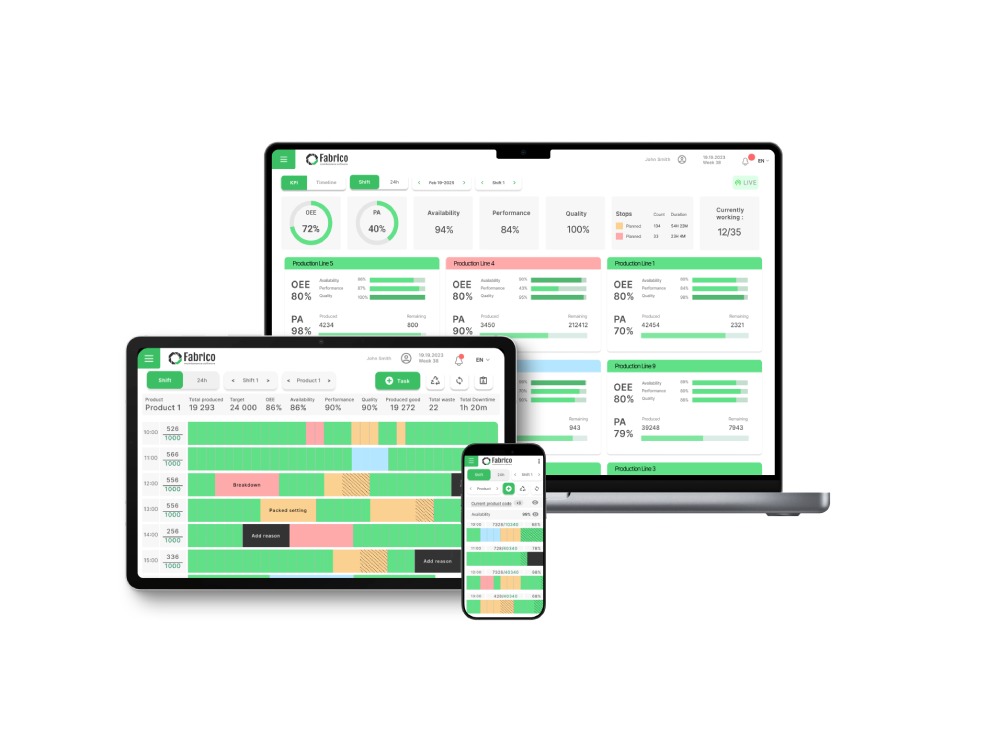
This is where Fabrico fits in a digital twin stack. Fabrico is computer-vision-verified OEE plus closed-loop maintenance execution. Cameras capture the micro-stops, manual interventions, and idle time that sensor and PLC data miss, and the CMMS records what maintenance was actually performed.
That verified event stream is exactly the ground truth a digital twin needs to stay honest. For the monitoring fundamentals, see OEE for manufacturing and equipment downtime analysis .
What is digital twin software?
Software that creates and maintains a virtual model of a physical asset, line, or plant, synchronized with real operational data, used for simulation, prediction, and decision support.
Is a digital twin the same as a simulation?
No. A simulation is typically a one-off model run with assumed inputs. A twin stays connected to live data and evolves with the physical asset.
Do small and mid-size manufacturers need digital twin software?
Usually not as a first step. Most SME plants get faster returns from reliable OEE monitoring and maintenance execution, which also build the data foundation a future twin would need.
What data does a digital twin need?
Machine states, cycle times, downtime events with causes, maintenance history, and quality outcomes. The completeness of downtime and intervention data matters most.
To see how computer-vision-verified shop-floor data can strengthen your operations today and feed whatever twin you build tomorrow, book a demo.
"Digital Twin" is the buzziest word in Industry 4.0.
Vendors promise you a minority-report style 3D hologram of your factory where you can simulate the future.
But for a Plant Manager ("Paula"), 3D graphics don't fix broken motors.
If you spend €500,000 on a 3D simulation that sits in the engineering office, you haven't helped the maintenance team on the shop floor.
You need an Operational Digital Twin.
This is a digital mirror of your factory that tracks Structure (Parent/Child relationships), State (Running/Stopped), and Health (Maintenance History).
It isn't about pretty graphics; it's about actionable data.
Here are the 5 Best Digital Twin Software Tools for 2026, ranked by their ability to improve daily operations.
Best For: Manufacturers who want to mirror their Production & Maintenance reality.
Fabrico strips away the heavy 3D CAD requirements and focuses on the Data Twin. We build a digital replica of your factory's logic and performance.
The Asset Tree: Fabrico creates a hierarchical twin of your plant (Factory -> Line -> Machine -> Component). This allows you to drill down and see exactly where costs and failures are accumulating.
Live Pulse (OEE): The twin is alive. By connecting to PLCs, Fabrico mirrors the machine's state in real-time. If the physical machine stops, the digital twin turns red and triggers a Work Order.
Contextual History: The digital asset holds the memory of the physical asset. Every repair, spare part used, and safety permit is stored in the twin, creating a "Golden Thread" of history.
Accessible Reality: Unlike heavy 3D tools that require powerful workstations, Fabrico’s twin is accessible on any smartphone, putting the data in the hands of the technician fixing the machine.
The Verdict: If you want a twin that helps you run the factory, not just simulate it, Fabrico is the practical choice.
Best For: High-fidelity physics simulation.
GE Digital is the pioneer of the Digital Twin. They focus on the Physics Twin.
Pros: Unmatched depth. They can simulate the thermal stress on a turbine blade based on current operating conditions. They can predict exactly when a part will crack based on physics models.
Cons: Extremely expensive and complex. It requires massive amounts of sensor data and engineering time to build the models. It is designed for multi-million euro assets (Jet Engines, Power Turbines), not a standard packaging line.
The Difference: GE models the physics; Fabrico models the process.
Best For: Automation and design simulation.
Siemens offers a Design Twin. It connects the machine design (CAD) with the machine operation.
Pros: Perfect for machine builders (OEMs). You can simulate how a machine will run before you even build it. It integrates deeply with Siemens PLCs.
Cons: Like GE, it is heavy. It is often used by the Engineering department to design lines, rather than by the Maintenance department to fix them.
The Difference: Siemens helps you build the machine; Fabrico helps you maintain it.
Best For: Spatial visual twins (3D Walkthroughs).
Matterport creates a Visual Twin. It uses cameras to scan your facility and create a "Google Street View" of your plant.
Pros: Incredible for remote management. You can virtually walk through the plant from your office to check layout or space constraints.
Cons: It is a static image. You can see the machine, but you can't see its temperature or OEE score live. It doesn't trigger work orders or track spare parts.
The Difference: Matterport captures the space; Fabrico captures the performance.
Best For: Engineering simulation and R&D.
Ansys is a pure simulation tool.
Pros: If you are trying to figure out why a design keeps failing (e.g., "Why does this shaft shear at 5000 RPM?"), Ansys allows you to simulate the forces involved.
Cons: It is an R&D tool. It is not an operational tool. A maintenance technician cannot use Ansys to log a repair or check inventory.
The Difference: Ansys is for the lab; Fabrico is for the floor.
| Feature | Fabrico | GE Digital | Siemens | Matterport | Ansys |
| Twin Type | Operational | Physics | Automation | Visual | Simulation |
| Live OEE | ✅ Native | ✅ Deep | ✅ Deep | ❌ No | ❌ No |
| Work Orders | ✅ Native | ⚠️ Separate | ⚠️ Separate | ❌ No | ❌ No |
| Setup Speed | Weeks | Years | Months | Days (Scan) | Months |
| Cost | Value | Very High | High | Low | High |
If you are designing a jet engine, you need a Physics Twin (GE/Ansys).
If you are planning a new building, you need a Visual Twin (Matterport).
But if you are managing a factory, you need an Operational Twin.
You need a system that mirrors the status of your production and the health of your assets in real-time.
Choose Fabrico if you want to connect the digital world (Data) to the physical world (Maintenance) to drive profit.
See your factory clearly.
[Book a Demo with Fabrico] to see how our Operational Digital Twin reveals the hidden opportunities in your plant.
















 Login
Login
 Blog
Blog