


 Login
Emergency Repairs and Unplanned DowntimeWhen a line stops, the clock runs. Get the urgent job to the right technician.
Fabrico's OEE software records the stop. The repair runs in the same system, with reaction time recorded.
- Urgent: same day by default
- Fast task from the line
- ISO/IEC 27001
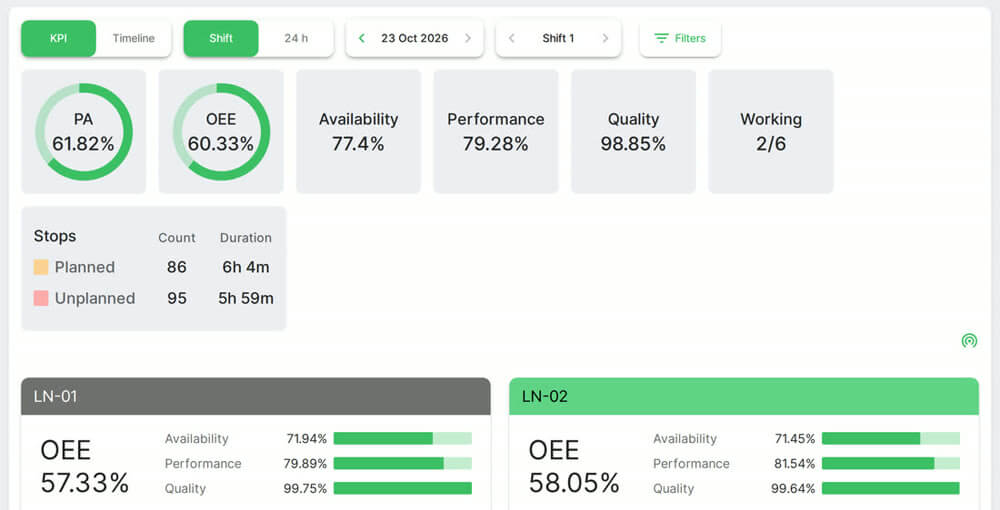 Plant and line OEE. Real Fabrico screen, sample data.
Trusted by manufacturing groups







Open the repair from the stop
A supervisor or technician opens a fast task for the stop.


The right technician gets the alert
Alerts reach the right technician by stop reason.
See notificationsLine has stopped
Unplanned stop
Urgent task for you
See which machines fail most
Filter reports by urgent tasks to find the worst machines and locations.
See analytics Stock photo: a CNC spindle.
Follow one breakdown to its repair in a live demo.
FAQs
Does a stop open a repair by itself?
A stoppage reason can be configured to open a maintenance task automatically. Supervisors and technicians can also create tasks by hand.
Who can report a breakdown?
Operators and technicians, from a phone, tablet or desktop.
How much downtime do emergencies cause?
Downtime is tracked for each emergency event, and each repair counts toward that machine's MTTR and MTBF.
More detail
What the repair record keeps
Users add photos and notes during or after the repair. Parts used are written off on the task, see spare parts inventory.
Where this sits in Fabrico
Emergency repairs are part of Fabrico's CMMS software, next to preventive maintenance.
Find out what your losses cost. Recover the output you already own.
See how losses get a price tag in a live demo.