


 Login
 Blog
ICONICS vs AVEVA: GENESIS and System Platform Compared by Job

In short: ICONICS vs AVEVA is a choice between two SCADA platforms that both reach into historian, OEE and MES work. ICONICS, now Mitsubishi Electric Iconics Digital Solutions, sells GENESIS, whose pages describe SCADA, a built-in historian, OEE, SPC and MES functions on one platform. AVEVA builds on System Platform, with InTouch HMI, AVEVA Historian and AVEVA Manufacturing Execution System as separate products. If the job is OEE and stop causes, a light MES such as Fabrico can measure that beside either.
- ICONICS was renamed Mitsubishi Electric Iconics Digital Solutions in 2025; GENESIS64 has been its HMI/SCADA line since 2008, and GENESIS version 11 followed in February 2025.
- AVEVA is a member of the Schneider Electric group, and its about page names Wonderware among the brands in its history.
- Both name OEE and SPC: GENESIS on its own solution pages, AVEVA inside AVEVA Manufacturing Execution System.
- Facts come from each vendor's own pages, as of 12.11.2026, linked in place. No prices, no verdicts.
A controls team has to modernise an ageing HMI and SCADA estate, and both names are on the list. The company's own site now says Mitsubishi Electric Iconics Digital Solutions (formerly ICONICS). AVEVA's System Platform page lists AVEVA Manufacturing Execution System as formerly known as Wonderware MES, so "ICONICS vs Wonderware" is the same question with older names.
Fabrico wrote this comparison and sells neither SCADA platform. Fabrico, our OEE and light MES, is not ranked here; it gets its own section.
ICONICS vs AVEVA at a glance
As of 12.11.2026, per each vendor's own pages (linked below), in our words. Not a ranking; a gap means only that we did not find it, so ask each vendor.
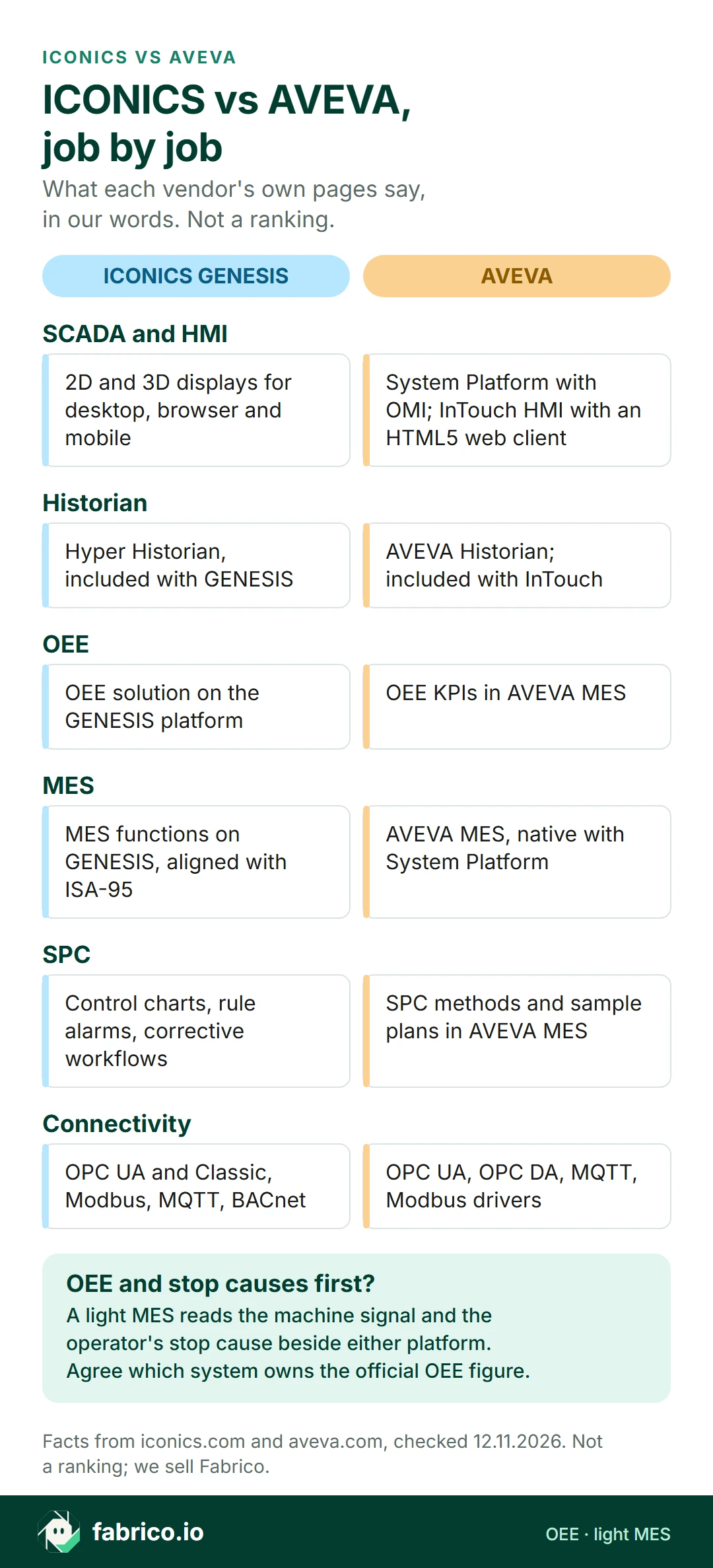
| Job | ICONICS GENESIS | AVEVA |
|---|---|---|
| Platform | GENESIS suite; GENESIS64 since 2008, version 11 since 2025 | System Platform: assets as objects from reusable templates |
| SCADA and HMI | 2D and 3D displays for desktop, browser and mobile | System Platform with OMI; InTouch HMI with an HTML5 web client |
| Historian | Hyper Historian, included with GENESIS | AVEVA Historian; included with InTouch |
| OEE | OEE solution on the GENESIS platform | OEE KPIs in AVEVA MES |
| MES | MES functions on GENESIS, aligned with ISA-95 | AVEVA MES, native with System Platform |
| SPC | Control charts, rule alarms, corrective workflows | SPC methods and sample plans in AVEVA MES |
| Connectivity | OPC UA and Classic, Modbus, MQTT, BACnet; DeviceXPlorer | Communication Drivers: OPC UA, OPC DA, MQTT, Modbus |
| Where it runs | On premises, hybrid or cloud | On premises, cloud or hybrid |
What Mitsubishi Electric Iconics Digital Solutions offers
Per its about page, the company was founded in 1986 as ICONICS, renamed Mitsubishi Electric Iconics Digital Solutions in 2025, and is headquartered in Foxborough, Massachusetts, as Mitsubishi Electric's Software Center of Excellence. As of 12.11.2026, its pages describe one platform, GENESIS, used for several jobs:
- GENESIS and GENESIS64. The GENESIS64 page says GENESIS64 has been its primary HMI/SCADA solution since 2008, and that GENESIS version 11, introduced in February 2025, keeps backward compatibility.
- SCADA. The SCADA page lists universal connectivity, data modeling, 2D and 3D visualization, integrated alarming and a built-in historian. Displays are built once and opened on operator workstations, web browsers and mobile devices.
- Historian. The data historian page describes Hyper Historian as the time-series historian included with GENESIS, with swinging-door compression and a store-and-forward buffer for network outages.
- OEE. The OEE page describes GENESIS automating the collection, calculation and visualization of OEE from PLCs, SCADA systems, historians and enterprise sources, and adding production context such as batch IDs, work orders, product codes and shift schedules.
- MES. The MES page says GENESIS provides the operational foundation for MES functionality, and lists production monitoring, work order management, shop-floor data collection, quality management, traceability, KPIs and workflow execution. It says GENESIS aligns with ISA-95.
- SPC. The SPC page lists standard control charts, from X-bar and R to P, NP, C and U charts, alarms when statistical rules are broken, and workflows that start corrective actions.
- Connectivity. The OPC connectivity page describes OPC UA as client and server, OPC Classic, native Modbus, MQTT and BACnet drivers, a REST web services connector, and the DeviceXPlorer OPC Server from partner Takebishi for over 230 device types.
Ask in the demo: which GENESIS functions the first phase needs, and which your team or an integrator configures.
What AVEVA offers for SCADA, historian and MES
AVEVA's site says it is a member of the Schneider Electric group, and its about page names Wonderware among the brands in its history. Its product menu also lists AVEVA Plant SCADA and AVEVA Enterprise SCADA; this page sticks to System Platform and the products around it. As of 12.11.2026:
- AVEVA System Platform models real-world assets as objects built from reusable templates, and template changes reach the derived objects automatically. Its page says it includes advanced SCADA capabilities and extends beyond traditional SCADA. It runs on premises, in the cloud or in hybrid setups, exchanges data through MQTT, and uses Python and C# for runtime logic in its Operations Management Interface (OMI). Plug-in extensions include MES, Quality and Batch.
- AVEVA InTouch HMI is HMI visualization software with an HTML5 web client for tablets and phones, and it includes AVEVA Historian.
- AVEVA Historian is described as a process database integrated with operations control, for process, alarm and event history, deployed for a single process or an entire facility.
- AVEVA Communication Drivers connect to OPC UA servers and support MQTT, OPC DA and OPC UA, with native drivers such as DNP3, IEC 60870 and Modbus.
- AVEVA Manufacturing Execution System measures OEE KPIs and schedule adherence in real time, applies SPC methods to find limit and rule violations, and tracks the transformation of materials into finished products. Its FAQ describes native integration with System Platform, and a hybrid cloud with multi-site services on CONNECT.
Ask in the demo: which parts need System Platform, which need InTouch alone, and who builds and maintains the templates.
ICONICS vs AVEVA, job by job
SCADA and HMI. Both build operator screens for desktops, browsers and phones. AVEVA's System Platform page centres on object templates reused across sites, with InTouch HMI as its own HMI product. The GENESIS pages centre on one suite configured in the Workbench, with cloning to extend a system. Ask each how a change to one machine type reaches 20 similar machines.
Historian. GENESIS includes Hyper Historian. AVEVA sells AVEVA Historian as a product, and InTouch includes it. Both describe compression for time-series data.
OEE. Both name OEE: GENESIS has its own OEE solution page, and AVEVA lists OEE KPIs under AVEVA MES. Either way, ask who defines the stop reasons, ideal rates and reports.
MES. AVEVA sells a separate MES product with native System Platform integration. Mitsubishi Electric Iconics Digital Solutions describes MES functions on the GENESIS platform, from work orders to traceability.
SPC and quality. GENESIS has an SPC solution page with control charts and rule alarms. AVEVA's MES page lists SPC methods and automated quality sample plans. Our SPC guide covers the method itself.
Connectivity. GENESIS lists OPC UA, OPC Classic, Modbus, MQTT and BACnet, plus DeviceXPlorer. AVEVA lists OPC UA, OPC DA, MQTT and Modbus on its Communication Drivers page, and System Platform connects controllers, historians, enterprise systems and devices. Ask both to show your PLC brands on a test bench.
Where it runs. The GENESIS SCADA page describes on-premises, hybrid or cloud architectures. The System Platform page says it runs on premises, in the cloud or across hybrid environments. Ask both which parts of the same scope run at the plant and which in the cloud.
Where OEE fits: in the SCADA, an MES or a light MES
Both platforms can carry OEE. The real question is who maintains the stop-cause list, screens and reports, and which system holds the official figure.
Our SCADA vs MES guide explains the split, OEE software vs SCADA covers the overlap, and OEE vs MES helps decide which comes first.
Where Fabrico fits, beside or instead
Fabrico is a cloud-based OEE and light MES platform, not SCADA: supervisory control stays in GENESIS or System Platform. Per our MES and OEE overview:
- Machine data. Fabrico reads cycles, stops and output from the PLC on automated lines, fits an IoT device with external sensors to older machines, and offers the camera add-on to count output at manual steps (how the camera add-on works). Protocols on our connectivity page include OPC UA, Modbus, PROFINET, MQTT and EtherNet/IP.
- Stops with causes. Connected machines report their own stops, including short stops too brief to log by hand, and operators add the stop reason on a tablet or phone.
- OEE and losses in money by machine, line and shift, on the web and in iOS and Android apps.
- Data out. A REST API, webhooks, and Excel or CSV export; a connection to SAP or another ERP can be scoped per customer.
- Rollout. Devices connected in about a month; full rollout in 3 to 4 months.
- Not Fabrico: supervisory control and process control, job dispatching, BOMs, routings and genealogy.
Beside GENESIS or System Platform: the SCADA keeps supervising and steering the process, and Fabrico measures OEE and stop causes by line. Instead of an OEE build: if the job you planned to configure in the SCADA is OEE and stop reasons, a light MES is built for that job.
Ask in the demo: how each machine on a pilot line would report run, stop and count, and how operators tag a stop.
Want to see the light MES side on a line like yours? Book a demo and bring one week's downtime log.
Worked example: the SCADA has the stop, the operator has the cause
Sample data for one shift on a packing line, not a customer's. The shift is 480 minutes with a 30 minute break, so planned time is 450 minutes. At an ideal 60 packs a minute, the line could make 27,000 packs.
The SCADA alarm and state log shows 63 minutes stopped, so run time is 387 minutes and availability is 86.0%. In 387 minutes the ideal is 23,220 packs; the line made 20,900, so performance is 90.0%. Of those, 418 were rejected, leaving 20,482 good, so quality is 98.0%. OEE is 86.0% x 90.0% x 98.0% = 75.9%, the same as 20,482 good of 27,000 possible (OEE calculation).
The log gives the 63 minutes. It does not give the cause. Once operators tag it, the minutes split into changeover 25, film reel change 16, waiting for cartons 12, jams at the case packer 6, and 4 with no reason given. That ranking is what the morning meeting acts on, whichever system stores it.
Questions to ask before you choose
- Which job comes first: supervising machines, running orders, checking quality with SPC, or measuring lost time?
- Who builds and maintains it? Your automation team, an integrator or the vendor, for screens, templates and reports.
- Which products or functions are in scope, and who sells and supports each one?
- How does an operator tag a stop cause at the line, and how long does it take?
- How does the price change from one line to the whole plant? Start with a one-line pilot.
For the layers behind this, read PLC vs SCADA vs MES, ISA-95 and OEE and the plant historian. For packaged goods plants, our FMCG guide shows where the camera add-on fits next to machine signals.
What people ask next
Is ICONICS the same as Mitsubishi Electric Iconics Digital Solutions?
Yes. Per its about page, the company was founded in 1986 as ICONICS and renamed Mitsubishi Electric Iconics Digital Solutions in 2025. GENESIS64 and GENESIS are its HMI/SCADA products.
How does ICONICS compare to AVEVA System Platform?
Both are SCADA platforms that reach into historian, OEE and MES work. GENESIS covers these jobs on one platform; AVEVA pairs System Platform with InTouch HMI, AVEVA Historian and AVEVA MES as separate products.
Is Wonderware the same as AVEVA?
AVEVA's about page names Wonderware among the brands in its history, and its System Platform page lists AVEVA Manufacturing Execution System as formerly known as Wonderware MES.
Do ICONICS and AVEVA include OEE?
Both name it. Mitsubishi Electric Iconics Digital Solutions describes OEE collection, calculation and visualization on GENESIS. AVEVA lists OEE KPIs and schedule adherence under AVEVA Manufacturing Execution System. Ask each who sets up the stop reasons and the reports.
Can Fabrico run next to GENESIS or System Platform?
Yes, as a separate layer. Fabrico takes machine data from the PLC, an IoT device or the camera add-on, and its data leaves through a REST API, webhooks, and Excel or CSV export. Agree first which system holds the official OEE figure.
Want to see OEE and stop causes on a line like yours? Book a demo or contact us.
Related articles



Latest from our blog


Real Fabrico tiles, sample data.