


 Login
 Blog
Tulip vs Poka: Build Your Own Apps or Use Ready-Made Modules

In short: Tulip vs Poka comes down to how a plant wants to get frontline tools: Tulip's pages describe a platform where engineers build their own apps, while Poka's describe ready modules for work instructions, forms, skills and daily management. Neither answer is better in general; the better one is the one that fits the first job and the team that will own it.
- Build or configure: Tulip has a no-code App Editor, custom widgets and app templates; Poka has modules built to work together.
- Quality: Tulip shows defect logs and a Pareto of reasons; Poka shows checklists with photos and approvals.
- People: Poka leads with skills and certificate expiry; Tulip logs operator, station and step times per job.
- Facts come from tulip.co and poka.io, as of 14.11.2026, linked in place.
Tulip and Poka both put guidance and data capture on a tablet next to the operator, so they land on the same shortlist. The split shows when someone asks who will set it up.
Key takeaways
- Tulip's pages give an engineer an editor, triggers and custom widgets; Poka's give a CI lead modules already shaped as instructions, forms, skills records and huddle boards.
- The deciding question is who owns the build after go-live, and how many hours a week that person has.
- In the sample weld cell below, a 27-minute wait for first-off sign-off costs 18 brackets a shift at the ideal rate: EUR 72 a shift and EUR 36,288 a year at a EUR 4.00 sample margin.
- Sign-off depends on scarce people: the American Welding Society Foundation projects 320,500 new welding professionals needed in the U.S. by 2029.
- Either tool can speed up the human step; stop minutes still come from the machine signal, which is how an OEE layer shows whether the gain holds.
Fabrico (cloud OEE and light MES software) is not one of the two and appears once, in a brief section toward the end. For a wider field, see the connected worker platform roundup.
Tulip vs Poka at a glance
Checked on 14.11.2026 against tulip.co and poka.io; every source is linked in the sections below.
| Job | Tulip | Poka |
|---|---|---|
| Headline | Where people, machines and agents work together | Industrial AI for Connected Work |
| How you start | Build apps in a no-code editor, or start from app templates | Use modules built to work together: instructions, forms, skills |
| Work instructions | Steps built in the App Editor; step times logged per job | AI builds steps from a filmed process; version control |
| Quality checks | Defect reports, Pareto of defect reasons, scrap costs | Checklists with conditional logic, photos and approvals |
| People | Each job logs operator, station and app version | Skills matrix, expiring certificates, routing to qualified staff |
| Machine and floor data | OPC UA, MQTT, current sensors; operator reason codes | Huddle boards fed with live SQDCP data and open issues |
| AI | Co-authoring agents, configurable AI agents | AI Assistant on plant documents; agents need operator approval |
| Integrations | ERP and PLM connectors, open APIs, MCP-aligned | 1,000+ systems via no-code workflows, open API and MCP |
What Tulip offers to engineers who build
Tulip's home page calls it "the platform where your people, machines, and agents work together" and offers each site "a single place to build, connect, and improve." The pages put the builder first. As of 14.11.2026:
- App Editor. The authoring page offers "no-code editing" for apps, logic and connectors, lets teams define Automations on schedules and events, and build reusable widgets in HTML, JavaScript, CSS or with AI. Co-authoring agents help with the build, and a development lifecycle adds approvers, versioning and activity history.
- Work instructions as apps. On the work instructions page, instructions are steps built in the App Editor without code. Every finished job logs how long each step took, who did it, at which station and on which app version, and no new version deploys until its approvers sign it electronically.
- Templates and app suites. The Composable MES page says "you can get started fast with the Composable MES App Suite" from the Tulip Library, and that app templates give a quick start.
- Quality. The non-conformance page prompts operators to report defects and SOP deviations, fills real-time Pareto charts of defect reasons, and uses defect logs to manage rework and track scrap costs.
- Machines and OEE. The OEE tracking page takes availability and performance from PLC and machine data arriving over native OPC UA or MQTT, with an operator picking the reason code when a line stops; it covers manual assembly lines too. The edge devices page adds current sensors and USB devices at work stations.
- AI and integrations. The AI page describes configurable AI Agents, and the connectors page links Tulip to ERP, PLM and other business systems and says it is "LLM-agnostic, MCP-aligned, and built on open APIs."
What Poka offers to CI leads who configure
Poka's home page leads with "Industrial AI for Connected Work". Its platform page says every module is "purpose-built to work seamlessly together" and that Poka runs as an iOS, Android and web application. As of 14.11.2026:
- Work instructions. Per the work instructions page, a team can film a process on a phone and have AI build the instructions, keep them centralized and version-controlled across sites, and use more than 70 languages.
- Forms and checklists. The forms page lists 5S audits, safety inspections and checklists for maintenance and quality. Forms add conditional logic, required fields and scoring, and hold photos, videos and approvals; data syncs when a device reconnects.
- Skills. The skills page gives one live view of who is trained, endorsed or close to certificate expiry, and schedules retraining. Skills data feeds who gets assigned a task, so work goes to qualified operators.
- Huddles. On the daily management page, the huddle board fills with live SQDCP data, open issues and finished forms, and unresolved issues move up a tier.
- AI. The industrial AI page grounds AI Assistant answers in the plant's own documents and data. Agents built in AI Studio wait for operator approval before acting, per Poka.
- Integrations. The integrations page says Poka works with more than 1,000 systems through no-code workflows, an open API and MCP, and offers an open RESTful API for custom integrations.
Tulip vs Poka, job by job
Who sets it up. This is the real fork. Tulip hands an engineer an editor, triggers, tables, custom widgets and approver-gated releases. Poka hands a CI lead modules whose shape is already set: instruction, form, skill record, huddle board. Ask each who owns the build after go-live.
Instructions. Both turn existing material into steps: Tulip from SOPs and videos, Poka with AI writing steps from a filmed process. Tulip times each step on each job; Poka stresses version control across sites and 70+ languages. Hand both the same welding procedure.
Signed releases in regulated plants. Tulip's work instruction page says each new version needs approvers' electronic sign-off before it deploys; Poka's forms carry approvals. In plants that answer to the FDA, the agency's Part 11 scope guidance recalls that in March 1997 it issued final part 11 regulations setting criteria under which electronic records and electronic signatures are accepted as equivalent to paper records and handwritten signatures (accessed 14.11.2026). It also links the need for an audit trail to regulated records that people create, change or remove during routine work. Ask both vendors for their validation pack and how a release is traced, rather than taking either tool's word for compliance.
Quality. Tulip's pages frame quality as defect capture with a Pareto and scrap cost; Poka's as checklists with photo proof and sign-off.
People and skills. Poka puts skills, endorsements and expiring certificates up front. On Tulip's pages, people show up in job records: who did which step, where, how long. Ask each to show who may sign off a weld.
Why sign-off rights are scarce. The welding workforce data site published by the American Welding Society Foundation projects that 320,500 new welding professionals will be needed in the U.S. by 2029, about 80,000 jobs to fill a year from 2025 to 2029, and says more than 157,000 welding professionals are approaching retirement (accessed 14.11.2026). When one inspector covers several cells, widening the list of people cleared to approve a first part is often the cheapest fix on the floor, which is why the skills record and the job record matter here.
Machines. Tulip lists native OPC UA and MQTT, edge devices and current sensors; the OPC Foundation says OPC UA "defines the rules and base building blocks necessary to expose an information model". Poka's pages lead with people data on the huddle board; ask how machine counts reach it. The project's own site, mqtt.org, presents MQTT as a messaging protocol for connected devices, standardised at OASIS. The OPC UA vs MQTT guide covers the protocol choice.
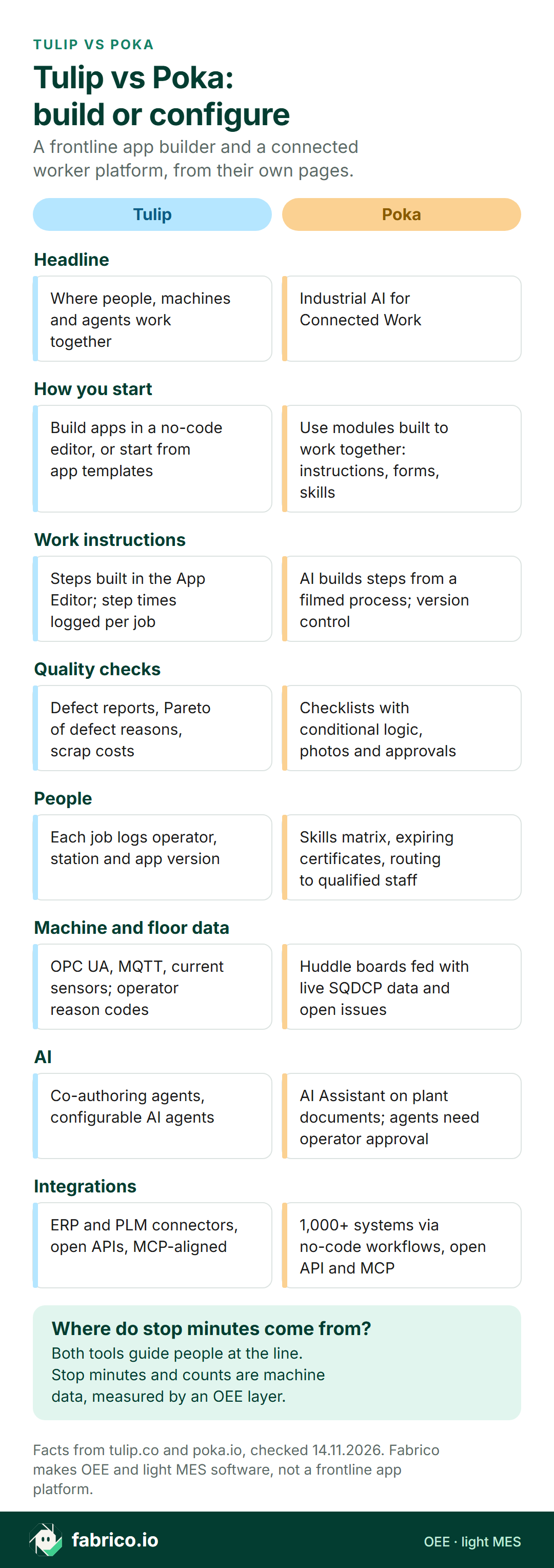
Text version of this infographic
- Headline. Tulip: Where people, machines and agents work together. Poka: Industrial AI for Connected Work.
- How you start. Tulip: Build apps in a no-code editor, or start from app templates. Poka: Use modules built to work together: instructions, forms, skills.
- Work instructions. Tulip: Steps built in the App Editor; step times logged per job. Poka: AI builds steps from a filmed process; version control.
- Quality checks. Tulip: Defect reports, Pareto of defect reasons, scrap costs. Poka: Checklists with conditional logic, photos and approvals.
- People. Tulip: Each job logs operator, station and app version. Poka: Skills matrix, expiring certificates, routing to qualified staff.
- Machine and floor data. Tulip: OPC UA, MQTT, current sensors; operator reason codes. Poka: Huddle boards fed with live SQDCP data and open issues.
- AI. Tulip: Co-authoring agents, configurable AI agents. Poka: AI Assistant on plant documents; agents need operator approval.
- Integrations. Tulip: ERP and PLM connectors, open APIs, MCP-aligned. Poka: 1,000+ systems via no-code workflows, open API and MCP.
- Where do stop minutes come from? Both tools guide people at the line. Stop minutes and counts are machine data, measured by an OEE layer.
Which to try first: Tulip, Poka or both
Pick the job that hurts most this quarter, start with the vendor whose pages lead with it, and give the other the same test.
| Your first job | Start with |
|---|---|
| An app nobody sells: custom screens, logic, a device at the bench | Tulip: App Editor, widgets, edge devices |
| Step times per operator and station on manual work | Tulip: work instruction apps |
| A defect log with a Pareto of reasons and scrap cost | Tulip: non-conformance management |
| Certificates that expire and work routed to qualified people | Poka: skills management |
| Audits and checklists with photos and sign-off, across sites | Poka: forms and checklists |
| Tiered huddles that escalate open issues | Poka: daily management |
| Instructions written from a senior operator's video | Both: Tulip's authoring, Poka's AI build |
| Lost minutes by machine and shift, with reasons | An OEE or light MES layer next to either tool |
Leaning one way already? See Tulip alternatives, Poka alternatives or Ignition vs Tulip.
Decision matrix: Tulip or Poka for your plant
The table above names where to start. This one adds the page each route rests on and a pilot result that would settle it. It sorts jobs; it does not score Tulip or Poka.
| If this is you | Look first at | Why (Tulip or Poka page) | Prove it in the pilot by |
|---|---|---|---|
| A process engineer has time to build and maintain apps | Tulip | An App Editor that needs no code, plus custom widgets | That engineer building the first-off check unaided and changing it once |
| The CI team wants forms running, not a build project | Poka | Checklists with conditional logic, scoring, photos and approvals | A supervisor configuring a 5S audit and a first-off form without IT |
| Step times per operator decide where to coach | Tulip | Each job logs step time, operator, station and app version | Two weeks of job records showing the slowest step on one bench |
| Expired certificates keep turning up in audits | Poka | Live view of trained, endorsed and near-expiry staff; work routed to the qualified | Trying to assign the sign-off to someone whose certificate has lapsed |
| Releases of instructions must be e-signed | Both | Tulip: approvers sign each version; Poka: version control across sites | Tracing one released change back to its approver and date |
| A gauge or sensor at the bench should feed the record | Tulip | Edge devices, current sensors and USB devices at stations | A gauge reading arriving in the record without typing |
| Shift huddles should escalate what stays open | Poka | Huddle board with live SQDCP data; issues move up a tier | Counting issues raised, moved up and closed over two weeks |
| Wi-Fi drops at the far end of the hall | Poka | Form data syncs when a device reconnects | Filling a form in the dead zone and checking it arrives intact |
| Answers should come from the plant's own documents | Both | Poka: AI Assistant grounded in plant data; Tulip: configurable AI Agents | Asking both the same ten questions from your own SOPs and scoring the answers |
Where OEE fits beside Tulip or Poka
Frontline tools record the person's side of a shift: which step, which form, who signed. OEE records the machine's side: run time, output against an ideal rate, good parts. They meet at a stop a person causes or ends, such as a wait for sign-off.
ISA's ISA-95 page puts manufacturing execution at Level 3, which it says "describes manufacturing execution systems", the layer where OEE and a light MES sit (more in the ISA-95 guide). Tulip's pages reach into that layer with a Composable MES app suite and an OEE tracking page; Poka's pages centre on the people doing the work. Choosing between the two kinds of tool? The light MES vs connected worker platform comparison helps.
Where Fabrico fits beside Tulip or Poka
Fabrico is cloud OEE software plus a light MES, described on the MES and OEE overview. It is not an app builder, a connected worker platform, SCADA or an inspection system, so it replaces neither Tulip nor Poka on instructions, forms or skills.
- Machine side. The machine's own PLC, or an added sensor or counter, reports stops and counts; operators tag why it stopped from a phone or tablet nearby.
- Camera add-on. On a manual bench, or a station with no signal worth wiring, the camera add-on does the counting. A camera that suggests stop reasons is a Roadmap item, with video streamed on request and not stored (camera add-on page).
- Reports. OEE and downtime by line and shift, with lost minutes turned into money, readable in a browser or on iOS and Android.
- Work orders. A work order opens from a logged stop in one tap, and you can set chosen stop reasons to create that work order automatically as soon as the reason is logged.
- Data out. A REST API and webhooks for systems, Excel and CSV exports for people.
Beside Tulip or Poka: Fabrico ranks the stops by minutes and money; the frontline tool carries the fixed method to the operator. Both vendors describe open APIs; Fabrico lists no ready connector for Tulip or Poka, so prove that hand-off in a pilot. The OEE software guide lists what to check.
Want to see stop reasons ranked by lost minutes for a sample weld shift? Book a demo.
Worked example: a robotic weld cell waiting for first-off sign-off
Sample data invented for this page, not from any plant or product screen. A robotic MIG cell welds steel brackets on a 9.5 hour shift with 45 minutes of breaks, so planned time is 525 minutes. The ideal cycle is 90 seconds a bracket, so the cell could make 350 brackets.
The shift changes from bracket A to bracket B once. After the fixture swap, the robot waits until quality signs off the first part, and today that took 27 minutes because the inspector was at another cell.
| Sample data: stop | Minutes |
|---|---|
| Fixture changeover, bracket A to B | 38 |
| Waiting for first-off sign-off | 27 |
| Nozzle and contact tip cleaning | 22 |
| Wire spool run-out | 16 |
| Robot collision fault reset | 12 |
| Total stopped | 115 |
The arithmetic. The cell stood still for 115 minutes, so it ran for 410 minutes and availability is 410 / 525 = 78.1%. In 410 minutes the ideal is 273 brackets; the cell made 246, so performance is 246 x 1.5 / 410 = 90.0%. The inspection bench rejected 7 brackets for porosity, leaving 239 good, so quality is 239 / 246 = 97.2%. OEE is 78.1% x 90.0% x 97.2% = 68.3%, the same as 239 x 1.5 = 358.5 good minutes out of 525 (see OEE calculation).
How each tool would attack the wait. With Tulip, an engineer could build a first-off app: a USB gauge feeds readings in, logic flags a value out of limits, and the job record keeps who did each step and how long it took. With Poka, a CI lead could set up a quality checklist with conditional logic, photos and an approval in the form, and use skills records so more people on the shift may approve. For the inspection side itself, see the first article inspection guide.
What the fix is worth. If sign-off took 10 minutes, run time would rise by 17 minutes to 427, and availability to 81.3%. At the same speed that is about 10 more brackets (17 x 0.9 / 1.5), and OEE comes to about 71.1%. The OEE layer shows whether the new check holds that over the following weeks. Metal shops weighing a wider system can read MES for metal fabrication; for packaged goods plants with manual stations, see computer vision in FMCG manufacturing.
The wait in euros
The margin is sample data too, invented for this page: EUR 4.00 contribution per good bracket. Assume two shifts a day and 21 production days a month, so 42 shifts a month and 504 a year for this cell. Losses are counted at the ideal rate of 40 brackets an hour, the basis OEE uses; the fix is counted at the cell's actual speed.
| Sample loss, weld cell | Per shift | Per month | Per year |
|---|---|---|---|
| Full OEE gap: 350 less 239 good, 111 brackets | EUR 444 | EUR 18,648 | EUR 223,776 |
| First-off wait: 27 min, 18 brackets | EUR 72 | EUR 3,024 | EUR 36,288 |
| Wait cut to 10 min: about 10 more brackets | EUR 40 | EUR 1,680 | EUR 20,160 |
The wait is about a sixth of the cell's money gap, yet it is the one stop a sign-off app or a wider skills list can attack without touching the robot. The fix row is smaller than the wait row because 10 minutes of waiting remain and the cell runs at 90% of ideal speed. Rerun the table with your own margin, shift count and the waits you timed this week.
What to do this week
Five steps a production or CI manager can take before either vendor visits:
- Name the build owner. Write down who will build or configure the first app or form, and how many hours a week they really have. If nobody has the hours, say so to both vendors.
- Time three first-off sign-offs. Log the minutes from the end of the fixture swap to the approval, and who approved. Three readings are enough to see whether the wait is a pattern.
- Price the wait. Minutes waited, times the ideal rate, times your own contribution margin, times shifts a year, as in the table above.
- Write the check on one page. Limits, gauge, photo, who may approve. Send the identical page to Tulip and Poka so the two pilots start from the same brief.
- List who may approve, per shift. A shift with one name, or none, is the skills test for both pilots.
Questions to ask Tulip and Poka
Give both the same procedure, checklist and skills list, then ask:
- Who in our plant builds and changes this after go-live, and what skills does that person need?
- Can you show our first-off check working, with limits, photos and a sign-off, from our own procedure?
- How is a change to an instruction or form approved, and what happens to a job already in progress?
- Where do machine counts and stops come from, and who enters the stop reason?
- How do you record who is qualified, and what happens when a certificate expires?
- Which documents does the AI answer from, and who signs off before an agent acts?
- Which ERP and quality systems have a ready connector, and which need work through the API?
What people ask next
Which is better, Tulip or Poka?
Neither is better in general; they suit different owners. Tulip's pages describe a platform where engineers build their own apps in a no-code editor, with custom widgets and app templates. Poka's describe ready modules for work instructions, forms, skills and daily management. Start with the vendor whose pages lead with the first job, then give the other the same trial.
What do reviews say about Tulip vs Poka?
Review scores move over time, so read them by job and by reviewer. A review from an engineer who built custom apps says little to a CI lead who wants ready checklists, and the other way round. Ask each vendor for a reference plant with the same first job and talk to the person who owns the build.
Is Tulip a no-code platform?
Tulip's authoring page describes no-code editing for apps, logic and connectors. The same page says teams can also build reusable widgets with HTML, JavaScript, CSS or AI, so code is an option where the editor stops.
Does Poka track skills and certifications?
Yes, per its skills page: a live view of who is trained, endorsed and close to certificate expiry, scheduled retraining, and skills data tied to task assignment so work routes to qualified operators.
Can Tulip or Poka measure OEE?
Tulip has an OEE tracking page fed by PLC signals over OPC UA or MQTT, with operator reason codes. Poka pulls live SQDCP data onto huddle boards. Ask either where run, stop and count signals come from.
Can Fabrico run beside Tulip or Poka?
Yes, as the machine-side layer. Machine signals give Fabrico the stops and counts, operators tag the reason, and results go out as CSV or Excel files, by webhook or over a REST API. A pilot should prove any hand-off, since Fabrico lists no ready connector for either product.
Want to see a sample shift's stop minutes, reasons and OEE side by side? Book a demo.
Related articles









Real Fabrico tiles, sample data.