








 Login
 Blog

Machine Data Collection Software for Manufacturing: Automated vs Manual (2026)


Machine data collection software reads what each machine is doing, such as run and stop state, part counts, cycle times and stop durations, straight from the PLC or a retrofit sensor, with a camera counting parts where there is no signal, and stores it with a timestamp. Operators then add only what the machine cannot know, such as the reason for a stop.
Key takeaways
- Let the machine count and time, and let people explain. Counts and stop times from the machine are hard to argue with; the reason for a stop still needs a person.
- Four sources, usually combined: the PLC, retrofit sensors on older machines, cameras that count parts where there is no signal, and operator input for context.
- Connecting is the first step, not the whole job. Data needs context (product, shift, planned time), storage and a use, or it stays a stream of tags.
- The five tools below come from different categories: an OEE and light MES platform, an industrial connectivity layer, a machine monitoring platform, a frontline operations app and a no-code app platform. Fabrico is our product.
What machine data collection software collects
Machine data collection, also called machine data acquisition, is the first layer of any production system: without it, OEE, downtime analysis and reports run on estimates. Six kinds of data matter most.
| Data | Usual source | What it is used for |
|---|---|---|
| Run and stop state | PLC or sensor | Availability and the stop timeline |
| Part counts, good and rejected | PLC counter, sensor, inspection station or camera | Output, performance and quality |
| Cycle time | Read from the PLC or calculated from counts | Slow running against the ideal cycle time |
| Stop reason | Operator on a tablet or phone | Why the time was lost |
| Alarms and process values | PLC or controller | Finding faults and setting limits |
| Product and order | Operator selection or the ERP | The right standard for each product |
Together these give the three OEE factors. Our guide to the OEE formula shows how they combine, and OEE data collection methods compared goes deeper on each source.
Four ways to collect machine data
| Method | Strengths | Plan for |
|---|---|---|
| PLC or machine controller (OPC UA, Modbus, MQTT and other protocols) | Detailed and exact, including alarms | Access to the controls and time from automation engineers |
| Retrofit sensor or IoT device | Works on older machines with no usable PLC | Stop reasons still need an operator |
| Camera | Covers manual steps with no electrical signal | Clear rules on what is filmed and who sees it |
| Operator input on a tablet or form | Adds the reason and the context | Depends on discipline, and short stops are often missed |
Most plants combine them: the machine counts and times, and the operator explains. For machines with no PLC access, see OEE without PLC for older lines, and for cameras, the camera-based OEE field guide.
From raw tags to usable data
Connecting a machine is one part of data collection. A working setup has four parts:
- Connect: read the signal from the PLC, a sensor or a camera.
- Add context: turn a raw tag, such as a counter bit, into "part made on line 3, product A, morning shift", and a stopped state into a stop with a start, a duration and a reason.
- Store: keep the events with timestamps, so shifts, lines and weeks can be compared.
- Use: dashboards, OEE, reports, alerts and exports to the ERP or BI tools.
Some tools cover the first part and pass the data on; others cover all four. That difference matters more than any feature list.
5 machine data collection tools at a glance
Fabrico is listed first because it is our product. The others are in alphabetical order, not ranked. Each description is based on the vendor's own website, checked 5 November 2026, with a link to the page.
| Tool | What it is and how it collects, per the vendor |
|---|---|
| Fabrico | Category: OEE and light MES platform Collects: machine data from the PLC, a Fabrico IoT device with external sensors, or AI cameras (an add-on), plus the operator's stop reason |
| Kepware (now part of Velotic) | Category: industrial connectivity Collects: data from PLCs, controllers, devices and industrial systems through one connectivity layer |
| MachineMetrics | Category: AI-powered operating system for discrete manufacturing Collects: data from machine controls and operators, with sensors and IO adapters for older equipment |
| Mitti (by SafetyCulture) | Category: frontline operations app Collects: production checks, inspections, photos and issues entered by people |
| Tulip | Category: composable frontline operations platform Collects: data from connected apps, and from machines and PLCs over OPC UA and MQTT |
This is what each vendor's own site says, in our words. It is not a ranking, and a gap means we did not find it on the pages we read, so ask each vendor directly.
1. Fabrico
Disclosure: Fabrico is our product.
What it is: a cloud-based OEE and light MES platform. Machine data collection is where it starts, and the same data then drives production monitoring, OEE and downtime analytics.
- Three ways in: machine data from the PLC, from a Fabrico IoT device with external sensors on older machines, or from AI cameras (an add-on) where there is no machine signal.
- Protocols: OPC UA, Modbus, PROFIBUS, PROFINET, MQTT, EtherNet/IP, EtherCAT, IO-Link and HTTP.
- Stops timed by the machine: with machine connectivity, connected machines report their own stops, including short stops too brief to log by hand. Operators add the stop reason on a tablet or phone.
- What the data becomes: real-time OEE per line and shift on a live OEE dashboard, the six big losses made visible, and revenue at risk and profit impact per loss.
- Getting data out: REST API and webhooks, Excel or CSV export; a connection to SAP PM or SAP S/4HANA can be scoped per customer with your SAP team.
- When a stop needs a repair: a work order is opened from the stop in one step, linked to the line, because maintenance (CMMS) is built in on the same data. Our guide to turning downtime data into work orders shows the flow.
Things to consider
- Machines without a usable signal need a Fabrico IoT device or AI cameras (an add-on) first. Plan that into the rollout.
- As a light MES, Fabrico leaves routings, BOMs, dispatching and genealogy in the ERP.
2. Kepware (now part of Velotic)
What it is: Velotic says "Kepware is a portfolio of industrial connectivity solutions that connect disparate legacy OT devices with software applications."
- "Kepware provides a common connectivity layer for PLCs, controllers, devices, and industrial systems, helping manufacturers standardize how operational data is collected across equipment, lines, and sites."
- On ownership, the page says "Kepware remains open and interoperable for connecting OT & IT" "but is now part of Velotic", which it describes as "a new independent industrial software company formed from the combination of Proficy from GE Vernova and ThingWorx and Kepware from PTC."
Source: Kepware on velotic.com (the old ptc.com product page now redirects there), checked 5 November 2026.
Things to consider
- Kepware is a connectivity layer. Plan which application turns its data into stops, OEE and reports, and who maintains the tag mapping.
3. MachineMetrics
What it is: MachineMetrics calls its platform "The AI-powered operating system for discrete manufacturing."
- "Plug-and-Play universal machine connectivity and data collection from PLC's"
- "Collect data from each machine control and machine operator for the entire production floor."
- "Older equipment connects through sensors and IO adapters."
Sources: MachineMetrics MaximaOS, machine monitoring and connect pages, checked 5 November 2026.
Things to consider
- MachineMetrics says its platform is built for discrete manufacturing. If you run process or packaging lines, ask for an example from a line like yours.
4. Mitti (by SafetyCulture)
What it is: safetyculture.com now redirects to mitti.com, where the app is called "Mitti (by SafetyCulture)". Mitti says it "connects your people, workflows and operational data into one complete picture."
- For manufacturing, Mitti says teams can "Run fast and accurate production checks, track downtime as it happens and build an audit-ready record".
- "Turn photos or voice notes into actionable issues"
Sources: mitti.com and Mitti for manufacturing, checked 5 November 2026.
Things to consider
- Ask Mitti how downtime is captured on your lines, by people or from machine signals, and how checks link to the machine they cover.
5. Tulip
What it is: Tulip says "Tulip is a composable frontline operations platform used to implement a composable MES."
- "OPC UA and MQTT connections are native, so most modern machines and PLCs connect directly."
- "Replace whiteboards and end-of-shift reports with connected apps that capture data as work happens."
- "Create apps, add logic, build connectors, and more with no-code editing."
Sources: Tulip electronics, OEE tracking software, production tracking software and App Editor pages, checked 5 November 2026.
Things to consider
- Ask Tulip which apps you would configure for data collection and which come ready from its Library.
Automated or manual data collection?
| Manual: paper, spreadsheet or form | Automated: machine data | |
|---|---|---|
| When you see a stop | After the shift | While it is happening |
| Short stops | Rarely written down | Recorded from the machine signal |
| Stop durations | Rounded, often from memory | Timestamped |
| Stop reasons | Written by the operator | Added by the operator on a tablet or phone |
| Best for | Checks and inspections no machine can make | Counts, states, cycle times and stops |
Manual forms stay useful for checks a machine cannot make. For counts and stop times, machine data is the more reliable source, and the operator's time goes into the reason instead of the stopwatch.
How to choose machine data collection software
- List your machines by data source: usable PLC, sensor needed, camera needed or manual only.
- Ask what happens after the connection: does the tool turn signals into stops, reasons and OEE, or deliver raw tags to another system?
- Check the shortest stop it records on your type of machine.
- Test the operator screen for entering a stop reason at the line.
- Check exports and integrations: ERP, BI tools and API.
- Review hosting and security, including certifications and where the data is stored.
- Run a pilot on one bottleneck machine and compare its counts with a manual count over a full shift.
Frequently asked questions
What is machine data collection software?
Software that reads run and stop states, counts, cycle times and alarms from machines through the PLC or sensors, with cameras counting parts where there is no signal, stores them with timestamps, and turns them into stops, OEE and reports. Operators add context such as the stop reason.
What is the difference between machine data collection and machine monitoring?
Collection gets the data off the machine and stores it. Monitoring shows it live and lets the shift act on it. Most tools do both, while connectivity servers collect and pass the data to another application.
Our guide to the machine monitoring system covers the monitoring side.
Can you collect data from machines without a PLC?
Yes. A retrofit sensor can read whether a machine runs and count its cycles, and a camera can cover manual steps with no electrical signal.
In Fabrico, that is a Fabrico IoT device with external sensors, or AI cameras (an add-on).
Which protocols does machine data collection use?
Common ones are OPC UA, Modbus, MQTT, PROFINET and EtherNet/IP, and older machines often need a sensor instead. Fabrico supports OPC UA, Modbus, PROFIBUS, PROFINET, MQTT, EtherNet/IP, EtherCAT, IO-Link and HTTP.
Is machine data collection the same as an MES?
No, it is the first layer of one. A light MES adds production monitoring, OEE and downtime analytics on top of the collected data and leaves routings, BOMs and dispatching in the ERP. A full MES also runs orders and genealogy.
Our guide to light MES explains where it stops.
How long does it take to connect machines?
It depends on the number of machines and the data source of each one, so ask each vendor for a plan. With Fabrico, plan for two steps. Installing the devices and connecting the machines takes about one month. Full rollout across the lines you choose takes 3 to 4 months.
Book a demo to see machine data turn into OEE and downtime by cause on a demonstration plant with lines like yours, or contact us with your machine list.
See machine data turn into live OEE.
Book a demoRelated articles





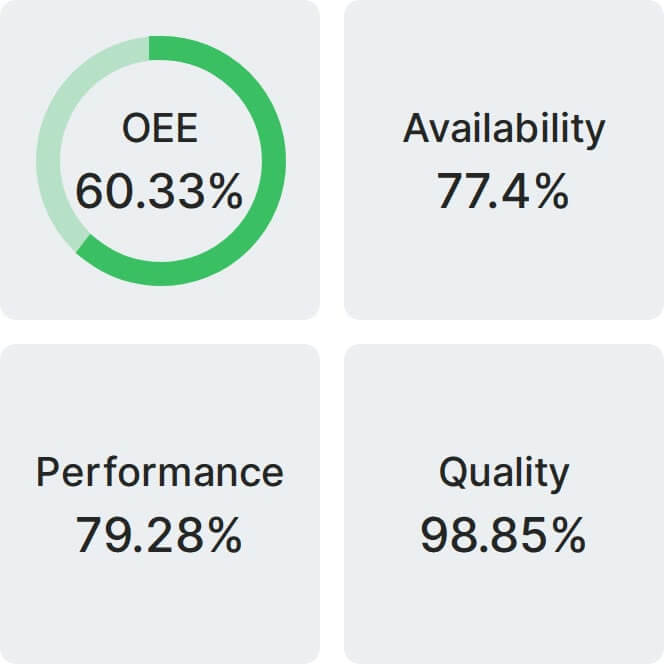
Real Fabrico tiles, sample data.