


 Login
 Blog
Kanoa vs Sepasoft: Two Ways to Run MES on Ignition

In short: Kanoa vs Sepasoft is a choice between two ways of adding MES to Ignition. Kanoa MES arrives as one packaged application (an Ignition module, the kanoaCore database on SQL Server and Perspective screens), with Kanoa Ops as the base and add-ons for Trace, Quality, Maintenance and Inventory. Sepasoft sells separate MES modules for Ignition, from OEE Downtime to Batch Procedure, that your team or integrator assembles into a project. When the first need is OEE and the reasons behind lost time, Fabrico, a light MES, can run beside either one.
- Both vendors build on Inductive Automation's Ignition, and both name OEE, downtime, traceability and SPC.
- Sepasoft describes modules for OEE, batch, trace, recipes, SPC and ERP links, plus MES Enterprise for many sites.
- We took each vendor fact from the vendor's own site on 13.11.2026 and link it in the text. Neither is picked as a winner.
A plant has run Ignition for its HMI for five years, and operations now wants an MES on the same platform. Two names keep coming up: Kanoa and Sepasoft. They package MES in different ways, and that changes who does the work.
Below, the two sit side by side, one job at a time, using what each company publishes. The author is Fabrico, which makes OEE software rather than Ignition modules. Since that is our product, Fabrico stays out of the comparison and gets a separate section on where OEE can live. For more options around Sepasoft, read our Sepasoft alternatives page, and for the platform choice underneath, our AVEVA vs Ignition comparison.
Kanoa vs Sepasoft at a glance
Summarised by us from the vendor pages cited further down, as checked on 13.11.2026. Rows are not scored, and each vendor can tell you more than a table holds.
| Job | Kanoa MES | Sepasoft |
|---|---|---|
| What you buy | One MES app: module, SQL database, Perspective projects | Separate MES modules for Ignition |
| Where you start | Kanoa Ops, then add-on Solutions | The modules your scope needs |
| OEE and downtime | Kanoa Ops: OEE, downtime, scrap and loss coding | OEE Downtime: detection algorithms, blocked and starved time |
| Scheduling | Shift and production schedules in Kanoa Ops | Schedule view inside OEE Downtime |
| Traceability | Kanoa Trace: lots, serials, genealogy | Track & Trace: genealogy, Trace Graph |
| Quality | Kanoa Quality: check sheets, SPC | SPC module |
| ERP link | Work orders in the app or from the ERP | Business Connector, Interface for SAP ERP |
| Many sites | Platform tools for consistent multi-site rollouts | MES Enterprise across Ignition servers |
| Who builds it | Configure in the Kanoa APP, extend in Ignition | Your team and implementation partner |
Both are judged here against the same yardsticks: OEE as defined in ISO 22400-2 on manufacturing KPIs, and MES scope as the operations level of the ISA-95 functional model (internationally IEC 62264-1).
What Kanoa MES offers on Ignition
Kanoa Consulting was founded in October 2018, per its about page, and Kanoa calls itself an Inductive Automation Alliance Partner on its Powered by Ignition page. As of 13.11.2026, its pages describe:
- Three parts in one product. The Kanoa homepage describes three layers sold together: the Kanoa MES Ignition module, the kanoaCore data layer and the kanoaAPP Perspective project. The Kanoa documentation adds that Microsoft SQL Server holds the kanoaCore schema.
- Kanoa Ops as the base. Per the MES overview, Kanoa Ops is the foundation the add-ons build on. It covers OEE, coded downtime, scrap and speed losses, shift and production schedules, and running work orders.
- Four add-ons. Kanoa Trace tracks lots, serial numbers, routes and genealogy. Kanoa Quality runs digital check sheets, specifications, inspection scheduling and SPC. Kanoa Maintenance and Kanoa Inventory cover maintenance work orders and storeroom stock.
- OEE from few signals. The Kanoa Ops page says three tags are enough for complete OEE KPIs. Planners drag work orders onto a schedule, and orders can live inside Kanoa or come from the ERP.
- Open to Ignition developers. The module adds over 650 system functions to Ignition. Customizations are made in the Ignition Designer, and custom logic uses Ignition scripting plus the system.kanoa APIs.
- Partners and training. A partner program with Associate, Certified and Premier integrator levels, a live demo you can explore yourself, and free, self-paced training.
Kanoa's customer stories are left out here, since they are the vendor's own accounts. Worth asking Kanoa: which add-ons phase one needs, and who keeps the Perspective screens current after upgrades.
What Sepasoft offers on Ignition
Sepasoft dates its MES work back to the 1990s, per its company story. Inductive Automation's Sepasoft page names it a Premier Technology Provider and says the modules are made with the Ignition module SDK. As of 13.11.2026, Sepasoft's pages describe:
- OEE Downtime. Per the OEE Downtime page, the module keeps collecting counts, cycle times and downtime events for each line. Several algorithms trace why a multi-cell line stopped, blocked and starved time are kept apart, and operators can split an event or add free-text notes.
- Track & Trace. Products are followed from raw materials to finished goods, consumables and byproducts included, and the Track & Trace page shows a Trace Graph with materials on the left and finished products on the right.
- Batch, recipes and quality. The products page lists Batch Procedure on the ISA-88 standard with electronic batch records, Settings & Changeover for recipe management, and SPC.
- Business systems. An Interface for SAP ERP module on top of Business Connector, plus a Web Services module for other systems.
- Many sites. MES Enterprise lets any Ignition server join, including Edge servers and cloud-hosted ones.
Results in Sepasoft's case studies are self-reported, and we leave them out. Worth asking Sepasoft: what the first phase buys, and which Sepasoft-certified integrators are close to your plants.
Kanoa vs Sepasoft, job by job
The starting point. Kanoa ships an application you configure: assets, modes, materials and rates are set up in the Kanoa APP. Sepasoft ships building blocks: its homepage names control, traceability and documentation as the suite's purpose, and the project team designs screens around the chosen modules.
OEE and downtime. Both measure availability, performance and quality on Ignition. Kanoa Ops codes downtime, scrap and speed loss by asset and shift. Sepasoft's module adds detection algorithms for lines with many cells and tracks blocked and starved time. Bring one awkward line to both demos, such as a filler feeding a case packer.
Traceability, batch and quality. Kanoa Trace and Kanoa Quality are add-ons to Kanoa Ops. Sepasoft sells Track & Trace, SPC and Batch Procedure as modules, and names electronic batch records for batch plants. If a regulator or a retailer asks for genealogy, put that requirement first in both conversations.
Who builds and owns it. Kanoa's documentation says Kanoa supports the platform, ships fixes and delivers upgrades, while your team can still inspect and extend the projects. Sepasoft's Quick Start Program adds planning reviews, and says it supports the project team rather than replacing the integrator. Either way, Ignition skills on site matter.
Where OEE fits: an Ignition module or a light MES beside it
Both vendors put OEE inside an MES on Ignition. If the immediate pain is lost time on a few lines, ask how quickly each route shows ranked stop causes, and who will maintain the reason lists. For how the layers stack, see SCADA vs MES.
| If this sounds like your plant | Look first at |
|---|---|
| Ignition team on site, one ready-made MES app wanted | Kanoa MES, starting with Kanoa Ops |
| Batch records or recipe control needed on Ignition | Sepasoft's Batch Procedure module; ask Kanoa about batch too |
| The pain is lost time, and no MES project is booked | Fabrico or another light MES with OEE |
| Older machines with no PLC tags | Retrofit sensors or a camera add-on at those stations |
Book a demo to see stop causes ranked for a line like yours; a week of downtime notes helps.
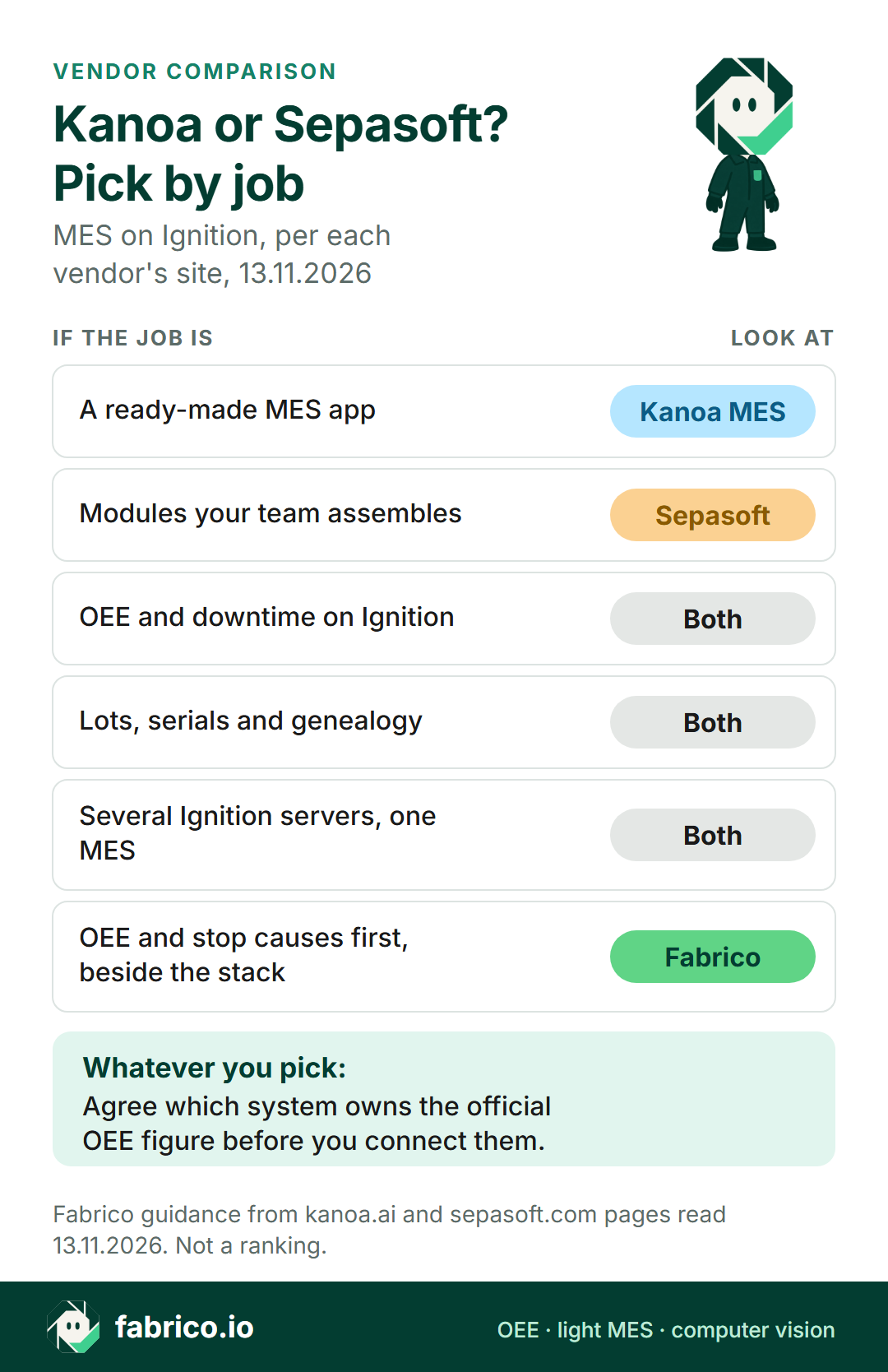
Text version of this infographic
Pick by job card for Kanoa vs Sepasoft on Ignition: a ready-made MES app (Kanoa MES), modules your team assembles (Sepasoft), OEE and downtime, lots, serials and genealogy, and several Ignition servers under one MES (both), and OEE and stop causes first beside the stack (Fabrico).
Where Fabrico fits: next to Ignition or in place of an OEE build
This is our product, so read it as a vendor's claim. Fabrico is cloud OEE software and a light MES that runs outside Ignition; the MES and OEE overview lists what it covers. For the plant above, with five years of Ignition screens, it changes who does the OEE work rather than replacing the HMI.
- Same PLCs, separate path. Fabrico reads cycles, stops and output from the line PLCs, over MQTT, OPC UA, EtherNet/IP, PROFINET, Modbus and the other protocols on the machine connectivity page.
- Machines the gateway cannot see. An older machine gets sensors fitted and wired to a Fabrico IoT device; a manual station can use AI cameras, an add-on, that count output. Pick a moment on the timeline and its video plays as a live stream, with no copy kept in Fabrico by default (camera add-on details).
- No screens to build. OEE by machine, line and shift, with the losses priced, comes in a browser and in the iOS and Android apps. Micro-stops come from the machine signal, and operators tag causes on a phone or tablet.
- Repairs and data out. A technician opens a maintenance work order from a stop. Results flow out through webhooks and a REST API, or as Excel and CSV files; SAP or other ERP links are scoped per customer.
- Limits. The ERP or MES keeps job dispatching, BOMs, routings and genealogy. On the roadmap and not live: stop detection with a suggested likely reason from the camera add-on, plus production planning and scheduling.
An illustration with invented figures: the Ignition team has a backlog of HMI changes, and OEE screens for two packaging lines would join the end of it. Run Fabrico on those two lines and the team's hours stay on the HMI; if the plant later buys Kanoa or Sepasoft, the stop history goes across by API or export. Name one system as the owner of the official OEE number, make a one-line pilot the first step, and use the OEE software guide for what to compare.
Worked example: three signals, and the causes behind them
The numbers below are made up for illustration; they do not come from a customer or a product screen. Picture a packaging line on an eight-hour shift: 480 minutes, minus a 30 minute break, leaves 450 planned minutes. The ideal rate is 40 packs a minute. The line sends three signals: running or stopped, total count and reject count.
Stopped time is 63 minutes, which leaves 387 minutes of running: availability 86.0%. At the ideal rate those 387 minutes could give 15,480 packs. The line counted 13,932, a performance of 90.0%. Rejects took 279 of them, so 13,653 were good and quality comes to 98.0%.
Multiply the three: 86.0% x 90.0% x 98.0% = 75.9%. As a check, 13,653 good packs at 40 a minute is 341.3 minutes, or 75.9% of 450 (OEE calculation). The three signals give those numbers on Kanoa, Sepasoft or Fabrico alike. What they don't give is why. Once operators tag the 63 minutes, they split into changeover 24, film reel change 15, jams 13, and 11 with no cause entered. The morning meeting works from that list, not from the total.
Questions to ask both vendors
- Which job comes first: OEE and downtime, traceability, batch records, or all of them?
- What does phase one include? Kanoa Ops alone, or which Sepasoft modules, and what comes later?
- Who builds the screens and reports, and who maintains them through Ignition upgrades?
- How does an operator enter the reason for a stop, and how is a long event split into two causes?
- Which records live in Ignition's database, and which flow to and from the ERP?
- How does the quote grow from one line to a whole site? Ask every vendor, us included, to quote the same scope.
For the full build or buy question, read light MES vs full MES and the signs you need a full MES. Food and consumer goods plants can start from our computer vision for FMCG manufacturing guide.
What people ask next
Is Kanoa MES the same as Sepasoft?
No. They are two companies that both build MES for Ignition. Kanoa sells one ready-made application with Kanoa Ops at its core. Sepasoft sells individual modules, such as OEE Downtime and Track & Trace, that a team builds into Ignition projects.
Do Kanoa and Sepasoft both need Ignition?
Yes, according to their own sites. Kanoa's documentation calls Kanoa MES Ignition-native and names Microsoft SQL Server as its database. Sepasoft describes its suite as a modular MES made for Ignition, and Sepasoft holds Premier Technology Provider status with Inductive Automation.
Which one tracks OEE and downtime?
Both. Kanoa Ops codes downtime, scrap and speed losses next to OEE. Sepasoft's OEE Downtime module adds detection algorithms for multi-cell lines. Ask both to show the same line.
Can Kanoa or Sepasoft handle traceability and batch records?
For traceability, Kanoa sells the Kanoa Trace add-on for lots, serial numbers and genealogy, and Sepasoft sells the Track & Trace module. For batch work, Sepasoft's Batch Procedure module follows ISA-88 and keeps electronic batch records; ask Kanoa how batch work fits its add-ons.
Who implements Kanoa MES or Sepasoft?
Kanoa lists Associate, Certified and Premier integrator partners. Sepasoft states that configuration, validation and delivery remain with the customer's team and its integrator.
Can Fabrico run next to Kanoa or Sepasoft?
It can, as its own layer outside Ignition. Fabrico takes signals from the PLC, a Fabrico IoT device or its camera add-on, then shares results by REST API, webhooks, or Excel and CSV files. Settle early which system reports the OEE number everyone uses.
Want Fabrico next to an Ignition gateway, on a line that keeps losing time? Book a demo, or ask us how it would connect.
Related articles
Latest from our blog


Real Fabrico tiles, sample data.