Login
Login
 Blog
Blog
CNC Machine Monitoring: What to Track and How to Connect

Key takeaways
- CNC machine monitoring records when a machine tool is in cycle, idle, in setup or in alarm, usually by reading its control, which also gives part counts, spindle load and feed override. Older machines can be covered with external sensors.
- On most modern controls the data is already there. MTConnect, OPC UA and vendor interfaces such as FANUC FOCAS are the usual ways to read it, depending on the control model and installed options.
- The most useful split is in cycle vs not in cycle, and then why the machine was not in cycle: setup, prove out, first article, waiting for an operator, or an alarm.
- In high mix job shops, setups and waiting usually cost more spindle time than breakdowns do.
- Pick one pacing machine, collect four weeks of data, and review the top three non cutting reasons every week.
What is CNC machine monitoring?
CNC machine monitoring is the automatic collection of state and production data from CNC machine tools: mills, lathes, machining centers, grinders and multi axis machines. Instead of relying on a traveler sheet or an end of shift estimate, the monitoring system reads the control directly, or on older machines an external sensor, and records every change with a timestamp.
It is a specialized form of general machine monitoring. The difference is that a CNC control is far more talkative than most production equipment. It knows whether a program is running, which program it is, whether the operator has turned the feed override down, and which alarm stopped the cycle.
That detail matters, because in a machine shop the question is rarely "is the machine on". It is "is the spindle actually cutting, and if not, what is it waiting for".
If the shop needs more than machine status, a light MES adds stop reasons, OEE by shift and production counts on top of the same connection. For several lines or plants, read MES vs machine monitoring.
What to capture from a CNC control
Not every signal is worth collecting. These are the ones that drive decisions:
- Execution state: running a program, ready, stopped, feed hold, interrupted. In MTConnect terms this is the Execution data item (ACTIVE, READY, STOPPED, FEED_HOLD, INTERRUPTED and related values).
- Controller mode: automatic, MDI, manual or edit. A machine in manual or MDI for two hours is almost always in setup or prove out, even if nobody logged it.
- Program name: ties time and counts to a part number, so you can compare actual cycle time with the quoted cycle time.
- Part count: usually from the control's part counter, incremented by the program.
- Spindle speed and load: separates real cutting from air cutting, warm up cycles and dwell.
- Feed and rapid override: an override held at 70% is a hidden speed loss, and often a sign of a worn fixture, chatter or an unproven program.
- Alarms: the alarm number and text, so a stop can be linked to a cause. Our FANUC alarm codes list shows how much a raw alarm number already tells you.
Beyond the CNC shop, the same monitoring logic applies to laser cutting, press brakes, robotic welding cells, roll forming, forging, high pressure die casting, pipe and profile extrusion, blown film extrusion, wire and cable, wire harness assembly and paint and coatings.
How to connect a CNC machine
The right connection depends on the control, its age and the options that were bought with it. In broad terms there are four routes.
1. MTConnect
MTConnect is an open, royalty free standard for reading data from manufacturing equipment, originally developed for machine tools. Some controls support it natively; others need an adapter that translates the control's own interface into MTConnect. Its big advantage is a common vocabulary: "Execution" means the same thing on every machine that implements it. Our MTConnect guide explains how the standard works and what it deliberately does not do.
2. OPC UA
OPC UA is a general industrial communication standard, widely used on PLCs and increasingly available on newer CNC controls, sometimes as a paid option. If a plant already uses OPC UA for other equipment, extending it to machine tools keeps one integration approach across the floor.
For machine tools there is also a dedicated companion specification, OPC UA for Machine Tools (OPC 40501), started by the German machine tool builders' association VDW together with the OPC Foundation and promoted under the umati name.
It defines common machine states, job information and runtimes, so machines from different builders that support it report data in the same structure. The specification is free to download. When you order a new machine, ask the builder whether it supports it.
3. Vendor interfaces
Control makers also offer their own interfaces. FANUC FOCAS is the best known example: a library that lets software read status, counters and alarms from FANUC controls, and write some data back, over Ethernet or FANUC's high speed serial bus (HSSB). Availability depends on the control series and on whether the Ethernet or HSSB hardware and the FOCAS function are enabled, so check the specific machine rather than the brand.
4. External sensors
Older machines, and some controls with no accessible interface, can still be monitored from the outside. A current sensor on the spindle drive or main supply shows when the machine is working, and a stack light sensor shows alarm and ready states.
You lose program names and override data, but you gain a dependable running and stopped timeline for machines that would otherwise be invisible, and with a stack light wired to cycle start it comes close to in cycle. See our guide to monitoring machines without PLC access for the tradeoffs.
Getting CNC machines onto the network
Most connection projects stall on networking, not software. Each control needs a working Ethernet port, a fixed IP address and a route to the data collector, usually on a separate machine network that IT controls.
Interfaces such as FOCAS and MTConnect listen on specific ports that the firewall has to allow. Set every control's clock from one time source, and give each machine one consistent name in the control, the monitoring system and your ERP, or the timelines will not line up.
Worked example: one machining center, one week
A job shop runs a vertical machining center on two shifts, five days a week: 80 scheduled hours. The shop believed the machine was "busy all week" because it was always either running or being set up.
After a week of monitoring from the control, the timeline showed:
- In cycle: 44 hours (55%). Of that, the spindle was under cutting load for about 34 hours. The rest was rapid moves, tool changes and dwell.
- Setup: 14 hours, spread across 9 job changes.
- Waiting for first article sign off: 7.5 hours. The machine sat ready while the first part queued at inspection.
- Program prove out: 5 hours in single block and reduced override.
- Idle with no operator: 6 hours, mostly at shift change and during breaks on the second shift.
- Alarms: 3.5 hours, most of it two tool breakages and one door interlock fault.
Those six categories add up to the full 80 hours. The first surprise was that alarms were the smallest loss. The shop had been planning a spindle rebuild to improve availability, when the data pointed at two cheaper changes instead:
- Moving first article inspection to a gauge at the machine for simple parts, recovering most of the 7.5 hours.
- Staggering breaks on the second shift so the machine is never left without an operator, recovering most of the 6 hours.
Together that is roughly 12 hours a week. Time in cycle would rise from 44 to about 56 hours, from 55% to 70% of the schedule: about 27% more cycle time from the same machine, without buying another machine, as long as there is work queued to fill it. The average feed override of 85% during cycles became the next project.
Watching unattended and lights out running
Many shops run the last hours of the night with nobody at the machine. That is where a single missed stop costs the most: a machine that alarms out at 01:00 and sits until 06:00 loses five hours without anyone knowing.
Set a notification for any stop longer than a few minutes outside staffed hours, send it to whoever is on call, and review the next morning which stops a tool life setting, a bar feeder check or a chip conveyor fix could have prevented.
Using the data to plan operator coverage
Idle time with no operator is often a staffing question, not a machine question. The timeline shows how long each machine runs on its own between interventions, and how often two machines in a cell need the same operator at the same moment.
That is the data you need to decide how many machines one person can tend, and which jobs to pair so that one machine's long cycle covers the load and unload on the next.
CNC monitoring, utilization and OEE
Machine shops often argue about which number to report. The two main options measure different things:
- Utilization is in cycle time divided by scheduled time. It is simple, it suits high mix work where setups are part of the job, and it answers "how much of the time we paid for was the machine working".
- OEE multiplies availability, performance and quality. It exposes speed loss (the override problem) and scrap, which utilization hides.
Most shops benefit from both: utilization for the weekly capacity conversation, OEE for improvement work on repeat parts. Our comparison of machine utilization and OEE covers when to use which, and OEE for CNC machining centers goes deeper on spindle utilization and tooling.
How to choose CNC machine monitoring software
- List your controls first. Make, model, age and options for every machine. Ask the vendor how each one will be connected, not just "do you support FANUC".
- Check the not in cycle reasons. The software should let operators give a reason for a stop in one or two taps at the machine, and it should prompt only when a stop is long enough to matter.
- Check how the part number is known. Actual vs quoted cycle time per part number is where estimating and scheduling improve, whether the part number comes from the control's program name or from the job an operator starts at the machine.
- Ask what happens after a repeated stop. The same stop on the same machine should reach maintenance as work, with the machine history attached, not stay on a chart.
- Keep the data yours. Make sure raw events can be exported or accessed through an API.
Common mistakes
- Counting setup as downtime without saying so. Decide up front whether setup is planned time or loss, and keep the rule the same on every machine, or comparisons become meaningless.
- Trusting "in cycle" as "cutting". A program that spends a large share of its time on rapids, tool changes and warm up is in cycle but not cutting. Spindle load tells the difference.
- Ignoring feed override. Operators slow machines down for good reasons. The data should start a conversation about the reason, not end with a rule that override must stay at 100%.
- Monitoring only the new machines. The old machine without a network port is often the bottleneck. Put a sensor on it.
How Fabrico fits
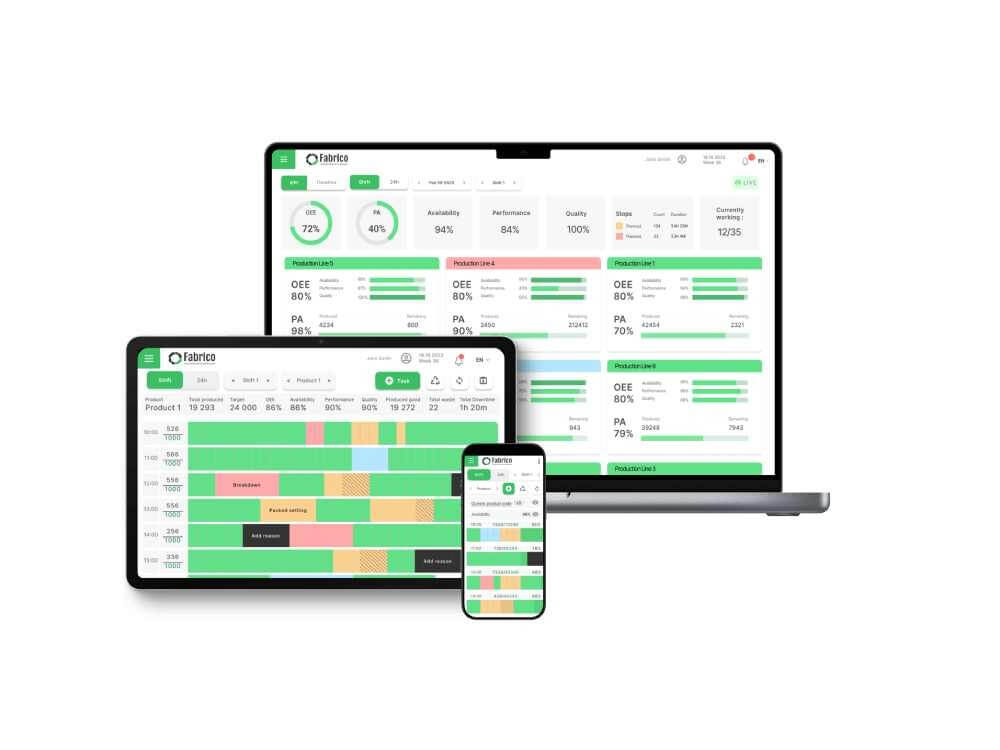
Fabrico collects machine data through PLC connectivity and IoT sensors, adds computer vision cameras where a stop leaves no signal, and turns it into real-time OEE dashboards and short stop detection. Because Fabrico is also a CMMS, when the same stop keeps coming back, the team can open a work order from that machine's record, with its history, parts and past fixes in one place.
Bring your machine list to a demo and we will go through which machines connect through a PLC, which need a sensor and where a camera adds the missing context.
Frequently asked questions
Can I monitor an old CNC machine without a network port?
Yes. A current sensor on the spindle drive or main supply and a sensor on the stack light will give you a dependable running, idle and alarm timeline that comes close to in cycle time. You will not get program names or override values, but you will see where the time goes.
Is MTConnect the same as OPC UA?
No. Both are open standards for reading machine data, but MTConnect was designed around manufacturing equipment and machine tools with a standard vocabulary, while OPC UA is a general industrial communication framework. There is also a companion specification that maps MTConnect information into OPC UA.
What is a good utilization rate for a CNC machine?
It depends heavily on the mix. High volume cells running one part for weeks can sustain much higher in cycle time than a high mix shop changing jobs several times a shift. Measure your own baseline for a month and improve against that, rather than against a published average.
Does CNC monitoring need changes to the part program?
Usually not. Execution state, mode and alarms are read from the control without touching programs. Part counting sometimes needs a counter increment in the program if one is not already there.
How is CNC machine monitoring different from condition monitoring?
CNC monitoring tracks what the machine is doing: cycles, stops, counts and alarms. Condition monitoring tracks the health of components such as spindle bearings, through vibration or temperature. The two complement each other, and our CNC spindle maintenance guide covers the health side.
See how Fabrico unifies OEE and maintenance in one platform.
Request a demoRelated articles