Login
 Blog
OEE for Robotic Welding Cells: Fixture Loading, Waits and Weld Rejects

Key takeaways
- Set the ideal cycle from the robot program time per part, including its share of torch cleaning, so waits at the fixture show as losses.
- A robot waiting for the start button is not a fault, but it can be one of the largest losses in the cell.
- Keep waiting for parts inside planned production time and code it, so the supply problem stays visible.
- Wire changes, unplanned tip changes, faults and recovery are stops with their own reason codes.
- Manual repair welds are rework, not first-time good parts.
The robot in cell 6 finishes side A of the turntable and stops. On side B the fixture is half loaded, because the brackets from the press brake have not arrived. The controller logs the robot as waiting for the start button, which is not an alarm, so the shift report says the cell ran without faults. OEE on a robotic welding cell catches that loss: the robot is fine, and the cell still lost an hour.
This guide is for plant managers, production managers and manufacturing engineers running robot welding cells. It covers how to set the ideal cycle, how to book fixture loading and waiting for parts, torch cleaning, tip and wire changes, faults and recovery, and how to count weld rejects and repairs.
Where the time goes in a welding cell
In a typical two-station cell, an operator loads and clamps parts in the fixture on one side and presses the ready button while the robot welds the other side. The turntable or positioner turns, and the robot starts again. Every set number of cycles the robot goes to the torch cleaning station.
| Source of loss | Typical events | OEE factor |
|---|---|---|
| Fixture loading | Robot waiting for the start button, clamp or part-present sensor fault, part does not fit | Performance or Availability |
| Parts supply | Waiting for parts from laser, press brake or kitting | Availability |
| Torch and consumables | Unplanned tip change, nozzle spatter, wire spool change, gas change | Availability or Performance |
| Faults | Arc start failure, wire stick, collision, touch sense fail, light curtain trip | Availability or Performance |
| Weld quality | Porosity, undercut, lack of fusion, burn-through, missing welds | Quality |

The robot cycle as the ideal
Set the ideal per part number from the robot program time: welding, travel moves and positioner moves for one part. Add the share of torch cleaning, so a cleaning cycle every so many parts is spread over those parts. Torch cleaning planned in the program is then part of the ideal, not a stop.
On a two-station cell, the cell can only run as fast as the slower of the robot and the loading side. If you set the ideal to the loading time, the robot's waits vanish from the numbers. Keep the ideal at the robot cycle, and the waits show as loss that points at the balance of the cell: the fixture design, the parts supply, the work split. Our guide to line balancing covers how to fix the imbalance once you can see it.
Count parts from the robot controller's cycle complete signal or the cell PLC. For a cell that welds two parts per cycle, count parts, not cycles.
Fixture loading and the start button
The robot finishes and waits for the operator to press ready. That wait is a machine state, read from the controller, and it is not a fault. It still costs output. Short waits under your stop threshold land in Performance; long ones land in Availability and need a reason.
Two different problems hide here. The first is design: loading and clamping takes longer than the robot cycle, every time. The second is interruption: the person loading is fetching parts, waiting for a crane or doing a quality check. Code the long waits by reason, such as waiting for parts, waiting for crane, fixture problem or quality check, and the two problems separate.
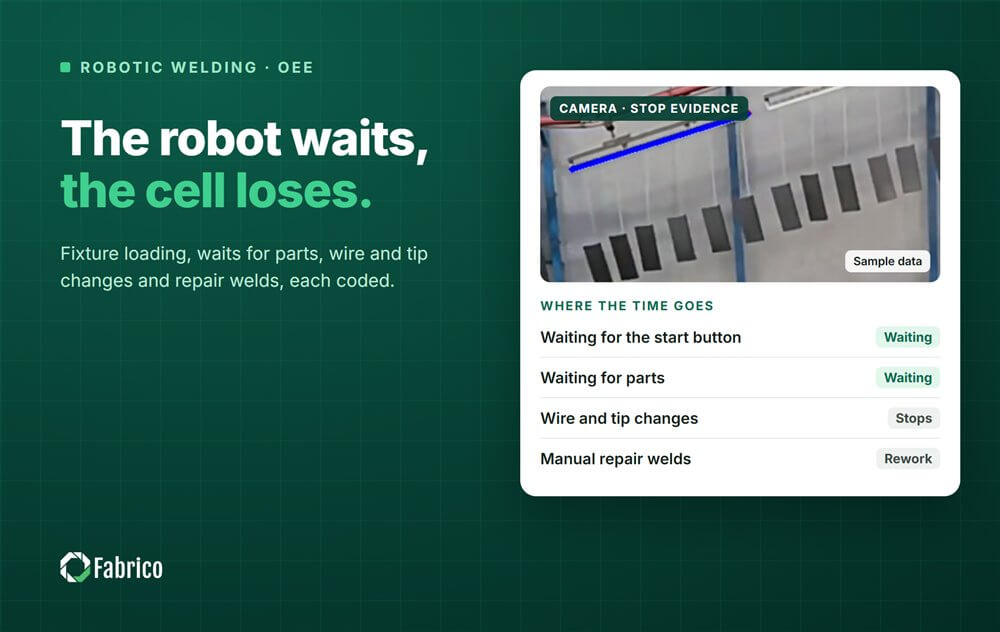
This is a measure of the cell, not of the person loading it. Report by cell, part number and shift, never by operator. Where a camera watches the cell, a clip shows whether the fixture was empty or waiting for a part. It does not time manual work steps, and it should not.
Waiting for parts
A welding cell fed by laser, punching and press brakes is only as busy as its supply. When the parts are not there, the cell is starved. Some plants book that outside planned production time, as if the cell was not scheduled. That makes the cell's OEE look better and hides the supply problem.
Keep it inside, with its own code, starved for parts, and the loss lands where it starts. The cost of a starved welding cell can belong to the upstream machine or the kitting area. Our article on OEE across multiple machines explains how to roll several machines up without double counting their losses.
Torch cleaning, tips and wire
Planned torch cleaning is part of the ideal. Unplanned consumable work is not. A contact tip changed after a burnback, a nozzle cleared of spatter between cleaning cycles, a gas cylinder swapped or a wire feed problem at the liner or the drive rolls is a stop with its own code.
A wire spool or drum change stops the cell, and its length depends on whether the next package is ready at the cell. Nozzle spatter is also a quality signal: poor gas coverage shows up as porosity, so the same root cause can appear in Availability and in Quality.
Faults and recovery
Robot cells stop for arc start failures, wire sticking to the part, collisions that trip the torch's collision sensor, touch sensing that cannot find the joint, and light curtain or door trips. The fault itself is short. The recovery is not: reset, move the robot clear, check the torch, decide whether to restart the program or repair the weld by hand.
Book the fault and the recovery as one stop, from the moment the robot stopped to the moment it welds again. Touch sense failures and collisions can point upstream, at part variation from cutting or bending, or at fixture wear. Our article on unplanned downtime covers how to code these so the root cause shows. Where a camera watches the cell, the clip from just before the fault shows a part out of position, a tangled wire at the feeder or the torch against a clamp. The software suggests a reason and the operator confirms it in one tap.
Weld rejects and repairs
Weld defects include porosity, undercut, lack of fusion, burn-through, missing or misplaced welds, spatter on visible faces and distortion. Some are found at the cell, others at assembly, paint or destructive testing. Bring the late ones back to the cell, the part number and the shift.
A part repaired by hand is rework: it ships, but it was not right first time, so it does not count as good in OEE. Parts cut up for planned destructive testing are a plant rule: count them apart from defects so they do not distort the reject Pareto. Our guide to the OEE Quality factor covers how to count rework.
A worked shift on one cell
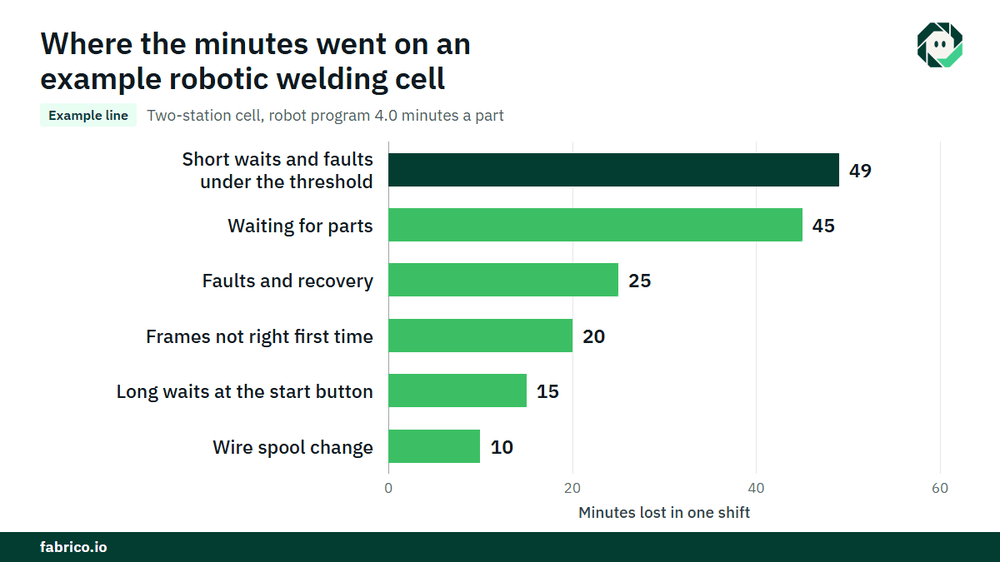
Sample line (illustrative numbers, not a customer): a two-station cell welds one frame with a robot program time of 4.0 minutes a part, torch cleaning share included. Planned production time is 480 minutes.
- Stops: waiting for parts 45 minutes, faults and recovery 25, a wire spool change 10, long waits at the start button 15. That is 95 minutes. Run time is 385. Availability is 385 / 480 = 80.2%.
- The cell made 84 frames, which is 336 minutes at the ideal. Performance is 336 / 385 = 87.3%. The 49 minutes lost are short waits and short faults under the threshold.
- Three frames were rejected and two were repaired by hand, so 79 were good first time. Quality is 79 / 84 = 94.0%.
- OEE is 0.8021 x 0.8727 x 0.9405 = 65.8%. Check: 79 x 4.0 minutes = 316 minutes, and 316 / 480 = 65.8%.
- At a contribution of $8.00 per robot minute, €8.00 in a euro plant, the 164 lost minutes cost $1,312 (€1,312). Waiting for parts cost $360 (€360), the short waits and faults $392 (€392), faults and recovery $200 (€200), the long start button waits $120 (€120), the spool change $80 (€80), and the five frames not right first time 20 minutes, $160 (€160).
Waiting for parts alone cost more than the faults and the spool change together, $360 against $280, and the robot was never at fault. The money becomes cash only if the extra frames sell or save overtime, so agree that rule with your controller.
What each data source sees
| Source | What it tells you | What it misses |
|---|---|---|
| Robot controller | Program running, waiting for start, fault codes, cycle complete | Why the start button was not pressed |
| Welding power source | Arc on time, arc faults | Waits, loading, parts supply |
| Cell PLC | Station ready, light curtain and door state | The cause behind a trip |
| Operator input | Stop reasons, rejects, repairs | Short waits nobody stops to enter |
| Camera on the cell | A clip as evidence of a fault or an empty fixture | Weld quality inside the joint |
Arc-on time is useful, but it is not OEE: it leaves out the ideal cycle, the waits and the rejects. Common mistakes: arc-on time reported as OEE, the ideal set to the loading time, and starved time moved out of planned time.
Where Fabrico fits
Fabrico is a computer vision enabled Manufacturing Performance Platform. In a welding cell it starts with OEE and light MES: automatic downtime logging from the robot and cell signals, OEE live by line and shift, and losses priced in money, so waits, faults, wire changes and rejects sit on one list.
- The operator confirms the reason for a stop in one tap.
- A camera clip as evidence for a stop, where a camera watches the cell.
- Losses ranked by money, so the costliest wait or fault comes first.
- One view across plants if you weld in more than one.
- When a stop is a breakdown, a work order to the right technician with its cost.
Machines connect through a PLC, a Fabrico IoT device or a camera, as described on our machine connectivity page. You start on one cell or one line, with a baseline and a decision date agreed in advance. Each plant gets a quote after a review of its lines.
Frequently asked questions
How do you calculate OEE for a robotic welding cell?
Availability is run time over planned production time. Performance is parts made times the robot program time per part, over run time. Quality is parts good first time over parts made. Multiply the three.
What is the ideal cycle time for a robot welding cell?
The robot program time per part, including its share of planned torch cleaning. Not the loading time, or the robot's waits disappear from the numbers.
Is arc-on time the same as OEE?
No. Arc-on time shows how long the robot welded. OEE also counts how long it should have taken, why the robot waited and how many parts were good first time.
Does waiting for parts count against the welding cell's OEE?
It should, with its own reason code. Moving it out of planned time makes the cell look better and hides the supply problem upstream.
Should torch cleaning count as downtime?
Planned torch cleaning in the program is part of the ideal cycle, so no. Unplanned tip changes, nozzle clearing between cycles and wire feed problems are stops.
See your welding cell losses in a demo
Bring one cell, one part number and your current shift report. We will show where the robot waits and what it costs.
Latest from our blog