Login
 Blog
OEE for Laser Cutting Machines: Sheet Changes, Nesting and Ideal Rate

Key takeaways
- A laser cutter has no single cycle time: use the planned cutting time per program from the nesting software as the ideal.
- Waiting for the outside table to be loaded or unloaded is a real loss, even when the controller only shows idle.
- Nozzle, protective window and head problems split between short stops and long ones, so set one stop threshold.
- Count Quality in planned time when a nest mixes different parts.
- Material utilisation and remnants are a material figure, not OEE Quality.
The fibre laser finishes its nest and the shuttle table swaps. On the outside table, the skeleton from the last sheet is still there, half its parts not yet knocked out, because the operator is still sorting the nest before it. The laser waits. The controller shows idle, not alarm, and a report built on beam-on time will barely notice. OEE on a laser cutting machine counts that wait, prices it and gives it a reason.
This guide is for plant managers, production managers and manufacturing engineers in sheet metal shops. It covers how to set the ideal rate when every program is different, how to book sheet loading and unloading, nesting and program changes, nozzle and lens issues, and how to count Quality on a mixed nest.
Where the time goes on a laser cutter
A sheet is loaded by crane and vacuum lifter, by hand or by an automation tower. The machine pierces and cuts the nest, then the shuttle tables swap. Parts are removed from the skeleton, sorted and deburred, the skeleton and remnants go away, and the next sheet goes on. Around this sit program loading, material and gas changes, nozzle changes and head calibration.
| Source of loss | Typical events | OEE factor |
|---|---|---|
| Loading and unloading | Outside table not ready, crane busy, tower fault, double sheet picked | Availability or Performance |
| Programs and nesting | Waiting for a program, program not released, nest changed | Availability |
| Material and gas | Wrong sheet on the table, thickness change, gas change, gas supply empty | Availability |
| Nozzle and optics | Damaged nozzle, centering, dirty protective window, height sensor calibration | Performance or Availability |
| Head collision | Tipped-up part hits the head, crash recovery, head repair | Availability |
| Cut quality | Dross, burr, part not cut through, dimension out, burned corners | Quality |

The ideal rate for mixed jobs
A press or a filler has one rated speed. A laser cutter does not: every program has its own mix of pierces, contour length, material and thickness. So the ideal is set per program, from the planned cutting time the nesting or CAM software calculates for it.
Add the machine's designed pallet change time to each sheet, so the ideal per sheet is planned cutting time plus the table swap. Then Performance is the sum of planned times for the programs completed, divided by run time. Any time beyond that, from short stops, slow cutting or feed rate overrides, is the Performance loss. Our guide to the ideal cycle time covers the general rules.
Check the estimates. Compare planned and actual times on repeat programs. If the software is consistently off for one material and thickness, correct the estimate for that group, not job by job. If the machine ever cuts faster than its plan, the plan is wrong, not the machine.
Sheet loading and unloading
On a shuttle table machine, loading and unloading happen on the outside table while the machine cuts the inside one. That is external work, as it should be. The loss appears when the cut ends and the outside table is not ready: the machine waits, and nothing has broken.
Give that wait its own reason code, such as waiting for unload or waiting for sheet. If it is shorter than your stop threshold it lands in Performance; if longer, in Availability. Either way it shows, and often it points at the sorting area, the crane or staffing at the machine, not at the laser.
On a single-table machine, loading is internal: the laser stands still while the sheet changes. On an automated cell, tower faults, suction cup problems and double sheets become the loading losses. Where a camera watches the tables, the clip from the wait shows the state of the outside table at that moment. It does not time how long people take to sort parts, and it should not.
Nesting, programs and material changes
A laser shop loses time to paperwork as well as to the machine. The program is not released, the nest was changed after release, the sheet on the table is the wrong grade, or the next job needs a different thickness with a gas change, a new nozzle and new settings.
Code these apart: waiting for program, waiting for material, material change. They are Availability losses, and they belong to engineering, planning and the warehouse as much as to the operator. A shop that only codes machine faults will see a reliable laser with low OEE and no explanation.
Nozzle, lens and head problems
The cutting head causes both short and long stops. Cleaning a nozzle, recentring it or swapping a damaged one takes a few minutes. A dirty or damaged protective window spoils cut quality and has to be changed. The height sensor needs calibration after a nozzle change.
Head collisions are the long ones. A part that tips up after it is cut can catch the head, and recovery or repair stops the machine for much longer. Code collisions separately from routine nozzle work, because the fixes differ: micro-joints, cut sequence and part placement in the nest versus nozzle stock and cleaning routine. Our article on OEE Availability shows how to split long stops by cause.
Quality on a mixed nest
Bad parts on a laser come from dross, burr, parts not cut through, dimensions out, burned corners and parts damaged in a tip-up. Counting them is easy; weighting them is the question. One bad bracket and one bad large panel are not the same loss.
When the nesting software gives planned time per part, count Quality in time: the planned time of good parts over the planned time of all parts cut. If it only gives time per program, use part counts per program as an approximation. Both match the one-line check, good output times ideal time over planned production time.
Material utilisation is a separate figure. The skeleton and the remnants are a nesting and material question, priced as material, not an OEE Quality loss. A nest with poor utilisation can still produce only good parts.
A worked shift on one laser
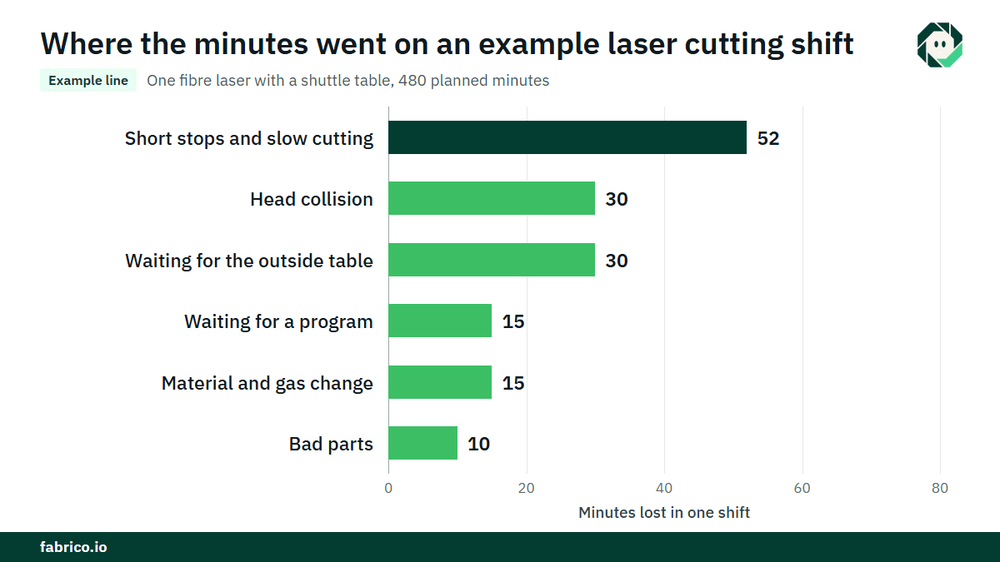
Sample line (illustrative numbers, not a customer): one fibre laser with a shuttle table runs a shift of mixed programs. Planned production time is 480 minutes.
- Stops: a head collision 30 minutes, waiting for a program 15, a material and gas change 15, and waiting for the outside table 30, logged above the threshold. That is 90 minutes. Run time is 390. Availability is 390 / 480 = 81.3%.
- The machine completed 26 sheets with a total planned time of 338 minutes, cutting plus table swaps. Performance is 338 / 390 = 86.7%. The 52 minutes lost are short stops and slow cutting.
- Parts with dross or tip-up damage had a planned time of 10 minutes, so good output is worth 328 planned minutes. Quality is 328 / 338 = 97.0%.
- OEE is 0.8125 x 0.8667 x 0.9704 = 68.3%. Check: 328 / 480 = 68.3%.
- At a contribution of $4.00 per planned cutting minute, €4.00 in a euro plant, the 152 lost minutes cost $608 (€608). Waiting for the outside table cost $120 (€120), as much as the head collision. Short stops and slow cutting cost $208 (€208), the program wait and the material change $60 (€60) each, and the bad parts $40 (€40).
The waiting for the outside table never shows as a fault, yet it cost as much as the crash. That is the case for coding it. The money becomes cash only if the extra capacity sells or saves overtime, so agree that rule with your controller.
What each data source sees
| Source | What it tells you | What it misses |
|---|---|---|
| Controller states | Cutting, idle, alarm, program running | Why the machine is idle |
| Program log | Which program ran, start and end | Waiting between programs and its reason |
| Nesting software | Planned time per program and per part | What actually happened on the machine |
| Operator input | Stop reasons, bad parts | Short waits nobody stops to enter |
| Camera over the tables | A clip as evidence of the table state at a stop | What happens inside the cutting area under the cover |
Beam-on or cutting time is a useful figure, but it is not OEE: it leaves out the planned time each program should take and every reason for waiting. The same trap exists on CNC machines, as our article on going beyond spindle time explains. Common mistakes: one ideal speed for all jobs, idle time left without a reason, material utilisation counted as Quality and planned times nobody checks.
Where Fabrico fits
Fabrico is a computer vision enabled Manufacturing Performance Platform. On a laser cutter it starts with OEE and light MES: automatic downtime logging from the machine signal, OEE live by line and shift, and losses priced in money, so table waits, program waits, nozzle stops and bad parts sit on one list.
- The operator confirms the reason for a stop in one tap.
- A camera clip as evidence for a stop, where a camera watches the shuttle tables.
- Losses ranked by money, so the costliest wait or fault comes first.
- One view across plants if you cut in more than one.
- When a stop is a breakdown, a work order to the right technician with its cost.
You start on one machine or one line, with a baseline and a decision date agreed in advance. Each plant gets a quote after a review of its lines. See how the cameras work with OEE data on our computer vision for OEE page, and how the same method applies across a shop in OEE for metal fabrication.
Frequently asked questions
How do you calculate OEE for a laser cutting machine?
Availability is run time over planned production time. Performance is the planned time of the programs completed over run time. Quality is the planned time of good parts over the planned time of all parts cut. Multiply the three.
What is the ideal cycle time for a laser cutter with mixed jobs?
Use the planned cutting time per program from the nesting software, plus the designed table swap time per sheet. Check it against actual times on repeat programs and correct it by material and thickness.
Is beam-on time the same as OEE?
No. Beam-on time shows how long the laser cut. OEE also asks how long it should have taken, why the machine waited and how many parts were good.
Does sheet loading count as downtime?
On a shuttle machine, loading during cutting is external and costs nothing. The wait when the outside table is not ready is a loss with its own reason code. On a single-table machine, loading time is internal and counts as a loss.
Does material utilisation count in OEE Quality?
No. Skeletons and remnants are a material figure. OEE Quality counts parts that came out bad.
See your laser cutting losses in a demo
Bring one machine, a few programs and your current shift report. We will show where the minutes go and what they cost.
Latest from our blog