Login
 Blog
OEE for Press Brakes: Setups, First Part Approval and Small Batches

Key takeaways
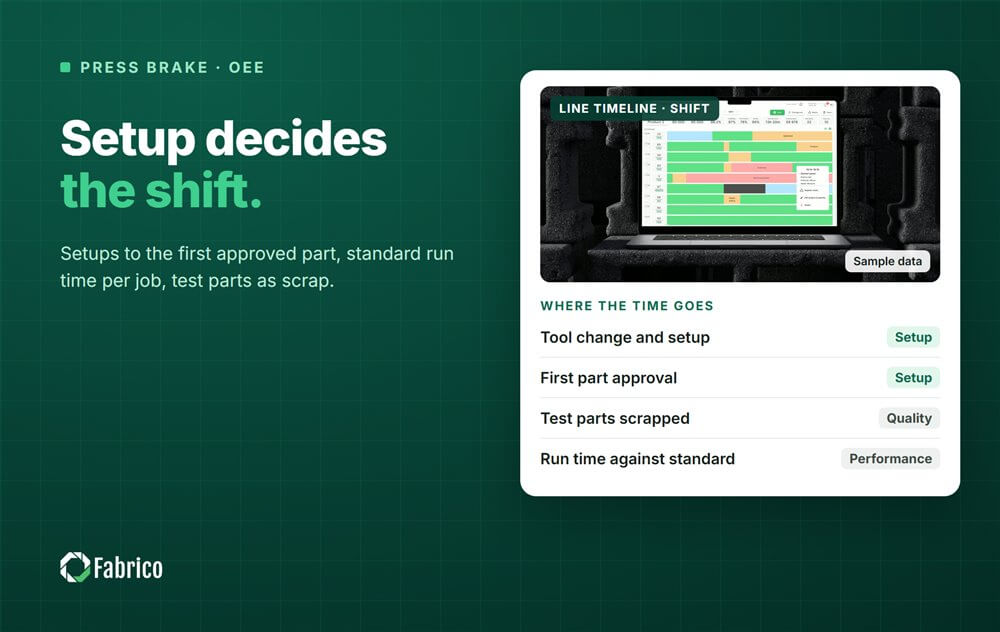
- On a press brake, setup and tool changes can decide the shift, so measure setup from the last good part of one job to the first approved part of the next.
- Measure Performance against a standard run time per part for each job, not a single machine speed.
- First part approval is part of setup; the test parts it scraps are Quality losses.
- Manual handling is part of the standard, and a slow job points at the job, never at a person.
- Price scrapped parts with the laser time and material already in the blank.
Press brake 3 bent eleven jobs on the day shift, four of them under ten parts. Each one needed a new tool layout, a program, a first part bent, measured, corrected and bent again before anyone signed it off. The stroke counter shows the ram moved for a small part of the shift. From that number alone, nobody can say whether the shift went well or badly, and that is the problem OEE on a press brake has to solve.
This guide is for plant managers, production managers and manufacturing engineers in sheet metal and fabrication shops. It covers where the time goes on a press brake, how to book setup and first part approval, how to measure Performance when every job is different, how to treat manual handling, and how to count bending rejects.
Where the time goes on a press brake
A job arrives as a stack of blanks from the laser or the punch. The operator loads the program, sets up the punches and dies along the bed, checks the backgauge, bends a test part, measures the angle and flange lengths, corrects and bends again until the first part is approved. Then the batch runs: pick a blank, place it against the backgauge, bend, turn it, repeat for each bend, stack. Then the next job starts the cycle again.
| Event | OEE factor | Where the data comes from |
|---|---|---|
| Tool change and backgauge setup | Availability (setup) | Controller, job start and approval entries |
| Program load or waiting for a program | Availability | Controller, operator reason |
| Test bends and first part approval | Availability, with test parts in Quality | Operator entry at approval |
| Waiting for blanks or a crane | Availability | Operator reason, camera clip |
| Running slower than the job standard | Performance | Parts made against the standard |
| Wrong angle, flange or bend order, cracks, marks | Quality | Operator or inspection entry |

Setup and tool changes
With small batches, setup can take longer than the bending itself. That makes it the first loss to measure well. The rule that keeps it honest: setup runs from the last good part of the previous job to the first approved part of the next one. Tool change, program load, test bends and approval all sit inside it.
Most of the fixes are familiar. Standard tool layouts for families of parts, so the next job needs fewer tool moves. Tools staged at the machine before the current job ends. Programs prepared offline with the tool layout already in them. Jobs that share a setup run back to back, a plant decision covered in our article on changeover sequence.
Give each job a setup standard, from offline programming or from history for that part family. Then the setup report shows which jobs ran over their standard and why, not only that setups were long.
First part approval
The first part is bent, then the angle and flanges are measured against the drawing. If the angle is off, from springback that changes with the material batch or from a crowning setting, the operator corrects and bends again. Some shops need a quality check before the batch can run.
Book the time as setup, an Availability loss, because the machine is not yet making sellable parts. Book the scrapped test parts as Quality, start-up loss, because they consumed blanks. If the batch waits for an inspector, give that wait its own reason code: it is a staffing or process question, and it often hides inside setup.
Performance when every job differs
A press brake has no single rated speed. One job is a small bracket with two bends, the next is a large panel with eight bends and a flip. So set the ideal per job as a standard run time per part, from the offline programming software, from the planner's standard or from good history for that part. The standard includes the handling a part needs, because no part bends without it.
Performance is then the standard run time of the parts made, divided by run time. A job with 40 parts at a standard of 0.5 minutes has 20 standard minutes, whether it ran fast or slow. If Performance ever reads above the maximum, the standard is too loose, so fix the standard. Our article on OEE in batch manufacturing covers the same logic for other small-lot processes.
Counting parts is easier than it looks. The stroke counter knows how many times the ram moved, and the program knows how many bends a part has, so parts are strokes divided by bends, minus the test bends. Some shops simply have the operator confirm the quantity at job end and use strokes as a check.
Manual handling, measured as a process
Large parts need two people or a crane, heavy parts need bending aids, and long parts need turning. That handling is part of the job, so it belongs in the standard. When a job runs slower than its standard, the question is about the job: the blank size, the crane access, the tool layout, the sequence of bends.
Report OEE by machine, job and shift, never by operator, and never rank people. A camera watching the press brake can keep a clip as evidence when the machine waits, for a crane, for blanks or for a drawing. It does not time manual work steps, and it should not. Our guide to measuring OEE on manual and hybrid lines explains where that line sits.
Quality losses on a press brake
Bending rejects come from wrong angles, wrong flange lengths from a backgauge error, bends in the wrong order or the wrong direction, cracks on a tight radius and tool marks on visible faces. A part that is rebent to correct the angle is rework, not a first-time good part.
Price rejects with what is already in the blank. A bad bend scraps laser time, material and any bending already done on the part, not only the last stroke. That is why a rejected part at the press brake is often worth more than its bending time suggests.
A worked shift on one press brake
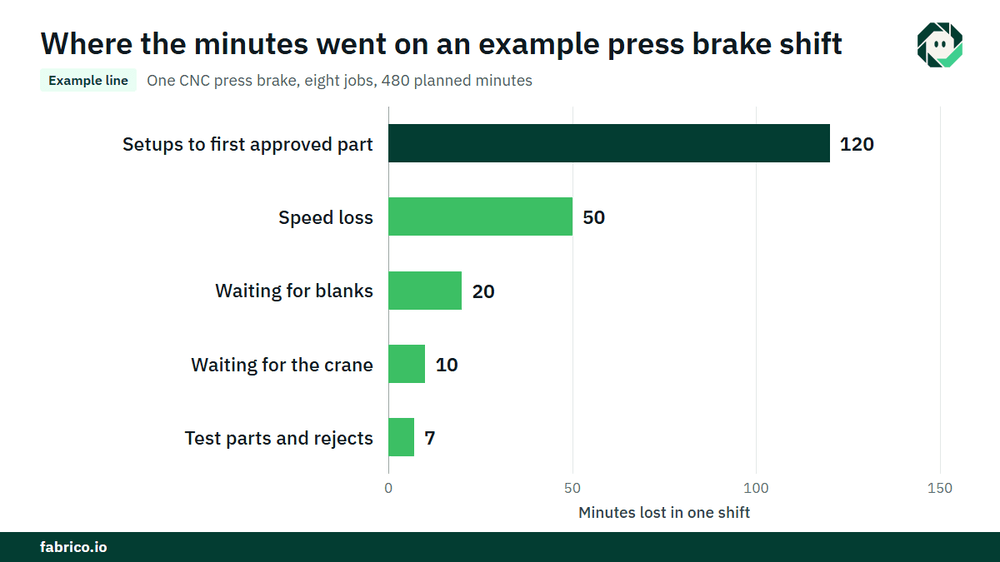
Sample line (illustrative numbers, not a customer): one CNC press brake runs eight jobs in a shift. Planned production time is 480 minutes.
- Setups to first approved part took 120 minutes against a standard of 96, waiting for blanks 20 and waiting for the crane 10. That is 150 minutes. Run time is 330. Availability is 330 / 480 = 68.8%.
- The parts made carry 280 standard minutes. Performance is 280 / 330 = 84.8%.
- Test parts and rejects carry 7 standard minutes, so good output is 273 standard minutes. Quality is 273 / 280 = 97.5%.
- OEE is 0.6875 x 0.8485 x 0.975 = 56.9%. Check: 273 / 480 = 56.9%.
- At a contribution of $2.50 per standard minute, €2.50 in a euro plant, the 207 lost minutes cost $517.50 (€517.50). Setups cost $300 (€300), of which $60 (€60) was time over standard. The 50 minutes of Performance loss cost $125 (€125), waiting for blanks $50 (€50), the crane $25 (€25), and rejects $17.50 (€17.50) plus their laser time and material.
Setup is more than half the lost time here, which is why it is the first loss to measure on a small-batch machine. The money becomes cash only if the freed time sells or saves overtime, so agree that rule with your controller.
What each data source sees
| Source | What it tells you | What it misses |
|---|---|---|
| Controller and stroke counter | Program, strokes, ram moving or idle | Why it is idle, whether parts were good |
| Offline programming | Tool layout, planned bend time per part | What happened on the machine |
| Job data | Quantity, setup and run standards | Waits and their reasons |
| Operator input | Job start, first part approved, reasons, rejects | Short waits nobody stops to enter |
| Camera at the machine | A clip as evidence of a wait for blanks, a crane or a drawing | Bending work and how long people take |
Common mistakes: strokes used as output, no standard per job so OEE means nothing, setup that ends at the first bend instead of the first approved part, operators compared with each other, and scrap priced at bending time only. Keep the reason list short, as our article on operator-friendly reason codes explains.
Where Fabrico fits
Fabrico is a computer vision enabled Manufacturing Performance Platform. On a press brake it starts with OEE and light MES: automatic downtime logging from the machine signal, OEE live by line and shift, and losses priced in money, so setups, waits and rejects sit on one list.
- The operator confirms the reason for a stop in one tap.
- A camera clip as evidence for a stop, where a camera watches the machine.
- Losses ranked by money, so the costliest job family or wait comes first.
- One view across plants if you bend in more than one.
- When a stop is a breakdown, a work order to the right technician with its cost.
You start on one machine or one line, with a baseline and a decision date agreed in advance. Each plant gets a quote after a review of its lines. See how stops get their cause on our downtime tracking page.
Frequently asked questions
How do you calculate OEE for a press brake?
Availability is run time over planned production time, with setup counted as a loss. Performance is the standard run time of the parts made over run time. Quality is good parts over parts made, weighted by standard time when jobs differ.
How do you measure Performance on a press brake with small batches?
Give each job a standard run time per part and compare the standard minutes of the parts made with the run time. That works for a batch of five as well as a batch of five hundred.
Does first part approval count as setup time?
Yes. Setup runs until the first approved part, so test bends and measuring are inside it. The scrapped test parts are a Quality loss.
Can you count press brake parts from the stroke counter?
Yes, as strokes divided by bends per part, minus test bends. Some shops have the operator confirm the quantity at job end and use the strokes as a check.
Should OEE compare press brake operators?
No. Report by machine, job and shift. A slow job points at the job, its tooling or its handling, and ranking people only stops them reporting stops.
See your press brake losses in a demo
Bring one press brake, a day of jobs and your current setup records. We will show where the minutes go and what they cost.
Latest from our blog