


 Login
 Blog
AWS IoT SiteWise vs IoT Core: Asset Models or Device Messaging

In short: AWS IoT SiteWise vs IoT Core is a question of layers, not a choice between rivals: IoT Core connects devices and moves their messages, while SiteWise organises industrial data into asset models and computes metrics from it. Many plant designs use both, with an IoT Core rule handing MQTT data to a SiteWise asset property.
- In: SiteWise takes OPC UA through its edge gateway, IoT Core rules and its API; IoT Core takes MQTT, MQTT over WSS, HTTPS and LoRaWAN.
- Structure: SiteWise has asset models with attributes, measurements, transforms and metrics; IoT Core has topics, things and Device Shadows.
- Metrics: AWS publishes a SiteWise tutorial that builds availability, performance, quality and OEE as metrics.
- Watch the ideal rate: held as one attribute per asset, it makes performance read wrong as soon as the product changes.
Both carry the AWS IoT name and share plant architecture diagrams, so they get compared as if they did one job. The real question is where PLC data lands first, and which service can hold a line and its OEE.
Fabrico's own product, OEE and light MES software, works on top of layers like these; it resells neither AWS service. Service facts below come from aws.amazon.com and docs.aws.amazon.com, as of 14.11.2026.
Key takeaways
- These are layers, not rivals: IoT Core moves device messages, SiteWise models assets and computes metrics, and an IoT Core rule can feed SiteWise.
- SiteWise has other ways in as well: OPC UA through its edge gateway, its own API and bulk imports from Amazon S3.
- AWS's OEE tutorial builds availability, performance, quality and OEE as SiteWise metrics, and warns that a plant's formulas might differ.
- In the sample stick-pack shift below, one static ideal rate invents a speed loss of EUR 518.40 a shift that the line never had.
- The rate per product, the shift calendar and the reason behind a stop each need an owner, in the asset model or in an OEE application.
AWS IoT SiteWise vs IoT Core at a glance
| Job | AWS IoT SiteWise | AWS IoT Core |
|---|---|---|
| How AWS puts it | Collect, store, organize and monitor industrial equipment data | Connect IoT devices to other devices and AWS cloud services |
| What comes in | OPC UA via a SiteWise Edge gateway, IoT Core rules, the SiteWise API, bulk import from S3 | MQTT, MQTT over WSS, HTTPS, LoRaWAN |
| How data is held | Asset models with attributes, measurements, transforms, metrics and hierarchies | MQTT topics, thing objects and Device Shadows |
| Computed values | Transforms per data point, metrics per time interval | Rule SQL that filters and transforms messages |
| Hand-off | Queries, alarms, SiteWise Monitor web apps | Rule actions to DynamoDB, S3, Lambda, Kinesis, SiteWise and more |
| Near the machines | SiteWise Edge gateway on AWS IoT Greengrass V2 | Greengrass devices that communicate with IoT Core |
AWS IoT SiteWise, as AWS documents it
The AWS IoT SiteWise page calls it a managed service to collect, store, organize and monitor data, and says asset models organise data at the enterprise, site, area and machine level. As of 14.11.2026:
- Ingestion. What is AWS IoT SiteWise? lists OPC UA read on site by the SiteWise Edge gateway, bulk operations from Amazon S3, MQTT routed by AWS IoT Core rules, and the SiteWise API.
- Asset models. Declarative structures that standardise asset formats, with hierarchies so an asset can read data from its child assets.
- Property types. Define data properties names attributes (generally static), measurements (raw streams), transforms and metrics (aggregated over a time interval).
- Metric windows. The metrics chapter offers fixed windows from 1 minute to 1 week, or a custom interval, with an optional offset and time zone.
- Edge. Per the gateway requirements, SiteWise Edge gateways run on AWS IoT Greengrass V2 as components for collection, processing and publishing on premises; the V3 gateway page lists real-time and S3-buffered destinations.
- Viewing. SiteWise Monitor builds web apps; the features page adds CloudWatch alarms.
AWS IoT Core, as AWS documents it
On the AWS IoT Core page, the pitch is to connect devices to the cloud easily and securely, with a fully managed MQTT message broker. As of 14.11.2026:
- Protocols. What is AWS IoT? lists MQTT, MQTT over WSS, HTTPS and LoRaWAN.
- Rules. Rules for AWS IoT run against the MQTT topic stream; their tasks include DynamoDB, S3, Lambda, Kinesis, CloudWatch, and sending message data to a SiteWise asset property.
- Device state. The Device Shadow service keeps desired and reported state in a JSON document, readable while the device is offline.
- Edge. Devices running AWS IoT Greengrass, the AWS edge software, can talk securely to IoT Core and export data to the AWS Cloud.
AWS IoT SiteWise vs IoT Core, job by job
What each ingests. IoT Core takes devices and gateways that speak its protocols, mostly MQTT, which the OASIS MQTT 5.0 standard defines as a client server publish/subscribe transport. SiteWise can also reach into the plant through its edge gateway reading OPC UA, a platform-independent standard per the OPC Foundation specification.
Asset modelling. The clearest split. In SiteWise, a filler, a line and a site become assets, and a hierarchy rolls metrics up. IoT Core organises by topic and thing; mapping topics to machines is your naming choice (see OPC UA vs MQTT).
Computed metrics. The AWS tutorial Calculate OEE in AWS IoT SiteWise models a generic packaging machine from a state code, a good count and a bad count. Transforms turn codes into idle, fault, planned stop and running flags; metrics sum state time and counts per interval and define availability, quality, performance and OEE. AWS notes your formulas might differ. In IoT Core, rule SQL reshapes a message in transit and hands it to another service.
Edge. The SiteWise Edge gateway is a set of Greengrass V2 components; its OPC UA source settings offer the server or the device timestamp per data point. Greengrass itself is the runtime under SiteWise Edge, not a third rival.
How the two meet. Per Ingest data using AWS IoT Core rules, the SiteWise rule action forwards message data to the BatchPutAssetPropertyValue API. The rule action settings target a property by IDs or by alias, with the equipment's timestamp or one from IoT Core.
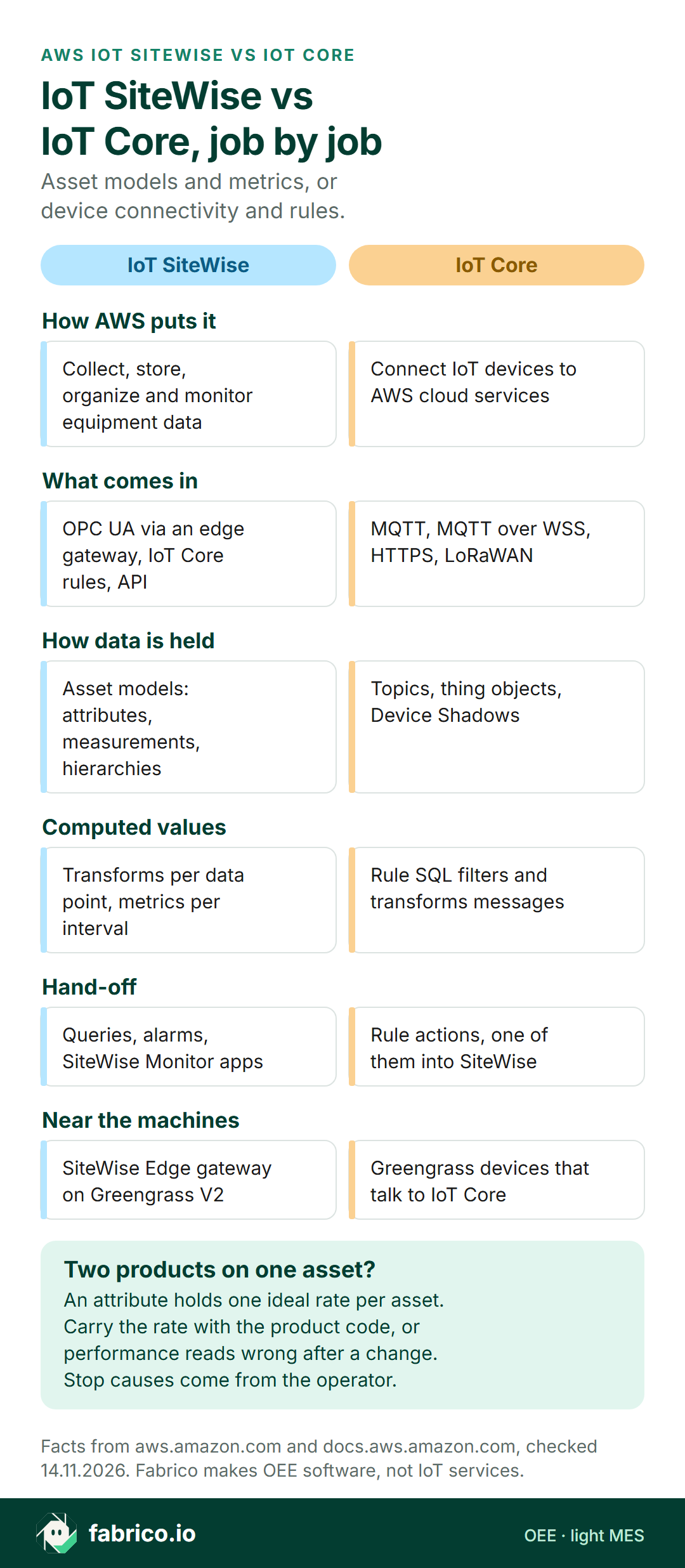
Text version of this infographic
- How AWS puts it. IoT SiteWise: collect, store, organize and monitor equipment data. IoT Core: connect IoT devices to AWS cloud services.
- What comes in. IoT SiteWise: OPC UA via an edge gateway, IoT Core rules, API. IoT Core: MQTT, MQTT over WSS, HTTPS, LoRaWAN.
- How data is held. IoT SiteWise: asset models with attributes, measurements, hierarchies. IoT Core: topics, thing objects, Device Shadows.
- Computed values. IoT SiteWise: transforms per data point, metrics per interval. IoT Core: rule SQL filters and transforms messages.
- Hand-off. IoT SiteWise: queries, alarms, SiteWise Monitor apps. IoT Core: rule actions, one of them into SiteWise.
- Near the machines. IoT SiteWise: SiteWise Edge gateway on Greengrass V2. IoT Core: Greengrass devices that talk to IoT Core.
- Two products on one asset? An attribute holds one ideal rate per asset. Carry the rate with the product code, or performance reads wrong after a change. Stop causes come from the operator.
Match the first job: which service to read first
Getting messages off devices points to IoT Core; modelling machines and computing metrics points to SiteWise; for both, plan them together around the rule action.
| First job | Read first |
|---|---|
| PLCs behind an OPC UA server, data needed in AWS | SiteWise Edge gateway and OPC UA sources |
| Sensors or gateways that publish MQTT | IoT Core broker, policies and rules |
| A site, line and machine tree with roll-up metrics | SiteWise asset models and hierarchies |
| Device state while a device is offline | IoT Core Device Shadows |
| MQTT data that should land on a machine asset | IoT Core rule with the SiteWise action |
| OEE by shift, stop causes, the cost of losses | An OEE application or light MES above both |
Decision matrix: AWS IoT SiteWise or IoT Core for your plant
Because the two services are often used together, several rows below end at both. Use the matrix to decide where the first sprint goes. Each row links the AWS page behind it (accessed 14.11.2026) and a pilot check that shows whether the row holds for the plant's own machines.
| If this is you | Look first at | Why (vendor page) | Prove it in the pilot by |
|---|---|---|---|
| PLCs sit behind an OPC UA server and the data is needed in AWS | AWS IoT SiteWise | What is AWS IoT SiteWise? lists OPC UA read on site by the SiteWise Edge gateway | Connecting one OPC UA server and comparing ten tag values with the HMI |
| Sensors or gateways already publish MQTT | AWS IoT Core | What is AWS IoT? says the broker serves clients using MQTT and MQTT over WSS | Publishing one line's state and count topics and checking every message lands |
| Management wants a site, line and machine tree with roll-ups | AWS IoT SiteWise | The SiteWise page organises data at enterprise, site, area and machine level | Modelling two lines and checking that the site figure equals their sum |
| Apps need a device's last state while it is offline | AWS IoT Core | The Device Shadow service keeps state available whether or not the device is connected | Unplugging one gateway and reading its shadow from an app |
| MQTT data has to land on a machine asset | Both, joined by a rule | Ingest data using AWS IoT Core rules forwards message data to BatchPutAssetPropertyValue | Sending a full day of counts through the rule and matching totals |
| The team wants AWS's OEE pattern as a starting point | AWS IoT SiteWise | The Calculate OEE tutorial defines availability, quality, performance and OEE as metrics | Recomputing one shift by hand and comparing it with the metric |
| Shift OEE must start at the real shift start | AWS IoT SiteWise | The metrics chapter offers a custom interval with an offset and a time zone | Setting a 06:00 offset and checking the first window's boundaries |
| Every value must carry the machine's own time | Both | OPC UA sources take the server or device timestamp; the rule action takes the equipment's or IoT Core's | Stopping a machine at a noted second and comparing the stored time |
Where OEE and stop causes fit
Either service can carry the numbers OEE is built from. Three inputs need more care than the machine signal: planned time, the ideal rate for the product running, and why a stop happened.
| OEE input | Usual origin | Where it can sit on AWS |
|---|---|---|
| Running or stopped | PLC bit or sensor | A SiteWise measurement, via the edge gateway or an IoT Core rule |
| Good and reject count | Counter, check-weigher reject signal | Measurements summed by a SiteWise metric |
| Ideal rate | Rated speed per product or format | A SiteWise attribute, or a stream that changes with the product code |
| Planned time | Shift pattern and breaks | A metric window aligned to the shift, or the OEE application |
| Stop cause | Operator choice from a cause list | Recorded beside the machine, matched to the stop by time |
The tutorial's state codes tell idle from fault from planned stop. Why the fault happened, a dosing jam or a film splice, comes from people at the line, and it drives the next action. For background on the arithmetic, see our OEE calculation guide and the performance guide; for long-term history, the data historian guide.
Where Fabrico fits for a SiteWise or IoT Core team
Fabrico is not an IoT platform: it sells no SCADA, HMI, connectivity layer, MQTT broker or cloud IoT service. Its product is an OEE application in the cloud, with light MES on top. A PLC, sensor or counter signal supplies stops and counts, and stop reasons come from operators, chosen on a phone or tablet at the machine. OEE, downtime and lost output in money are shown by line and by shift in web, iOS and Android apps (product overview).
Our machine connectivity page names OPC UA, Modbus and MQTT among its protocols. Outbound, stop causes can return to an AWS data platform through the REST API or webhooks, or as CSV and Excel files; prove that route in a pilot.
Where a manual step gives no machine signal, the camera add-on counts output; a camera-suggested stop reason is on the Roadmap, and video is streamed on request, not stored (computer vision add-on, FMCG computer vision hub). Inspection stays with dedicated systems.
For a demo, a shift of sample counts with product codes is enough to show where the rate per product and the operator's reason sit.
Worked example: one ideal rate on the asset, two products on the line
Sample data, invented spice plant, no customer. A six-lane stick-pack machine fills ground pepper in 2 g sticks and sea salt in 8 g sticks. Planned production time is 432 minutes: an 8-hour shift less 48 minutes of breaks. Rated speed is 300 sticks a minute on pepper and 180 on salt, since the heavier dose fills slower.
The asset follows the tutorial pattern: state code, good count and bad count as measurements, and the ideal rate as an attribute set to the pepper rate, 300 a minute, at creation. Per the metrics chapter, a formula that uses an attribute takes its latest value when it computes. Data arrives through an IoT Core rule, stamped with PLC time.
Pepper runs 200 minutes, a 30 minute changeover follows (clean-down, film reel, dosing auger), then salt runs 160 minutes. Other stops add 42 minutes: a dosing jam of 17, a film splice of 14 and 11 waiting for salt. Stopped time is 72 minutes, so run time is 360.
| Sample data | Pepper, 2 g | Salt, 8 g |
|---|---|---|
| Run time | 200 min | 160 min |
| Ideal rate | 300 a min | 180 a min |
| Ideal output in run time | 60,000 | 28,800 |
| Sticks counted | 54,000 | 25,920 |
With the rate following the product. Availability is 360 / 432 = 83.3%. Ideal output is 60,000 + 28,800 = 88,800 sticks, against 79,920 counted: performance 90.0%. The check-weigher rejects 1,600, which leaves 78,320 good: quality 98.0%. OEE is 83.3% x 90.0% x 98.0% = 73.5%.
With one static rate of 300 a minute. The tutorial's performance formula divides the count rate by the ideal rate: 79,920 sticks in 21,600 running seconds is 3.7 a second against an ideal 5, so performance reads 74.0% and OEE 60.4%. Salt ran at 90% of its rated speed yet is judged as slow pepper.
With the attribute edited at the changeover. Someone sets it to 180 when salt starts. By the documented formula behaviour, a shift-long metric window would then use 180 for all 360 minutes: ideal output 64,800, performance 123.3%, OEE 100.7%. The transforms chapter adds that new attribute values do not launch transform updates, and the attribute update page wants the current timestamp on an update.
The fix. Let the rate follow the product. The PLC publishes the active product or recipe code as a measurement and a transform maps it to a rate, or the PLC sends the loaded recipe's rated speed directly. Compute ideal output in one-minute windows as running seconds times the rate in force, then sum over the shift; the temporal functions page defines latest() as the last value before the interval ends, so the changeover minute is the most that gets the wrong rate. Whichever layer computes OEE has to hold the rate per product (see ideal cycle time and changeover time).
Carried to money. Give pepper sticks a sample contribution margin of EUR 0.03 and salt sticks EUR 0.05 (both sample data, made up for this page; real margins come from the spice plant's costing). At rated speed both products earn EUR 9.00 a minute: 300 x EUR 0.03 and 180 x EUR 0.05. The 1,600 rejects split 1,000 pepper and 600 salt in this sample.
| Loss, rate following product, sample data | Basis | Shift, EUR | Month, EUR (42 shifts) | Year, EUR (500 shifts) |
|---|---|---|---|---|
| Stops and changeover | 72 min x EUR 9.00 | 648.00 | 27,216.00 | 324,000.00 |
| Slow running | 6,000 pepper + 2,880 salt | 324.00 | 13,608.00 | 162,000.00 |
| Rejects | 1,000 pepper + 600 salt | 60.00 | 2,520.00 | 30,000.00 |
| Total | Sum of the three | 1,032.00 | 43,344.00 | 516,000.00 |
The month assumes two shifts on 21 production days; the year, 250 days. With the static rate of 300 a minute, the model expects 108,000 sticks in 360 running minutes and reports 28,080 missing to speed (108,000 minus 79,920), EUR 842.40 at the pepper margin. The real speed loss is EUR 324.00, so the dashboard invents EUR 518.40 a shift, about EUR 259,200 a year, of slow running that could send a CI team after the salt runs for nothing.
Asset model failure modes that bend OEE
Static rates are the most common trap, but not the only one. Each row below names a modelling choice, what it does to shift OEE and the AWS page that explains the behaviour (accessed 14.11.2026).
| Modelling choice | What shift OEE does | AWS page |
|---|---|---|
| One ideal rate attribute for several products | Slower products read as slow running | The OEE tutorial divides the count rate by one Ideal_Run_Rate |
| Rate attribute edited at a changeover | The whole metric window takes the new rate | The metrics chapter: a formula uses the latest attribute value |
| Expecting transforms to follow an attribute edit | Derived flags keep the old value until new data arrives | The transforms chapter: new attribute values don't launch transform updates |
| Metric window not aligned to the shift | One OEE figure mixes two crews | The metrics chapter: interval, offset and time zone |
| Arrival time used instead of equipment time | Delayed data lands in the wrong window | The rule action settings and OPC UA source settings both offer the device's timestamp |
On timestamps, the DataValue section of OPC UA Part 4 says the sourceTimestamp reflects the time the data source gave a value. That is the moment a stop should be filed under, so prefer it wherever the OPC UA server supplies it. A SiteWise Edge gateway also sits on the plant network beside controllers. NIST's guide to OT security, SP 800-82 Rev. 3, published in September 2023, describes typical OT topologies, threats and countermeasures; put the gateway through that review.
Questions to ask AWS and your integrator
Send a line list, a product list and a day of sample data to whoever designs the AWS side, then ask:
- Which controllers reach SiteWise through the edge gateway, and which go through IoT Core as MQTT?
- Where is the ideal rate per product stored, and what changes it at a changeover?
- Which metric window matches our shifts, including the offset and time zone, and how are breaks kept out of planned time?
- Which timestamp does each data point carry, the device time or the time IoT Core or the gateway saw it?
- How does a stop cause entered at the line join the stop in SiteWise, and who maintains the list of causes?
For the application layer, see our OEE software guide; for edge or cloud processing, edge vs cloud shop floor data; on OPC UA as a source, OPC UA for OEE.
What to do this week
- List the products on one line with the rated speed of each, and mark which ones share a machine.
- Find where the ideal rate lives today: an asset attribute, a PLC recipe value or a spreadsheet. If it is one attribute per asset, flag it before any OEE metric goes live.
- Write down the shift calendar with start times and breaks, and check that each metric window's offset and time zone match it.
- Value one rated minute: rated units a minute multiplied by each unit's margin from the plant's costing, as in the stick-pack table.
- Decide the route in for each controller, SiteWise Edge over OPC UA or MQTT through IoT Core, using the matrix rows.
- Name an owner for the stop cause list and decide where operators will record causes, before the first dashboard is shown.
What people ask next
Is AWS IoT SiteWise built on AWS IoT Core?
They are separate services that work together. AWS documents an IoT Core rule action that sends MQTT message data to a SiteWise asset property, and SiteWise can also ingest through its own edge gateway, its API and bulk imports from Amazon S3.
Do I need AWS IoT Core to use SiteWise?
Not for every route in. AWS lists OPC UA through a SiteWise Edge gateway, the SiteWise API and bulk operations from S3 beside IoT Core rules.
Can AWS IoT SiteWise calculate OEE?
AWS publishes a tutorial that defines availability, quality, performance and OEE as SiteWise metrics from an equipment state code and good and bad counts, and notes that your own formulas might differ. Planned time, a rate for each product and the reason behind a stop still need a home, in the model or in an OEE application.
Why does performance look wrong after a product change?
If the ideal rate is one attribute per asset, every product is measured against the same speed. A slower product looks slow, and an attribute edited at the changeover is applied to the whole metric window. Carrying the rate with the product code fixes it.
How does Fabrico relate to AWS IoT SiteWise and IoT Core?
Fabrico is OEE and light MES software above layers like these, and it sells no IoT service. Machine signals give stops and counts, operators pick stop reasons beside the machine, the camera add-on is a counter for steps without a signal, and results can go back to AWS by REST API or webhook.
Want to see performance follow the product code after a changeover? Book a demo.
Related articles

Latest from our blog





Real Fabrico tiles, sample data.