


 Login
 Blog
HighByte vs Kepware: Data Modelling or Device Connectivity?

In short: HighByte vs Kepware compares two layers of the same data path. Kepware, now part of Velotic, is a set of connectivity products: Kepware Server talks to PLCs and devices through 150+ drivers and serves the data in open protocols, OPC UA and MQTT among them. HighByte Intelligence Hub is industrial DataOps software: it reads devices and systems, gives the data structure and context in reusable models, and sends it on through pipelines.
- Kepware's job is device connectivity: drivers in, normalised data out, on Windows or in a Linux container.
- HighByte's job is shaping data: models, instances, pipelines and an embedded MQTT broker, from the edge to the cloud.
- They meet at OPC UA: Kepware Server converts device protocols into it, and HighByte's OPC UA connection connects to an OPC UA server.
- OEE needs context above both: the shift plan, ideal speeds per product and the reason an operator gives for a stoppage, held by an OEE or light MES application.
A data architecture lead has forty machines in three halls, a cloud data lake request from head office, and a plant manager who wants OEE by line. Both products promise to connect industrial data, but at different heights. Kepware answers "how do we talk to this controller?" HighByte answers "what should this value be called, what belongs next to it, and where should it go?"
We make OEE software and a light MES, the application that would sit above either product, and we sell neither. HighByte facts come from highbyte.com and HighByte's user guide; Kepware facts come from velotic.com, where the Kepware product pages now sit. All are as of 13.11.2026.
HighByte vs Kepware at a glance
Each cell paraphrases the vendor page linked in the sections below, read on 13.11.2026.
| Job | HighByte Intelligence Hub | Kepware |
|---|---|---|
| What it is | Industrial DataOps software for modelling, orchestration and governance | Connectivity products that link OT devices to software |
| Device side | Connections for OPC UA, Modbus TCP, MQTT and Sparkplug | Kepware Server with 150+ drivers |
| Data shape | Models and instances that add names and context | Device protocols turned into OPC UA and MQTT |
| Moving data | Pipelines from sources to targets, with transforms | To MES, SCADA, AWS, Azure, ODBC databases |
| Where it runs | Edge, on premises or cloud; embedded to server hardware | Windows (Kepware Server) or a Linux container (Kepware Edge) |
| Many sites | Embedded MQTT broker and the parts for a Unified Namespace | Kepware+ Manager, a SaaS control plane |
| Production counts | Guide's line model example: scrap, good count, bad count | Device data for MES and SCADA applications |
What HighByte Intelligence Hub does, per HighByte
HighByte, of Portland, Maine, calls the product edge-native, no-code DataOps software that curates, models and delivers AI-ready data, on HighByte's homepage. As of 13.11.2026:
- Connections. The HighByte connections page names OPC UA, Modbus TCP, MQTT and Sparkplug for device data, SQL databases and historians such as the PI System, CSV and other files, and direct API integrations with AWS, Microsoft Fabric and Google Cloud.
- Models. HighByte's user guide says models provide a standard definition for an asset, process, product or system. A model is a set of attributes, each with a name and a data type, and the guide says models abstract away the specifics of the data source.
- Instances. If the model is the definition, the instance is the real thing. The guide's instances page gives the example of a quality manager's line model with scrap, good count and bad count: ten lines, ten instances. An attribute can point straight at a source, for example an OPC UA tag, or run a JavaScript expression that scales or combines inputs.
- Pipelines. The guide calls pipelines the core engine for moving and transforming data. Triggers inject events, and stages read, write or transform each event on its way from source to target.
- Broker and where it runs. The Intelligence Hub product page describes an MQTT broker built by HighByte, compliant with MQTT v3.1.1 and v5, and platform-agnostic software that runs on premises at the edge and scales from embedded to server-grade computers. The same page says it can also be deployed in on-premises data centers or in the cloud. The homepage lists the parts to build a Unified Namespace (UNS).
Worth listing early: which of your sources need an OPC UA server or gateway in front of HighByte.
What Kepware does, per Velotic
Kepware's pages now live on velotic.com. Velotic's Kepware page says the product remains open and interoperable for connecting OT and IT, and is now part of Velotic. Its FAQ describes Kepware as connectivity solutions that connect disparate legacy OT devices. Older installs say KEPServerEX; the current pages say Kepware Server. As of 13.11.2026:
- Kepware Server. The Velotic page for Kepware Server describes turning proprietary data from industrial devices into normalised data that applications can use, through 150+ drivers and customisable interfaces. It converts proprietary protocols into open standards like OPC UA and MQTT, and its product card reads: industrial connectivity for Windows.
- Where the data goes. Destinations named on that page are MES, SCADA, AWS and Azure applications, plus ODBC-compliant databases for compliance, analytics and AI or ML work. It also mentions tag linking and database logging.
- Kepware Edge and fleets. Kepware Edge ships as a Linux container; the Kepware Edge page lists drivers including Siemens S7, ControlLogix and Modbus Ethernet. Remote management of the whole fleet runs through Kepware+ Manager, delivered as SaaS.
Worth listing early: which driver each controller needs, and whether Kepware Server or Kepware Edge carries it.
HighByte vs Kepware, job by job
Talking to the controller. Kepware's pages centre on this job: 150+ drivers, one place where device protocols become OPC UA or MQTT. Devices that already speak OPC UA, Modbus TCP or Sparkplug can feed HighByte directly. For an older controller's own protocol, check both lists, machine by machine.
Giving data a shape. This is where HighByte puts its weight. A raw tag such as a filler's count register becomes an attribute on a line model, next to the product, the shift and the scrap, with one structure across lines. One reference for such a hierarchy is the ISA-95 standard, also published as IEC 62264, which includes in Part 1 a discussion of how the physical assets of a manufacturing enterprise are organised. Kepware's pages speak of normalised device data and tag linking, which is a different job from modelling the line. Our ISA-95 guide covers the levels.
Moving data on. Both send data to other systems, as the table shows. The difference is what travels: device values from Kepware, modelled payloads from HighByte. For the protocol side, see our OPC UA vs MQTT guide.
Where it runs. Both run close to the machines, with central management on offer. Ask how a change reaches twenty sites. The trade-offs are in our edge vs cloud shop floor data guide.
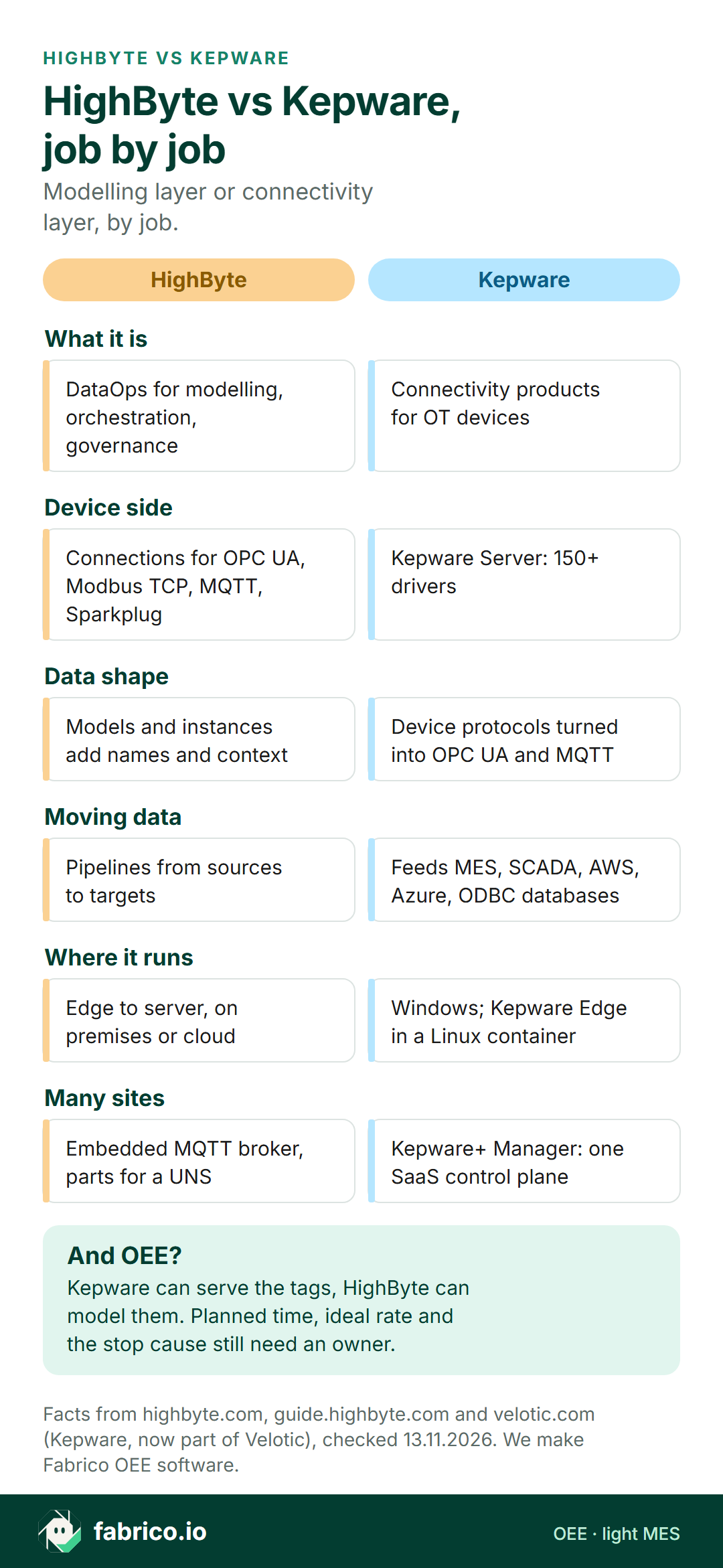
Text version of this infographic
- What it is. HighByte: DataOps for modelling, orchestration, governance. Kepware: Connectivity products for OT devices.
- Device side. HighByte: Connections for OPC UA, Modbus TCP, MQTT, Sparkplug. Kepware: Kepware Server: 150+ drivers.
- Data shape. HighByte: Models and instances add names and context. Kepware: Device protocols turned into OPC UA and MQTT.
- Moving data. HighByte: Pipelines from sources to targets. Kepware: Feeds MES, SCADA, AWS, Azure, ODBC databases.
- Where it runs. HighByte: Edge to server, on premises or cloud. Kepware: Windows; Kepware Edge in a Linux container.
- Many sites. HighByte: Embedded MQTT broker, parts for a UNS. Kepware: Kepware+ Manager: one SaaS control plane.
Kepware under HighByte: how the two stack
Because the jobs differ, the useful question is "which layer, and who owns it?" One pattern puts Kepware next to the controllers and HighByte above it.
Pick HighByte if, pick Kepware if, or run both
| Your situation | Layer to look at first |
|---|---|
| Many controller brands, several apps want the same tags | Kepware as the shared connectivity layer |
| Data reaches the cloud, but nobody can tell which line it came from | HighByte models on top of what you have |
| Devices already serve OPC UA or Modbus TCP | Test HighByte's connections directly |
| Head office wants a UNS, the plant wants new drivers | Both, with one named owner per layer |
| The plant wants OEE and stop causes by line | An OEE or light MES layer above the data |
For the control layers, see PLC vs SCADA vs MES.
Where OEE and stop-cause context come from
A Kepware tag can say the capper is stopped. A HighByte model can say it is the capper on line 3, running the 1.5 litre bottle, on the night shift. Still missing: why the line stopped, and what it should have made while it ran.
| OEE input | Where it usually comes from | In the data layer? |
|---|---|---|
| Run and stop state | PLC tag, served through Kepware or a HighByte connection | Yes, as a model attribute |
| Good and bad count | Counter tags or a sensor; bad count from the line's reject signal or count. A camera add-on counts output only | Yes, as in HighByte's line model example |
| Planned production time | Shift calendar and planned stops | If some system holds it as a source |
| Ideal rate per product | Engineering standard per product | If some system holds it as a source |
| Stop cause | Chosen by the operator from an agreed reason list | Needs a screen where people enter it |
A model is as good as its sources, and a stop cause has no tag until a person records it. So the design question is which application operators use to record the cause, and which system owns the official OEE figure: a cause-entry app built on the stack, an MES, or a light MES that takes the machine signal and prompts people at the line for the reason. More on that split in our OPC UA for OEE guide and our SCADA vs MES guide.
Where Fabrico fits in a data architecture
Fabrico does not sell connectivity, DataOps, SCADA or HMI software. It is cloud OEE software with light MES, and in a layered architecture it plays one role: the application where lost time gets its cause and OEE gets its official number, by line and shift.
Signal in. The PLC protocols on our machine connectivity page run from OPC UA and Modbus to PROFINET and EtherCAT, with MQTT for brokers. Each project starts with a machine review, where an existing connectivity layer is discussed. Where a machine gives no usable signal, or at a manual step, the camera add-on counts the output instead. For a data team the camera add-on is one more count source, not a video archive: a supervisor opens a live view on request, and in the standard setup Fabrico stores no video. Camera-suggested stop causes are Roadmap, so they are not something you can model today (camera add-on page).
Context out. At the line, people pick the reason on a phone or tablet, and Fabrico turns it into OEE, downtime and money lost per line and shift on web and mobile (MES and OEE overview). Results go out via REST API and webhooks, or as Excel and CSV exports. For a data team, stop causes become a source to model, not a spreadsheet to chase. Test that path in a pilot.
Have a UNS map or a list of your HighByte models? Attach it to your demo request and we will mark where planned time and the stop cause would join it.
Worked example: tag, model and operator on one shift
Made-up figures, with no customer and no product screen behind it. A bottling line runs a 720 minute night shift with 60 minutes of planned breaks and cleaning, so planned time is 660 minutes. At an ideal rate of 40 bottles a minute, the line could make 26,400 bottles.
The run tag, served through Kepware and mapped onto the HighByte line model, shows 84 minutes stopped. Run time is 576 minutes, so availability is 576 / 660 = 87.3%. In 576 minutes the ideal is 23,040 bottles; the count attribute shows 20,850, so performance is 90.5%. The inspection system rejected 420, leaving 20,430 good bottles: quality 98.0%. Multiplied, 87.3% x 90.5% x 98.0% = 77.4%, the same as 20,430 good of 26,400 possible (OEE calculation).
The planned time and the 40 bottles a minute came from a shift plan and a product standard, not a tag. Once the operator entered causes, the 84 minutes split into label web break 27, capper fault 22, waiting for empties 19 and product change 16. The cause is now a field next to line, product and shift, so the data team can model it like any other attribute and compare label web breaks across all ten line instances.
Questions to ask both vendors
Give HighByte and Velotic the identical list of devices and systems, and ask:
- Which of our devices and systems do you reach, model by model, and through which driver or connection?
- Where do tag names and model definitions live, and who can change them after go-live?
- If we run both, which side owns the OPC UA session, the certificates and the support call when data stops?
- What is buffered when a site loses its network, and for how long?
- How does a change to a driver or a model reach all sites, and how is it rolled back?
- For Velotic: what changes for existing Kepware installs now that Kepware is part of Velotic?
For the OEE side of the project, our OEE software guide lists what to check in the layer above.
What people ask next
Is HighByte a replacement for Kepware?
Per their own pages, they do different jobs. Kepware Server is device connectivity with 150+ drivers. HighByte Intelligence Hub is industrial DataOps software that models and moves data, with connections for OPC UA, Modbus TCP and MQTT. Some devices can go straight to HighByte; check the rest against Kepware's drivers.
Can HighByte read data from Kepware?
The pieces line up on paper. HighByte's guide says its OPC UA TCP connection connects to an OPC UA server and supports browsing, reading and writing, and Velotic says Kepware Server turns proprietary protocols into OPC UA and MQTT. Ask for a reference setup that both sides have tested with your controller models.
Is Kepware still a PTC product?
The Kepware product pages now sit on velotic.com and say that Kepware is now part of Velotic. Velotic combines ThingWorx and Kepware, which came from PTC, with Proficy from GE Vernova. For an older KEPServerEX install, ask Velotic which current product it maps to.
Does either one calculate OEE?
HighByte's guide uses a line model with scrap, good count and bad count as an example, and Kepware's pages describe feeding device data to MES and SCADA applications. Planned time, ideal rates and stop causes still have to come from somewhere, usually an OEE, light MES or MES layer.
Where does Fabrico sit next to HighByte or Kepware?
Fabrico is its own OEE and light MES application; it does not sell connectivity or DataOps software. It reads machine signals from the PLC or sensors, takes output counts from the camera add-on, records why the line stopped as the operator reports it, and shares data via REST API and webhooks or as Excel and CSV exports.
Want to see how a stop cause from the line becomes one more attribute in your model? Book a demo.
Related articles


Latest from our blog


Real Fabrico tiles, sample data.