


 Login
 Blog

Humble Operations vs Tulip: Which Fits Real-Time Factory Scheduling

In short: Humble Operations and Tulip put factory apps beside the ERP; the split is who writes them. Choose Humble if its AI agents should build your scheduler and workflows after a refundable paid sprint (humbleops.com); choose Tulip if your engineers will build no-code apps at published prices (tulip.co/plans); choose neither if IT rules out cloud software (Humble security, Tulip plans FAQ).
- Makers, from their own pages: Humble Operations Corporation, a United States company; Tulip Interfaces, Inc., headquartered in Somerville, Massachusetts.
- Prices on 19.11.2026: Humble, no public price; quote on request (checked 19.11.2026). Tulip from USD 100 per interface a month, billed annually, ten interfaces minimum.
- Sample cabinet-panel router: 72.6% OEE; removing 15 stopped minutes is worth about EUR 132 a shift.
Both vendors write for the planner who rebuilds the day's plan four times before lunch. Humble's pages address that planner; Tulip's address the engineer who will build the screens. Fabrico, which makes cloud OEE and light MES software, gets a short section of its own before the FAQ.
Key takeaways
- Decide who writes and changes the software after go-live: the vendor's agents and team, or your own app builders.
- Humble sells scheduling as a headline feature; Tulip lists work-order scheduling and tracking among production management uses.
- Both leave the ERP in place. Humble writes the link; Tulip offers pre-built, HTTP and SQL connectors, the last two on its Professional plan.
- Tulip publishes prices per interface; Humble starts with a paid pilot sprint.
- Time one real re-plan, by stopwatch, in the pilot. Speed claims on both sites are the vendors' own.
The two makers, as their own pages state them
Humble. The site is humbleops.com; humbleops.ai forwards to it. Its privacy policy names "Humble Operations Corporation" and calls it "a United States company providing an intelligent operations platform to manufacturing and industrial customers", remote-first with no offices or data centres of its own. The footer reads "Humble Operations Corp.", and the About page lists Radu Spineanu as founder and CEO. Its fit test lists discrete and process manufacturing among example industries. All read 19.11.2026.
Tulip. The Tulip about page gives "Tulip Interfaces, Inc. Founded in 2014 as a spinoff of the MIT Media Lab", headquartered in Somerville, Massachusetts, with offices in Munich, Budapest, Singapore, Tel Aviv and Tokyo. It files itself under "Frontline operations platform and composable MES" (read 19.11.2026).
Scheduling: what each vendor says its software does
Humble puts scheduling near the top. Its homepage describes a "Living Schedule That Adapts": "A dynamic engine that understands your exact constraints" (tools, crews, materials, deadlines) that "adapts in real time" and is tuned daily by frontline feedback. The same page gives a machining example: when tooling wear drops a run from full speed to 70%, Humble will "Track variable run rates within single work orders" and "Automatically adjust scheduling when equipment degrades." Its FAQ suggests "scheduling one constraint resource" as a common first project, and the pricing page lists a Scheduler in every Humble instance.
Tulip frames scheduling as one use inside production management. Its production management page offers "Work Order & Material Tracking" to "Schedule and track work orders, materials, and jobs across the operation" and to "Keep the floor and the ERP pointed at the same status." The authoring page adds Automations that "orchestrate activities based on schedules and events", listed beside its no-code app editing.
Settle this first. "Real-time scheduling" can mean a sequencer that re-plans when a machine slows, or a live board of where each order stands. Humble's pages describe the first as its own engine; Tulip's describe the board and the tools to build either. Write down which one the plant means.
Humble Operations vs Tulip on eight questions
Each cell rests on the linked page, read 19.11.2026. Both also show operators the next step and send alerts when a line halts.
| Question | Humble Operations | Tulip |
|---|---|---|
| Who builds the apps | Humble's agents generate the code from plain descriptions (homepage) | Plant builders in a no-code App Editor (authoring) |
| Scheduling | A Scheduler in each instance; a schedule that adapts to tools, crews, materials | Schedule and track work orders; Automations on schedules and events |
| ERP link | Integration code written from manuals, API docs or schemas | Pre-built connectors; HTTP and SQL connectors (connectors) |
| Machine data | Links coded from equipment manuals, "That 1990s German sensor" included | Native OPC UA and MQTT; edge devices for older machines (OEE page) |
| Run rates and OEE | Variable run rates per work order; cost per part from actual machine performance | Availability, performance and quality in real time with operator reason codes |
| Where it runs | Cloud-only; AWS regions in the US or the EU (security) | Software as a service; AWS or Microsoft Azure; GovCloud option (plans) |
| How it is paid | Paid pilot sprint, then by workflows live plus AI usage (pricing) | Per interface a month, billed annually (plans) |
Connecting to the ERP you already run
Whether Humble Operations works with an existing ERP is the second question in the search data. ISA-95 gives the neutral frame: per the ISA-95 standard page, Part 2 defines the content passed from manufacturing systems at level 3 to business systems at level 4, aiming "to reduce the risk, cost and errors" of that interface (accessed 19.11.2026). Both products sit at level 3, beside the ERP.
Humble's homepage is direct: "Your ERP stays running. Your MES keeps humming." The method: "Drop in equipment manuals, API docs, or database schemas", and Humble writes the integration code. The security page sets guard rails: integrations start read-only, writes need "scoped approvals (IT manages access tokens)", and changes land outside active shifts.
Tulip's authoring page promises to "Push and pull work orders and inventory updates from your ERP", and its connectors page offers pre-built connectors to ERP and PLM systems. The plans page puts HTTP and SQL connectors, an on-premise connector host and the Tulip API in Professional; the SQL connector reaches PostgreSQL, MySQL, Microsoft SQL and Oracle.
Test both the same way: one order released in the ERP, run on the floor, and its good count booked back, checked by whoever closes the month.
How fast each one says it goes live
Humble publishes a day-by-day plan on its pricing page: pick one bottleneck on days one and two, "First Workflow live" on day three, daily releases to day ten, go-live on day eleven. It asks an internal champion for 45 to 60 minutes a day over ten business days. Its homepage table puts "DIY Low-Code" at 3 to 6 months to first value; that is Humble's view of a category, not a figure measured on Tulip.
Tulip speaks in relative terms: its composable MES page pitches the Composable MES App Suite as a quick start and says an MES can "get value in a fraction of the time".
Both answers are vendor claims. The fifth change matters as much as the first screen: Humble ships changes described "in plain English" overnight; Tulip runs app releases through "approvers, versioning, and activity history" (authoring page). Time both in the pilot.
Published prices and what the quote depends on
Tulip's plans page lists Essentials at USD 100 and Professional at USD 250, each "per interface billed annually" with a "10 interface minimum"; Enterprise and Regulated Industries are by conversation. An interface is a device running Tulip Player. Humble's pricing page shows no public price; quote on request (checked 19.11.2026). It states the model: a paid pilot sprint "100% refundable" if Humble misses, then a price set by the number of live workflows plus AI usage. Euro figures use 1.0968 dollars to the euro, the ECB euro reference rate published for 18 November 2026 (accessed 19.11.2026), before VAT and services.
| List price, 19.11.2026 | Humble Operations | Tulip |
|---|---|---|
| Entry | no public price; quote on request (checked 19.11.2026) | Essentials: USD 100 per interface a month, billed annually |
| Smallest annual commitment | Paid pilot sprint first; amount on request | 10 interfaces: USD 12,000, about EUR 10,941 |
| With ERP and machine connectors | Priced by workflows live plus AI usage | Professional, 10 interfaces: USD 30,000, about EUR 27,352 |
| Extras named on the page | AI usage on top | Machine Monitoring, AI Actions, Automations Tasks, Cloud Choice as add-ons, no figure given |
On Tulip, the integration row sets the tier; on Humble, the count of live workflows moves the quote. Ask both for a written first-year total for the same scope.
A rush order on a cabinet-panel router, through both tools
Made-up numbers, labelled as sample data; no product screen appears. A family cabinet business cuts carcass panels for kitchens on one CNC nesting router from melamine-faced chipboard. The ideal cycle is 5.0 minutes a sheet. The shift runs 06:00 to 14:45 less 50 minutes of breaks: 475 planned minutes, room for 95 sheets. The table follows it through Humble and Tulip in the words of their own pages.
| Time and event | Humble | Tulip |
|---|---|---|
| 06:00 cutting list arrives from the ERP | Over a link Humble wrote; the ERP "stays running" (homepage) | Work orders pulled into an app (authoring) |
| 07:40 first of three décor changeovers, 9 min each | Screen shows what matters for that step | Reason picked from a pre-configured list (OEE page) |
| 09:15 rush order; re-nest and program wait, 14 min | Schedule engine re-plans around tools, crews, materials | Status tracked so "the floor and the ERP" match (production management) |
| 10:30 dust extraction filter alarm, 12 min | Machine manuals at hand "when something's wrong" | Trigger sends SMS, e-mail or push notice |
| 11:00 cutter wears; feed slows | Variable run rate tracked within the work order | Machine states over OPC UA or MQTT, or an edge device |
| 12:50 waiting for oak sheets, 8 min | Reason logged on the task screen | "waiting on materials", an example reason on Tulip's page |
| 14:45 shift report | Unit cost "from actual run data, not estimates" | OEE by line and shift, with a Pareto of reasons |
Two rows need their own test: the stopwatch time from the rush order landing in the ERP to a new sequence on the router screen, and whether the slower feed after 11:00 shows up without an operator saying so.
The router shift in OEE and euros
| Sample shift, one router | Minutes or sheets |
|---|---|
| Planned time | 475 min |
| Décor changeovers, 3 x 9 min | 27 min |
| Rush-order re-nest and program wait | 14 min |
| Dust extraction filter alarm | 12 min |
| Waiting for oak sheets | 8 min |
| Stopped time | 61 min |
| Sheets cut | 72 |
| Sheets scrapped, chipped edges after cutter wear | 3 |
- Availability. 475 minus 61 leaves 414 running minutes: 414 / 475 = 87.2%.
- Performance. 414 minutes at 5.0 minutes a sheet allow 82.8 sheets; the router cut 72: 72 / 82.8 = 87.0%.
- Quality. 72 minus 3 leaves 69 good sheets: 69 / 72 = 95.8%.
- OEE. 87.2% x 87.0% x 95.8% = 72.6%, the same as 69 good sheets out of 95 possible.
What the pilot aims at. Two stops belong to the plan, not the machine. Grouping the rush order with the next oak job removes one 9-minute changeover, and staging the next décor at the router cuts the material wait from 8 to 2 minutes: 15 minutes back. At 5.0 minutes a sheet, 87.0% performance and 95.8% quality, that is 3 x 0.870 x 0.958 = about 2.5 more good sheets, 71.5 in all, and an OEE of about 75.3%, up 2.7 points.
Which margin to use. Give the panels nested from one sheet a sample value of EUR 240 and count 22% of it, EUR 52.80, as the contribution lost per good sheet not cut. Aswath Damodaran's NYU Stern margins by sector table (data as of January 2026) puts 27 US Furniture and Home Furnishings firms between a 6.59% pre-tax operating margin and a 30.28% gross margin (accessed 19.11.2026); 22% sits inside that range. The gain is 2.5 x 52.80 = EUR 132 a shift. On one shift a day, five days a week, over 48 weeks, 240 shifts, that is about EUR 31,680 a year, EUR 2,640 a month. The 61 stopped minutes on this shift cost about 10.2 good sheets, about EUR 537.
The OEE calculation guide walks through the formula, and job shop vs flow shop explains why high-mix plants plan differently.
Decision matrix: Humble or Tulip for your plant
Rows where the two answer alike, such as cloud hosting and alerts, are left out.
| If this is you | Look first at | Why (vendor page) | Prove it in the pilot by |
|---|---|---|---|
| Nobody in the plant has time to build apps | Humble | Agents write the code; Humble plus your experts | One named workflow live on real work, signed off by the line lead |
| An engineer will build and own the apps | Tulip | No-code App Editor, approvers and versioning | Your engineer changing one step with no vendor help |
| The bottleneck is a schedule with tools, crews and materials | Humble | Living Schedule That Adapts | A rush order re-planned on a real shift, timed |
| Finance wants a list price before the first call | Tulip | USD 100 or 250 per interface a month | A written annual total with every add-on used |
| Finance wants the first spend refundable if it misses | Humble | Paid pilot sprint, 100% refundable | Acceptance criteria written before the sprint starts |
| Machines already speak OPC UA or MQTT | Tulip | Native OPC UA and MQTT | A week of machine states matched to a hand log |
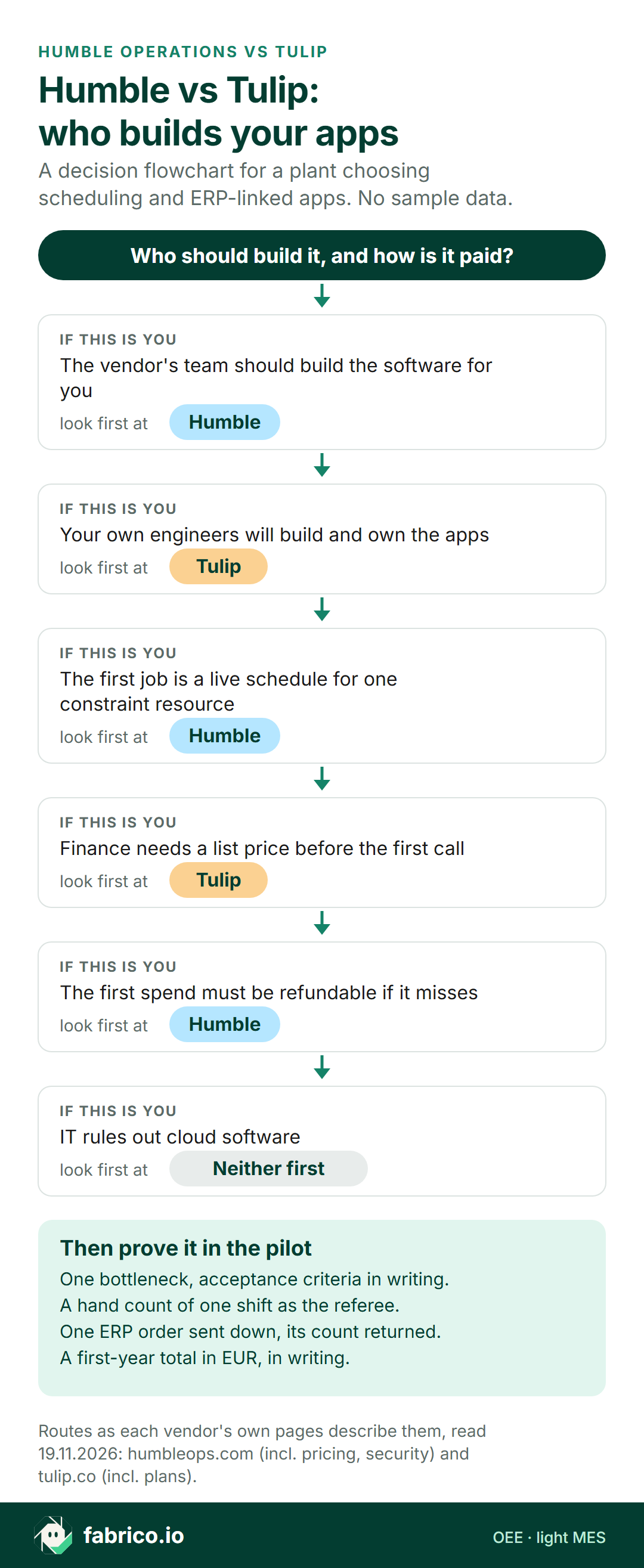
Text version of this flowchart
- The vendor's team should build the software: look first at Humble.
- Your own engineers will build and own the apps: look first at Tulip.
- The first job is a live schedule for one constraint resource: look first at Humble.
- Finance needs a list price before the first call: look first at Tulip.
- The first spend must be refundable if it misses: look first at Humble.
- IT rules out cloud software: look at neither first.
- Pilot checks: written acceptance criteria for one bottleneck; a hand count of one shift as the referee; one ERP order sent down and its count returned; a first-year total in EUR, in writing.
Where Fabrico fits
As cloud OEE software with light MES functions, Fabrico measures what each line actually produced; its solution overview for MES and OEE lists the modules. A PLC signal, a sensor or a counter tells it when a machine runs, halts and completes a part, and operators give the reason from a tablet or phone against the product that ran. Each loss carries a euro value per line and shift, the same sums as the router example. Fabrico supplies measured rates per line; the plan itself is made in the ERP, APS or planning spreadsheet. For a bench or machine without a usable signal, Fabrico's camera add-on counts output; where the camera covers the line, the video for the minute of a stop can be opened from the shift timeline, streamed on request and not stored in Fabrico. Reports export to Excel, and Fabrico also has a REST API and webhooks. For hosting, EU customers are hosted on AWS in Frankfurt. Check any hand-off to Humble, Tulip or the ERP during a pilot, and book a demo to see stops ranked by euros lost in Fabrico.
Where Fabrico is not the right pick. Pick Humble when the first need is software that re-sequences jobs around the plant's own constraints. Pick Tulip when engineers should build work instructions, kitting and genealogy apps on one platform. A site whose IT keeps production software on its own servers needs a product that installs there; Fabrico is a cloud service.
Questions to ask Humble and Tulip
- For Humble: which acceptance criteria decide the refundable sprint, and who signs them?
- For Humble: who reviews the generated integration code, and who keeps it after the contract ends?
- For Tulip: which pre-built connector exists for the plant's ERP, and which plan does it need?
- For both: after a rush order lands in the ERP, how long until the floor screen shows the new sequence at a reference plant?
What to do this week
- Name the constraint machine whose schedule breaks most often, and log one week of re-plans on paper.
- Decide who will own the software after go-live: a named engineer or the vendor.
- Ask IT two questions: is cloud software acceptable, and who issues read and write access to the ERP.
- Request a written first-year total from both for the same scope: machines, screens, ERP link.
- Count one shift by hand on that machine, then value lost output with a margin from a published industry range.
Related reading: Fabrico vs Tulip Interfaces for an OEE-first view of Tulip, Tulip alternatives for manufacturers, work order scheduling software for manufacturing, and light MES vs a connected worker platform.
Questions buyers ask next
Which fits real-time factory scheduling, Humble Operations or Tulip?
Humble's pages lead with a schedule engine that adapts to tools, crews, materials and deadlines. Tulip's pages describe scheduling and tracking work orders, with Automations on schedules and events, in apps the plant builds. Pick by who should build the scheduler.
Does Humble Operations integrate with an existing ERP?
Humble's homepage says the ERP stays running and Humble writes the integration code from manuals, API docs or database schemas. Its security page says integrations start read-only and writes need scoped approvals.
Does Humble Operations deploy faster than Tulip?
Humble publishes a plan with the first workflow live on day three and go-live on day eleven. Tulip says an MES built from its app suite gets value in a fraction of the time. Both are vendor claims; time one workflow in each pilot.
What do Humble Operations and Tulip cost?
Humble: no public price; quote on request (checked 19.11.2026), starting with a paid pilot sprint. Tulip: Essentials USD 100 and Professional USD 250 per interface a month, billed annually, ten interfaces minimum.
Who makes Humble Operations?
Its privacy policy names Humble Operations Corporation, a United States company, at humbleops.com. Tulip comes from Tulip Interfaces, Inc. of Somerville, Massachusetts.
Can Fabrico run beside Humble or Tulip?
Yes, where a plant wants OEE and stop losses in euros. Fabrico supplies measured rates per line; the plan itself is made in the ERP, APS or planning spreadsheet. Check the hand-off between them during a pilot.
Want measured run rates and stop losses in euros, by line and shift, beside the tool that holds the schedule? Book a demo.
Related articles



Latest from our blog




Real Fabrico tiles, sample data.