Login
 Blog
Alternatives to Spreadsheets for Shop Floor Operations: A Tab-by-Tab Audit

The main alternatives to spreadsheets for shop floor operations are a light MES, an ERP or MRP module and a planning tool. No single one replaces a production workbook, so sort it tab by tab.
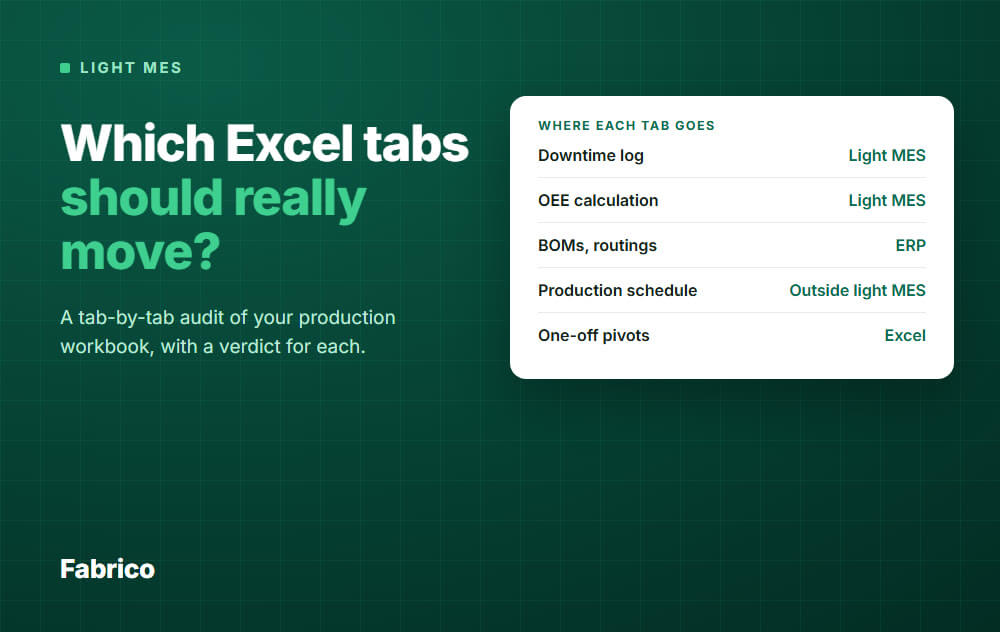
- Moves to a light MES: downtime log, output counts, OEE calculation, reason codes, shift numbers.
- Goes to the ERP: job list, BOMs, routings, lot trace, stock, job cost.
- Stays in Excel, or goes to ERP scheduling or a planning tool: schedule, capacity load, changeover matrix.
- Stays in Excel: pivots, what-if sheets, the roster.
Open your production workbook and look at the tabs along the bottom. Each one is a separate decision.
A schedule and a downtime log have different jobs, so they need different homes.
This page is a worksheet. It takes one sitting with the person who owns the file, and you leave knowing which tool type to shortlist, if any.
Step 1: list your tabs
Make a sheet with the six columns below, then add one row per tab, hidden tabs included. Do it with the workbook owner, since they know which tabs really matter.
| Column | What to write | Example row |
|---|---|---|
| Tab name | As it appears in the file | Stops L2 |
| Who types it | A name, not a team | Shift lead |
| Where the number starts | Machine, person, ERP, or another tab | Paper log at the line |
| Hours typed per week | A rough guess is fine | 5 |
| Who uses it, for what | The decision it feeds | Morning meeting |
| Verdict | Fill in during Step 2 | Moves |
The hours column matters most. It turns a vague wish to leave Excel into a number you can compare later.
Step 2: give each tab a verdict
Ask these four questions in this order, and stop at the first yes. The order matters: a schedule also holds numbers, but its job is deciding, so it must leave the path first.
Step 3: check your tabs against this list
These are common production workbook tabs. Names vary, so match them by job.
Moves to a light MES
A light MES records what a machine did and why it stopped. These tabs are copies of that, typed by hand.
| Tab | Why it moves |
|---|---|
| Downtime log | Start and end times can come from a machine, sensor or camera signal. Hand logs often miss micro-stops. |
| Output by shift | Counted from the signal. Where no sensor counts, it is entered on a tablet. |
| OEE calculation | The formula is the easy part, see OEE calculation. The inputs were the problem. |
| Reason code list | Operators pick from your list at the line. Cut it down before you move it. |
| Shift report numbers | Output, stops and OEE already exist, so nobody retypes them. |
| Pareto of stops | A Pareto of downtime comes from tagged stops, with no retyping. |
Goes to the ERP
If one of these lives in Excel, your ERP has a gap or nobody trusts it. A light MES will not close that gap.
| Tab | Why it goes there |
|---|---|
| Job list or dispatch sheet | Orders and their release belong to the system that creates them. |
| BOMs | Product definition. One master only. |
| Routings | Same reason. A copy in Excel will drift. |
| Lot trace or genealogy | A record you may have to prove, so it needs controlled entry. |
| Stock and WIP | Material moves need one count, tied to orders. |
| Job cost | Finance owns the method and the rates. |
Stays outside: planning tabs
This is where many plants hope for too much. A light MES does not plan.
| Tab | Where it can live |
|---|---|
| Production schedule | Excel, the ERP scheduling module, or a planning tool. |
| Capacity load | Same. It depends on orders and routings. |
| Changeover matrix | With the schedule. Measured changeover stops can correct it. |
The planning tabs do get better inputs. Real stop and run data can replace the rates a planner guessed, which is often the weak part of the sheet.
If the schedule is your main pain, read when Excel production planning breaks before you buy anything.
Stays in Excel, on purpose
Excel is good for working through a question. Keep it for that.
- One-off pivots and charts built from exports.
- What-if sheets, such as adding a shift or a second line.
- Budget and business case models.
- The shift roster and skills matrix, unless HR has a system for them.
Splits in two
Some tabs do two jobs. Cut them in half rather than forcing one verdict.
| Tab | What moves | What stays |
|---|---|---|
| Scrap log | Good and scrap counts | Defect detail, in Excel or your quality system |
| Shift handover | The numbers | Free notes. Check where the new tool can keep them. |
| Ideal cycle table | The value used for Performance | The master, usually with routings |
| Repair log | Only if maintenance runs in the same system | Otherwise, your current tool |
A worked example: 12 tabs, 24 hours
All numbers here are example data, for a made-up plant with three lines. The audit gave this result:
How this plant reads it:
- 12 of 24 hours sit in tabs that can move, so a light MES is a fair first look.
- The 12 hours do not all vanish. Operators still tag causes, and someone owns the reason list and the weekly review.
- The 4 hour schedule stays. If the planner's pain is the loudest in the plant, this purchase will not quiet it.
- The job list and stock hours are an ERP question, and worth raising with whoever runs the ERP.
Step 4: read your totals and pick a tool type
Add up the hours by verdict. The largest group, weighed against the pain it causes, points to your first tool type. Hours are not the whole story: one lost lot record can outweigh a month of typing.
| Tool type | Good alternative for | Leaves open |
|---|---|---|
| Light MES or OEE software | Downtime, output, OEE, shift numbers | Planning, dispatch, BOMs, trace |
| Full MES | Dispatch, process control, genealogy, regulated records | Needs more master data and a longer project |
| ERP or MRP production module | Orders, BOMs, routings, stock, cost | Usually no machine-level stop detail |
| Planning or scheduling tool | Sequence and capacity | Needs real rates from somewhere |
| Forms or low-code app | Checklists and simple logs | Data is still typed, and you maintain the app |
| Shared cloud spreadsheet | One version of a small tab | Data is still typed, and links can still break |
Fabrico sells a tool of the first type, so weigh our view with that in mind. If your hours land in the other rows, it is the wrong first purchase.
Landing on two rows is a normal result. One example is a light MES next to an ERP, with planning left in Excel for now.
Step 5: check the links before you cut a tab
This step is easy to skip. A tab you retire may still feed a tab you keep.
- Search the workbook formulas for the name of each tab that is leaving. Check macros and other workbooks too, since they can read it as well.
- Mark every hit. A schedule that reads rates from the OEE tab will break or, worse, go stale without any error.
- Decide how each link gets its data from now on. An export is a file, not a live link, so name who refreshes it and how often.
- Run old and new side by side for a short period on one line, then freeze the old tab as read-only.
Expect the two to disagree. Machine data shows short stops the hand log never held, so a gap does not by itself mean the new numbers are wrong.
Harden the tabs that stay
Staying in Excel is fine, but treat those tabs as the risk they are.
Ray Panko's spreadsheet research site pools nine older audits of working spreadsheets: 163 sheets, with errors found in about 84 percent. The studies used different methods and counted errors differently.
Read that as a warning about hand-built sheets in general, not a shop floor measurement.
- Give each tab one named owner and one deputy.
- Keep one copy, in a shared place with version history.
- Separate typed inputs from formulas, and color the input cells.
- Lock formula cells, but know the limit: Microsoft says worksheet protection is not intended as a security feature. It stops accidental edits, nothing more.
How Fabrico fits this audit
Fabrico is a light MES for OEE and downtime. On the audit above, it takes the tabs in the "moves" group.
- Machine data comes from the PLC over OPC UA, Modbus, PROFIBUS, PROFINET, EtherNet/IP or EtherCAT, from IoT devices with external sensors on older machines, and from AI cameras that count output at manual steps. Stops are recorded where one of those signals exists.
- Operators tag the cause on a tablet or phone, from your own reason codes.
- Good parts and scrap can be entered on a tablet where no sensor counts them.
- You see OEE by machine, line and shift, shift results, and losses shown in money.
- Any list exports to Excel or CSV, so your stay-in-Excel tabs still get data. Data can also be imported in bulk from Excel.
- ERP links: SAP S/4HANA, custom integrations for Dynamics or Oracle, plus a REST API, webhooks and Zapier.
What it does not do. Production planning and scheduling are not part of Fabrico today, so your planning tabs stay where they are. It does not create, schedule or dispatch production orders.
BOMs, routings and genealogy stay in your ERP. Fabrico is cloud software and the app has no offline mode, so the app needs a working connection at the line. If the link drops, the gateway buffers machine data for a period agreed with you, as standard up to 30 days.
Plan on about 1 month to install and connect devices, and 3 to 4 months for a full rollout. See the Fabrico MES and OEE overview.
Bring your finished audit to the call. Two things worth asking on it are how ideal cycle times get loaded for your products, and which of your tabs the bulk import can take.
What people ask next
What can replace Excel for production planning in a fabrication shop?
Look at your ERP's scheduling module first, then at a planning or scheduling tool built for high-mix work. A light MES is not the answer to this question, though its measured rates can help a planner.
What are good spreadsheet alternatives for a machine shop?
Run the same audit. If most hours land in job, routing and cost tabs, that points to a job shop ERP rather than a light MES.
If most of the pain is unexplained spindle and machine time, the "moves" group grows. Older machines can be read with external sensors.
Do we stop using Excel after a light MES goes in?
No, and you should not try. You stop typing machine numbers into it. Analysis and what-if work carry on, from exports.
Which tab should move first?
Usually the downtime log on one representative line. It tends to carry many typed hours, and the OEE and shift report tabs depend on it.
If a planning or lot record tab is what could stop the plant, deal with that risk first, with the right tool.
Will operators just type into a new system instead?
Partly, and be honest with them about it. The signal supplies when the machine stopped, and the operator supplies why. Typing counts and times should drop where a signal exists.
What if most of our tabs land in the ERP group?
Then the audit has found an ERP problem. Fix order and master data there first, since machine data will not repair it.
Finished your audit and the "moves" group is large? Request a demo or Contact us and bring the sheet.
Latest from our blog