Login
 Blog
OEE Software Integration with MES, SCADA and PLCs: A Test for Each Link

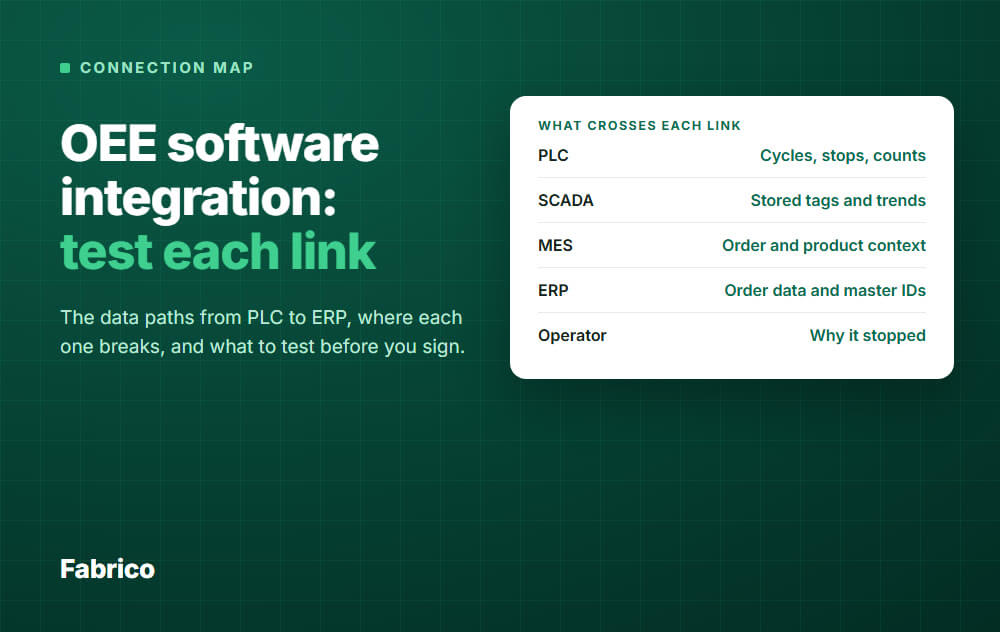
The map: OEE software usually takes machine signals from the PLC or through SCADA, gets order and product context from the MES or ERP, and sends results back. Each of those is a separate link, and each one fails in its own way.
- PLC: cycles, stops and counts. Test the meaning of each signal, not just the connection.
- SCADA or historian: tags and stored trends. Test whether a short stop survives the trip.
- MES: order and product context. Test what happens at a product change.
- ERP: orders and master data in, results out. Test a day of reconciliation.
- Network: test what happens when the connection drops.
"Yes, we integrate" tells a controls lead almost nothing. It can mean anything from a live PLC read to a nightly CSV file.
So do not ask whether a product integrates. Draw your own links, ask what crosses each one, and run one test per link.
This page gives you that map and the tests. We sell OEE software, so hold our answers to the same tests.
What crosses each link
| Link | What moves | Who should own the answer |
|---|---|---|
| 1. PLC, sensor or camera to OEE | Cycles, stops, counts, sometimes fault codes | Controls lead |
| 2. SCADA or historian to OEE | Stored tags and trends, alarms | SCADA owner |
| 3. MES and OEE | Order and product context in, results out | MES owner |
| 4. ERP and OEE | Order data and master IDs in, summaries out | ERP owner |
| 5. Operator to OEE | Why it stopped | Production lead |
| 6. Network path | All of the above | IT and OT security |
Links 3 and 4 sit where ISA-95 does most of its work: the interface between control functions and business functions. It is a useful shared vocabulary for this meeting.
If the vendor cannot fill in this table for your plant, you are not ready to sign.
Link 1: PLC to OEE software
What comes across: a run or stop state, a cycle pulse, a good count and a reject count where the machine has them. Fault codes are a bonus if they exist and mean something.
Common ways to read them:
- OPC UA: client and server exchange, with certificates and a data model.
- Modbus: client and server exchange of I/O and register data, so you need the register map.
- MQTT: lightweight publish and subscribe through a broker, often from a gateway or device.
- The controller maker's own protocol: common on installed PLCs, and it may need a driver or a gateway.
Where it breaks:
- The signal means something else. A "running" bit may stay on while the machine idles with no product. The connection is fine and OEE is wrong.
- The counter resets or rolls over. A signed 16 bit counter tops out at 32,767. A batch reset can look like a huge negative count.
- Access is off. Ask your controls engineer if each controller needs a setting changed and a download before it allows remote reads. If it does, that means a planned window and a change record.
- The read is too slow. Short stops vanish between samples. See the chart below and micro-stops.
- There is no usable signal. Older machines may need an external sensor. Manual steps may need a camera.
The test: pick your oldest and your newest machine. Write down the exact signals, then run this:
- Hand-count output for one hour and compare it with the software.
- At a safe moment, stop the machine on purpose for 30 seconds. Check that a stop appears, with the right length.
- Reset the counter, as a shift or batch change would. Check that the count stays sane.
- Get it in writing that access is read-only. Ask for the read rate and tag count, so your controls engineer can sign them off.
Link 2: SCADA or historian to OEE software
What comes across: tags someone has already named and scaled, alarms, and stored trends. It looks like the easy path, and it often is. It also passes on every choice made when that system was set up.
Where it breaks:
- Stored data is thinner than live data. Ask how each tag is logged: on change, at a fixed rate, or with a deadband.
- Alarms are not stops. One stop can raise ten alarms, and a stop can happen with no alarm at all.
- A SCADA outage becomes an OEE outage. You now depend on one more server, and on its upgrade schedule.
- Licences and load. A new client or connection may need a licence, or more capacity on that server. Ask the SCADA owner.
Direct to the PLC, or through SCADA?
| Question | Lean direct | Lean through SCADA |
|---|---|---|
| Are short stops a big loss? | Yes | Only if the SCADA read rate is fast enough |
| Are new connections to controllers hard to approve? | No | Yes |
| Are tags already clean and named? | No | Yes |
| Does SCADA cover all your lines? | No | Yes |
The test: trace one stop end to end. Stop a machine for 30 seconds, then read the same event in the HMI, the historian and the OEE software. Compare the start time and length. If they disagree, fix the logging or go direct.
Link 3: MES and OEE software
What comes across: the current order, the product and its ideal cycle time from the MES. Results and loss data can go back the other way.
The ideal cycle time matters most. Performance in the OEE calculation is only as good as that number, and it changes with the product.
Where it breaks:
- The product change arrives late. Ten minutes of the new product get judged against the old rate.
- Two systems count. The MES and the OEE software each hold a good count, and no one agreed which one wins.
- Two systems log downtime. Operators get asked twice, and they stop answering.
- Nobody knows where the boundary sits. If you are still deciding what you need from an MES, read MES software first.
The test: run a real product change with the integration on. Check when the new product appears, what rate applies from that moment, and whether the order total matches in both systems.
Link 4: ERP and OEE software
What comes across: order data, products and master IDs from the ERP, depending on the project. Summaries go back, not raw events. An ERP has no use for a 40 second stop.
Where it breaks:
- IDs do not match. The machine called Line 3 in the plant has a different code in the ERP.
- A sync fails quietly. Nobody sees it until month end.
- "Integrated" hides the scope. A sync of maintenance records is not a sync of production orders. Ask for the field list.
- Conflicts have no rule. When both sides change a record, one must win, and someone must decide which.
The test: ask for the field list, then reconcile one full day. Then break the link on purpose for an hour. Check that the failure is visible to someone, and that missed records go across once it returns.
Link 5: the operator
This one is not a cable, and it is the most often forgotten. The machine knows when it stopped. It rarely knows why in words that help you.
A fault code can suggest a cause, but waiting for material or a late changeover will not show in the PLC. A person has to tag it.
The test: put the screen at the line for one real shift with your own reason codes. Count how many stops have a reason at the end. Ask the operators what they would change.
Link 6: the network path
Cloud OEE software means a path from the control network out to the internet. This is usually where IT says no, so bring them in first.
OWASP's OT Top 10 warns against direct, loosely controlled IT and OT connections and points to zones and conduits under IEC 62443. NIST SP 800-82 is the longer guide to OT security.
Where it breaks:
- A device ends up with one leg in each network.
- Firewall rules open whole ranges because nobody listed the exact connections.
- Plant Wi-Fi or the uplink is weaker at the line than on the office side.
- Clocks differ. Four systems give four times for one stop, and time zone changes split your reports.
The test: get a list of each connection: source, destination, port, direction and encryption. Then cut the uplink for 30 minutes and see what you lost. Ask what happens to the data from that gap, and get the answer in writing.
The test sheet to bring to the meeting
Pass marks here are examples. Set your own before you talk to vendors, so you do not bend them later.
| Link | Test | Example pass mark |
|---|---|---|
| 1. PLC | Hand count for one hour, oldest and newest machine | Within 1 count per 1,000 |
| 1. PLC | Forced 30 second stop | Appears, length within 2 seconds |
| 2. SCADA | Same stop in HMI, historian and OEE | Same order of events, same length within 2 seconds |
| 3. MES | Real product change | New rate applies within 1 minute |
| 4. ERP | One day reconciled, one hour link break | Totals match, failure is visible, records catch up |
| 5. Operator | One real shift with your codes | 9 of 10 stops have a reason |
| 6. Network | Connection list, 30 minute uplink cut | IT approves, the gap is explained in writing |
Some vendors will not connect a line before a contract. In that case, write these tests into the contract as acceptance criteria for the first line.
Where Fabrico sits on this map
Fabrico is a light MES: cloud software for machine data collection, production monitoring, OEE and downtime analytics. Here is where it sits, link by link.
- Link 1: Fabrico reads cycles, stops and output from the line's PLC. Older machines get a Fabrico IoT device with external sensors. Manual steps can use AI cameras. One plant can mix all three. See machine connectivity. Fabrico's PLC link covers OPC UA, Modbus, PROFIBUS, PROFINET, EtherNet/IP and EtherCAT, and its wider list adds MQTT, IO-Link and HTTP. Confirm your controller with us in a demo, machine by machine.
- Link 2: if you want to read through SCADA or a historian, bring that path to the demo and confirm it for your plant. There is no AVEVA PI connector today. Get the answer in writing. Keep your SCADA for supervising the process, since Fabrico does not replace it.
- Link 3: other systems connect through webhooks, the REST API or Zapier. If you run an MES, confirm in the demo what crosses this link, then run the product change test above.
- Link 4: Fabrico syncs both ways with SAP PM and connects to SAP S/4HANA. Microsoft Dynamics or Oracle can be linked through a custom integration. There is no Epicor connector today. Ask us for the field list, as you would anyone else.
- Link 5: operators tag the cause of a stop.
- Link 6: Fabrico is cloud software and the app has no offline mode, so the app needs a working connection at the line. If the link drops, the gateway can store machine data offline for up to 30 days, with automatic recovery within 72 hours by default. It runs in the AWS EU region, with data encrypted at rest and in transit. Fabrico is certified to ISO/IEC 27001.
Stops are recorded where a machine, sensor or camera signal exists. No signal, no record.
Job dispatching, BOMs, routings and genealogy stay in your ERP. If you need those from one system, Fabrico is not it.
Each project starts with a review of your process and your machines. Your own automation team, a partner you work with or the Fabrico team can do the integration.
Plan on about 1 month to install and connect devices, and 3 to 4 months for a full rollout. The Fabrico MES and OEE overview has the rest.
Bring your map and your test sheet: Request a demo or Contact us.
What people ask next
Do we need SCADA to run OEE software?
No. OEE software can take signals from the PLC, a sensor or a camera. If you have SCADA, use the table above to choose the path.
Which protocol should we choose?
Your controllers usually decide it. Ask the vendor to name the method per machine, not in general, and ask which ones need a gateway.
Will reading the PLC slow it down?
It can if the read is too large or too fast. Agree the tag count and read rate with your controls engineer, then watch the controller during the test.
Do we have to change the PLC program?
Not if the signals already exist and access is allowed. Check this per machine. Where a machine has no usable signal, an external sensor can avoid touching the program.
Can OEE software replace our MES?
Only if you need the monitoring part. A light MES covers data collection and OEE, not the full order and traceability scope.
Who should be in the room?
The controls lead, the IT or OT security owner, the ERP owner and one production lead. Links fail when one of them hears about the project last.
Ready to test your links against a real answer? Request a demo or Contact us.