Login
 Blog
Real-Time Shop Floor Visibility Software: What It Must Answer in the First Hour

The short test: Real-time shop floor visibility software shows machine state, stops and output during the shift, so people can act while a problem can still be fixed. It is worth buying only if the right person gets the right answer in time, so write those questions down first and test each vendor with a stopwatch.
- Each role asks different questions in the first hour of a problem, and needs different data.
- Not all data needs to be fast. We suggest seconds for machine state, and the next day for loss analysis, as long as it is complete.
- "Real time" has no single meaning, so ask what is live, and measure it.
- The longest delay can sit between the screen and the person, so measure that too.
A line stopped at 22:40. You read about it at 07:30, in a shift report with one line of text: "mechanical problem".
Buying a screen does not fix that by itself. A screen only helps if someone looks at it, understands it and can act.
So start with a list of questions. Here is the list we would use, then how fresh each answer should be, then six tests for any "real time" claim.
The first hour of a problem, role by role
The minutes below are an example. Change them to fit your plant, but keep the order: each person's answer depends on the person before.
Operator: is it me, and what do I do?
- Is my machine counted as stopped right now?
- Since when?
- Which reason do I pick?
- Has someone been called?
Data needed: machine state, stop start time, your reason list, call status.
Shift lead: where do I go first?
- Which lines are stopped, and for how long?
- Is this stop waiting for a person, a part or material?
- Who has been told, and has anyone answered?
- Can I move people to another line?
Data needed: status of all lines, stop length, reason so far, who was alerted.
Technician: what am I walking into?
- Which machine, and which part of it?
- What did the operator report?
- Did it stop like this last week, and what fixed it then?
Data needed: machine name, stop start, operator reason, past stops on that machine.
Production manager: do we still make the shift?
- How far behind target are we now?
- How many minutes have been lost this shift, and to what?
- Is this one long stop, or many short ones?
- Is it the bottleneck, or can the line catch up?
Data needed: output so far against target, stop minutes by reason, a line timeline.
The last question is the one a screen rarely answers. A person who knows the line has to say which machine is the bottleneck.
Planner: which order is at risk?
- When is the line expected back?
- How much of the current order is done?
- Which promise date moves if the line stays down?
Data needed: line status, output so far, the expected return time from the shift lead, and open orders from the ERP.
Plant manager: do I need to step in?
- Which stop is the largest right now?
- Does it have an owner?
- Is a customer or a safety issue involved?
Data needed: open long stops, lines behind target, owner of each stop.
This role needs an alert when a stop passes an agreed limit, not a screen to watch. An escalation matrix for downtime sets that limit, and who gets told at each level.
CI engineer: the next day, what really happened?
- How did the time split between stops, slow running and scrap?
- How many stops have no reason?
- Is this cause new, or does it keep coming back?
Data needed: the full stop log with times and reasons, short stops, counts, the OEE split.
This person does not need speed. They need the data to be complete.
How fresh each answer should be
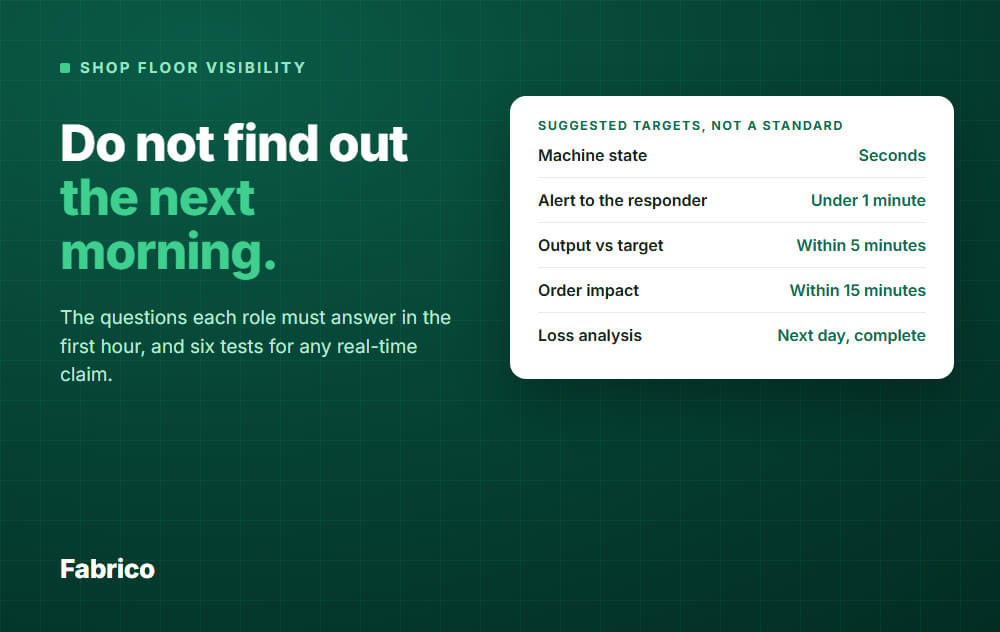
Seconds everywhere is rarely worth the effort, and not everyone should have to watch a screen. Set a target per role, and decide how the answer reaches that person.
The targets below are our suggestions, not an industry standard. Argue with them, then write down your own.
| Who | Data | Suggested target | How it reaches them |
|---|---|---|---|
| Operator | Machine state | Seconds | Screen at the line |
| Shift lead | Alert to the responder | Under 1 minute | Phone alert |
| Technician | Alert to the responder | Under 1 minute | Phone alert |
| Production manager | Output vs target | Within 5 minutes | Phone or browser, when they look |
| Planner | Order impact | Within 15 minutes | Shift lead's estimate, plus ERP |
| Plant manager | Long stops and owners | Within 15 minutes | Alert past an agreed limit |
| CI engineer | Loss analysis | Next day, complete | Report or export |
Only alert someone who can act. If ten people get the same message, each one can assume another person has it.
These targets are what to ask of any tool. They are not measured figures for Fabrico or any other product.
Also agree who may see and change what. An operator needs their own line. A plant manager needs all of them.
What "real time" means on a vendor's page
The term has no single meaning, even inside the industry.
- The OPC Foundation's ISA-95 summary says each level has its own definition. Control systems respond in sub-seconds, while Level 3, the operations layer where an MES sits, treats real time as information available a few seconds after an event.
- Vendor guides often draw the line in minutes, not seconds.
Neither is wrong. They answer different questions, so ask which delay a vendor means.
One screen, several ages of data
This is the part that catches buyers. A screen can show a live machine state beside a scrap figure that is three hours old.
| Field | Comes from | Only as fresh as |
|---|---|---|
| Running or stopped | PLC, sensor or camera | The signal and the connection |
| Output count | PLC, sensor or camera | The signal and the connection |
| Stop reason | Operator | The moment the operator tags it |
| Scrap | Counter or manual entry | The last count or entry |
| Shift OEE | Calculated from run time, counts and scrap | Its oldest input |
So ask this for each number on the screen: where does it come from, and when was it last updated?
The delay a faster refresh cannot fix
The time from the stop to a person at the machine is a chain, and the data refresh is only part of it.
Measure your own chain before you compare refresh rates. If the biggest block is people finding out, fix the alert route first.
Six tests for any "real time" claim
A demo on sample data proves little. Run these on a connected machine of yours, before the full rollout.
Never stop a line just to test software. Use a planned stop such as a changeover, or wait for a natural one with a stopwatch in hand.
- Stopwatch test. Note the second the machine stops. Note when the screen changes, on the line screen and on a phone. Do it three times, and repeat for the restart.
- Short stop test. Watch a stop of under a minute. Is it recorded as a short stop, or does it only show up as lower speed?
- Alert test. Set a rule, then time the gap from the stop to the phone buzzing. Then ask the person if they would have noticed it on a normal shift.
- Connection test. Disconnect one data device from the network, never the machine's control network. Does the screen say the data is old, or keep showing "running"? Then ask what happens to the counts from that gap.
- Late entry test. Tag a stop reason 30 minutes late, and enter scrap at the end of the shift. Check that the stop keeps its true time, and that the scrap changes quality and OEE.
- Age test. Point at each number and ask how old it is. A good screen, or a good vendor, can tell you.
Write the results in a table like this one, and use the same sheet for each vendor.
| Test | Suggested target, change it | Measured |
|---|---|---|
| Stop shows on screen | Seconds | |
| Short stop is recorded | Yes | |
| Alert reaches the responder | Under 1 minute | |
| Old data is marked as old | Yes | |
| Late entries keep true times and correct OEE | Yes | |
| Vendor can state each number's age | Yes |
Where to find reliable MES software for shop floor visibility
Start with the type of software, because each type was built for a different question. Your plant may need two of them.
| Type | Usually strong on | Check |
|---|---|---|
| ERP shop floor module | Orders, planner questions | Is machine state read, or typed in later? |
| Full MES | Dispatching, routings, genealogy | How long until the first line shows live data? |
| Light MES or OEE software | Machine state, stops, line performance | Which order questions stay in the ERP? |
| SCADA or historian | Process signals, control rooms | Can a shift lead read it without an engineer? |
| Andon system | Calling for help fast | Does the call data feed your loss analysis? |
We sell software in the light MES group, so weigh this table with that in mind.
To go deeper by type, see this comparison of OEE software categories and this guide to MES software.
"Reliable" is something you check, so ask each vendor for four things:
- A reference plant with machines like yours, that you may call.
- A written answer on how fast each field updates, and what happens when the connection drops.
- The six tests above, run on your own machine.
- A way to get your data out.
How Fabrico answers the list, and where it stops
Fabrico is a light MES: cloud software built around OEE, downtime and line performance.
- Operator: tags the stop cause on a tablet or phone, from your own reason codes.
- Shift lead: sees live status by line and shift. Push, in-app and email notifications follow rules for who is told about what.
- Technician: can open a work order straight from a stop, through the built-in maintenance module.
- Production manager: sees output as the counts come in, and OEE by line and shift, split into availability, performance and quality.
- Plant manager: sees plants side by side on one screen, and can check a line from a desktop or a phone.
- CI engineer: gets micro-stops from the machine signal and can export data to Excel.
Stops are recorded where a PLC, IoT sensor or camera signal exists. The operator adds the cause, so a reason is only as fresh as that tag.
Role-based access sets who can see and change what.
What it does not do: Fabrico has no production scheduling today. Job dispatching, BOMs, routings and genealogy stay in your ERP, so "which order moves?" is still answered there, with Fabrico's line status as an input.
Fabrico is cloud software and the app has no offline mode, so the app needs a working connection at the line. If the link drops, the gateway can store machine data offline for up to 30 days, with automatic recovery within 72 hours by default.
We quote no refresh figure on this page. Run the stopwatch test on your first connected line and judge us on that.
Plan on about 1 month to install and connect devices, and 3 to 4 months for a full rollout. See the Fabrico MES and OEE overview for details.
Bring your question list to a 30 minute conversation: Request a demo or Contact us.
What people ask next
What is shop floor visibility?
It means the people who run production can see what is happening on the lines soon enough to act on it.
A good test is whether a stop gets a response during the shift, not a comment the next morning.
Is real-time OEE the same thing?
No. OEE is one answer on the list, and it mostly serves the production manager and the CI engineer.
See OEE calculation for how that number is built.
Do we need a full MES for this?
Not for the machine questions. A light MES can answer what stopped, for how long and why.
If you also need dispatching and genealogy on the floor, look at a full MES or keep those in the ERP.
Can a whiteboard do this?
A whiteboard at the line answers the operator and the shift lead, if someone keeps it current.
It will not reach a manager at home, and it misses stops too short for anyone to write down.
Do older machines need replacing first?
Usually not. An external sensor can give a run signal on an older machine, and a camera can count where there is no signal at all.
Test the signal on your oldest machine first, as that is where surprises appear.
Who should own this after go-live?
Name one person per plant, often the production manager or a CI engineer.
That person reviews the alert rules and the stops with no reason. Without an owner, alerts tend to get ignored.
Tired of finding out the next morning? Request a demo or Contact us.