Login
 Blog
Compare Shift Performance with Video Evidence: A 30 Minute Meeting Script

The meeting: To compare shift performance with video evidence, meet once a week for 30 minutes on one line. Use minutes to find the gap, then use clips to see what the gap looks like.
- Check first that both shifts ran comparable work.
- Pick the one loss with the biggest gap in minutes.
- Pull 3 clips per shift, chosen by a fixed rule, not by taste.
- Read each clip with the same four questions, before anyone says which shift it came from.
- Leave with one test on the line, one owner and one date. Compare stops and lines, never people.
Example: your OEE report says nights ran 7 points below days. Someone in the room says what everyone is thinking: nights are slower.
A clip can calm that argument, or make it worse. It depends on which clip you show and what you ask of it.
Below is a script you can run next week, minute by minute. It needs stops recorded with a time and a camera on at least part of the line.
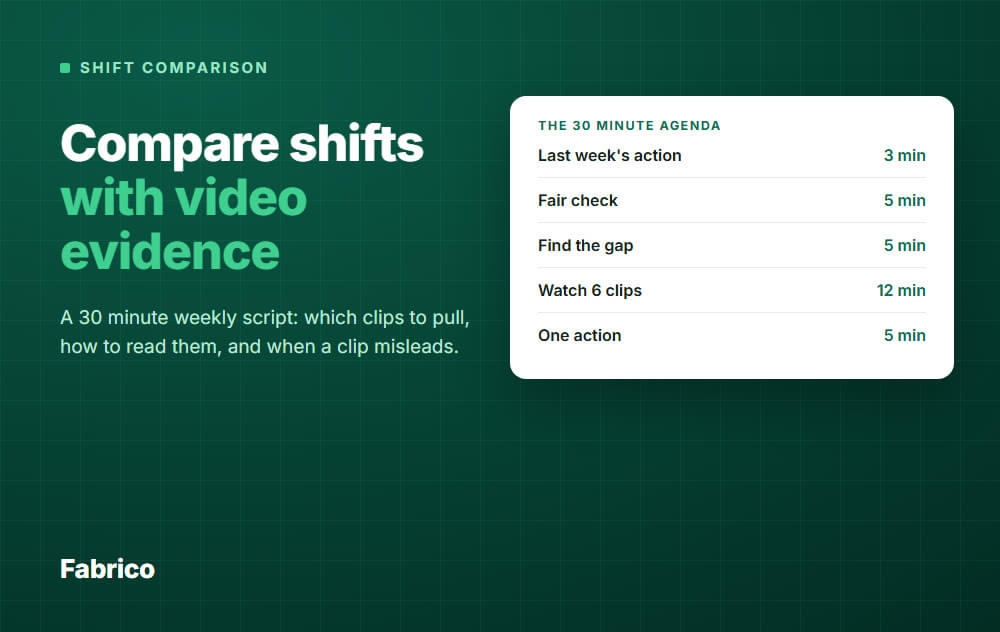
The 30 minute agenda
| Minute | Step | What you leave with |
|---|---|---|
| 0 to 3 | Last week's action | Did the minutes move? Keep, change or drop the test |
| 3 to 8 | Fair check | Yes or no: can these two shifts be compared this week? |
| 8 to 13 | Find the gap | One loss confirmed, with the gap in minutes |
| 13 to 25 | Watch 6 clips, 3 per shift | One line of notes per clip |
| 25 to 30 | One action | A test, an owner and a date |
Who is in the room, and the rule you say out loud
Keep it small: the CI lead who runs it, a shift lead from each shift and whoever owns the line. Add maintenance if the loss is mechanical.
If the night lead cannot attend in person, send the notes and take their reading first next time.
Open with the same sentence each week: "We compare stops and lines here, not people."
Then keep to it. Notes name the line, the stop and the conditions, not the operator. Clips stay out of personal reviews and discipline.
On a small crew, a shift label can still point to one person. Those clips are then about one person. Raise it with your works council or employee representatives, and your data protection lead, and leave them out until it is agreed.
Settle the camera rules before the first meeting, and name this use, comparing shifts, in what you agree with your works council or employee representatives, or with HR and legal if you have neither. Framing, access and retention are covered in the privacy section of our video context guide.
A weekly meeting needs footage from up to 7 days ago. If your agreed period is shorter, meet more often.
Before the meeting: pick the loss, pull the clips
The person preparing should not be the lead of either shift. Take the downtime list by cause and shift for the past week, pick the loss with the biggest gap, and pull clips for it.
The room confirms the pick at minute 8. If it picks another loss, skip the clips this week and pull them for next time.
Which clips to pull
| Where the gap sits | Pull this | Watch for |
|---|---|---|
| Long stops, same cause | Stops with that reason code, from both shifts | What the line did just before, and what the recovery needed |
| Short, repeated stops | Short stops at the same station, from both shifts | The same small event repeating |
| Slow running | A running period on the same product, at a similar point in each shift | Cycle rhythm and gaps in product flow |
| Changeover | The end of the changeover, up to the first steady running | Adjusting and waiting after the "finish" |
| "Other" or untagged time | Untagged stops from the shift with the most of them | Whether the other shift would have tagged the same scene differently |
The selection rule
For each shift, sort the stops of that cause by length. Then take:
- The longest stop.
- The middle one.
- One at random.
Use the same rule on both sides. If you pick by hand, you will find what you came looking for.
Start each clip well before the stop, because the useful part is often what came first.
Minutes 0 to 8: last week, then the fair check
Start with last week's test. Read the minutes for that loss, before and after, and decide what happens to it.
Then ask five questions. A "no" does not end the meeting. It changes what you compare.
- Same products? If not, compare only the product or family both shifts ran.
- Same ideal cycle time? The same product needs the same standard on both shifts.
- Same planned time rules? Cleaning, breaks and planned work must count the same way.
- Same support? Note hours without a technician, a material handler or a quality check.
- Same reason list? Check how much time each shift left untagged. A shift can look better just because it recorded less.
If the fair check removes most of the gap, you have your finding. Move on to the support or planning difference it exposed.
For more on how to run this check, read our guide to fair OEE comparison across shifts.
Minutes 8 to 13: turn points into minutes
OEE points start arguments. Minutes point to a stop you can look at.
All numbers here are example data. Line 2 runs 5 shifts a week on days and 5 on nights, with 480 planned minutes per shift, so 2,400 minutes each.
| Example data | Days | Nights |
|---|---|---|
| Stop minutes | 265 | 475 |
| Availability | 89% | 80% |
| Performance | 85% | 85% |
| Quality | 95% | 95% |
| OEE | 72% | 65% |
The whole gap sits in availability. That is 210 stop minutes, so the next question is which stops.
A performance gap converts too. Example: at 2,000 run minutes, 85% against 80% is 100 minutes of speed loss.
Stay on one loss. Six clips on one loss teach more than six clips on six losses.
No material comes next week, and it points at support rather than at the labeler.
Minutes 13 to 25: how to read the clips
You have 12 minutes for 6 clips, so about 2 minutes each. Run them mixed, as clip A to clip F. The presenter does not say which shift each one came from until all six are read.
A time stamp may give it away, but try: people read a scene differently once they know whose it is.
Ask the same four questions of each clip:
- What is the first thing we can see going wrong? Say "we can see", because the start may be out of frame.
- What was the line doing just before? Look at speed, product flow, a roll change or a recent restart.
- What did the recovery need? A tool, a part, material or a second pair of hands. Ask what was there, not who was slow.
- Does the scene fit the tagged reason? Yes, no or cannot tell.
Note one line per clip. Then reveal the shifts and read across.
What the pattern means
| What you see across the clips | What it suggests | Next move |
|---|---|---|
| Same scene on both shifts, more of it on one | A condition differs: material, settings, upstream flow | Compare those conditions between the shifts |
| Same scene, different reason tags | The gap may partly be a tagging gap | Agree the tag, then read the minutes again |
| Same start, longer recovery on one shift | Support differs: a tool, a spare, technician cover | Check what that shift has within reach |
| Two ways of recovering, one clearly quicker | A method worth sharing between shifts | Try it on both shifts as a test |
| Nothing useful in frame | The camera cannot answer this one | Go to the line, or read the machine data |
The example, continued
Example data again. In 4 of the 6 clips, the labeler jam starts just after a label roll change, on both shifts.
The stop list shows nights had more jams, not just longer ones. The shift leads add that nights often get part-used rolls, so they change rolls more often.
The clips show when the jam starts. They do not prove the short rolls cause it.
Minutes 25 to 30: leave with one test
The clips give you an idea. Only a change on the line can test it.
Write one row and stop:
| Field | Example |
|---|---|
| Line and loss | Line 2, labeler jam |
| Gap | 115 minutes a week, nights above days |
| What we will test | Full rolls at the start of both shifts, for one week |
| Owner and date | A named person, next meeting |
| Result | Jam minutes per shift, read at minute 0 next week |
The owner is someone who can change the condition, such as the person who controls material supply. Naming the night crew as owner is the old blame in a new form.
When a clip misleads
Comparing shifts adds traps that a single clip does not have.
| Trap | What goes wrong | What to do |
|---|---|---|
| Picked clips | The worst of one shift against the typical of another | Use the same selection rule on both |
| Different view | Night lighting or a moved camera hides what days can show | Check the frame first. If you cannot see it, do not compare it |
| Empty station | It looks like absence, but that shift may have no one else to do the job they left for | Note "station unattended, reason unknown", then ask |
| Six clips as proof | Six clips cannot tell you how often something happens | Check the pattern against the stop list before you act |
If people start to feel judged, tags get vaguer and more time lands in "other". Watch that number on both shifts. It tells you if the meeting is doing harm.
What your tool needs for this meeting
There is no single best tool to compare shift performance with video evidence. Any system that passes these checks can run this script.
- OEE and downtime by cause, split by shift, for a past week.
- A clip you can reach from the stop, on one clock with the machine data.
- Footage from both shifts still there on meeting day.
- A way to compare the same product across shifts.
- Access limited by role, so clips stay with the people in the room.
OEE software with cameras keeps stops, clips and reasons in one place. CCTV plus a separate OEE tool can work if the clocks agree, but someone has to find each clip by hand.
Running this script with Fabrico
We sell this software, so test it against this script the way you would test any other.
Fabrico is a light MES: cloud software for OEE and downtime.
- The gap: MES and OEE software showing availability, performance and quality live by line and shift, and downtime by cause, machine and shift for this week or a past period.
- The stops: recorded with start and length where a machine, sensor or camera signal exists. The operator tags the cause on a tablet or phone from your own reason codes.
- The clips: with the camera option, footage is synced with machine and timeline data, so you can zoom in on the moment a line stopped. Footage, machine record and tagged reason sit in one place.
- Alerts: push, in-app and email notifications, with rules for who is told about what, and alerts can go to a technician by stop reason.
Camera count is agreed per line after a review of your process and machines. Plan on about 1 month to install and connect devices, and 3 to 4 months for a full rollout.
What Fabrico does not do. It has no root cause analysis workflow: no cause tree and no investigation file. It gives your team evidence to start from.
It does not run this meeting or choose your clips, and job dispatching, BOMs, routings and genealogy stay in your ERP.
Ask us in the demo about views by crew or product, a list of clips by reason and how long clips are kept, and get the answers for your lines in writing.
Request a demo or Contact us to walk through this script with a line of your own in mind.
What people ask next
Which systems show live OEE by shift, crew and product, with supervisor alerts?
OEE software and light MES tools are the usual place to look. Product and crew views vary, so ask to see them on a sample of your own data.
A crew view can slide into ranking people, so agree with your works council or employee representatives, or with HR and legal if you have neither, how it may be used. Check alerts too: who gets them, and for which stops.
Do we need a camera on the whole line?
No. Start where your largest shift gap sits, if that spot can be seen. Without a camera there, you can still run minutes 0 to 13 and go and look at the line.
How many weeks before this shows results?
Each test takes a week to read. One week can be noise, so look for the minutes to hold over a few weeks before you call it a gain.
What if a clip shows a safety problem?
Act on the hazard at once through your normal safety route. Then check what your camera agreement says about using a clip that way.
Want to try the script on your own line data? Request a demo or Contact us.
Latest from our blog