


 Login
 Blog
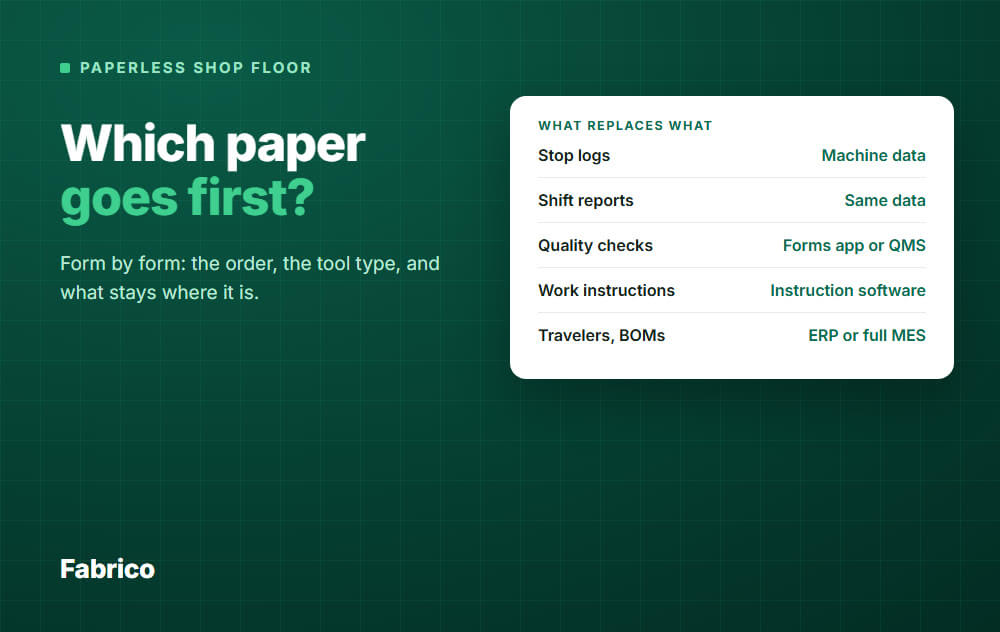
Paperless Shop Floor Software: Which Paper Goes First, and With What Tool

In short: No single tool takes all the paper off a shop floor. Replace the stop log and count sheet first, with machine data plus a tablet, because the shift report then mostly writes itself. Forms come next, and instructions after that.
- If a machine already knows it, connect the machine. Do not build a digital form for it.
- If only a person knows it, capture it digitally: a tablet tag for a stop cause, a form or checklist app for a check.
- Job travelers, BOMs, routings and genealogy belong in the ERP or a full MES.
- Physical locks and tags on parts stay physical. Some signed records may have to stay too.
You want paper off the floor. Then you look at the software market and find forms apps, frontline platforms, OEE tools, full MES and ERP modules, all with "paperless" on the homepage.
They replace different paper. This guide goes form by form: what goes first, which tool type fits it, and what should stay where it is.
One note: we sell software that covers part of this list. We say plainly below which part, and which part it does not cover.
First, ask what the paper is doing
Paperless projects often list forms by department. It works better to sort them by job, because the job decides the tool.
- It copies what a machine already knows. Stop times, cycle counts, run hours. This paper should go away, not become a screen.
- It captures what only a person knows. Why the line stopped, what a check found, what the next shift must watch. This needs quick digital entry.
- It tells a person what to do. Work instructions and procedures. This needs one current version at the station.
- It travels with the job. Travelers, routings and batch records. This needs the system that owns the job.
- It does a physical job. A lock, a warning tag, a label on a rejected part. A screen cannot do this.
The first group is where projects often go wrong. They turn a stop log into a tablet form, and the operator still types what the machine could have reported.
Paper by paper: what replaces it
| Paper | Tool type that fits | When |
|---|---|---|
| Stop or downtime log | Machine data and OEE, with a tablet for the cause | First |
| Count or tally sheet | Machine count, tablet for scrap | First |
| Shift production report | Built from the same data | Second |
| Shift handover notes | Digital log or forms app | Third |
| Start-up and quality checks | Forms app, or a QMS if regulated | Third |
| Maintenance requests | CMMS | When maintenance is the pain |
| Work instructions | Instruction software | Fourth |
| Traveler, routing, BOM | ERP or full MES | Separate project |
| Batch record, genealogy | ERP or full MES | Separate project |
Why the stop log goes first
Three reasons, and the first one is the strongest.
1. The record gets more accurate when the paper goes
A digital checklist holds the same answers as the paper one. Machine data holds more than the paper log ever did, because nobody writes down a 60 second stop.
The stop times are rounded too, often at the end of the shift from memory.
In this example the gap is 25 minutes a shift. Over 20 line shifts a week (say 2 lines on 2 shifts), that is about 8 hours of loss the log never showed.
A warning for the first weeks: your reported downtime will go up.
The line did not get worse. You can now see it.
2. It removes other paper with it
A paper shift report mostly retypes the stop log and the count sheet. Once those two are live, output, stops and OEE per shift are already there.
The supervisor adds a comment and stops being a typist. See what belongs on a shift production report.
3. Real decisions wait on it
A filed start-up checklist often changes nothing that day. A ranked list of stop causes tells you what to fix this week.
When a different paper should go first
The order above is a default, not a law. Start elsewhere if your pain is different:
- Customer complaints or audit findings are the fire. Start with quality checks.
- Operators build from the wrong revision. Start with work instructions.
- Repairs get lost between shifts. Start with maintenance requests in a CMMS.
- Your work is mostly by hand, with no machine signal. Machine data gives you less unless you add a camera, so forms may come first.
Score your own forms in one afternoon
Walk the floor and collect one copy of each form. You may find more than anyone expected.
Then ask four questions about each one:
- Does a machine already know this?
- Does someone retype it later?
- Does a decision wait on it?
- Does a rule or a customer require this exact form?
Yes to 1: connect the machine. Yes to 4: ask your quality lead before you touch it.
If nobody can name a decision and nobody retypes it, you may be able to retire the form with no software at all.
Then add up the minutes spent writing and retyping. All numbers here are example data, for 2 lines on 2 shifts, 5 days a week: 20 line shifts.
| Form | Sheets a week | Minutes each | Total minutes |
|---|---|---|---|
| Shift report | 20 | 15 | 300 |
| Stop log | 20 | 10 | 200 |
| Quality checks | 40 | 3 | 120 |
| Start-up checks | 20 | 2 | 40 |
That is 660 minutes, or 11 hours a week. The stop log and shift report are 500 of those minutes, about three quarters, and one project removes most of both.
The tool types, and what each is for
Searching for the best paperless shop floor software gets you all of these. Pick by the paper you have most of.
| Tool type | Good for | Not its main job |
|---|---|---|
| Machine data and OEE, or light MES | Stops, counts, shift results | Inspections, instructions, job routing |
| Forms and checklist apps | Checks, audits, simple logs | Reading machine signals on their own |
| Frontline or no-code platforms | Custom apps across many forms | Quick start with nobody to build and own the apps |
| Work instruction software | Current steps at the station | Measuring losses |
| CMMS | Maintenance tasks and history | Running production records |
| QMS | Controlled documents, nonconformances | Stop tracking |
| Full MES | Dispatching, routing, batch records | Fast, small projects |
| ERP shop floor module | Job booking, material, labor | Live stops and short stops |
These are typical roles, and products overlap. Test any product on your own forms in the demo, not on theirs.
You may end up with two or three of these. That is fine if each piece of data has one home and nobody types it twice.
For named products by category, see our shop floor management software review.
What should stay on paper, or in the ERP
A good project says this out loud on day one. It also calms the people who love their clipboards.
Stays physical
- Locks and warning tags. The OSHA lockout standard in the US defines a lockout device as one that holds an energy isolating device in a safe position, and a tag as a warning fastened to it. An entry on a tablet does not hold a valve shut.
- Tags on rejected parts. The part needs a mark that travels with it, whatever the system says.
- Emergency steps at the machine. They need to be readable when the network and the power are down.
May stay on paper, ask first
- Records a regulator or customer defines. In FDA-regulated plants, 21 CFR Part 11 allows compliant electronic records in place of paper "unless paper records are specifically required."
- Signed printouts you rely on. FDA guidance generally treats paper records you actually rely on differently from electronic records, so your quality lead should decide which copy is the record.
- Areas with no network or no safe place for a screen. A clean sheet beats a dead tablet.
- Rare, short forms. A form used twice a year does not need a project.
ISO 9001 is often blamed for paper. A note on the site of ISO's quality committee says organizations have moved from paper to electronic media, and that "ISO 9001 has reflected this change."
Check with your auditor what your own system needs.
Stays in the ERP
Job orders, BOMs, routings, material and genealogy have an owner already. Do not create a second copy in a shop floor tool just to take a traveler off the floor.
Replacing the traveler is a real project, usually with the ERP or a full MES. Keep it separate from your first step.
Common mistakes
- Copying the form as it is. A PDF of the sheet on a tablet is still paper, only harder to use.
- A form for what the machine knows. You keep the typing and the rounding.
- Too many reason codes. Operators pick the first one on the list. Start short, and add codes when "other" grows.
- A tablet two minutes away. If paper is faster, paper comes back. Put the screen at the line.
- Running paper alongside forever. Two records mean double work and an argument about which is right. Set an end date.
- No check of the Wi-Fi. Walk the floor with a device before you buy anything.
How to roll it out
- Pick one representative line and one paper. Usually the stop log there.
- Keep the paper log for a few weeks. Compare the two, and explain the gap to the team.
- Set a date and remove the clipboard. If it stays on the machine, it stays in use.
- Retire the retyping. Tell the supervisor which report no longer needs to be built by hand.
- Go to the next line, then the next paper.
Good looks simple: a named list of retired forms, each with a date. No one retypes shop floor data, and the shift review opens with numbers already on the screen.
How Fabrico fits
Fabrico is a light MES: cloud software for OEE and downtime. It is built for steps 1 and 2 of the order above.
What it replaces
- Stop logs. Stops are recorded where there is a signal from a PLC, an IoT device with sensors, or an AI camera. The operator tags the cause on a tablet or phone, using your own reason codes.
- Count sheets. Output comes from the machine or camera. Good parts and scrap are entered on a tablet where no sensor counts them.
- Most of the shift report. Output, stops and OEE per shift are on the screen, and any list exports to Excel or CSV.
A built-in CMMS can also take over maintenance tasks, if that paper is on your list.
Check these in the demo
- Forms and checklists. Recurring task templates with conditional tasks can replace some printed checklists on the maintenance side. For quality or inspection forms, show us the form before you count on it.
- Work instructions. Files can sit on the machine record. If you need one controlled version at each station, treat that as its own requirement and test it. See digital work instructions vs paper.
What it does not replace
- Job dispatching, BOMs, routings and genealogy stay in your ERP, so do not plan on it for travelers or batch records.
- It does not plan or schedule your production.
- It is cloud software and the app has no offline mode, so the app needs a working connection at the line. Check coverage first. If the link drops, the gateway can store machine data offline for up to 30 days, with automatic recovery within 72 hours by default.
Fabrico syncs both ways with SAP PM and connects to SAP S/4HANA. Other systems can link through the REST API, webhooks or a custom integration.
Plan on about 1 month to install and connect devices, and 3 to 4 months for a full rollout. See the Fabrico MES and OEE overview.
If your paper is mostly stop logs and tally sheets, Request a demo.
If it is mostly quality forms, a forms tool or QMS may be the better first buy. Contact us with your list of forms.
What people ask next
Can one system replace all the paper?
A full MES can reach furthest, but it is also the biggest project. You can also go step by step, with two or three tools that each own their data.
How is this different from software to replace paper OEE logs?
It is the first step of this list. For a comparison of tools for that one job, see software to replace paper OEE logs.
Do I need an MES to go paperless?
No. You may need one, or your ERP, if the paper you want gone is job routing and batch records.
For stops, counts and shift results, a light MES is often enough.
Will operators accept tablets?
They tend to accept what saves them time. If the machine records the stop and the operator only taps a cause, there is less writing than before.
Be open about what the data is for. If people think it is for blame, the reasons they tag will be useless.
Will auditors accept digital records?
Often, if the records are controlled and meet your rules. Requirements differ by industry and customer, so ask your auditor before you bin the paper form.
How do I show this is working?
Count the forms retired and the hours of retyping removed. Then check whether the top stop causes shrink once people act on them.
Bring your stack of paper to the call, and we will say which of it Fabrico can take off the floor. Request a demo or Contact us.






