


 Login
 Blog
Running Empty in OEE: Is a Machine With No Product Stopped?

Key takeaways
- Running empty means the motors run but no product passes. The machine makes nothing.
- A PLC "running" signal counts that time as run time, so the loss hides in Performance as slow running.
- Log it as a stop, usually starved, so it gets a cause and an owner.
- In the worked example OEE stays at 83.3% either way. What changes is the diagnosis.
Fabrico, OEE and light MES (manufacturing execution system) software with AI cameras, logs stops automatically. A camera clip shows what the line was doing during a stop, and the operator confirms the reason in one tap.
Below: what running empty is, why signals miss it, a worked shift logged two ways, and the rule to use. Check your own figures in the free OEE Lab calculator.
What does running empty mean?
A machine runs empty when it is switched on and moving, but no product goes through it. The conveyor turns, the labeller cycles, the infeed is bare. It happens when upstream stops, when product gaps open on a conveyor, or when material runs out.
The machine is available, but it is not producing. OPC UA for Machinery has a state for exactly this: NotExecuting, available but waiting, for example starved.
Why do machine signals miss it?
Many PLCs report one bit: running or not. A labeller that cycles without bottles still says running. So the minutes count as run time, the counter stays flat, and Performance falls as if the machine ran slowly.
The loss is there, but in the wrong place. The team chases a speed problem that is really an empty infeed. Our guide to reduced speed vs minor stops shows how the two get confused.
| Logged as | Availability | Performance | Cause |
|---|---|---|---|
| Run time | Looks high | Looks low | None |
| Starved stop | Lower | Higher | Upstream |
What does a worked example of an empty infeed look like?
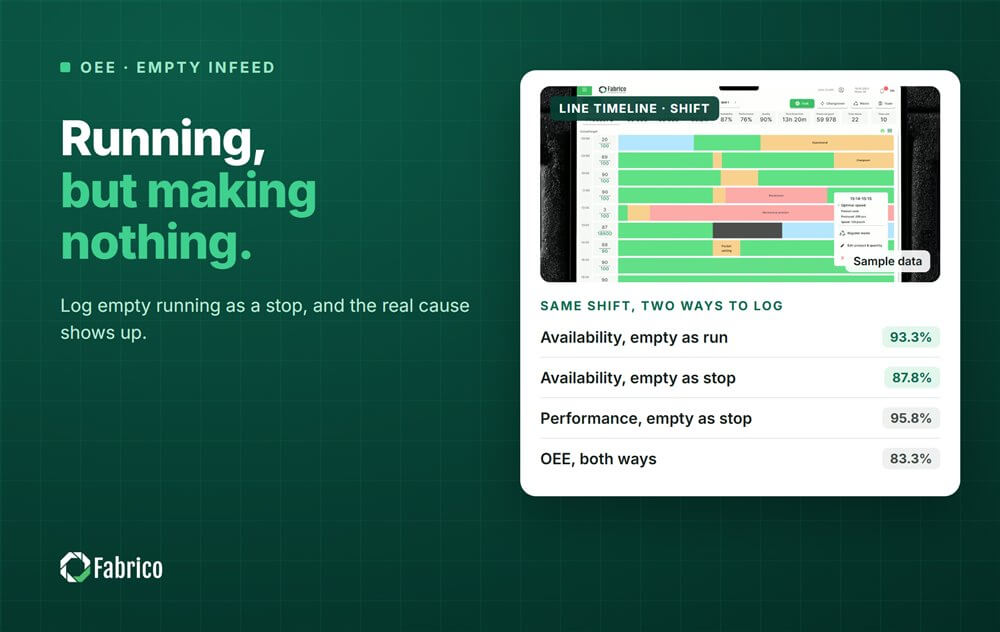
Sample line (illustrative numbers, not a customer): a labeller with 450 minutes of planned time and an ideal cycle time of 1.0 second. The PLC says it ran for 420 minutes. In 25 of them the infeed was empty.
It labelled 22,700 bottles, and 22,500 were good.
| Figure | Empty time as run | Empty time as stop |
|---|---|---|
| Run time | 420 min | 395 min |
| Availability | 93.3% | 87.8% |
| Performance | 90.1% | 95.8% |
| Quality | 99.1% | 99.1% |
| OEE | 83.3% | 83.3% |
- Performance as run: 22,700 / (420 x 60) = 22,700 / 25,200 = 90.1%.
- Performance as stop: 22,700 / (395 x 60) = 22,700 / 23,700 = 95.8%.
- Count check: 22,500 good x 1.0 second = 375 minutes. 375 / 450 = 83.3%.
OEE does not move, because it only depends on good output and planned time. But the second column tells the truth: the labeller ran well, and it lost 25 minutes waiting for bottles.
Where does running empty happen on a packaging line?
- After a jam upstream, while the conveyor between machines drains.
- When a depalletiser or an unscrambler falls behind and gaps open in the stream.
- When caps, labels or film run out and the machine keeps cycling.
- At the start of a shift, while the first product works its way down the line.
Each of these looks like a running machine on the PLC screen. Only the count, a sensor or a camera shows that nothing passed.
Who owns the minutes when a machine runs empty?
Usually the machine upstream that stopped first. On a linked line, an empty infeed is a starved state. Charge it to the cause, and judge the empty machine on its own stops.
Our guide to finding the real constraint on linked packaging lines covers starved and blocked time in detail.
How do you detect running empty?
- Watch the count, not only the run bit. No count for longer than your stop threshold means a stop.
- Add an infeed sensor where product presence matters most.
- Where neither is reliable, a camera over the infeed is evidence of an empty line, and the operator confirms the reason.
- Use one threshold on every machine, so the split between stops and slow running stays fair.
No standard sets the stop threshold. The plant's cutoff decides whether a gap lands in Availability or Performance. Our micro stops guide covers thresholds.
What mistakes do plants make with empty running?
- Trusting the PLC run bit as the only state.
- Chasing speed on a machine that is really starved.
- Charging the empty minutes to the machine that ran empty.
- Different stop thresholds on neighbouring machines.
Where Fabrico fits
Fabrico is a computer vision enabled Manufacturing Performance Platform. OEE and light MES come first. Automatic downtime logging and OEE live by line and shift put the stops on record.
- Automatic downtime logging, so stops are on record without anyone writing them down.
- A camera clip as evidence for a stop, where the signal only says running.
- The operator confirms the reason in one tap, so starved time gets its owner.
See how the camera adds evidence on our camera-based OEE software page. You start on one line, with a baseline and a decision date agreed in advance. There is no free plan and there are no tiers: each plant gets a quote.
Frequently asked questions
Is running empty counted as downtime in OEE?
It should be. A machine running without product makes nothing, so its time is lost. Log it as a stop, usually starved, once no product passes for longer than your stop threshold. If it is left as run time, the loss hides in Performance and looks like slow running.
Does running empty change OEE?
Not on its own, as long as good count and planned time stay the same. It changes the split: as run time, Availability looks high and Performance low. As a stop, Availability falls and Performance rises in proportion. The cause only becomes visible in the second case.
How can I tell if a machine is running empty?
Look at the counter. If the machine reports running but the count does not move for longer than your stop threshold, it is running empty. An infeed sensor or a camera over the infeed makes the state clear, and the operator can confirm the reason.
Who is responsible for empty running?
Usually the machine upstream that stopped first, because the empty machine is starved. Show the minutes in the empty machine's full OEE, but charge them to the cause. Then judge each machine on its own stops, so nobody fixes the wrong problem.
What stop threshold should I use?
No standard sets one. Two settings matter: when a gap with no count becomes a stop, and the minor stop cutoff that splits Availability from Performance. Pick both once and write them down with the reason. Use the same values on every machine, so stops and slow running are split the same way everywhere.
See your line's empty running in a demo
Bring one line and a week of counts. We will show where machines ran empty and which upstream stop caused it.
Related articles








Real Fabrico tiles, sample data.