


 Login
 Blog
ThingWorx Alternatives: Build on a Platform or Run an OEE App

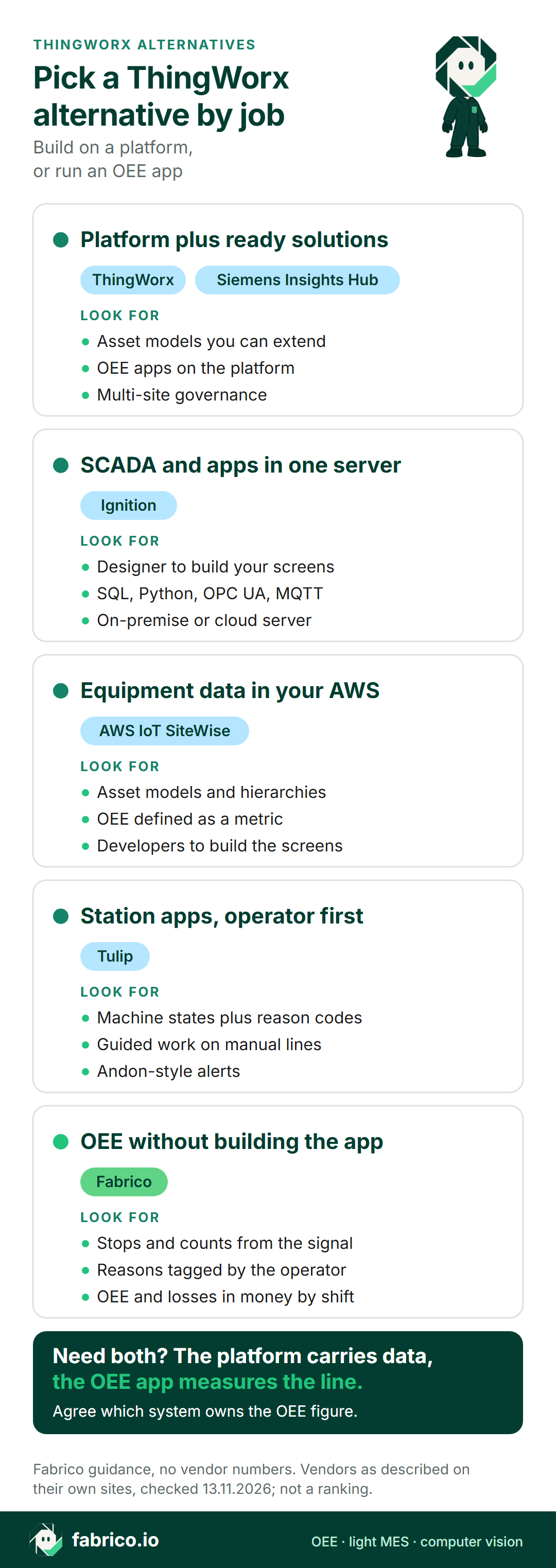
In short: if you have ThingWorx in view but the real goal is OEE and production apps, first decide whether you want to build those apps on a platform or use an OEE application that is ready to run. Platforms such as ThingWorx, Ignition, AWS IoT SiteWise, Siemens Insights Hub and Tulip let your team model assets and build apps. An OEE application with light MES, Fabrico for example, gives you OEE, downtime by cause and losses in money without building the app first.
- ThingWorx is now a Velotic product. Velotic was formed from GE Vernova's Proficy and PTC's ThingWorx and Kepware.
- Velotic calls ThingWorx an industrial IoT platform, with ready solutions such as Real-time Production Performance Monitoring for OEE.
- On a platform, your team owns the OEE logic: what counts as a stop, a planned stop and an ideal cycle.
- Every vendor fact below is taken from that vendor's site on 13.11.2026 and linked where it appears. We list no prices and rank no one.
An engineering manager has ThingWorx on the shortlist because the group already used it for a connected product project. The plant director asks a simpler question: when will we see OEE by line and shift, and the top three reasons we lose time?
That gap is the real choice. A platform can do far more than OEE, but someone has to build and keep the OEE app. A ready OEE tool does less, and starts from the number. Below: what ThingWorx is today, per Velotic's pages, four platform alternatives, and where a ready OEE application fits. We make Fabrico, one of the options here, so treat our section like any vendor's pitch and test it.
What ThingWorx is today, per Velotic (13.11.2026)
ThingWorx has a new owner. Velotic's launch post (31 August 2026) introduces Velotic as a new independent industrial software company that combines GE Vernova's Proficy with PTC's ThingWorx and Kepware, and GE Vernova's Proficy page now reads "We are now Velotic". On 13.11.2026, PTC's old ThingWorx address forwarded to Velotic's ThingWorx page. What Velotic's pages say:
- Platform. ThingWorx is an industrial IoT platform that connects and contextualizes data from machines, systems and enterprise applications. Velotic calls it its industrial intelligence platform.
- Apps. Teams can build, deploy and scale industrial applications, with dashboards, monitoring and visualization.
- Models. Velotic's home page says ThingWorx models assets, systems, processes and their relationships.
- AI. Conversational capabilities, AI agents and operational intelligence drivers.
- Scale. Governance for multi-site deployments.
- Connectivity. Kepware, a sister product, connects machines, control systems and assets.
Velotic also sells ready solutions on ThingWorx. Its Real-time Production Performance Monitoring (RTPPM) page lists prebuilt dashboards for KPIs including OEE, MTBF and MTTR, drill-downs with reason trees to investigate downtime, and views across assets, lines, plants, shifts and crews. Kepware gives RTPPM access to production data from brownfield equipment. Its Digital Performance Management (DPM) page covers bottlenecks, loss prioritization and tracking of corrective actions, from manual and automated data.
Ask in the demo: which parts of RTPPM come configured, which your team builds, and how stop reasons reach the reason tree.
Build on a platform, or run an OEE app?
Most "ThingWorx alternatives" searches are really this question. A platform is the right call when OEE is one of many apps you plan, and you have people to build and own them. A ready OEE app is the right call when the plant needs the number and the loss list first. Our MES vs IIoT platform guide goes deeper.
Comparison table: ThingWorx and five alternatives
Rows paraphrase each vendor's own pages as read on 13.11.2026; the links sit in the sections that follow. Order carries no meaning beyond Fabrico first, since this is our page. A topic missing from a row only means our reading did not surface it, so raise it in the demo.
| Tool | What it is, in its words | Path to OEE, per its site | Question for the demo |
|---|---|---|---|
| ThingWorx (for reference) | Industrial IoT platform, now Velotic | RTPPM solution with prebuilt dashboards | What comes configured? |
| Fabrico | Cloud OEE and light MES | OEE built in, from signal and operator reasons | What reads a station with no PLC? |
| Ignition | Server software for SCADA, IIoT, MES | Apps built in Ignition Designer and modules | Who builds and supports the app? |
| AWS IoT SiteWise | Managed service for equipment data | OEE defined as an asset metric | Who writes the metric and the screens? |
| Siemens Insights Hub | AI analytics for manufacturing data | Insights Hub OEE application | Which data sources feed it? |
| Tulip | Composable platform for frontline work | Machine states plus operator reason codes | Which apps are templates, which built? |
Want to see a ready OEE app on a line like yours? Book a demo and bring a recent week of downtime notes.
Fabrico: a ready OEE app with light MES
This is our product. Fabrico is a cloud-based OEE and light MES platform. Where a platform hands you building blocks, Fabrico comes with the OEE logic, the stop reason screens and the loss reports defined. Per our MES and OEE overview:
- Machine data, three ways. From the PLC, from a Fabrico IoT device with external sensors on older machines, or, at stations without a machine signal, from AI cameras sold as an add-on. Protocols include OPC UA, Modbus, PROFINET, MQTT and EtherNet/IP (machine connectivity).
- Stops with reasons. Connected machines log when their stops start and how long they last. The operator picks the cause on a phone or tablet, and a downtime-by-cause record grows with every shift.
- OEE and losses in money. OEE split into availability, performance and quality for every machine, line and shift, with the losses priced in money; it runs on the web, iOS and Android.
- The camera add-on counts output at manual stations, and its video opens for any moment on the shift timeline. In the standard setup, video from the camera add-on is streamed on request, not stored in Fabrico (how the camera add-on works).
- Maintenance built in. If a stop needs a repair, the technician raises a work order straight from it, against the same machine.
- Data out to your platform. REST API and webhooks, Excel or CSV export, so OEE results can feed a data platform or a group dashboard.
- Rollout. Devices connected in about a month; full rollout in 3 to 4 months.
- Outside Fabrico today: your ERP keeps job dispatching, BOMs, routings and genealogy. On the roadmap, not live: production planning and scheduling, plus a camera add-on that would detect stops and propose a likely reason.
Fits plants that want OEE and downtime by cause on mixed lines without a software project to build the app. EU customers are hosted on AWS in Frankfurt. A one-line pilot is the usual first step, and our OEE software guide lists the points to compare.
Ignition: server software you build on
Inductive Automation's Ignition page calls it one industrial platform for SCADA, IIoT, MES and more. Its pages state, as of 13.11.2026:
- Ignition runs as server software at the center of the plant floor and talks to equipment as well as SQL databases.
- Its stack uses open technologies: MQTT, OPC UA, Python and SQL.
- Ignition Designer is the development environment for building industrial applications for desktops, industrial displays and mobile screens.
- Web clients launch from an on-premise or cloud-based server.
Compared with ThingWorx: both are platforms your team builds on. Ignition's pages start from SCADA and plant-floor integration; ThingWorx's start from contextualized data and industrial apps. See our Ignition OEE review.
Fits plants that have controls engineers or an integrator who want SCADA, data and apps in one environment.
AWS IoT SiteWise: equipment data as a managed cloud service
Amazon's AWS IoT SiteWise page describes a managed service to collect, store, organize and monitor data from industrial equipment at scale. Read on 13.11.2026, its features page says:
- SiteWise Edge runs on local hardware, reads equipment, data servers and historians over protocols including OPC-UA and MQTT, and can define asset metrics such as OEE.
- Asset models represent assets, processes and facilities, with hierarchies within one facility or across several.
- Metrics are computed at user-defined intervals for one asset or rolled up from a group.
- Dashboards come through the SiteWise Grafana plugin, and data reaches BI tools through an ODBC driver.
Compared with ThingWorx: both model assets and compute metrics. SiteWise is an AWS cloud service with an edge component; you build the OEE screens and logic on top.
Fits teams that already run on AWS and want equipment data in their own data lake, with in-house developers.
Siemens Insights Hub: AI analytics with an OEE app
Siemens' Insights Hub page describes AI analytics on equipment and process data to optimize availability, quality, performance and sustainability. Its pages state, as of 13.11.2026:
- Insights Hub OEE automatically measures the OEE of your lines, with detail on availability, performance and quality.
- The page also covers energy and resource use, maintenance, and an Insights Hub Quality Prediction application.
- Insights Hub Production Copilot is described as simplifying how users get insights and act on them, and Copilot Studio lets users define their own skills.
- The page invites MindSphere users to take that investment forward.
Compared with ThingWorx: both pair a platform with ready applications. Insights Hub's pages lead with AI analytics and apps per optimization area.
Fits groups that run Siemens automation, or are moving on from MindSphere, and want analytics apps by topic.
Tulip: composable apps with operator context
Tulip's OEE tracking page calls Tulip a composable platform that connects equipment, enterprise systems and frontline workers. Its pages state, as of 13.11.2026:
- Availability and performance come from machine and PLC data over native OPC UA or MQTT, combined with the reason code an operator enters, broken out by line and by shift.
- Older equipment connects through edge hardware, and manual assembly lines are tracked through guided workflows on a screen.
- Automations can trigger Andon-style alerts when a line stops or OEE drifts out of target.
Compared with ThingWorx: both let you build apps. Tulip's pages put the operator and the station first; ThingWorx's put the data model first. See our Tulip alternatives.
Fits plants that want engineers to build station apps with operator input at the center.
Which ThingWorx alternative fits your plant
- An industrial IoT platform with ready OEE and performance solutions on top: ThingWorx.
- SCADA, data and apps in one server environment: Ignition.
- Equipment data in your own AWS cloud, built by your developers: AWS IoT SiteWise.
- AI analytics apps by topic, close to Siemens automation: Siemens Insights Hub.
- Station apps built around the operator: Tulip.
- OEE, downtime by cause and losses in money without building the app: Fabrico.
A platform and a ready OEE app can run together: the platform carries the data, and a single system publishes the OEE figure. See the IIoT guide and light MES vs full MES. Food or consumer goods plant? Read about computer vision for FMCG manufacturing.
Worked example: one rule, two OEE figures
On a platform, your team writes the OEE rules. One rule that often splits plants is whether a changeover is planned time or a loss. Sample data for one 8 hour shift on a packing line, made up for illustration, with no customer line or product screen behind it: 450 minutes after a 30 minute break, a 45 minute changeover, 40 minutes of other stops, an ideal cycle of 0.5 minutes a unit, 630 units made and 600 good.
Run time is the same in both: 450 minus 45 minus 40 is 365 minutes. Performance is 630 units x 0.5 minutes over 365 minutes, 86.3%. Quality is 600 over 630, 95.2%.
Under rule A, availability is 365 over 450, 81.1%, and OEE is 600 x 0.5 over 450, 66.7%. Under rule B, the changeover leaves planned time, so availability is 365 over 405, 90.1%, and OEE is 300 over 405, 74.1%. Same line, same output, a 7.4 point gap.
Rule A shows the changeover as a loss to attack; rule B hides it. Whichever you choose, write it down before you compare lines, and check how each vendor handles it. The OEE calculation guide has the formula.
What to ask every vendor here
Pick one representative line and ask each vendor, Fabrico included, the same things.
- Build or configure? Which OEE screens, rules and reports come ready, and which your team builds.
- Who owns the app after go-live? Your engineers, an integrator, or the vendor.
- How are changeovers, breaks and short stops counted? Ask to see the rule, not only the dashboard.
- How do stop reasons get in? Operator screen, reason tree, or machine fault codes.
- How does each station report? PLC, sensor, gateway or camera, and what happens at a station without a signal.
- Where does the data go after that? API, export, data lake or ERP, and in which format.
What people ask next
Who owns ThingWorx now?
Velotic. Velotic's launch post describes it as a new independent industrial software company that combines GE Vernova's Proficy with PTC's ThingWorx and Kepware. PTC's old ThingWorx address now forwards to Velotic's ThingWorx page.
Is ThingWorx an OEE software?
Velotic describes ThingWorx as an industrial IoT platform. OEE comes through solutions built on it, such as Real-time Production Performance Monitoring, which lists prebuilt dashboards for KPIs including OEE, MTBF and MTTR.
What are the main alternatives to ThingWorx?
Other platforms buyers compare are Ignition, AWS IoT SiteWise, Siemens Insights Hub and Tulip. If the goal is OEE and downtime by cause without building the app, a ready OEE application such as Fabrico is another route.
Should we build OEE on an IoT platform or buy an OEE app?
Build on a platform when OEE is one of many apps you plan and you have a team to build and own them. Use a ready OEE app when the plant needs OEE and the loss list first. Many groups do both and agree which system owns the OEE figure.
How is Fabrico different from ThingWorx?
ThingWorx is a platform for building industrial apps, per Velotic's site. Fabrico is an OEE and light MES application. It reads stops and counts from the machine signal, takes the reason from the operator, and reports OEE and money lost per line and shift, with a REST API and webhooks to pass data on.
Can Fabrico run next to ThingWorx or another platform?
Yes. The platform can keep carrying machine and enterprise data, while Fabrico measures stops, reasons and line time. Settle which system publishes the official OEE figure first.
Want to see a ready OEE app on a line like yours? Book a demo, or send us a question.
Related articles




Latest from our blog


Real Fabrico tiles, sample data.