


 Login
 Blog
EMQX vs Mosquitto: Pilot Broker, Many-Site Cluster and OEE

In short: EMQX vs Mosquitto comes down to the size of the job: EMQ documents EMQX clustering as multiple EMQX nodes working together as a unified system, with a rule engine and Data Integration beside the broker, while the Eclipse project describes Mosquitto as a broker for the MQTT protocol version 5.0/3.1.1/3.1, set up from one configuration file.
- One-node pilot: a single EMQX node on Docker, or Mosquitto from mosquitto.conf.
- Many sites: EMQX clusters and Cluster Linking, or Mosquitto bridges that remap topic prefixes.
- Neither broker knows what a topic means: a good count sent to a reject topic is delivered as sent, and OEE quality goes wrong.
- Shift plan, rated speed and the operator's stop cause come from an OEE layer above the broker.
Plant data projects hit the broker question early: gateways are ordered, a first line is picked, and someone asks whether Eclipse Mosquitto on a small box will do or EMQX should go in. Both speak MQTT, so the differences sit in scale, rules, security, persistence and who keeps the broker running. Fabrico builds cloud OEE and light MES software that reads from brokers like these; it sells neither. Facts about both products are taken from emqx.com, docs.emqx.com and mosquitto.org, as of 13.11.2026, with a link at each one.
Key takeaways
- EMQ documents EMQX as a clustered platform with a rule engine and Data Integration; the Eclipse project documents Mosquitto as a lightweight broker run from one configuration file, extended by plugins and bridges.
- Choose by the step after the pilot: one line, several regions, rights changed while running, or messages reshaped inside the broker.
- Before counts feed OEE, test queue limits, bridge reconnects, silent link failures and the topic map itself.
- In the sample feed mill below, a swapped topic posted EUR 8,508 a shift of rejects that never happened, at a sample margin, and hid line 2's real EUR 2,292 loss.
- Neither broker knows which topic means a good bag; the topic map review and the OEE layer carry that.
EMQX vs Mosquitto at a glance
What EMQX offers, per EMQ
From EMQ's own documentation and site, as of 13.11.2026:
- Scale. The clustering introduction says EMQX clustering is designed for large-scale and mission-critical applications.
- Many regions. Per the Cluster Linking introduction, Cluster Linking connects separate EMQX clusters, often geographically dispersed, and you name the topics to be replicated.
- Rules. The rule engine page says the rule engine works with Data Integration to extract, filter, enrich, transform and store IoT data, and is especially useful for rerouting incoming messages.
- Topic rewrite. The topic rewrite guide builds each rule from a filter and a regular expression, in publish, subscribe and all variants.
- Access. The authentication overview lists X.509 certificates, JWT, username and password, MQTT 5.0 enhanced authentication and PSK. The authorization guide covers publish and subscribe permissions per client.
- Persistence and hosting. Per the durability introduction, Durable Sessions keep sessions and messages on disk and resume after a node restart. The EMQX Cloud page describes a fully managed MQTT service.
What Eclipse Mosquitto offers, per mosquitto.org
From the project's own site and manual pages, as of 13.11.2026:
Mosquitto sits under the Eclipse IoT top-level project, and its Eclipse project page says it "provides a lightweight server implementation of the MQTT protocol that is suitable for all situations from full power machines to embedded and low power machines" (accessed 14.11.2026).
- The broker and tools. The mosquitto(8) manual covers the broker; the project homepage adds a C library for MQTT clients and the mosquitto_pub and mosquitto_sub command line tools.
- Configuration. Settings load from a file with -c. Without one, the manual says the broker listens on port 1883 bound to the loopback interface, so networked gateways need a written configuration.
- Login. The authentication methods page offers password files, authentication plugins and anonymous access, and since Mosquitto 2.0 you must choose explicitly before clients connect.
- Topic rights. In the mosquitto.conf manual, an acl_file controls client access to topics, pattern lines substitute %c for the client id, and per_listener_settings gives each listener its own rules.
- Bridges and plugins. A bridge topic line can carry local and remote prefixes that remap topics between brokers. The plugin option loads external modules for authentication, access control and other features.
- Persistence. An in-memory database is saved to disk every autosave_interval seconds or, with autosave_on_changes, after a count of changes.
EMQX vs Mosquitto, job by job
MQTT.org calls MQTT an extremely lightweight publish/subscribe messaging transport, so gateways talk to either broker the same way. What changes is the work around it.
A single-node pilot
One line, a few topics, one subscriber. EMQ's Docker page walks through a single EMQX node; Mosquitto runs as one process from one file, on hardware down to low power single board computers. The pilot's topic names, client ids and permissions become the draft plant standard, because later lines copy them.
A cluster for many sites
With ten plants: a broker per site or a central service, and which topics travel? EMQX documents nodes acting as one system, and Cluster Linking for separate regional clusters. Mosquitto documents bridges, whose prefixes can add or strip a site level as topics cross. Placement is covered in where plant data should be processed.
Rules and data integration
EMQX documents processing inside the broker, with rules that filter and reroute messages into Data Integration. Mosquitto loads plugins. If a database must receive plant data, ask which component carries it and who maintains that after the integrator leaves.
Security
One identity per gateway, limited to its line's branch of the tree. EMQX pairs its authentication mechanisms with authorization sources such as files, databases or an HTTP service. Mosquitto uses password files or plugins, and ACL patterns where %c ties a client id to a topic level.
Persistence
EMQX Durable Sessions survive a node restart from disk; Mosquitto saves its in-memory database to persistence_location on a timer or after changes. Make the pilot setting match production.
Who runs it
Self-hosted EMQX belongs to the plant or IT team; EMQX Cloud is operated by EMQ. Mosquitto is operated by whoever installs it. Agree who updates it, who handles expiring certificates and who answers the night call.
Topic names, which neither broker corrects
The MQTT 5.0 specification says topic names and filters are case sensitive, and the server must not normalise them when matching. Line2 and line2 are two topics, and a count sent to the wrong branch arrives where it was sent. EMQX topic rewrite and Mosquitto prefixes rename topics in bulk; neither knows a good bag from a rejected one. The unified namespace guide covers agreeing a topic tree.
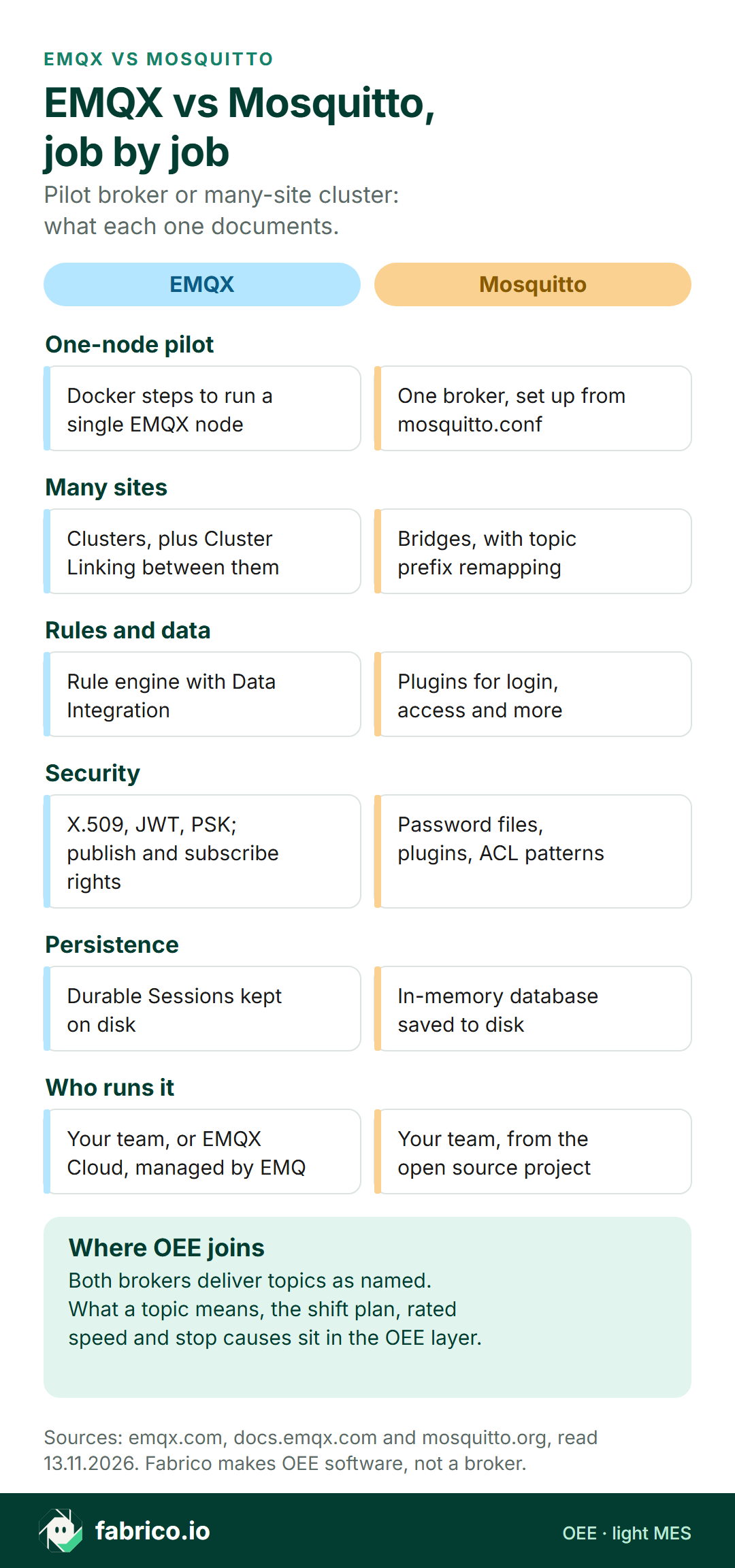
Text version of this infographic
- Pilot broker or many-site cluster: six jobs, with what EMQX and Mosquitto each document.
- One-node pilot. EMQX: Docker steps to run a single EMQX node. Mosquitto: One broker, set up from mosquitto.conf.
- Many sites. EMQX: Clusters, plus Cluster Linking between them. Mosquitto: Bridges, with topic prefix remapping.
- Rules and data. EMQX: Rule engine with Data Integration. Mosquitto: Plugins for login, access and more.
- Security. EMQX: X.509, JWT, PSK; publish and subscribe rights. Mosquitto: Password files, plugins, ACL patterns.
- Persistence. EMQX: Durable Sessions kept on disk. Mosquitto: In-memory database saved to disk.
- Who runs it. EMQX: Your team, or EMQX Cloud, managed by EMQ. Mosquitto: Your team, from the open source project.
- Where OEE joins. Both brokers deliver topics as named. What a topic means, the shift plan, rated speed and stop causes sit in the OEE layer.
- Sources: emqx.com, docs.emqx.com and mosquitto.org, read 13.11.2026. Fabrico makes OEE software, not a broker.
Match the first job
Pick the job due first, then read across.
| First job | Look at |
|---|---|
| One line's counts on a screen, on a small box | A single EMQX node on Docker, and Mosquitto with one mosquitto.conf |
| Plants in several regions sharing chosen topics | EMQX Cluster Linking, and Mosquitto bridges with prefixes |
| Filtering or rerouting messages inside the broker | The EMQX rule engine, and Mosquitto plugins |
| Each gateway kept to one branch of the tree | EMQX authorization, and Mosquitto ACL patterns with %c |
| Sessions that survive a broker restart | EMQX Durable Sessions, and Mosquitto persistence settings |
| Shift OEE with stop causes from the line | An OEE application subscribed to either broker |
Weighing a modelling hub too? Read HighByte vs HiveMQ; for the protocol question itself, see OPC UA vs MQTT.
Decision matrix: EMQX or Mosquitto for your plant
Find the rows that match the next twelve months, not only the pilot. Most rows name a page on each side, because both projects document the job; the pilot test in the last column is what separates them for your plant.
| If this is you | Look first at | Why (vendor page) | Prove it in the pilot by |
|---|---|---|---|
| One line, one box, results this month | Either | EMQX single node on Docker; Mosquitto from one configuration file | Rebuilding the pilot broker from its saved config on a spare box |
| Plants in several regions share chosen topics | EMQX Cluster Linking or Mosquitto bridges | Cluster Linking names the topics to replicate; bridge topic lines with prefixes | Sending one line's branch to a second site and checking names on arrival |
| The central team must know when a site link fails | Both | EMQX bridge fallback actions; Mosquitto bridge notifications, 1 or 0 | Cutting a site link and timing the alert |
| Gateway rights change while the broker runs | Both | EMQX authorization sources; Mosquitto Dynamic Security: clients, groups, roles | Adding, then revoking, a test gateway mid-shift |
| Messages must be filtered or rerouted inside the broker | EMQX rule engine, or a Mosquitto plugin | EMQX rules with Data Integration; Mosquitto plugin option | Routing reject counts to a quality topic on a test line |
| The OEE subscriber may be down for a while | Both | EMQX Durable Sessions on disk; Mosquitto queue, 1,000 messages per client by default | Stopping the subscriber for 30 minutes and counting what arrives |
| The broker must sit on a small box by the line | Mosquitto, or EMQ's edge broker | Mosquitto on low power single board computers; EMQX Edge for the industrial edge | Running a full shift's traffic on the actual box |
| OEE with stop causes from the line | An OEE or light MES app on either broker | MQTT.org: a publish/subscribe transport | Matching one shift's stops to the causes operators chose |
Failure modes to test before the counts feed OEE
Each fault below can put a wrong figure on the OEE screen. Trigger each on purpose and record what the screen showed and how long it took anyone to notice.
| Fault | What OEE shows | Setting to check |
|---|---|---|
| Good and reject topics swapped in a gateway map | Quality collapses on one line | Divert bags by hand and watch which topic moves (worked example below) |
| Subscriber down longer than its queue | Shift totals short after the outage | max_queued_messages on Mosquitto, Durable Sessions on EMQX; test past the limit |
| Bridge reconnects with a clean session | A burst of old retained states | Mosquitto's cleansession warning; set it on purpose |
| Site link fails without a sound | Last state frozen on the central screen | Bridge notifications; EMQX fallback actions |
| Old gateway sessions never expire | Nothing, until the broker runs short of memory | persistent_client_expiration |
The mosquitto.conf manual is plain about three of these (accessed 14.11.2026). The queue holds "the maximum number of QoS 1 or 2 messages to hold in the queue (per client) above those messages that are currently in flight", 1,000 by default. Setting a bridge's clean session to true "may cause a large amount of retained messages to be sent each time the bridge reconnects". With no persistent_client_expiration set, "the default if not set is to never expire persistent clients". Bridge notifications publish 1 while the connection is active and 0 when it has failed, using the Last Will and Testament feature, so a central rule can mark a site as unknown.
Treat either broker as OT equipment. NIST's SP 800-82 Rev. 3, dated September 2023, describes typical OT topologies, common threats and countermeasures, and ISA presents the ISA/IEC 62443 series as the standards for securing industrial automation and control systems (each accessed 14.11.2026). Put the broker, its gateways and the OEE subscriber in the plant's zone plan before line 1 publishes.
Where OEE and stop causes fit
A topic such as mill1/bagging/line1/count/good carries a number. Turning it into OEE takes the planned minutes for the shift, an ideal rate for the feed being bagged, the reject count, and a cause for each long pause, given by a person at the line. Run state and counts are machine data, which either broker moves well. Planned time, rates and causes are plant decisions and human input, kept in OEE software or a light MES; the OEE calculation guide shows how the three factors multiply.
The topic map belongs on that list. The specification defines the plus sign as a wildcard that matches one topic level, so one subscription to mill1/bagging/+/count/good picks up every line, and one mislabelled topic flows straight into the figures.
Worked example: line 2's good bags land on the reject topic
Sample data for an invented animal feed mill; no customer, no product screen. Two open-mouth bagging lines fill 25 kg bags, each with a checkweigher whose gate diverts off-weight bags. Gateways publish count/good and count/reject per line, and the OEE app adds the two for the total.
Line 2 got a new PLC in a retrofit. Its counter for bags that passed the checkweigher is named RejGate_Pass, inside a block called RejectGate; diverted bags are counted by RejGate_Out. Whoever mapped line 2's gateway matched on "Rej" and swapped them: good bags went to line2/count/reject, rejects to line2/count/good. The rights for gw-line2 covered all of line 2, so the broker accepted both.
The shift runs 06:00 to 15:00, 540 minutes, with 40 planned minutes for a break and a sieve check: 500 minutes of planned production time. At an ideal 18 bags a minute, each line could make 500 x 18 = 9,000 bags.
| Sample shift | Line 1 | Line 2, as logged | Line 2, map fixed |
|---|---|---|---|
| Stopped minutes | 55 | 70 | 70 |
| Availability | 445 / 500 = 89.0% | 430 / 500 = 86.0% | 86.0% |
| Total bags | 7,480 | 110 + 7,090 = 7,200 | 7,200 |
| Performance | 7,480 / 8,010 = 93.4% | 7,200 / 7,740 = 93.0% | 93.0% |
| Good bags | 7,400 | 110 | 7,090 |
| Quality | 7,400 / 7,480 = 98.9% | 110 / 7,200 = 1.5% | 7,090 / 7,200 = 98.5% |
| OEE | 82.2% | 1.2% | 78.8% |
The arithmetic. Ideal output in run time is 445 x 18 = 8,010 bags on line 1 and 430 x 18 = 7,740 on line 2. Line 1: 89.0% x 93.4% x 98.9% = 82.2%, the same as 7,400 good of 9,000 possible. Line 2 fixed: 86.0% x 93.0% x 98.5% = 78.8%, or 7,090 of 9,000. As logged, 110 of 9,000 is 1.2%.
Availability and performance stayed right, because the total was still good plus reject; quality took the whole error. The area screen pools both lines: the day shift read 7,510 good of 14,680 bags, 51.2% quality. On the late shift line 2 was planned off and line 1 ran to the same sample figures, so the area read 98.9%. The number swung from shift to shift, and the first suspect was line 1's checkweigher. With the map fixed, the day shift reads 14,490 of 14,680, or 98.7%.
The clue and the fix. Line 2's checkweigher display showed 110 rejects while the screen claimed 7,090. The team fixed the gateway map, then tested both lines by diverting five bags by hand and watching which topic moved. EMQX authorization or a Mosquitto ACL pattern keeps gw-line2 out of line 1's branch, and a rewrite rule or bridge prefix can rename a wrong level. Neither knows that RejGate_Pass means good; that check belongs to the topic map review and to an OEE rule that flags an abnormal reject share.
In euros. Assume each 25 kg bag earns a contribution margin of EUR 1.20, a sample figure made up for this page. With the map fixed, line 2 made 7,090 good bags of 9,000 possible: 1,910 bags, or EUR 2,292 a shift. That splits into stops 70 x 18 = 1,260 bags (EUR 1,512), slow running 7,740 minus 7,200 = 540 bags (EUR 648) and 110 rejects (EUR 132). Line 1 lost 1,600 bags, EUR 1,920: stops 990, speed 530, rejects 80.
As logged, line 2's quality loss read 7,090 bags, EUR 8,508 a shift of rejects that never existed. Line 2 runs the day shift only, 22 shifts in a sample month. Had the swap stood for a month, the reports would have carried EUR 187,176 of phantom rejects, while the real loss, EUR 50,424 a month or EUR 605,088 over 264 shifts a year, sat behind them, mostly in stop time. That is the cost of a quality team checking line 1's checkweigher while the stops on line 2 wait.
Where Fabrico fits for an EMQX or Mosquitto buyer
Fabrico is not a broker, gateway, SCADA, HMI or DataOps tool. Beside EMQX or Mosquitto it plays the top box in the first diagram: the application that turns counts into OEE and keeps the causes.
- Signals. The machine side is a PLC tag, sensor pulse or counter value. The connectivity FAQ names MQTT beside OPC UA, Modbus, PROFINET and others.
- Causes. Operators tap the reason for a stop on a tablet or phone; reports turn that into OEE, downtime and a money figure for lost time, split by line and shift, on web and mobile (solution overview).
- Manual stations. For a manual step with nothing to read, Fabrico's camera add-on counts output only. Suggesting stop reasons is Roadmap for the camera add-on. Where a camera covers the line, the video for the minute of a stop can be opened from the shift timeline; it is streamed on request and not stored. Read the computer vision feature, or cameras on FMCG lines.
- Export. Data leaves as Excel or CSV files, through webhooks or over the REST API.
Book a demo to watch planned time, rated speeds and operator causes meet machine counts.
Questions to ask both projects
- How do we keep each gateway inside one branch of the topic tree, and keep that rule identical across plants?
- Which persistence setting do you advise for a pilot, and does it match what production will run?
- Where should message filtering or routing run, inside the broker or in another component, and who maintains it?
- How do sites share topics, through clusters, Cluster Linking or bridges, and what happens to a site prefix on the way?
- Which login method suits PLC gateways that cannot renew certificates on their own?
- How do we test a new line's topic map before its counts reach a report?
For the application above the broker, the OEE software guide lists what to check before signing.
What to do this week
A plant, controls or CI team can get through these in a week, before either broker goes in:
- Write the topic map down. One sheet per line: each PLC tag, the topic it feeds and who checked it. Mark any tag whose name could be read two ways.
- Run the five-bag test on every line already publishing: divert a few units by hand and confirm the reject topic moves, not the good one.
- Read your settings against the failure table. Queue size, clean session on bridges, client expiry and persistence, on the broker you run today.
- Decide the step after the pilot. Pick the matrix rows for the next twelve months and send them, with the questions above, to whoever will run the broker.
- Put a euro figure on a bad map. Take one line's margin per unit from finance and work out a month of phantom rejects; that number sizes the time worth spending on map reviews.
What people ask next
Should a pilot start on EMQX or Mosquitto?
Look at the step after the pilot. For one line, EMQ documents a single EMQX node on Docker, and Mosquitto runs from one mosquitto.conf. If many sites follow, compare EMQX clusters and Cluster Linking with Mosquitto bridges first.
Does Mosquitto support clustering?
The Mosquitto manual describes bridging: brokers share chosen topic patterns, with optional prefixes that remap topics. EMQX documents clusters of nodes acting as one system, plus Cluster Linking between clusters.
What does the EMQX rule engine do?
Per EMQ, it works with Data Integration to extract, filter, enrich, transform and store IoT data, and suits rerouting incoming messages. Mosquitto adds features through plugins it loads.
Can a wrong topic name change OEE?
Yes. In this page's sample feed mill, line 2's good bags went to the reject topic. Line 2 quality read 1.5% instead of 98.5%, and area quality swung between 51.2% and 98.9% until the topic map was fixed.
Does EMQX or Mosquitto calculate OEE?
Both carry state and count messages. The shift plan, ideal rate and the operator's stop cause usually live in an OEE application or MES that subscribes to the broker.
Does Fabrico replace EMQX or Mosquitto?
No. Fabrico is OEE and light MES software that would sit above either broker, taking machine stops and counts, adding the cause the operator chooses, and exporting results by webhooks, REST API or Excel and CSV.
Want to see broker counts become shift OEE with operator causes? Book a demo.
Related articles


Latest from our blog



Real Fabrico tiles, sample data.