


 Login
 Blog
HighByte vs HiveMQ: Modelling Hub or MQTT Backbone for a UNS?

In short: HighByte vs HiveMQ is a choice between a data modelling hub and an MQTT broker platform, and many UNS designs use one of each. HighByte describes Intelligence Hub as DataOps software for industrial data modelling; it gives plant data context, moves it on, and includes its own MQTT broker. HiveMQ builds its industrial data platform around an enterprise MQTT broker, with HiveMQ Edge as a gateway next to the machines.
- HighByte puts its weight on shape: models, a Namespace hierarchy for a Unified Namespace, pipelines and a REST Data Server.
- HiveMQ puts its weight on transport: a clustered broker for MQTT 3.1.1 and 5.0, payload checks in Data Hub, and extensions to streaming and databases.
- Both reach the machines: HighByte reads OPC UA and Modbus TCP sources directly, HiveMQ Edge converts device protocols into MQTT.
- OEE needs three things neither a broker nor a model holds by itself: planned time, an ideal rate per product and the stop cause an operator records at the line.
Picture a data team sketching a Unified Namespace for five plants. HiveMQ answers "how do messages travel reliably between everything?" HighByte answers "what does each message mean, and what belongs next to it?" The two overlap at the broker, which is where buyers get confused.
Fabrico builds OEE software and a light MES, the kind of application that subscribes to a UNS, and we sell neither product. HighByte facts below come from highbyte.com and the HighByte user guide; HiveMQ facts come from hivemq.com and docs.hivemq.com. All of them are as of 13.11.2026.
HighByte vs HiveMQ at a glance
Every cell summarises a vendor page linked further down, read on 13.11.2026.
| Job | HighByte Intelligence Hub | HiveMQ |
|---|---|---|
| Self-description | DataOps software for industrial data modelling | Industrial data platform, from the machine to the decision |
| Machine side | Reads OPC UA servers, Modbus TCP devices, MQTT and Sparkplug sources | HiveMQ Edge adapters for OPC UA, Modbus, Siemens S7, BACnet |
| Structure | Models, instances and Namespaces to design a UNS | ISA-95 topic prefixes in HiveMQ Edge; schemas in Data Hub |
| Broker | Built-in MQTT broker over TCP or WebSocket | HiveMQ Broker for MQTT 3.1.1 and 5.0, masterless cluster |
| Onward | Pipelines, cloud connections, REST Data Server | Extensions for Kafka, Kinesis, PostgreSQL, MongoDB, Snowflake |
| Where it runs | Edge, on-premises data centres or cloud | HiveMQ Cloud, or self-managed on Kubernetes or OpenShift |
What HighByte Intelligence Hub offers, per HighByte
HighByte's homepage describes no-code DataOps software that runs at the edge and prepares plant floor data for analysis in the cloud, and lists the components to build a UNS. As of 13.11.2026:
- Sources. The connections page says the hub can browse tags on OPC UA devices, read sensors and protocol gateways over Modbus TCP, and subscribe to an MQTT broker for a JSON payload or a Sparkplug metric, with device data coming from PLCs, controllers, RTUs, sensors, SCADA and HMIs.
- Models and Namespaces. The Intelligence Hub page talks of models that standardise and contextualise industrial data, and of Namespaces used to design and govern a UNS. In the user guide, a namespace organises sources of data into a logical hierarchy, where each node holds one source such as an input, an instance or a callable pipeline.
- Built-in broker. HighByte calls its broker a critical component for building a local UNS inside the factory. The guide's MQTT broker settings cover authentication, TCP or WebSocket endpoints, and system topics that report broker state, connected clients and active topics.
- Other brokers. The MQTT connection reads and writes messages on MQTT brokers, with fallback brokers if the primary fails. The Sparkplug connection reads and writes Sparkplug data and can act as primary host. The UNS Client shows any broker's topics as a tree.
- Onward and where it runs. A REST Data Server acts as an API gateway for industrial data, and the hub runs at the edge, in on-premises data centres or in the cloud.
What HiveMQ offers, per HiveMQ
HiveMQ's homepage calls HiveMQ the industrial data platform for agentic AI. Its platform page sets out four stages, connect, contextualise, analyse and act. As of 13.11.2026:
- HiveMQ Broker. The broker page describes reliable, event-driven messaging between devices and enterprise systems, full support for MQTT 3.1.1 and 5.0, a masterless cluster that grows or shrinks without downtime, and messages persisted to disk. The broker documentation also lists MQTT 3.1 and an extension framework for custom integrations.
- Deployment. The broker page lists HiveMQ Cloud as fully managed, and self-managed options for private, hybrid and public cloud, with images for Kubernetes, OpenShift and DC/OS.
- HiveMQ Edge. The Edge page calls it an MQTT gateway and protocol converter on standard hardware. The Edge documentation lists adapters including OPC UA, Modbus, Siemens S7 and BACnet, a two-way bridge to remote brokers, and topic prefixes in a hierarchy that adheres to ISA-95.
- Data Hub. The Data Hub documentation says it defines how MQTT data and client behaviour are handled in the broker, and validates messages against JSON Schema or Protobuf.
- Extensions. The extensions page names Kafka, Google Pub/Sub and Amazon Kinesis, plus databases such as PostgreSQL, MongoDB and Snowflake.
HiveMQ's UNS Essentials page calls a UNS the structure and events of your business, reached through one interface such as an MQTT broker or a database.
HighByte vs HiveMQ, job by job
MQTT is the common ground. MQTT.org calls it an OASIS standard messaging protocol for the Internet of Things, an extremely lightweight publish/subscribe transport. Both vendors speak it; they build different things around it.
Getting PLC data onto MQTT. HiveMQ Edge converts device protocols at the edge; HighByte reads OPC UA and Modbus TCP and publishes the modelled result. Compare adapter by adapter.
Deciding what a topic means. HighByte gives the hierarchy its own workspace, Namespaces. HiveMQ Edge prefixes topics with an ISA-95 hierarchy, and Data Hub can reject payloads that break a schema. ISA describes ISA-95 as standards for integrating logistics systems with manufacturing control systems, which is why topic trees borrow its levels (our ISA-95 guide).
Carrying messages for many clients. This is HiveMQ's centre of gravity: a clustered broker, persistence, TLS and mutual TLS. HighByte's broker serves a local UNS inside a factory, and its MQTT connection can publish to another broker with failover. Ask each vendor what client count and message rate they have tested for your design.
Feeding the systems above. HighByte uses pipelines, cloud connections and its REST Data Server; HiveMQ uses extensions. See OPC UA vs MQTT and edge vs cloud shop floor data.
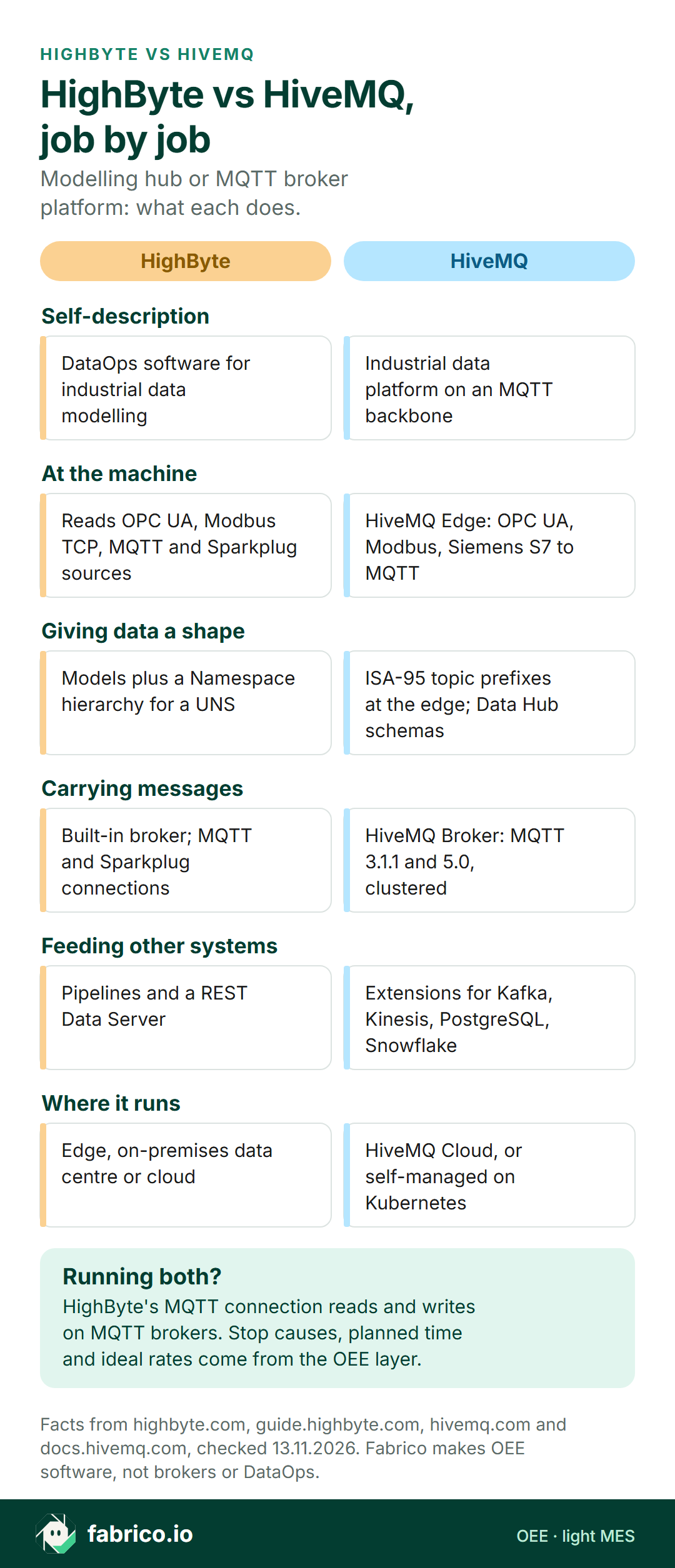
Text version of this infographic
- Self-description. HighByte: DataOps software for industrial data modelling. HiveMQ: Industrial data platform on an MQTT backbone.
- At the machine. HighByte: Reads OPC UA, Modbus TCP, MQTT and Sparkplug sources. HiveMQ: HiveMQ Edge: OPC UA, Modbus, Siemens S7 to MQTT.
- Giving data a shape. HighByte: Models plus a Namespace hierarchy for a UNS. HiveMQ: ISA-95 topic prefixes at the edge; Data Hub schemas.
- Carrying messages. HighByte: Built-in broker; MQTT and Sparkplug connections. HiveMQ: HiveMQ Broker: MQTT 3.1.1 and 5.0, clustered.
- Feeding other systems. HighByte: Pipelines and a REST Data Server. HiveMQ: Extensions for Kafka, Kinesis, PostgreSQL, Snowflake.
- Where it runs. HighByte: Edge, on-premises data centre or cloud. HiveMQ: HiveMQ Cloud, or self-managed on Kubernetes.
- Running both? HighByte's MQTT connection reads and writes on MQTT brokers. Stop causes, planned time and ideal rates come from the OEE layer.
Match the first job: which product to open first
When the opening task is a shared broker for many plants, look at HiveMQ; when it is turning raw tags into line models, look at HighByte; when both are on the plan, put the two side by side.
| Opening task | Look first at |
|---|---|
| One broker that many sites, apps and clients share | HiveMQ Broker |
| Raw tags that need names, units and line context | HighByte models and instances |
| Designing the UNS hierarchy and mapping sources into it | HighByte Namespaces, next to HiveMQ Edge topic prefixes |
| Rejecting payloads that break the agreed format | HiveMQ Data Hub schemas |
| Getting OPC UA or Modbus machines onto MQTT | HiveMQ Edge adapters and HighByte connections, side by side |
| Modelled data published into a shared broker | Both: HighByte shapes the payload, HiveMQ carries it |
| OEE figures and stop causes per shift | An OEE application or light MES on top |
Where OEE and stop causes fit in a UNS
A topic such as plant2/hall1/line4/wrapper/state can say the flow wrapper is stopped. A HighByte model can add the product and the shift. Neither knows why the wrapper stopped, how long the line was meant to run, or how fast it should run that product.
| OEE input | Usual origin | On the UNS? |
|---|---|---|
| Run and stop state | PLC value, published through HiveMQ Edge or HighByte | Yes, as a topic or model attribute |
| Good and reject count | Counter or sensor; rejects from the line's reject signal | Yes, if a source publishes it |
| Planned production time | Shift pattern, breaks and planned cleans | Only if a system publishes it |
| Ideal rate per product | Rated speed for each pack size | Only if a system publishes it |
| Stop cause | Picked by the operator from an agreed list | Only after a person records it |
HiveMQ's platform page names higher OEE and yield among its outcomes. The team still decides which application owns the shift plan, rates and reason list (see our OPC UA for OEE guide).
Where Fabrico fits beside a UNS
Fabrico does not sell SCADA, HMI, MQTT brokers, edge gateways or DataOps software. Fabrico itself is an OEE application in the cloud with light MES on top. Next to HighByte or HiveMQ it does one job: it turns machine signals and the operator's reason into OEE, downtime and lost money for each line and shift.
Signals in. Fabrico takes machine signals from a PLC, a sensor or a counter. MQTT sits on the protocol list of our machine connectivity page, beside OPC UA and Modbus, and each project begins with a review of the machines to agree a route for each one. Where a step is manual, or a machine has no signal worth using, output is counted by the camera add-on, which counts output only (stop-reason suggestion is Roadmap), and its video is streamed on request, not stored. See the camera add-on page and our computer vision guide for FMCG lines.
Context out. Operators pick the stop reason on a tablet or phone at the line, and results appear in the web app and the iOS and Android apps, as the Fabrico overview describes. Data leaves through a REST API, webhooks and Excel or CSV export, so a data team can pull stop causes into its own pipelines as one more UNS source. Prove that path in a pilot.
Bring your topic tree or a list of your HighByte models to a demo, and we will mark the spot where shift plans and operator reasons enter it.
Worked example: one wrapper shift through the UNS
Sample figures for a made-up plant, not from any customer or product screen. A biscuit flow-wrap line runs a 600 minute day shift, with 45 planned minutes for a break and a hygiene clean, leaving 555 minutes of planned time. The 200 g pack has an ideal rate of 55 packs a minute, so the ceiling is 555 x 55 = 30,525 packs. HiveMQ Edge converts the wrapper PLC's OPC UA values into MQTT, the broker holds them under the line 4 topic, and a HighByte model adds product and shift.
The arithmetic. The state topic shows 96 stopped minutes, so the line ran 555 minus 96 = 459 minutes: availability 459 / 555 = 82.7%. In 459 minutes the ideal is 25,245 packs; the count topic shows 22,980, so performance is 91.0%. The checkweigher's reject signal counts 260, leaving 22,720 good packs: quality 22,720 / 22,980 = 98.9%. OEE is 82.7% x 91.0% x 98.9% = 74.4%, the same as 22,720 of 30,525 (OEE calculation).
The 45 planned minutes and the 55 packs a minute were set by the planner and by the product's rated speed, not by any machine topic. The 96 minutes became useful once operators split them: film splice 31, infeed jam 24, waiting for product 23, size change 18.
Questions to ask both vendors
Send HighByte and HiveMQ the same controller list and draft topic tree, then ask:
- Which of our controllers do you reach directly, and which need a gateway or OPC UA server in front?
- Where is the topic hierarchy defined, and who approves a change once plants depend on it?
- How are payload formats checked, and what happens to a message that fails?
- What is buffered, and where, when a site loses its link to the central broker?
- If we run both, which product owns topic names and which owns the payload model?
- How does one configuration change roll out to twenty plants, and how do you undo it?
Our OEE software guide covers the checks for the application layer above the UNS.
What people ask next
Is HighByte an MQTT broker?
HighByte Intelligence Hub includes a built-in MQTT broker, which HighByte calls a critical component for building a local UNS inside the factory. Its main job, per HighByte, is DataOps: modelling, contextualising and moving data. Its MQTT connection can also read from and write to other MQTT brokers.
Can HighByte and HiveMQ work together?
The pieces fit on paper. HighByte's guide describes MQTT and Sparkplug connections that read and write data on MQTT brokers, and HiveMQ's broker page states full support for MQTT 3.1.1 and 5.0. Ask both vendors for a tested reference setup with your payload format and topic tree.
Which one builds the Unified Namespace?
Both speak to it. HighByte offers Namespaces to design and govern a UNS, plus its own broker. HiveMQ describes a UNS as reached through one interface such as an MQTT broker, and HiveMQ Edge can prefix topics with an ISA-95 hierarchy. A team can split the job: hierarchy and models in one product, the shared broker in the other.
Does either one calculate OEE?
The OEE arithmetic usually runs in an OEE, light MES or MES application. HiveMQ's platform page names higher OEE among its outcomes as a result, and HighByte models can carry state and counts per line. Planned time, the ideal rate per product and the stop cause still come from a shift plan, a rated speed and the people at the line, usually held in an OEE, light MES or MES application.
How does Fabrico relate to HighByte and HiveMQ?
Fabrico is an OEE and light MES application and sells no brokers, gateways or DataOps software. It takes machine signals from a PLC, sensor or counter, counts output with the camera add-on where there is no usable signal, records the stop cause the operator picks, and sends data out through a REST API, webhooks and Excel or CSV export.
Want to see a stop cause from the line arrive as one more field next to your topic tree? Book a demo.
Related articles





Real Fabrico tiles, sample data.