


 Login
 Blog
Amper Alternatives for CNC and Job Shops: Sensors, Jobs and Stop Causes

In short: Amper alternatives differ in how machine data is collected, who explains the lost minutes, and how tightly the result ties to ERP jobs. Amper is ECI Software Solutions' production monitoring and intelligence platform for manufacturers, with sensors on the machines, an operator touchscreen and ERP-linked jobs. The options here are MachineMetrics, FourJaw, Datanomix and Fabrico.
- Amper's pages describe non-invasive sensors, aggregators, PLC integrations and hardware-free linked assets.
- Operators log downtime, scrap and setups on a touchscreen; add-on modules cover scheduling, issues and maintenance.
- The split that matters between vendors: sensor-first monitoring, CNC job and profit data, an execution platform, or OEE by cause with losses in money.
- Each statement about a vendor is linked to that vendor's own page, read on 13.11.2026.
Take a contract machining shop with 28 CNC lathes and mills, a few older manual machines, a deburring and packing bench, and an ERP that holds the jobs. The owner quotes on standard cycle times, and margins are thinner than the quotes say. Somewhere between setup, waiting for material and slow cycles, a third of the shift disappears.
Amper is on the list because it is built for job shops, OEMs and contract manufacturers, and because ECI also sells ERP to shops like this one. First comes what ECI publishes about Amper; after that MachineMetrics, FourJaw, Datanomix and Fabrico, which is our product, each sorted by the job it is built around.
What Amper is (as of 13.11.2026, per ecisolutions.com)
Amper is listed among the manufacturing products of ECI Software Solutions, next to ECI's ERP, MES and APS products, and its pages sit on ECI's site. The Amper product page calls it a production monitoring and intelligence platform designed for manufacturers, including job shops, OEMs and contract manufacturers. As of 13.11.2026, ECI's Amper pages say:
- Connecting machines. Non-invasive sensors, aggregators, PLC integrations and hardware-free linked assets pull data from machines, people or processes. The Amper features page describes electrical sensors that monitor any machine that uses power, and a secure, encrypted cellular connection to the cloud.
- Monitoring and OEE. IoT sensors track uptime, downtime and cycle counts; the features page adds real-time scoreboards, automated cycle counting and OEE analytics by availability, performance and quality.
- Operators. A touchscreen lets operators capture downtime, scrap and setups. The operator interface, which ECI calls the Copilot, shows job progress, shift targets and downtime prompts, with Andon calls for maintenance, tooling and quality.
- ERP and scheduling. Pre-built ERP and MES integrations link jobs, parts and production standards to machine signals. Smart scheduling builds job completion forecasts from live performance, with drag-and-drop changes.
- AI. A Daily Briefing compares output with potential, Trend Analysis watches margins, demand, delivery and supply, and users can ask questions of their data in plain language.
- Teams. The Amper solutions page splits the use by operations, continuous improvement and P&L leaders, with a cost savings dashboard for CI projects.
Worth asking ECI: which modules the first machine group needs, and how a setup or a stop reason entered on the touchscreen flows back to the job in the ERP.
When a sensor-first monitoring platform makes sense
- The machine park is mixed, with older machines whose controllers you would rather not touch.
- Uptime and cycle counts come first, and the shop wants them on every machine before anything else.
- The ERP is already from ECI, or the shop wants jobs and standards linked to machine signals.
- The network is a worry, and a cellular link that avoids the plant network appeals to IT.
Those are sound reasons. If the bigger question is what each lost minute cost and why it happened, compare how each option records the reason and puts money on it.
Four sources of shop floor data
Every tool here starts from the machine, but not all of them read the same thing. A power sensor shows when a machine is running and, as several vendors here describe, can count cycles; a controller can add part counts and alarms; neither knows the operator was waiting for bar stock. The difference between those layers is the subject of our MES vs machine monitoring guide.
Amper and four alternatives at a glance
Each cell paraphrases the vendor's own site as read on 13.11.2026, and the links are in the sections below. Amper leads as the subject of the page and Fabrico follows as its author; row order says nothing about merit.
| Option | Data capture, per its site | Further modules on its site | First question for the vendor |
|---|---|---|---|
| Amper (reference) | Sensors, aggregators, PLC links, linked assets | Operator touchscreen, scheduling, AI briefings | Which modules does the first group need? |
| Fabrico | Machine PLC, IoT device, camera add-on at the bench | Operator reasons, losses in money, MTTR | How are setups and material waits coded? |
| MachineMetrics | Every machine plus ERP and CMMS, in one model | Scheduling, labour, tooling, Max AI | Which connection does each machine use? |
| FourJaw | MachineLink device with clip-on power sensors | Operator tablets, alerts, energy data | How do jobs come in from the ERP? |
| Datanomix | Automated part and job tracking from the machine | ERP insights, part profitability, G-code management | Which machines connect first? |
Quoting on standard cycle times? Book a demo with a sample machine shop to see actual cycles against the ideal.
Fabrico: why the minutes were lost, and what they cost
The description below is ours; the features it names are on our MES and OEE overview and in our light MES guide. For the contract shop in the opening, knowing a lathe stood idle is where the work starts. What the owner wants is the reason beside the idle block and a cost he can set against the quote.
Twenty-eight CNCs and a bench. Machines with a reachable controller report cycles, stops and output through their PLC, over a protocol listed on our machine connectivity page. The manual machines get a Fabrico IoT device with external sensors. The deburring and packing bench sends no signal at all, so the camera add-on counts finished parts there; video of a moment at the bench plays as a stream when someone opens it and, in the standard setup, Fabrico does not store it (camera add-on page).
Setup, material and slow cycles, kept apart. Stops on a connected machine are logged with a start time and a length. Short stops for chips and tool changes show up from the signal and are reported separately from long ones, while cycles slower than the ideal count as performance loss. The operator picks the reason, say first-off check or waiting for bar stock, on a tablet or phone from the shop's own code list, and first-off scrap can be keyed in where no sensor sees it.
What the owner reads on Monday. Availability, performance and quality per machine and shift, downtime by cause, and the lost minutes priced in money. If a stop turns into a repair, the technician raises a work order from it on the same machine record, and the repair counts toward that machine's MTTR and MTBF.
The ERP keeps the jobs. Fabrico is a light MES. Jobs, BOMs, routings and genealogy live in the ERP, and production planning and scheduling are on our roadmap, not in Fabrico yet. An SAP or other ERP connection can be scoped per customer through REST APIs; webhooks or Zapier reach other systems, and any list exports to Excel or CSV. In the five-level ISA-95 model, that keeps Fabrico at the operations level, which IEC 62264-1 calls Level 3, beneath the Level 4 enterprise systems. EU customers are hosted on AWS in Frankfurt.
Worked example: one lathe shift with the reasons attached
Sample data: one CNC lathe, a 480 minute shift and a 30 minute break, which leaves 450 planned minutes. The ideal cycle, the same one the quote was built on, is 90 seconds a part.
Availability. The lathe stood for 90 minutes: a 55 minute setup for the next job, 20 minutes waiting for material, and six short stops for tool changes and chip clearing that add up to 15 minutes. Run time is 450 minus 90, or 360 minutes. Availability is 360 / 450 = 80.0%.
Performance. At 90 seconds a part, 360 minutes allow 240 parts. The lathe made 204, so performance is 204 / 240 = 85.0%; the average cycle was about 106 seconds.
Quality. Six parts failed the first-off check after the setup, leaving 198 good. Quality is 198 / 204 = 97.1%.
OEE. 80.0% x 85.0% x 97.1% = 66.0%. As a check, 198 good parts at 1.5 minutes each need 297 minutes, and 297 / 450 = 66.0%. The factors follow ISO 22400-2's OEE index, and our OEE calculation guide walks through the same formula.
A utilisation figure would show the lathe idle for 90 minutes. The setup, the material wait and the tool stops are three different fixes, owned by three different people.
MachineMetrics: an operations platform on machine data
MachineMetrics presents MaximaOS as an AI-powered operations platform. As of 13.11.2026, the MachineMetrics home page describes:
- A platform purpose-built for discrete manufacturers, which it calls a next-gen MES.
- Every machine, old and new, joined with the ERP, the CMMS and the plant's documented knowledge in one normalised model.
- Scheduling, work orders, labour, tooling and quality run on that model, and OEE, downtime and cycle time are measured the same way across sites and priced in dollars.
- Max AI, which sits under MaximaOS and works from live machine data with ERP context.
Compared with Amper: both tie machine signals to ERP jobs and add scheduling. MachineMetrics frames the whole as an MES for discrete plants; Amper frames it as monitoring and intelligence with add-on modules. See also our MachineMetrics alternatives.
FourJaw: clip-on sensors and operator reasons
FourJaw describes manufacturing analytics and production monitoring. The FourJaw home page says, as of 13.11.2026:
- Its plug-and-play MachineLink hardware captures live production data from machines of any age or type; the sensors clip onto the machine's power cables.
- FourJaw tablets give operators a quick way to add the reason behind lost production time.
- The system brings machine monitoring, downtime analysis, production quantities, work orders, planning and energy data into one view, without replacing the ERP.
Compared with Amper: both start with non-invasive sensors on the power supply and add operator input on a tablet. Our FourJaw alternatives page goes deeper.
Datanomix: CNC job data with no operator input required
Datanomix sells what it calls Data-Powered Production. The Datanomix home page says, as of 13.11.2026:
- Production monitoring with automated part number and job tracking, true cycle time and part count, and automated setup and changeover detection.
- Automated downtime insights and OEE, with no operator input required.
- Planning and job tracking that auto-syncs work orders, quantities and due dates with the ERP, plus on-time delivery predictions.
- Automated part-level profitability analysis, and G-code file management with DNC.
Compared with Amper: both link machine data to ERP jobs. Datanomix leads with automatic job and setup detection from the machine; Amper leads with sensors plus an operator touchscreen. More on our Datanomix alternatives page.
Which Amper alternative fits which job
- Sensors on any machine, an operator touchscreen and ERP-linked jobs from an ERP vendor: Amper.
- An MES for discrete plants, with scheduling, work orders and tooling built on machine data: MachineMetrics.
- Clip-on power sensors with reason tablets and energy data: FourJaw.
- CNC part and job tracking with setup detection and part profitability: Datanomix.
- Setups, material waits and slow cycles coded per machine and priced against the quote, with MTTR from the same record: Fabrico.
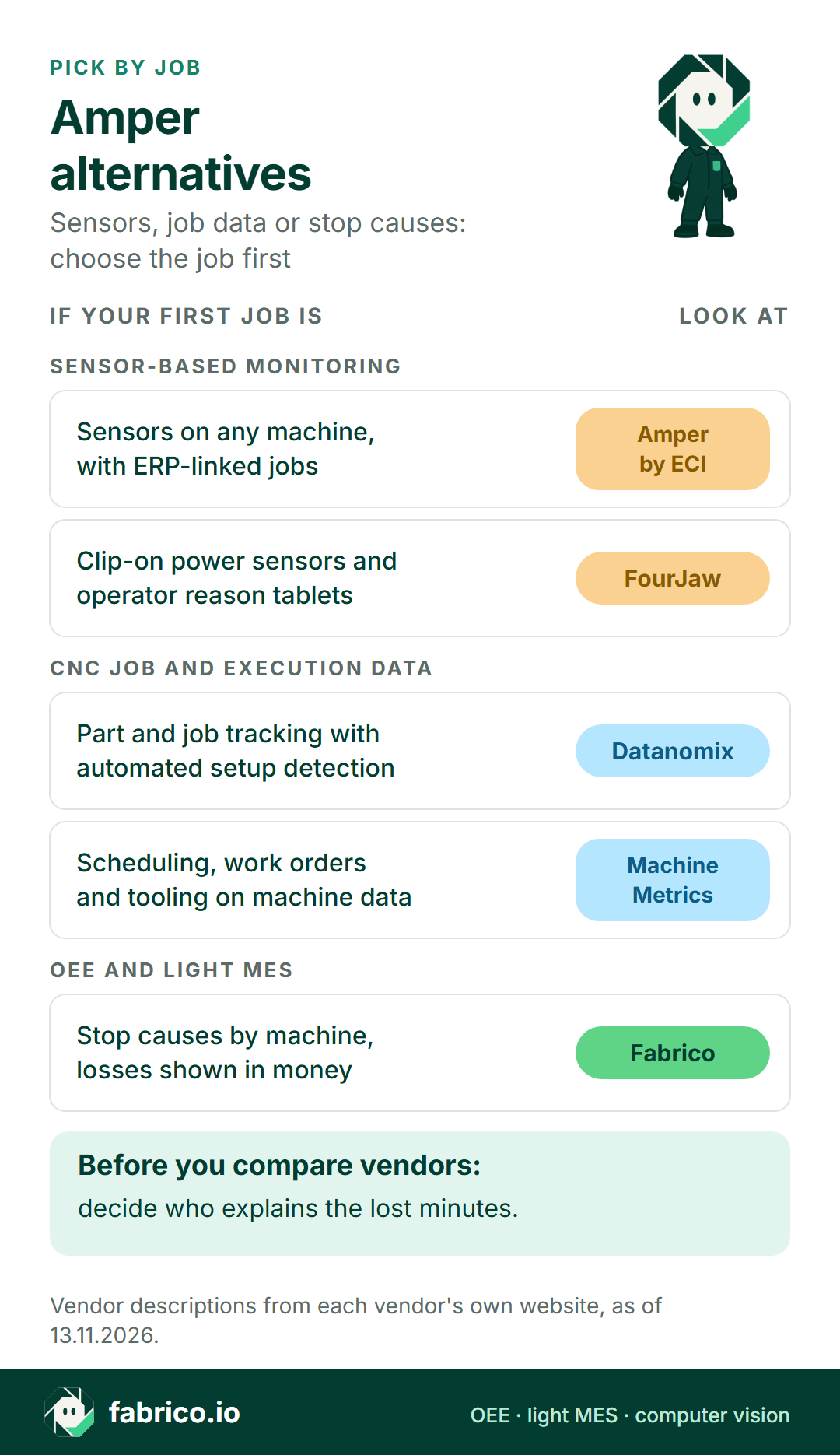
Text version of this infographic
- Pick by job: Amper alternatives. Sensors, job data or stop causes: choose the job first.
- Sensor-based monitoring: sensors on any machine, with ERP-linked jobs (Amper by ECI); clip-on power sensors and operator reason tablets (FourJaw).
- CNC job and execution data: part and job tracking with automated setup detection (Datanomix); scheduling, work orders and tooling on machine data (MachineMetrics).
- OEE and light MES: stop causes by machine, losses shown in money (Fabrico).
- Before you compare vendors: decide who explains the lost minutes.
- Vendor descriptions from each vendor's own website, as of 13.11.2026.
Questions to put to each vendor
The same list works for all five, Fabrico included.
- What does the sensor see? Running, idle and stopped, or also parts and cycles?
- Who explains a stop, and where do the minutes go that nobody explains?
- How are setups counted? As planned time, as availability loss, or apart?
- How does a job arrive from the ERP, and what goes back?
- How is a first-off scrap part recorded on a machine with no reject signal?
For the wider category, see our OEE software guide and light MES vs full MES; for metal shops, MES for metal fabrication; for the whole category, our production monitoring systems comparison.
What people ask next
Who makes Amper?
Amper is listed among the manufacturing products of ECI Software Solutions, and its product pages sit on ECI's website, which describes it as a production monitoring and intelligence platform for manufacturers.
How does Amper connect to machines?
ECI's pages describe non-invasive sensors, aggregators, PLC integrations and hardware-free linked assets, and electrical sensors that monitor any machine that uses power, sending data to the cloud over a secure cellular connection.
Does Amper track OEE and downtime reasons?
Yes. Its pages list OEE and downtime tracking, OEE analytics by availability, performance and quality, and a touchscreen where operators capture downtime, scrap and setups.
How is Fabrico different from Amper?
Both read machines and take operator reasons on a screen. Fabrico is a cloud OEE and light MES platform with no ERP of its own: it reads the PLC, a Fabrico IoT device or the camera add-on, the operator codes setups, waits and short stops on a tablet or phone, and losses show in money next to MTTR and MTBF on the same machine record. Jobs, BOMs and routings stay in whichever ERP the shop runs.
Why does a busy CNC lathe still score 66% OEE?
Because setups, waiting and slow cycles each take a share. In the sample shift on this page, 90 stopped minutes, a 106 second average cycle and six first-off rejects together leave 66.0%.
Book a Fabrico demo to see setups, material waits and slow cycles on a sample lathe priced against the quote, or put a question to us on the contact page.
Related articles

Latest from our blog


Real Fabrico tiles, sample data.