


 Login
 Blog
CIMCO MDC-Max Alternatives for CNC Shops, Compared by Job

In short: most shops that look past CIMCO MDC-Max already run DNC-Max or CIMCO Edit, so the first choice is what sits on top of the DNC. Predator MDC and Scytec DataXchange also collect CNC data and operator reasons. MachineMetrics and Datanomix add job tracking tied to the ERP. If the question you ask most is which stops cost the most money, by machine and shift, an OEE and light MES platform such as Fabrico measures that, while programs stay in the DNC and orders in the ERP.
- MDC-Max is CIMCO's manufacturing data collection and machine monitoring software. CIMCO A/S is headquartered in Copenhagen, Denmark.
- In March 2025 Sandvik acquired the probing and post processor business lines of CIMCO Group, per Sandvik's release. CIMCO's site still lists MDC-Max, with a CIMCO A/S copyright line.
- MDC-Max reads controls over protocols such as Fanuc FOCAS, Haas M-Net and MTConnect, and operators add downtime reasons on screen or by barcode.
- Vendor facts are from each vendor's own site, as of 12.11.2026, linked where they appear. We list no prices and no ranking.
Picture a shop with fourteen CNC machines and one DNC server. Programs reach every control on time, the newer Fanuc and Haas machines report their status, and the older lathes still talk over RS-232. What nobody can show is why the spindles sat idle on second shift, or what those hours cost.
Below: MDC-Max per CIMCO's own pages, the Sandvik deal, MDC-Max vs MachineMetrics, and five alternatives sorted by starting job. Fabrico publishes this page and appears in it, so nothing is ranked. For a wider list, read our machine monitoring software review.
What CIMCO MDC-Max is (as of 12.11.2026, per CIMCO's site)
CIMCO A/S develops software for computer integrated manufacturing and is headquartered in Copenhagen, Denmark, according to its about page. It reports more than 150,000 licenses deployed through resellers since 1991 (a vendor figure). The MDC-Max page says, as of 12.11.2026:
- Minimum events. Most installations collect at least Cycle Start, Cycle Stop and Part Complete, and the events can be customised to what each machine can report.
- Connections. Fanuc FOCAS, Haas M-Net, MTConnect, Heidenhain, Netlink, Brother, OPC, Modbus and MQTT, over wireless, Ethernet, RS-232 or parallel I/O. It can extract DPRNT messages and use telemetry such as spindle speed and power consumption.
- Operator input. Operator Screens take downtime reasons, the current job, operator and shift, and scrap reasons. Reasons can also come from a barcode reader, and the page lists an unlimited number of downtime reasons.
- Screens, alerts and reports. Live Screens and Shop Floor Screens; stack lights, buzzers and Andon boards; a notice when an unattended machine stops or falls behind; and OEE, MTBF, MTTR and other KPIs from user-defined formulas, with an Excel sheet that updates itself.
- Architecture. A server with a SQL database (optionally Microsoft SQL), a PC client and a web client. Other systems read and write it over ODBC, and data also moves through external databases, web services, XML files or a C++ library called OEM Link.
- Family. DNC-Max configures machine ports and manages the network, and the new CIMCO Scheduler adds web-based production scheduling to MDC-Max.
Ask in the demo: which of those events each control model can send, and which machines need extra hardware first.
Is CIMCO part of Sandvik?
Partly. In its press release of 3 March 2025, Sandvik says it "acquired the probing and post processor business lines of CIMCO Group", which it describes as a Denmark-based developer of software for computer-integrated manufacturing. The release says the acquisitions will be part of business unit Mastercam. It does not name MDC-Max or DNC-Max.
As of 12.11.2026, the CIMCO homepage lists CIMCO Edit, DNC-Max and MDC-Max, and its footer reads CIMCO A/S and CIMCO Americas, LLC. If ownership matters for a support contract, ask CIMCO to confirm it in writing.
Signs MDC-Max still fits your shop
- DNC-Max or CIMCO Edit is already running. The DNC-Max page names MDC-Max as the way to add manufacturing data collection and machine monitoring.
- The controls span several generations, with serial ports, parallel I/O and DPRNT next to networked controls.
- The data should sit in your own SQL database.
- Stack lights, lights-out alerts and home-built reports matter more than a hosted platform.
If your first question is which stops cost the most, read on. Our CNC machine monitoring guide covers the basics.
CIMCO MDC-Max vs MachineMetrics for CNC shops
Both read CNC controls and both report OEE, yet one is software you install beside your DNC and the other a hosted platform that adds execution on top of machine data. From each vendor's own pages, as of 12.11.2026:
| Question | CIMCO MDC-Max | MachineMetrics |
|---|---|---|
| Built around, per its site | Data collection and monitoring | One platform for discrete plants |
| Where it runs | Server, PC client, web client | "Nothing to host" |
| Stop reasons | Operator Screens or barcodes | Categorised from machine signals |
| Beyond monitoring | DNC-Max, CIMCO Scheduler | Scheduling, work orders, tooling |
| Reports and questions | Custom reports, Excel updates | Max AI answers with a chart |
| Other systems | Databases, web services, ODBC | ERP, CMMS, open APIs |
For MachineMetrics on its own, see our MachineMetrics alternatives page.
Machine data collection and a light MES are different jobs
Data collection answers what the machine is doing: in cycle, idle or in alarm, which program, how many parts. A light MES with OEE answers where planned time went: when it stopped, why, at what cost. Most tools cover part of both, so pick by the question your morning meeting asks first. Our guides to machine data collection and MES vs machine monitoring go deeper.
Comparison table: MDC-Max and five alternatives
Each row paraphrases the vendor's own site as of 12.11.2026, linked in the sections below. Cells are short, so take the last column into each demo. Fabrico sits after MDC-Max because Fabrico publishes this page; the order is not a ranking.
| Tool | Built around, per its site | Machine data, per its site | Ask in the demo |
|---|---|---|---|
| CIMCO MDC-Max (for reference) | Machine and operator data, Andon, reports | FOCAS, M-Net, MTConnect, OPC, Modbus | Which events can each control send? |
| Fabrico | Machine signal, operator reasons, losses in money | PLC, IoT device with sensors, camera add-on | How does a CNC control connect? |
| MachineMetrics | One platform on real-time machine data | Machines old and new, plus ERP and CMMS | How are stoppages categorised? |
| Datanomix | Production monitoring, no operator input | Major makes and models of CNC machines | How are setups detected? |
| Scytec DataXchange | OEE and machine monitoring | CNC controls, legacy machines, sensors | Cloud service or on-premise? |
| Predator MDC | Monitoring, KPIs, OEE, data collection | Network via Predator DNC | How do MDC and DNC share data? |
Want to see the OEE side on a CNC cell like yours? Book a demo; a week of downtime notes makes it concrete.
Fabrico: light MES and OEE on top of your DNC
Fabrico publishes this page. Fabrico is a cloud-based light MES and OEE platform. MDC-Max begins with the events a control reports; Fabrico begins with the planned minutes that were lost. Per our MES and OEE overview and machine connectivity page:
- Three routes for machine data. Automated machines report through the PLC, older or semi-automated ones get a Fabrico IoT device with external sensors, and AI cameras, an add-on, cover places with no machine signal. The connectivity page names OPC UA, PROFINET, EtherNet/IP, Modbus and MQTT among others, and every project opens with a machine review that sets the route per machine.
- Short stops and reasons. Stops too short for anyone to write down come from the machine signal, and operators tag the cause on a tablet or phone.
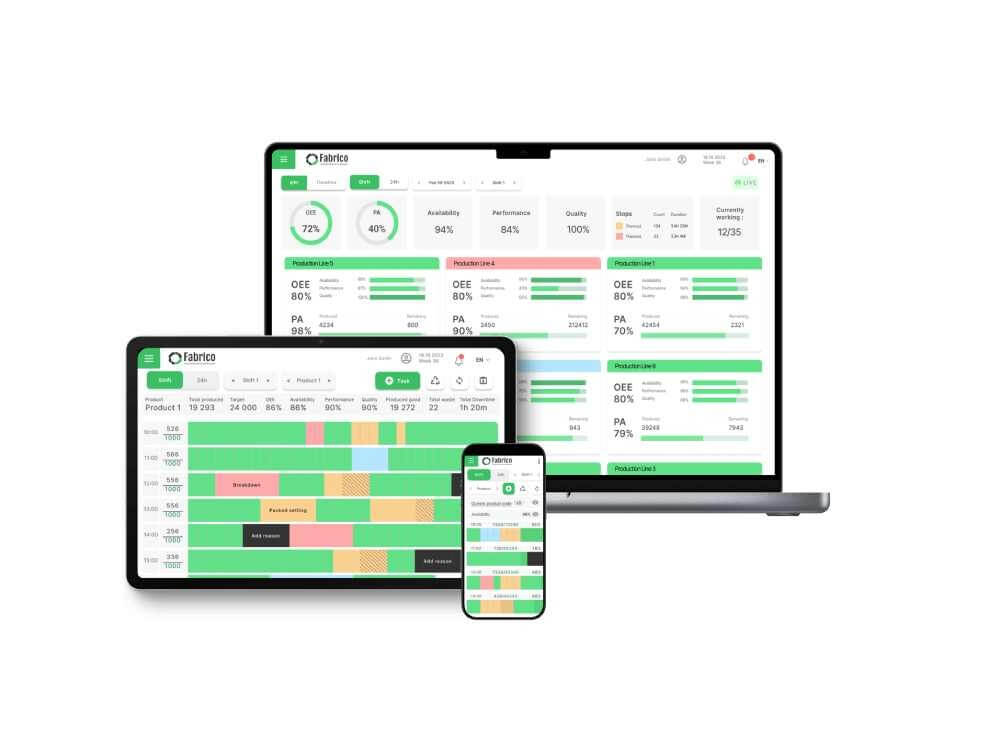
- OEE and money. Real-time OEE by machine, line and shift, with losses shown in money, on the web and in iOS and Android apps.
- The camera add-on counts output at manual stations such as deburring or assembly benches. In the standard setup, video from the camera add-on is streamed on request, not stored in Fabrico (how the camera add-on works).
- Maintenance built in. If a stop calls for a repair, the technician opens the work order straight from that stop.
- Data out. A REST API and webhooks, and export of any list to Excel or CSV. ERP links, SAP included, are scoped per customer.
- Rollout. Devices connected in about a month; full rollout in 3 to 4 months.
- Left to your DNC, CAM and ERP: NC programs, routings and job dispatching. Roadmap, not live: production planning and scheduling, and stop detection with a suggested reason from the camera add-on.
Ask in the demo: how each CNC control model connects, and which data moves to and from the ERP.
Suits shops that need downtime ranked by cause and priced per machine and shift, across CNC machines, older machines and manual stations. EU customers are hosted on AWS in Frankfurt. Start with a one-machine or one-line pilot, and see our OEE software guide.
MachineMetrics: an AI operations platform for discrete plants
MachineMetrics presents MaximaOS as one platform that runs on real-time machine data and is purpose-built for discrete manufacturing. As of 12.11.2026, its homepage says:
- Machines of every generation connect, along with the ERP, the CMMS and the plant's documented knowledge.
- Stoppages are captured regardless of duration, categorised from machine signals and ranked by cost.
- Availability, performance and quality come from machine data against real schedules, traceable to shift, job and event.
- An execute layer runs scheduling, work orders, labor, tooling and quality; operators see the next job and live pacing.
- Max AI answers plain-language questions with a chart. The page also lists nothing to host, open APIs and ISO 27001 certification.
Next to MDC-Max: both read CNC machines and report OEE. MachineMetrics runs scheduling and work orders on its hosted platform; on the CIMCO side, those jobs sit with DNC-Max and CIMCO Scheduler.
Fits shops that want monitoring, scheduling and work orders in one hosted system.
Datanomix: machine-side job tracking with no operator input
Datanomix says it connects to all major makes and models of CNC machines, fabrication equipment and more, and speaks to precision manufacturers. As of 12.11.2026, its homepage lists:
- Production monitoring with "No Operator Input" required: part number and job tracking from the machine, true cycle time and part counts, setup and changeover detection, and downtime insights with OEE.
- Job tracking that auto-syncs work orders, quantities and due dates with the ERP, and ERP Insights that compare machine performance with ERP expectations, for cloud or on-prem ERP.
- G-Code Cloud, with integrated DNC, for managing G-code files in a browser, and TMAC ai for automated tool monitoring limits.
- Access by web, mobile app or TV app.
Next to MDC-Max: both connect CNC machines and both have a DNC side. Datanomix leads with tracking that needs no operator entry; MDC-Max pairs the machine events with reasons operators enter.
Fits shops that want part, job and setup tracking from the machine, checked against the ERP.
Scytec DataXchange: OEE monitoring, cloud or on-premise
Scytec calls DataXchange cloud and on-premise OEE and machine monitoring software, built on 25 years of data collection and OEE work. Its site also carries a post headed "Minitab Acquires Scytec". As of 12.11.2026, its homepage says:
- It runs as a cloud-based service or an on-premise installation.
- User-configurable real-time dashboards show utilisation, downtime and OEE, with apps for desktop PCs, tablets and smartphones.
- Menu pages cover machine downtime tracking, an operator data interface, legacy equipment and sensors, lights-out notifications, an API, MTConnect and umati.
Next to MDC-Max: both cover dashboards, downtime tracking and operator entry. Scytec offers a choice between cloud and on-premise.
Fits shops that want OEE monitoring and a say in where it runs.
Predator MDC: monitoring next to Predator DNC
Predator Software, of Beaverton, Oregon, offers a suite of fourteen shop floor applications that run stand-alone or integrated. As of 12.11.2026, its homepage says:
- Predator MDC covers real-time machine monitoring, dashboards, KPIs, OEE and manufacturing data collection.
- Predator DNC networks CNCs, robots, CMMs, PLCs, part markers, tool presetters and test stands, wired or wireless, over Ethernet, RS232 or parallel.
- Other applications include Tracker, for tools, gages and fixtures.
Next to MDC-Max: the closest match in shape here. Both vendors pair data collection with a DNC and other CNC tools.
Fits shops that want to add monitoring, DNC and program tools from one vendor, one application at a time.
Which MDC-Max alternative fits your shop
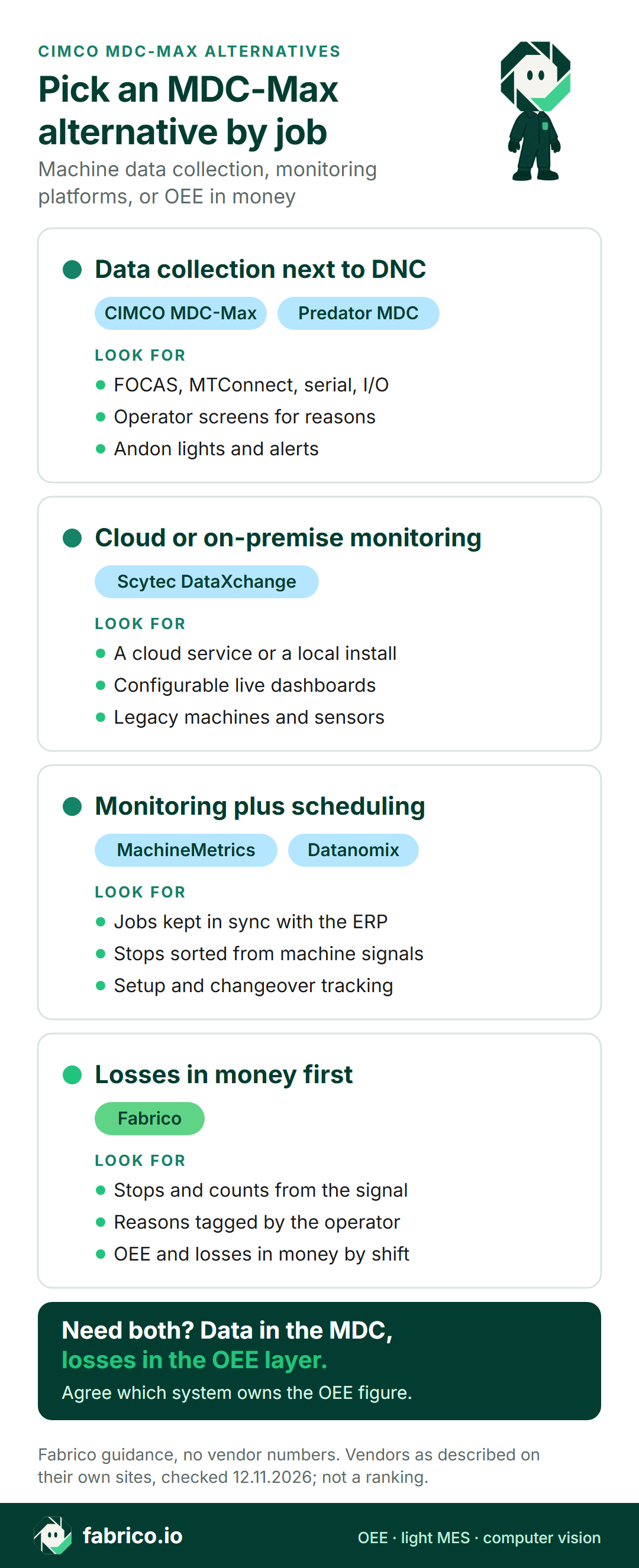
Data collection beside a DNC: MDC-Max or Predator MDC. OEE monitoring with a cloud or on-premise choice: Scytec DataXchange. Monitoring with job tracking tied to the ERP: MachineMetrics or Datanomix. Losses ranked by cause and priced in money first: Fabrico.
Keeping DNC-Max for programs and adding an OEE layer works when everyone agrees which system owns the OEE figure. See MES for metal fabrication and light MES vs full MES.
Worked example: what three events show on an older lathe
MDC-Max names Cycle Start, Cycle Stop and Part Complete as the usual minimum. Here is what those three events give on one shift, and what they leave open. Sample data for an older CNC lathe on RS-232, not from a real customer or a Fabrico screen. Planned time is 420 minutes and the ideal cycle is 2.4 minutes a part.
The three events show 315 minutes in cycle and 105 out of cycle, so availability is 75.0%. In 315 minutes the ideal is 131 parts; Part Complete counted 125, so performance is 95.2%. Three parts failed the check, leaving 122 good, so quality is 97.6%. OEE is 75.0% x 95.2% x 97.6% = 69.7%, the same as 122 good parts x 2.4 minutes over 420 minutes.
What the events cannot say is why the 105 minutes happened. With reasons added, the sample splits into first-off check 30, waiting for bar stock 25, tool change 20 and program edit 15, with 15 minutes untagged. Watch the untagged share: it shows whether the reason step works. The formula is in our OEE calculation guide, and micro-stops covers the short stops paper logs miss.
Questions for a shop that already runs a DNC
Ask every vendor the same questions, Fabrico included.
- Which of our controls connect directly, over FOCAS, MTConnect, OPC UA, DPRNT or I/O, and which need extra hardware?
- Does the tool read the DNC or run beside it, and which program or job data does it pick up?
- Where do stop reasons come from: signal rules, operator entry or both? How is untagged time shown?
- How is OEE calculated: where does the ideal cycle come from, and how do setups and first-off checks count?
- Where does it run, who maintains the server or the cloud account, and which data flows to and from the ERP?
What people ask next
Is CIMCO MDC-Max owned by Sandvik?
Sandvik's release of 3 March 2025 covers the probing and post processor business lines of CIMCO Group, for its Mastercam business unit, and does not name MDC-Max. As of 12.11.2026, cimco.com lists MDC-Max with a CIMCO A/S footer. Ask CIMCO to confirm in writing if ownership matters.
Does CIMCO MDC-Max calculate OEE?
Yes, per CIMCO's MDC-Max page. Its reports calculate OEE, downtime and other KPIs, and Live Screens show OEE per machine in real time. Ask how the ideal cycle is set for each part and how setups count.
What is the difference between CIMCO MDC-Max and DNC-Max?
DNC-Max sends NC programs to the machines from one central application and defines the machine ports. MDC-Max collects machine and operator data for screens, alerts and reports. CIMCO's DNC-Max page names MDC-Max as the upgrade for data collection and machine monitoring.
How does MachineMetrics compare with CIMCO MDC-Max?
Per each vendor's site, MDC-Max is installed software with a server, PC client and web client, and operators enter downtime reasons. MachineMetrics is a hosted platform that categorises stoppages from machine signals and adds scheduling and work orders.
Which MDC-Max alternatives work without operator input?
Datanomix says its production monitoring needs no operator input, and MachineMetrics says it categorises stoppages from machine signals. MDC-Max and Fabrico pair the machine signal with a reason an operator adds. Ask each vendor which causes a signal alone can tell apart.
How is Fabrico different from CIMCO MDC-Max?
MDC-Max collects and shows machine data and sits beside CIMCO's DNC tools. Fabrico is a cloud light MES with OEE: stops and counts from the machine signal, causes tagged by operators, and losses shown in money by machine and shift.
Want to see how the OEE side reads on a CNC cell like yours? Book a demo or contact us.
Related articles




Latest from our blog




Real Fabrico tiles, sample data.