


 Login
 Blog
PROXIA MES Alternatives: Shop Floor Data, Cloud MES or OEE First

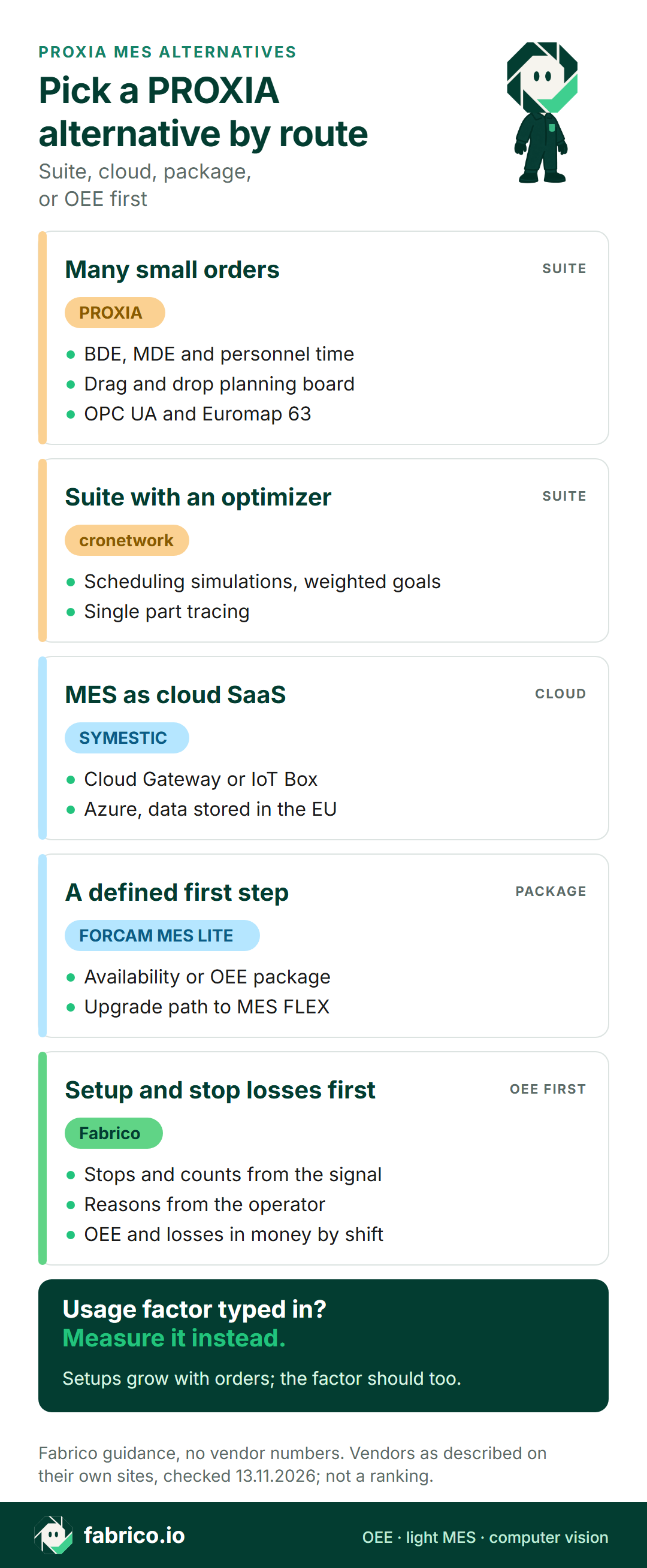
In short: the PROXIA MES alternative that fits depends on how you want to get off paper feedback. For a configurable suite with operating data, machine data, a planning board and personnel time, compare PROXIA with Industrie Informatik's cronetwork. For a cloud MES or a packaged start for smaller plants, look at SYMESTIC or FORCAM ENISCO MES LITE. If stop causes and OEE matter first, Fabrico measures them and leaves orders in the ERP.
- PROXIA is a German MES vendor and, since the end of 2022, a business unit of Shoplogix, part of Constellation Software.
- Its site covers BDE, MDE, personnel time, a drag and drop planning board and real-time OEE.
- Its sector page names contract manufacturing, tool and mould making, automotive, machinery, plastics and chemicals.
- Every vendor fact is from its own website as of 13.11.2026 and linked in the text. Nothing is priced or ranked.
Think of a contract machining shop near Munich: thirty CNC machines, hundreds of small orders a month, setups every few hours. Operators fill in job cards, the office types them into the ERP, and nobody can say on Tuesday why last Thursday ran late.
PROXIA's sector page names contract manufacturing, and other tools serve shops like this too. Below: PROXIA as its own pages describe it, the cases where it fits, and four alternatives on three routes. Fabrico wrote the page and features in it, so there is no ranking here. More options are in our MES software guide, and MPDV's suite has its own page on MPDV HYDRA X alternatives.
PROXIA MES at a glance, per PROXIA (as of 13.11.2026)
PROXIA Software AG grew out of COSCOM's MES division, according to its history page, which also records that Shoplogix bought PROXIA in November 2022. The group page places it as a Shoplogix business unit inside Constellation Software, run as an autonomous company. Its homepage speaks of more than 30 years of MES work, and its MES pages describe, as of 13.11.2026:
- Sectors. Contract manufacturers, tool and mould makers, automotive suppliers, machine builders, and plastics and chemicals plants each get a section on its sector page.
- Four module groups. Planning, evaluation, data collection, and extensions and options. The system is modular standard software, adapted to each company, and its site calls it the link between management and production.
- Machine data (MDE). Machine states are reported by hand or fully automatically, piece counts can be captured automatically, and even short stoppages and faults are shown without gaps. Standards such as OPC UA and Euromap 63 are supported (MDE page).
- Operating data (BDE). Operators book in alone or in groups, scanners and RFID can be connected, and two-way exchange with the planning board or ERP allows post-calculation of finished orders (BDE page). Status buttons are freely configurable (data collection page).
- Planning board. Planners drag orders around an animated, graphical board and can simulate before they commit. Orders arrive from the ERP, and machine capacity follows from the shift model times a usage factor (planning board page).
- Personnel time. Clock-in and clock-out at BDE or time terminals, with hours passed on to payroll; it can be fully integrated with BDE (time recording page).
- OEE, cloud and AI. The evaluation group covers analyses, OEE and KPIs in real time. Its hybrid cloud concept keeps sensitive, time-critical data in a private core database (cloud page), and MES-Intelligence answers questions such as which stop reasons occur most often on a machine (AI page).
Ask in the demo: which collection mode, manual or automatic, each machine type gets, and how the usage factor on the planning board is set and updated.
When PROXIA is the right pick
PROXIA belongs on the shortlist if most of these hold:
- You run many small orders with frequent setups, as in contract manufacturing or tool and mould making.
- You want BDE, MDE and personnel time in one system, with operators booking orders at terminals.
- Your planners want a graphical board that pulls orders from the ERP.
- Sensitive data should stay on site, with less critical data allowed in the cloud.
If that describes you, a configurable MES suite is the right family; see when a light MES stops being enough. If you mostly need to know where machine hours go, read on.
Three routes off paper job cards
Most PROXIA buyers start from paper or Excel feedback. From there, three routes lead to live shop floor data. A configurable suite does the most and asks the most of the project. A cloud MES or SME package connects machines through a gateway and grows by use case. An OEE-first tool measures lost time and leaves orders and planning where they are. Our comparison of light and full MES goes deeper on the trade-offs.
PROXIA and four alternatives side by side
Rows sum up each vendor's own website in our words, as of 13.11.2026; links sit in the sections below. Where a row skips a topic, it was not on the pages we checked; ask the vendor. Fabrico heads the list because Fabrico wrote it, not because of any ranking.
| Tool | Route | Machine link, per its site | Question for the demo |
|---|---|---|---|
| PROXIA (for reference) | Configurable MES suite | OPC UA, Euromap 63, manual states | Which modules start first? |
| Fabrico | OEE first, light MES | PLC, IoT box, camera add-on | Machines without a PLC? |
| cronetwork | Configurable MES suite | OPC UA, fieldbus, SCADA, SQL | Where does capacity come from? |
| SYMESTIC | Cloud MES on Azure | Cloud Gateway or IoT Box | Which use case goes first? |
| FORCAM ENISCO MES LITE | Package for SMEs | I/O controller, digital signals | Availability or OEE package? |
Want to know how stop data would read for a shop of this kind? Bring last week's job cards to a short online demo: book a demo.
Fabrico: OEE first, with orders kept in the ERP
Fabrico is our product: a cloud OEE and light MES platform that starts from performance. PROXIA books orders, people and machines in one suite. Fabrico looks at machine hours: what stopped, how long, why, and the cost of it. What our MES and OEE overview states:
- Machine signal three ways. PLC; an IoT device from Fabrico with external sensors on older machines; AI cameras, an add-on, where no signal is available. See machine connectivity.
- Short stops count. Micro-stops come from the machine signal, including ones too short to write down, and operators give the cause on a phone or tablet.
- Money, by shift. Live OEE during production, losses priced in money, and output, stops and OEE reported shift by shift in the web app and on iOS and Android phones.
- Manual stations. Here the camera add-on counts output, and its video can be opened from the shift timeline at a chosen moment. Standard setup: the video is streamed on request, not stored in Fabrico (camera add-on details).
- Repairs linked. From a stop, a technician opens a work order, and repair, parts and time to fix stay on that machine's record.
- Data out. A REST API and webhooks, plus Excel or CSV exports. ERP connections, SAP included, are scoped per project.
- Rollout. Devices connected in about a month; full rollout in 3 to 4 months.
- Kept in your ERP: dispatching of jobs, bills of materials, routings and genealogy. Planned for later, not available now: planning and scheduling in Fabrico, and a camera add-on mode that spots stops and offers a probable cause.
Worth a look if you want true availability per machine and the cost of setups and stops before you commit to a full suite. EU customers are hosted on AWS in Frankfurt. A pilot on one line is a low-risk first step; background in our OEE software guide.
Industrie Informatik cronetwork: suite with a scheduling optimizer
Industrie Informatik, from Linz, sells cronetwork, and its about page reports more than 500 installations, a vendor-stated figure. As of 13.11.2026:
- Its machine data page lists OPC, fieldbus, SCADA and SQL collection, real-time machine status that generates feedback on the order, and automatic recording of piece counts, scrap and disruption reasons.
- The scheduling page adds an Optimizer that keeps running simulations against weighted goals, on top of orders taken from the ERP.
- Further modules cover part tracing, BI and personnel time.
Compared with PROXIA: the two are closest on this page: modular suites with machine and operating data, a planning board and personnel time. Ask both how their boards turn measured machine data into capacity.
Worth a look if you want an optimizer behind the planning board and single part tracing in the same suite.
SYMESTIC: cloud-native MES for mid-sized plants
SYMESTIC, of Dossenheim in Germany, calls itself the cloud-native manufacturing platform for mid-sized manufacturers. Its about page dates today's company to 1999, says it delivered mainly on-premise MES projects until 2018, and describes a cloud-native rebuild on Microsoft Azure in 2019. As of 13.11.2026:
- Its OEE page says quantities, scrap and downtime come straight from the machine, read over OPC UA by its Cloud Gateway software or by an IoT Box for digital signals.
- Stops are detected automatically and explained at the workstation from a downtime reason catalogue, and data is buffered at the plant if the connection drops.
- It runs on Microsoft Azure with data stored in the EU, and orders flow both ways with SAP, Microsoft Dynamics or InforCOM.
Compared with PROXIA: both collect machine data and stop reasons. SYMESTIC's pages describe a cloud SaaS product; PROXIA's describe modular standard software with a hybrid cloud option.
Worth a look if you want MES as cloud SaaS, with use cases added machine by machine.
FORCAM ENISCO MES LITE: a packaged start for SMEs
FORCAM ENISCO describes MES LITE as a smart factory solution for SMEs. As of 13.11.2026, its page says:
- An Availability package covers downtime, setup time, operating status and utilisation, with four digital signals by default.
- The OEE package adds an order reference through an XML interface to the ERP, plus quantity recording.
- Machines connect through an I/O controller, and the page offers an upgrade to MES FLEX for more MES functions.
Compared with PROXIA: both record machine states, setup time and order quantities. MES LITE comes as defined packages with a path to the larger MES FLEX; PROXIA presents configurable modules.
Worth a look if you want a defined first package with a clear step up later.
Which PROXIA alternative fits your plant
- Configurable BDE, MDE, personnel time and a drag and drop board for many small orders: PROXIA.
- A comparable suite with a scheduling optimizer and single part tracing: cronetwork.
- MES as cloud SaaS on Azure, use case by use case: SYMESTIC.
- A defined SME package that can grow into a larger MES: FORCAM ENISCO MES LITE.
- Stop causes, setup losses and OEE per machine first, while the ERP keeps the orders: Fabrico.
Plastics plants may also want our page on MES for injection moulding, and the Shoplogix platform that owns PROXIA has its own alternatives page.
Worked example: the usage factor behind a late order
These numbers are made up to show the arithmetic and come from no customer or product screen. A CNC lathe works through three small orders in one shift: 480 minutes less a 30-minute break gives 450 planned minutes. Its ideal pace is 2.5 minutes a part, and the planning board applies an 85% usage factor.
Stops, including three setups, took 105 minutes, so the lathe ran 345 minutes: availability 76.7%. At 2.5 minutes a part that is 138 parts, and it made 126, so performance is 91.3%. Three parts were scrap, leaving 123 good: quality 97.6%. OEE is 76.7% x 91.3% x 97.6% = 68.3%, which equals 123 x 2.5 minutes over 450.
With an 85% factor, the board expected about 153 parts from this shift, 30 more than the lathe delivered. Setups alone took 75 minutes, 20 of them over standard. The gap has a simple cause: the board's factor was set once, while setup time grows with the number of orders. Feeding measured OEE back into the factor, or cutting setup time, closes it. The formula is explained under OEE calculation; stops too brief for a job card are covered under micro-stops.
What to ask each vendor
Take one machine group and ask every vendor the same things, Fabrico included.
- Which route is this? Configurable suite, cloud SaaS, defined package, or OEE first.
- How are setups counted? As planned time, as a loss, or both, and against which standard.
- How does a machine report? OPC UA, Euromap, digital signals or manual buttons, and what happens on machines with no controller.
- Where does planning capacity come from? A typed usage factor or measured OEE.
- Where does the data live? On site, hybrid or cloud, and in which region.
- What stays in the ERP, and what flows back after the shift?
What people ask next
Who owns PROXIA today?
Shoplogix. PROXIA's group page says it has been a Shoplogix business unit since the end of 2022, within Constellation Software, and its history page dates the purchase to November 2022.
Does PROXIA MES measure OEE?
Yes, per its site. The evaluation module group covers analyses, OEE and KPIs in real time, and its machine data page says the collected machine data feeds part of the OEE calculation.
What do MDE and BDE mean in PROXIA?
MDE is machine data collection: machine states, automatic piece counts and stoppages. BDE is operating data collection: operators booking orders and times at terminals. PROXIA offers both, plus personnel time.
How does cronetwork compare with PROXIA?
Per their own sites, both are modular MES suites with machine and operating data, a planning board and personnel time. cronetwork adds an Optimizer that runs scheduling simulations against weighted goals.
Can Fabrico run next to PROXIA?
Yes, with one owner per record. PROXIA can keep orders, bookings and the planning board, while Fabrico keeps stops, causes and OEE by machine and shift. Settle which system reports the official OEE before you link them.
What does Fabrico do differently from PROXIA?
PROXIA books orders, people and machine states in one suite, per its site. Fabrico measures lost machine time from the signal, with causes from the operator and losses in money, while dispatching, routings and genealogy remain with the ERP.
Want the setup and stop picture in practice? Book a demo, or get in touch.
Related articles


Latest from our blog


Real Fabrico tiles, sample data.