


 Login
 Blog
Can Your Existing CCTV Cameras Measure OEE? What to Check First

In short: Existing CCTV cameras can sometimes count output for OEE, but only after each camera passes checks on view, frame rate, light, stream access, network and legal purpose. Most security cameras were placed for a different job, so expect to re-aim some and add a dedicated line camera at others.
- Check each camera on its own: angle, height, field of view, frame rate, resolution and light at the counting zone.
- IT has to give you a stream (RTSP, ONVIF) on a network path that keeps the security system safe.
- Security footage has a documented purpose. Using it for production is a new purpose until your data protection officer and, where it applies, the works council agree.
- Prove any reused camera against a hand tally at full line speed before its counts feed OEE.
Can existing CCTV cameras be used for OEE?
Yes, sometimes. A CCTV camera that happens to look down on the outfeed of a filler, under steady light, with a stream IT can share, can count units well enough to feed OEE. But most security cameras were placed to watch doors, aisles and loading bays. They sit high on walls, look across the hall at a shallow angle and record at settings tuned for evidence, not for counting fast-moving units.
So the honest answer is "check per camera, then test". This guide gives the checks and a decision rule. Deep dives: for mounting and light see camera placement and lighting on a production line, for IT see line cameras on the plant network, and for numbers see how many cameras per line.
Why security cameras and counting cameras differ
A security camera answers "who was there, and when?". A counting camera answers "how many units passed, and when did the flow stop?".
| Setting | Typical security setup | What counting needs |
|---|---|---|
| Position | High on a wall or ceiling, wide view of an area | Above the flow, framing one counting zone |
| Angle | Shallow, across the hall | Steep, looking down so units do not overlap |
| Frame rate | Often reduced or motion-triggered to save space | Steady, high enough for full line speed |
| Light | Night mode, infrared, auto exposure | Steady light at the zone, no mode switching |
| People | People are the subject | People kept out of frame where possible |
The checklist: eight checks per camera
Run these for each camera you hope to reuse, at the station it covers. Ask the same of any vendor who says they can use what you have.
| Check | Passes when | If it fails |
|---|---|---|
| 1. Angle and height | The camera looks down on the flow and units do not hide behind each other | Re-aim, or add a line camera |
| 2. Field of view vs counting zone | The zone is near the centre of the frame, away from the edges | Zoom, re-aim or add a camera |
| 3. Frame rate | Each unit is in several frames at top speed, on the stream you will get | Raise it on a second stream, or add a camera |
| 4. Resolution | Each unit covers enough pixels to stand out from the belt | Tighter lens, closer camera |
| 5. Lighting | Light at the zone stays steady across shifts; no night mode switch | Fixed lamp, block daylight |
| 6. Stream access | You can get an RTSP or ONVIF stream with a service account | Ask the recorder maker; else add a camera |
| 7. Network path | IT approves a route that keeps the security network separate | Separate line camera on its own zone |
| 8. Purpose and retention | Production use fits the documented purpose, or a new one is agreed | Stop until the legal check is done |
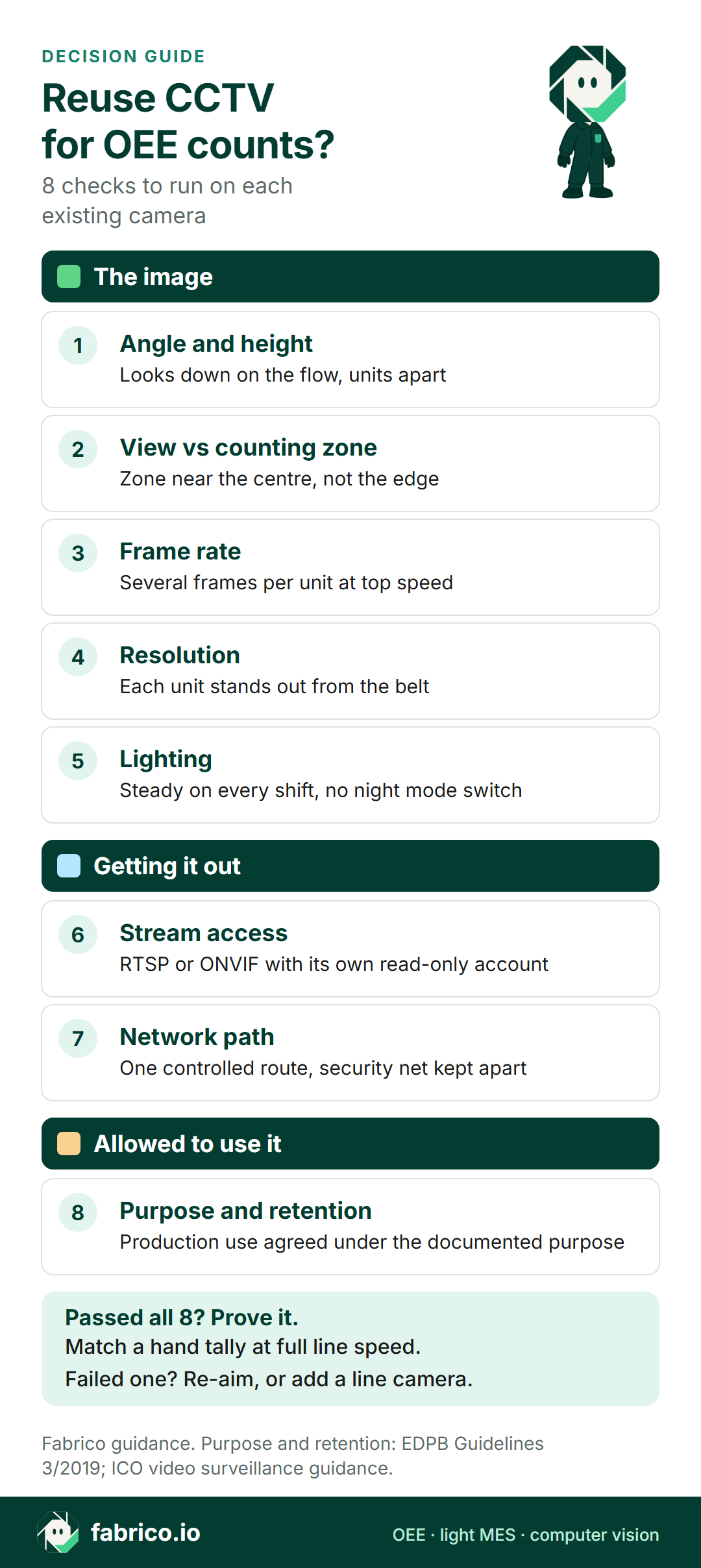
Checks 1 to 5 are about the image. Checks 6 and 7 are about getting the image out safely. Check 8 is about whether you are allowed to use it at all. A camera has to pass all eight.
Illustrative scorecard, sample data: a typical wall camera, 6 m up, run through the eight checks.
| Check | What the camera shows | Result |
|---|---|---|
| 1. Angle | Shallow, across three lines | Fail |
| 2. View vs zone | Outfeed is a strip at the frame edge | Fail |
| 3. Frame rate | 6 fps substream: 7.2 frames per unit in the sample zone below | Test |
| 4. Resolution | Units small at that distance | Fail |
| 5. Lighting | Infrared night mode after dark | Fail |
| 6. Stream | RTSP available | Pass |
| 7. Network | Security network, no route agreed | Open |
| 8. Purpose | Documented for property protection only | Not yet |
Verdict: leave this camera on security duty and add a dedicated line camera at the station.
Angle, field of view and the counting zone
A wall camera 6 metres up, looking across three lines, sees the outfeed of one machine as a thin strip near the edge of the frame. Units overlap, operators walk through the view, and pallets block it. Counting needs the zone near the middle of the frame, seen from above, with units clearly apart.
Some cameras can be re-aimed or zoomed. A pan-tilt-zoom camera may hold a preset over the line, but if security staff move it, the counting zone moves too. Agree who owns the preset. If the camera has to keep its security view, it cannot also hold a tight counting view, and a dedicated camera is the cleaner answer.
Frame rate and resolution: a worked example
Security recorders often save space by cutting the frame rate, recording on motion, or offering a low-resolution second stream. Ask what the stream you will receive delivers, not the best case.
A simple test: how many frames does the camera capture of each unit while it crosses the counting zone? Work it out from belt speed and zone length.
Illustrative, sample data. A counting zone 0.6 m long on a belt at 0.5 m/s keeps each unit in view for 0.6 / 0.5 = 1.2 s. At 25 frames per second that is 30 frames per unit. At 2 frames per second it is 2.4. The second camera has far less room to separate two units that touch.
Now see what a counting error does to OEE. Take one shift with planned production time of 480 minutes, run time of 420 minutes, an ideal rate of 120 units a minute, 45,360 units made and 460 rejects.
- Availability = 420 / 480 = 87.5%
- Performance = 45,360 / (420 x 120) = 45,360 / 50,400 = 90.0%
- Quality = (45,360 minus 460) / 45,360 = 44,900 / 45,360 = 99.0%
- OEE = 87.5% x 90.0% x 99.0% = 78.0% (check: 44,900 good units / (480 x 120) = 78.0%)
If a reused camera misses 3 units in 100, it reports 43,999 units made. Performance drops to 43,999 / 50,400 = 87.3%, good units to 43,539, and OEE to 43,539 / 57,600 = 75.6%. The line did not get worse; the measurement did. That is why a hand tally at full speed comes before trust. For how to run that test, see how accurate camera OEE is.
Lighting, night mode and the shifts
Security cameras switch to infrared and black and white when light drops. On a line, that means the count model sees a different picture after the switch. Daylight through roof panels and steam do the same. Check the image at the counting zone on each shift. If the camera must keep night mode for security, add a line camera with its own fixed light.
Stream access: RTSP and ONVIF
To count, software needs a live stream. Most IP cameras offer one over RTSP. ONVIF adds a standard way to find the camera, read its settings and ask for the stream address. ONVIF Profile T covers video streaming with H.264 and H.265 encoding. ONVIF Profile S is older, and ONVIF states that its deprecation is in process, with 31 March 2027 as the last date for product conformance submissions.
Questions for the recorder or camera maker:
- How many streams can the camera serve at once, and at which resolution and frame rate?
- Can a separate, read-only service account pull the stream, so security logins are never shared?
Network segmentation: keep security and production apart
Security systems usually sit on their own network for good reason. Opening a path from it to production analytics is an IT and security decision. Ask for one controlled route from the cameras you reuse to the processing device, with nothing coming back the other way. If IT will not open that route, a separate line camera on its own zone is often simpler than changing the security design. The network requirements guide lists the setup IT will ask about, and edge or cloud for line video covers where frames should be processed.
Purpose, retention and the works council
This is the check people skip. Security cameras exist for a stated purpose, usually protecting people and property. The EDPB Guidelines 3/2019 on video devices say that monitoring purposes "should be documented in writing" and "need to be specified for every surveillance camera in use". Counting output and reviewing line stops is a different purpose.
The UK regulator is just as plain. The ICO guidance on video surveillance (under review in 2026) says you can only use the personal data for a new purpose if it is compatible with the original one, you have consent, or you have a clear legal basis. It also says your retention period should be the shortest period for that purpose, and that you should reflect the risk in a DPIA before any deployment.
In practice:
- Talk to your data protection officer before any production use of a security camera.
- Update or write the DPIA and the per-camera purpose record.
- Where a works council or union agreement covers cameras, bring them in early. In Germany, technical systems that can monitor employees' behaviour or performance need works council co-determination (BetrVG § 87 (1) no. 6). In Austria, control systems that affect human dignity need works council consent (ArbVG § 96 (1) no. 3).
- Keep security retention and production use apart. The EDPB guidance expects footage to be erased after a few days in most cases, and storage beyond 72 hours needs more justification.
More on this in GDPR and production line cameras and cameras on the line without surveillance. A dedicated line camera with a production purpose from day one is often easier to agree.
Reuse, adjust or add a line camera: how to decide
Reuse the CCTV camera if it already looks down on the counting zone, gives a stream with enough frames per unit at full speed, sits under steady light, IT can route its stream safely, and production use is agreed under its purpose.
Add a dedicated line camera if the security view must stay as it is, the angle is shallow, night mode or daylight changes the picture, the stream is limited, or the legal route for a new purpose is slow.
Do both if some stations already have a good top-down camera and others do not. Reuse where a camera passes, add where it fails, and use machine signals where a PLC or sensor already counts (see camera or sensor by machine).
| Situation | Reuse | Adjust | Add line camera |
|---|---|---|---|
| Top-down view of the zone, steady light | Yes | No need | No need |
| Good view, low frame rate on the stream | Not yet | Second stream | If no stream fits |
| Shallow wall view across the hall | No | Rarely enough | Yes |
| Purpose not agreed for production use | Not yet | Legal check | With a new purpose |
Use the checklist on your own cameras first. To see how a dedicated line camera counts a station with no usable signal, book a demo and bring a short station list.
Questions to put to any vendor
- Which camera models, streams and protocols have you counted from in production, and at what line speeds?
- What frame rate and resolution do you need at the counting zone for a unit of this size and speed?
- How do you test accuracy before go-live, and against what reference count?
- Where are frames processed, and what leaves the plant network?
- Is any video kept, where, and for how long by default?
- What happens to counts when the stream drops or the recorder restarts?
For the commercial side, see business case questions for line cameras, and for a first trial, how to run a computer vision OEE pilot.
Where Fabrico fits
Fabrico is a cloud OEE software and light MES platform. Stops and counts come from the machine signal, a PLC, sensor or counter, and operators add stop reasons on a tablet or phone. OEE, downtime and losses show by line and shift, with losses in money.
The computer vision camera add-on counts output at stations with no usable signal, including manual steps. Fabrico's camera add-on uses its own industrial-grade camera over each station. If any vendor says it can count from the cameras you already have, use the eight checks above to judge that claim. With the camera add-on, video for a stop is streamed when someone opens it and is not stored in Fabrico in the standard setup.
Roadmap, not live today: camera-detected stops and a camera proposing a likely stop reason for the operator to confirm. Fabrico does not sell quality inspection vision. For a wider view of the category, see computer vision for manufacturing OEE and computer vision for FMCG manufacturing. Test these claims like any vendor's.
What people ask next
Can any CCTV camera be used to measure OEE?
No. It must see the counting zone clearly, keep units apart at full speed, and give a stream you may use legally and securely. Many security cameras fail at least one of those checks.
Do I need ONVIF to reuse an existing camera?
Not always. Many analytics tools read a plain RTSP stream. ONVIF helps because it gives a standard way to find the camera, read its settings and get the stream address. Profile S is being deprecated, with the last product conformance submissions on 31 March 2027, so check which profile your cameras support.
Can we use security footage to work out why a line stopped?
Only if that use fits the purpose you documented for the camera, or you settle a new purpose first. EDPB guidance asks for purposes to be documented in writing for each camera. Check with your data protection officer, and in many countries the works council, before production staff open security video.
Is it cheaper to reuse CCTV than to add a line camera?
Sometimes, but the camera body is rarely the main cost. Re-aiming, new mounts, lighting, a separate network path and the legal work can add up. Compare both options on the same station list, with the same accuracy test, before you decide.
What frame rate does a counting camera need?
There is no single number. It depends on how long each unit stays in the counting zone. Work out the time in view from belt speed and zone length, multiply by the frame rate you can actually get, and test at full speed against a hand tally.
Want to see the camera add-on on a line like yours? Book a demo.
Related articles













Real Fabrico tiles, sample data.