


 Login
 Blog
Build vs Buy Computer Vision for Production Lines: An Honest Decision Guide

In short: Build computer vision for a production line in-house only when the station is unique and a data team can own labelling, retraining and night-time failures for years. For counting output into OEE on standard packaging lines, buying a camera add-on is usually the lower-effort path.
- The model is the small part. Cameras, edge boxes, labels, retraining after packaging changes and on-call cover are most of the work.
- Ultralytics recommends at least 1,500 images and 10,000 labelled instances per class for reliable real-world performance.
- Check licences early: Ultralytics YOLO needs an Enterprise License unless you open-source your whole project. OpenCV is Apache-2.0.
- In our sample plant, a build takes 844 engineering hours in year one and 424 hours a year after that.
- A mixed route often fits: buy for standard lines, build only the station no vendor can count.
Your engineers have seen the demos. A pretrained YOLO model draws boxes around products on a laptop in an afternoon. So the question comes up in every plant that wants camera counts for OEE: why pay a vendor when the models are free?
It is a fair question, and sometimes building is the right answer. This guide shows what an in-house build involves, where the hours go, and how to decide station by station. It covers the camera layer only; for OEE software in general, see build vs buy OEE software.
What you are actually deciding
The job here is counting output and feeding it into OEE, often at stations with no usable machine signal: manual packing, old machines, a case packer with no spare PLC output. Quality inspection (defects, labels, codes, fill levels) is a different job with its own decision. If you are not sure a station needs a camera at all, see camera or sensor for OEE by machine.
So the real choice is between three routes:
- Build: your own team picks cameras and edge boxes, trains open-source models, writes the counting logic and connects it to your OEE data.
- Buy a camera add-on: a vendor supplies the counting and its link to OEE, and you mount, power and network the cameras with them.
- Buy a vision platform, build the model: your team labels and trains inside a vendor's tooling. Our pages on Landing AI alternatives and Elementary alternatives compare vendors in that space, as each describes itself.
What an in-house build involves
Open-source tools make the first step easy. OpenCV, the Open Source Computer Vision Library, is released under the Apache-2.0 licence. Ultralytics YOLO gives you pretrained detection models to fine-tune on your products. A prototype on one camera is a realistic goal for a capable engineer. But a counting system a plant can trust on every shift needs all of these parts:
- Cameras, lenses, light and mounts that survive washdown, vibration and forklifts. Placement and lighting decide accuracy more than the model does; see camera placement and lighting on a production line.
- An edge box per line or per few cameras, with a GPU, an operating system, drivers and security patches, plus the network to carry the results.
- Labelled training data. The Ultralytics guide on data collection and annotation says a few hundred annotated objects per class is enough to start experimenting with transfer learning, and recommends at least 1,500 images and 10,000 labelled instances per class for reliable real-world performance.
- Counting logic on top of detection: tracking each unit through a zone, so a pack that pauses or touches its neighbour counts once, not twice.
- The link to OEE: machine states, shifts, products and ideal rates, so a count becomes performance and quality, not just a number on a screen.
- Model operations: version control for models and data, monitoring of count accuracy, and a way to roll back a bad model.
Researchers who run machine learning in production have warned about this gap for years. In "Hidden Technical Debt in Machine Learning Systems", engineers from Google argue that "it is dangerous to think of these quick wins as coming for free". The quick win is the demo. The debt is everything around it.
Packaging changes are the hidden workload
On an FMCG line the product keeps changing: new artwork, a promotional sleeve, a new pack size, a different film. To the camera, each is a new-looking object.
Machine learning has a name for this: drift. A review in IEEE Transactions on Knowledge and Data Engineering, "Learning under Concept Drift: A Review", defines concept drift as "unforeseeable changes in the underlying distribution of streaming data over time". On a packaging line the changes are often foreseeable, because they are planned, but the effect is the same. A model trained on last year's packs may miss or double count this year's.
Drift is quiet. Nothing crashes; the count is simply a bit low, and OEE looks worse than reality. The worked example below shows by how much. The guide on how accurate camera OEE is covers how to test counts against a reference.
Who fixes it at 3 a.m.?
Lines run nights and weekends. When an edge box hangs or a camera gets knocked at 3 a.m., the OEE data for that line stops or goes wrong until someone fixes it. With a build, that someone is on your payroll.
One person cannot be on call every night of the year. A real rota needs at least two people who know the system, plus written runbooks for the shift team. If your data team is one engineer who also owns the plant historian, that is a risk, not a detail, and it gets worse the day that engineer leaves.
Licences: the open-source bill
Free to download is not always free to use in a plant. The Ultralytics licensing page says: "An Enterprise License is required if you want to use Ultralytics YOLO without open-sourcing your entire project." The same page lists internal business tools and embedded deployments on edge devices and cameras among the cases it covers. OpenCV itself is Apache-2.0, which is permissive. This is not legal advice: put the exact libraries and models in front of your legal team before anything runs in production, and budget for any commercial licence alongside the hours.
Build vs buy: the decision table
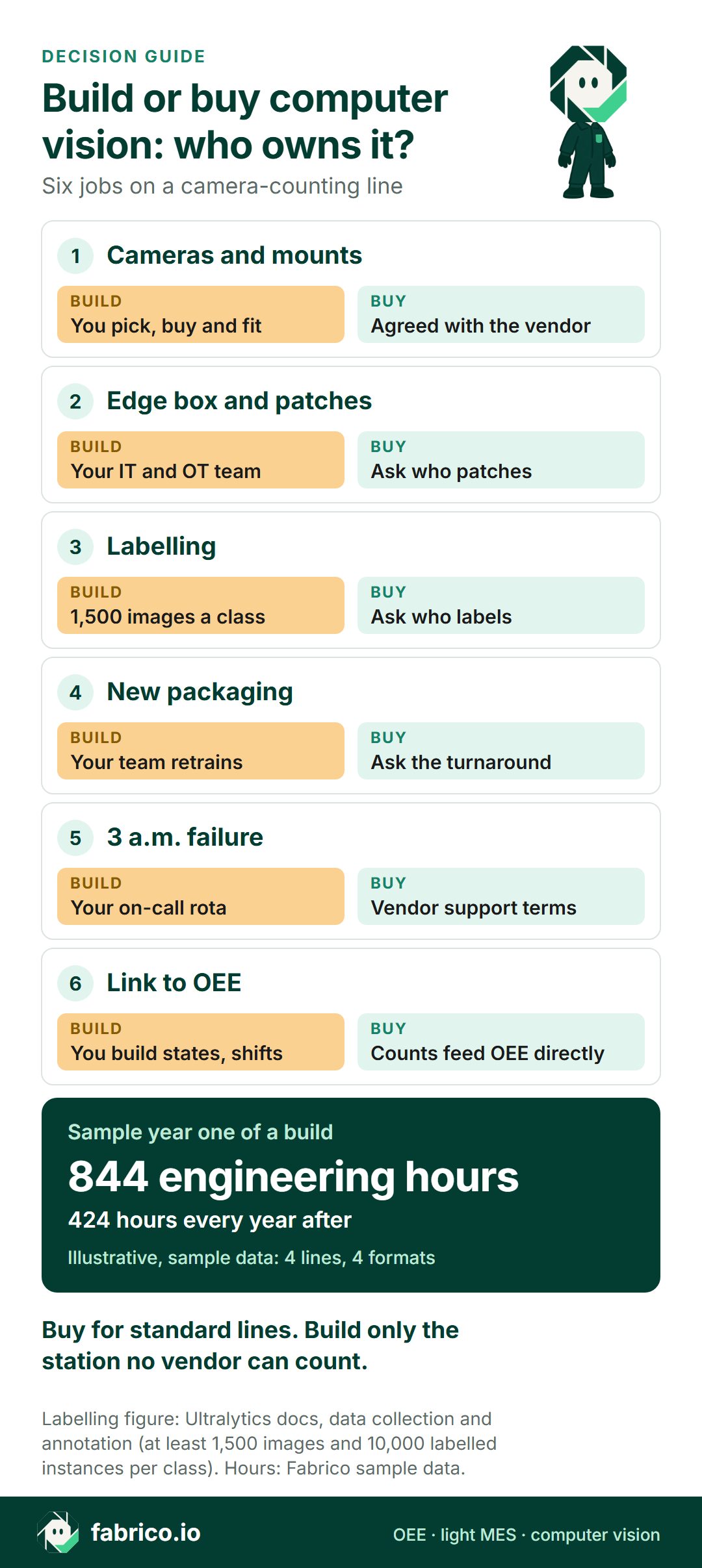
| Factor | Build in-house | Buy a camera add-on |
|---|---|---|
| Labelling | Your team, per class | Ask who labels |
| Packaging change | Your team retrains and tests | Ask the turnaround |
| Edge box, patches | Your IT and OT team | Ask who patches |
| Night failures | Your on-call rota | Vendor support terms |
| Link to OEE | You build states, shifts, rates | Ask how counts reach OEE |
| Licences | Check each library and model | In the vendor contract |
| Control of the model | Full | Vendor's roadmap |
| Fits when | Unique station, strong team | Standard lines, lean team |
Building buys you control. Buying moves the recurring work (labelling, retraining, patching, night cover) to someone whose job it is. Which is worth more depends on your team and your stations.
Want to see how a camera add-on feeds OEE before you decide? Book a demo and bring your station list.
Sample effort model: year one of a build
Illustrative, sample data. A plant puts cameras on 4 lines that run 4 pack formats. The team labels to the Ultralytics recommendation of 1,500 images per class and spends 1 minute per image. Marketing changes packaging 8 times a year. These are sample inputs, not benchmarks: replace them with your own.
- Initial labelling: 4 formats × 1,500 images × 1 minute = 6,000 minutes = 100 hours.
- Model training and acceptance tests: 80 hours (sample).
- Counting logic, tracking and the link to OEE states, shifts and ideal rates: 320 hours (sample).
- Edge box and camera care: 4 lines × 2 hours × 12 a year = 96 hours.
- Retraining after packaging changes: 8 changes × 1,500 images × 1 minute = 200 hours, plus 8 test runs × 6 hours = 48 hours, so 248 hours.
Total for year one: 100 + 80 + 320 + 96 + 248 = 844 hours. At a sample working year of 1,700 hours, that is about half of one engineer. In year two the labelling and logic are done, but care and retraining stay: 96 + 248 + 80 hours of fixes and upgrades (sample) = 424 hours, about a quarter of an engineer, every year. These hours do not include night call-outs.
What quiet drift does to OEE
Illustrative, sample data. One line, one shift: 450 minutes of planned production time, 400 minutes of run time, an ideal rate of 100 units a minute. The line really makes 34,000 units, of which 680 are rejects.
- Availability = 400 ÷ 450 = 88.9%.
- Performance = 34,000 ÷ (400 × 100) = 85.0%.
- Quality = 33,320 ÷ 34,000 = 98.0%.
- OEE = 88.9% × 85.0% × 98.0% = 74.0%. Check: 33,320 good units ÷ (450 × 100) = 74.0%.
Now a new sleeve arrives and the model misses 3% of units without anyone noticing. It counts 32,980. Performance falls to 82.5%, quality (with the same 680 rejects) to 97.9%, and OEE to 71.8%. The line did not get worse. The count did. A team chasing those lost 2 points of OEE would be chasing a model problem. That is why count audits and a retraining plan belong in the business case, whoever builds the system.
When building is the right call
Building is not the wrong answer. It fits a narrow set of plants well.
Pick build if:
- The station is unique: an unusual product, a process no vendor has seen, or a count that needs custom logic.
- You already have a data team that runs models in production, with on-call cover and documentation.
- The vision work is part of your edge over competitors, so owning the model matters more than the hours.
- Your legal team has cleared the licences, and you are ready to fund the work every year, not once.
Pick buy if:
- Your lines run standard packs, cases and trays, and the goal is counts for OEE, not a research project.
- Your engineers are better spent on changeovers and losses than on model care.
- Nobody can promise night cover for the camera system for years.
Do both if: most stations are standard but one is not. Buy the counting for the standard lines, and point your team at the one station where no vendor fits. If you go the build route anywhere, run it as a pilot with clear exit criteria; the computer vision OEE pilot guide sets those up.
Questions to put to any vendor, or to your own team
The same questions work in both directions. If your own team cannot answer them, that is your answer on build.
- Who labels the training data, and how many images per product does the first model need?
- When packaging changes, who retrains the model, how fast, and how is the count checked before the new run?
- How is count accuracy tested against a reference count, and how often after go-live?
- Who patches the edge box and the cameras, and who notices when one goes offline?
- Who answers at 3 a.m. on a Sunday, and what is written down for the shift team?
- Which open-source libraries and models are inside, and under which licences?
- How do counts join machine states, shifts and ideal rates to become OEE?
- Is video stored, where, and who can see it? See line video storage and cameras without surveillance.
Where Fabrico fits
Fabrico is a cloud OEE software and light MES platform. Stops and counts come from the machine signal (PLC, sensor or counter), and the operator adds the stop reason at the line on a tablet or phone. OEE, downtime and losses show by line and shift, with losses in money.
For stations without a usable signal, Fabrico offers a computer vision camera add-on on request. The camera add-on counts output on the line, including at manual steps, and those counts feed the same OEE as the machine data. With the camera add-on you can open the video for any moment on the shift timeline; in the standard setup video is streamed on request, not stored. How the counting works is explained in AI visual counting in manufacturing.
Roadmap, clearly labelled: camera-detected stops and stop-reason suggestions that the operator confirms are on the roadmap, not live today. Fabrico does not sell quality inspection. Custom AI modules are available as custom work on request, for the rare station that needs it.
Data leaves Fabrico through a REST API, webhooks and Excel or CSV export. How packaging changes are handled, and whether counts from your own model can come in, are questions for the demo. Test these claims like any vendor's. For an FMCG view of where cameras earn their place, see computer vision for FMCG manufacturing.
What people ask next
Is it cheaper to build computer vision in-house?
The code and models can cost little or nothing. The hours do not. In the sample model on this page, a team spends 844 hours in year one and 424 hours in each year after that, mostly on integration and retraining. Put your own hours next to each vendor's quote, and ask every vendor to price the same station list so the numbers compare.
Can we start with open-source YOLO and switch to a vendor later?
Yes, and a short trial is a cheap way to learn how hard your products are to count. Check the licence before anything runs in production: Ultralytics says an Enterprise License is required if you want to use its YOLO models without open-sourcing your entire project. Keep your trial counts and definitions, so you can compare them with a vendor's counts on the same shifts.
How many images do we need to label?
Ultralytics says a few hundred annotated objects per class is enough to start experimenting with transfer learning, and recommends at least 1,500 images and 10,000 labelled instances per class for reliable real-world performance. Every pack format that looks different is a candidate for its own class or extra training data.
What happens to a counting model when packaging changes?
The product looks different to the camera, so the model can miss units or count one twice. Plan new images, labels and a test run before the new artwork reaches the line. If you buy, ask each vendor who handles a packaging change, how fast, and how they prove the count is right afterwards.
Can we run our own model and still use a vendor's OEE software?
Often, if the OEE software accepts counts from outside sources. Ask each vendor how outside counts come in and how they join machine states and shifts. For Fabrico, whether counts from your own model can come in on a given line is a question to ask in the demo.
Does a camera add-on for OEE replace our inspection cameras?
No. Inspection systems check defects, labels, codes and fill levels. A camera add-on for OEE counts output. The two sit side by side, and rejects from an inspection system can feed the quality part of OEE through the line's reject count or signal.
Want to compare the buy route with your build plan? Book a demo and see it on a line like yours.
Related articles
Latest from our blog


Real Fabrico tiles, sample data.