


 Login
 Blog

Computer Vision for Breakfast Cereal Lines: From Bagger to Pallet

In short: computer vision for breakfast cereal lines pays off on the packing side: cameras count cartons and cases where the cartoner or case packer gives no usable count, and let you open the video of a stop at the bag insert or the carton magazine.
- Flake colour, foreign bodies, seal leaks, fill weight and codes are inspection jobs, for sorters, metal detectors, X-ray, checkweighers and vision systems.
- Cereal packing loses time at the bag insert, the carton magazine, dry allergen cleans and a backed-up end of line.
- Read the PLC where it counts. Put cameras on old cartoners, case packer infeeds you cannot read, and hand-packed promo tables.
- Fabrico's AI camera add-on counts output and opens the video for any moment on the shift timeline. Stops come from the machine signal, and the operator adds the reason.
The process half of a cereal plant rarely stops. The packing half can stop dozens of times a shift, mostly for too short a time for anyone to write down.
This page is for engineers and plant managers choosing cameras and OEE software for cereal packing. It shows where a camera earns its place, where the machine signal is enough, and what to ask each vendor.
To measure the process and the packing line as two figures, read OEE for breakfast cereal lines first.
Computer vision for breakfast cereal lines: two different jobs
Two kinds of camera system get sold to cereal plants under one name. Inspection systems check the product and the packs. OEE cameras count output and show you what happened at a stop. Keep them apart in the spec.
| Job on a cereal line | Inspection system | OEE camera |
|---|---|---|
| Flake colour, size, burnt pieces | Optical sorter or vision | No |
| Metal and foreign bodies | Metal detector or X-ray | No |
| Leaking bag seals | Leak or seal check | No |
| Carton fill weight | Checkweigher | No |
| Best-before code and artwork | Code reader or vision | No |
| Count good cartons and cases | Often counts what it checks | Yes, also at hand packing |
| Video of a stop | Reject images, not stop video | Open the video for that minute |
| Feeds OEE through | Its reject count | The output count |
The two work side by side. Read the checkweigher and metal detector reject counts by signal, and they feed the quality part of OEE, so a rejected carton counts once. For where one job ends and the other starts, read label and code vision vs an OEE camera.
One more thing no OEE camera judges: how full a closed carton looks. Cereal settles in transit. In the US only, the rule on misleading containers, 21 CFR 100.100, covers packs the shopper cannot see into, and lists "unavoidable product settling during shipping and handling" as one reason that empty space in a pack is not nonfunctional slack-fill. Other markets have their own rules. Fill is set by weight, and weight is the checkweigher's job.
Where the losses hide on a cereal packing line
Siemens' 2024 True Cost of Downtime report puts a lost hour at $36,000 in fast moving consumer goods, the lowest of the four sectors it covers. It is based on a survey of large industrial companies from April 2019 to March 2023, and it found FMCG plants lose about as many hours to unplanned downtime as they did in 2019. Your number will differ, so price your own hour. Here is where cereal packing hours go.
The bag going into the carton
On a bag-in-box line, a vertical bagger makes and fills the liner bag, and the cartoner puts it into the carton. The handover is where many short stops start: a bag that lands crooked, a bag not fully in the box, a flap that catches it, a glue fault on closing.
Each one clears in under a minute, and fifty 40-second stops are 33 minutes. The alarm names the symptom, not always the cause. Open the video for the minute before the stop and you can see whether the bag, the carton or the transfer was at fault.
Our page on cartoner OEE covers the cartoner's own stop modes, and micro-stops covers the short-stop threshold.
Weigher and bagger
The multihead weigher and the vertical bagger tend to blame each other, and fines from broken flakes get into the seal. That pair has its own page: VFFS bagger stops shows where its two cameras go and how to tell which machine stopped first. We will not repeat it here.
Starved by the bin, blocked by the end of line
Starved and blocked time is booked by the bin rules on OEE for breakfast cereal lines. What a camera adds is the check: the video at the case packer infeed shows whether the cartoner stopped on its own or was blocked by the end of line. See case packer downtime and palletizer downtime for the end of the line.
Many SKUs, many dry cleans
One packing line often runs many carton sizes, flavours, private labels and promo packs. Every size or artwork change is a changeover, and a flavour change can also mean a clean.
Cereal plants mostly clean dry, and the clean depends on the direction of the change. Going from a product with an allergen to one without it, such as a nut granola followed by a plain flake, needs the full allergen clean. The reverse may need little. Our allergen changeover matrix shows how to plan and price each change. In the US only, the FDA lists nine major food allergens: milk, eggs, fish, Crustacean shellfish, tree nuts, peanuts, wheat, soybeans and sesame. It also says milk "represents the most common cause of recalls due to undeclared allergens."
Never shorten a validated allergen clean. A camera adds little to the clean itself. It helps after it: the count, from the PLC or the camera add-on, shows when the restart reaches full speed. For timing and typing changeovers on a cereal line, see OEE for breakfast cereal lines.
Promo packs, variety packs and display trays
Not every cereal pack leaves on an automatic line. Variety packs, banded twin packs, bonus packs and shelf-ready display trays are often finished by hand at a table, or sent to a co-packer.
A hand table has no PLC and no count. Output is a tally at the end of the shift, and stop time is a guess. This is where a camera pays off most: it counts the packs or trays that leave the table. The people at the table still add the stop reasons. Camera-detected stops are on the roadmap, so ask any vendor how stop time is captured at a station with no signal. For work sent out, see computer vision for co-packers.
Dust on the lens
Cereal halls are dry but dusty, and fines and coating sugar settle on lenses near the weigher. Mount cameras away from open product, on the closed-carton side, outside the guarding. Agree lens cleaning and every position with QA before anyone drills, and check the housing against your glass and brittle plastics policy.
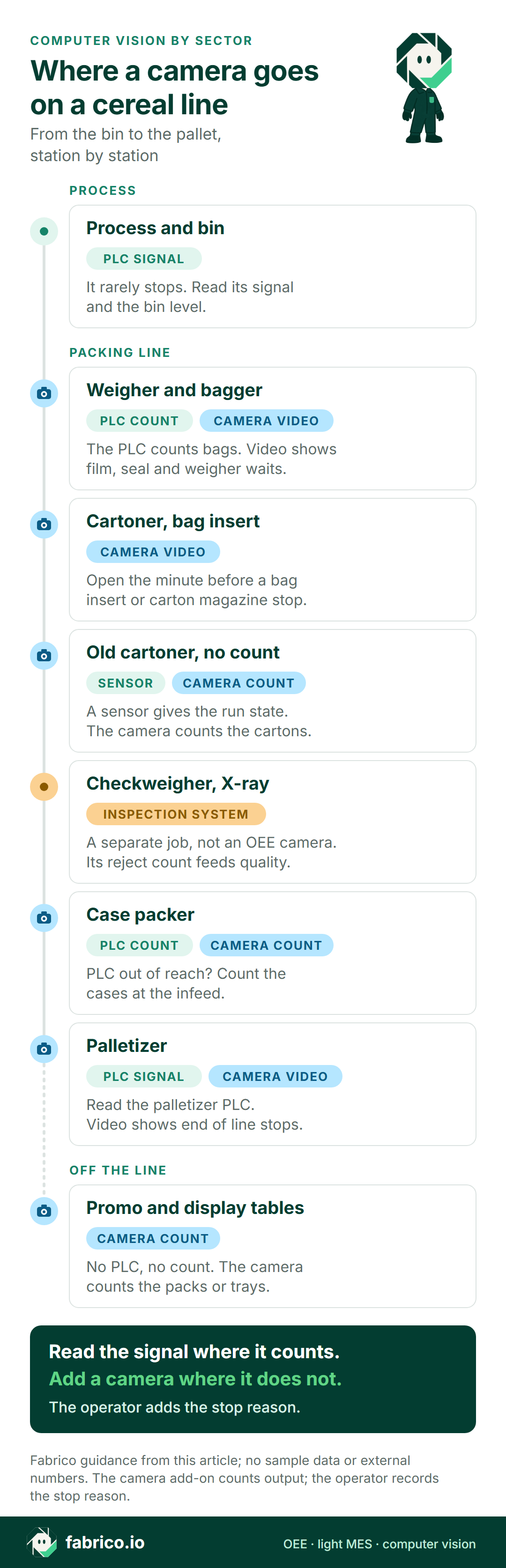
Where a camera goes on a cereal line
Here is one example: a bag-in-box line from the bin to the pallet, plus a promo packing table.
For how many cameras a line needs, see how many cameras per line.
Camera, sensor or operator: station by station
This is typical for a cereal site, not a rule. Check each machine.
| Station | Count and stops from | What a camera adds |
|---|---|---|
| Process, bin, sifter | Process control and bin level | Little. Use the signal. |
| Weigher and bagger | Machine PLC | Video of film, seal and weigher waits |
| Cartoner | Cartoner PLC | Video of bag insert and magazine stops |
| Old cartoner, no usable count | A sensor for the run state | Carton count |
| Checkweigher, metal detector, X-ray | Its own reject count | Nothing. Feed rejects to quality. |
| Case packer | PLC, if you can reach it | Count at the infeed if you cannot |
| Promo or display table | Nothing, or a tally sheet | Count of packs or trays |
| Palletizer | Palletizer PLC | Video of end of line stops |
| Stop reasons, all stations | The operator, on a tablet or phone | Video to check a disputed reason |
You rarely need a camera at every station. The card below shows where one pays off.
Book a demo, bring your station list and one week of stop sheets, and we will go through it station by station.
Worked example: an old cartoner with no usable count
These are example numbers, and they describe no real plant. An older cartoner packs a 375 g carton at an ideal rate of 70 cartons a minute, over one 480-minute shift. Its PLC gives no count that anyone can reach.
A sensor gives the run state, so stop time comes from the signal. A camera at the cartoner discharge counts the cartons, and the checkweigher and metal detector send reject counts by signal.
Stops took 90 minutes: an artwork changeover 35, 46 short stops 31, a carton magazine jam 14, and 10 minutes starved when the bin ran empty. Run time is 390 of 480 minutes, so availability is 81.3%.
At 70 a minute, 390 minutes could make 27,300 cartons. The camera counted 24,570, so performance is 90%. The gap is 39 minutes of slow running.
The checkweigher and the metal detector rejected 490, which leaves 24,080 good cartons. Quality is 98.0%.
OEE is 81.3% x 90% x 98.0% = 71.7%. Check it the short way: 24,080 good cartons at 70 a minute is 344 minutes of perfect running, and 344 of 480 is also 71.7%.
The paper sheet for the same shift lists only the changeover and the magazine jam: 49 minutes.
Those 41 minutes are more than 8% of the shift. The 10 starved minutes go on the process team's list, not the cartoner's. And when short stops jump one night, someone can open the video for those minutes instead of guessing.
Seven questions for a cereal computer vision vendor
Run these with every vendor, and with us. Bring one real shift from last week as the test case.
| Ask | How to test the answer |
|---|---|
| What exactly does the camera count? | Bags, cartons, twin packs or cases? Ask how each converts per SKU, and run it next to a hand count for a shift. |
| What happens at a station with no signal? | Ask how stop time is captured at a promo table, and what is live today and what is roadmap. |
| Can you open the minute before a stop? | Pick a short stop at the bag insert from the test shift, and ask them to open the video for that minute. |
| What changes when the pack changes? | Ask what happens to the count when the line moves from a single carton to a twin pack or a display tray. |
| Does a rejected carton count once? | Ask how the camera count and the checkweigher and X-ray reject counts are joined, so a reject never counts as good. |
| What happens when the lens gets dusty? | Ask how the count behaves with a dirty view, and how the lens is cleaned under dry-clean rules. |
| Is video kept, and who can open it? | Ask where it lives, for how long, and who sees it. |
Before you roll out across the site, test on one line first. See our guide to a computer vision OEE pilot.
Cameras, privacy and the works council
A camera over a promo table will see hands. Tell staff before any camera goes up, and in many European countries talk to the works council first. Frame the camera on the cartons, the cases or the table top, not the crew, and report by line and shift, not by person.
Ask each vendor, us included, what privacy masking is live today and what is still roadmap. Fabrico's camera add-on counts product, not people. For a fuller checklist, read production line cameras without surveillance.
Where Fabrico fits on a cereal line
Fabrico is a cloud OEE and light MES platform. Here is what it does on a cereal packing line today.
- Stops and counts: from the machine signal, through the PLC, a sensor or a counter.
- Stop reasons: the operator adds them at the line, on a tablet or phone.
- OEE and losses: OEE, downtime and losses by line and shift, with losses shown in money. On the web, iOS and Android.
- Cameras, an add-on on request: AI cameras count output, including at promo tables and on cartoners with no usable signal. You can open the camera video for any moment on the shift timeline. In the standard setup, video is streamed on request, not stored in Fabrico.
- Your data: it leaves through a REST API, webhooks and Excel or CSV export.
Roadmap, not live today: stops detected by the camera, jam zones on the video, and a camera suggesting a stop reason.
What Fabrico does not do: inspection, which stays with your sorters, metal detectors, X-ray, checkweighers and vision systems, and feeds Fabrico's quality figure through the reject signal or counter. Fabrico does not control your weigher. Production planning is on our roadmap, with no release date. Today Fabrico does not build or schedule your plan: it shows what the lines can do.
See the Fabrico camera add-on for OEE for the product, and our guide to OEE software if you are still comparing. Other sectors start at computer vision for FMCG manufacturing and computer vision for food manufacturing.
What people ask next
Which cereal station should get the first camera?
Usually the one with the weakest count: a promo or display packing table, an old cartoner with no count you can reach, or a case packer whose PLC is locked. Weighers and baggers with a PLC count you trust come last.
Can a camera check flake colour or find foreign bodies?
Yes, but that is inspection, not an OEE camera. Optical sorters and vision systems check the product, and metal detectors or X-ray find foreign bodies. Fabrico does not sell inspection. Their reject counts can feed the quality part of OEE.
Does computer vision work in a dusty cereal hall?
It can, if the camera sits away from open product and the lens is cleaned under your dry-clean rules. Ask each vendor what happens to the count when the lens gets dusty, and test it on one line.
Can a camera count variety packs packed by hand?
Yes. Counting output at manual steps is a main use of Fabrico's AI camera add-on. It counts the packs or trays that leave the table, and the people there add the stop reasons. Ask any vendor how stop time is captured at a table with no signal.
Is the camera video stored?
Not in the standard setup. Video is streamed on request, and you can open it for any moment on the shift timeline. Ask every vendor the same question, and where their video lives.
What drives the cost of computer vision on a cereal line?
Pricing is set per quote. The drivers are the number of lines and cameras, mounting, the network to the packing hall, and training. Give each vendor the same list of lines and stations so the quotes compare.
Want to see it on a line like yours? Book a demo and bring one shift from a cereal packing line.
Related articles







Real Fabrico tiles, sample data.