


 Login
 Blog
HALCON vs MERLIC: Coding or Configuring Vision Apps on the Line

In short: HALCON vs MERLIC comes down to who builds the vision app and how. MVTec's products page says to use HALCON to develop advanced, custom applications and MERLIC to build solutions quickly without programming. Same vendor, related libraries, so pick by the person, the job and the hardware at each station. OEE output counting sits beside both as its own task.
- HALCON: a developer writes and debugs the vision logic in HDevelop, then deploys it on PCs, embedded or Arm boards, per the HALCON features page.
- MERLIC: an engineer sets processing steps and parameters on the image itself, per the MERLIC page.
- MERLIC 26.10 runs on HALCON 26.05 Progress libraries, per its release notes.
- All MVTec facts from mvtec.com, as of 13.11.2026, linked in place.
A pouch line gets a camera at the outfeed to read the best-before date and confirm the right label is on. The camera is picked. Now somebody has to build the app that judges each pouch, and in an MVTec plant two names come up: HALCON and MERLIC. The job decides: who builds, how, where it runs, and what happens at the next SKU.
Fabrico makes cloud OEE software with light MES. We sell no vision library and no inspection system, so neither product here competes with ours; the second half of the page covers where a vision station hands numbers to OEE. For two hardware vendors side by side, see Cognex vs Keyence.
HALCON vs MERLIC at a glance
As of 13.11.2026, from MVTec's own pages, linked in the sections below.
| Point | HALCON, per mvtec.com | MERLIC, per mvtec.com |
|---|---|---|
| How MVTec frames it | The 2D and 3D machine vision toolbox | The easy-to-use no-code software |
| Intended use | Develop advanced, custom applications | Build solutions quickly without programming |
| How an app is built | Logic created, tested and debugged in HDevelop | Steps and parameters set on the image in MERLIC Creator |
| Typical jobs | Inspection, measurement, identification, recognition | Inspection, measuring and counting, OCR, codes, position, 3D |
| Deep learning | Accelerated with Intel OpenVINO and NVIDIA TensorRT | Combined with rule-based processing |
| Where it runs | Standard PCs, embedded and Arm-based platforms | Windows and Linux PCs, Arm embedded, Siemens Industrial Edge |
| Link to the line | Tools for integrating vision logic into an application | Communication plug-ins, including SIMATIC S7 and TwinCAT ADS |
| Current version | HALCON 26.05 Progress | MERLIC 26.10, on HALCON 26.05 Progress libraries |
What HALCON offers
MVTec's HALCON page says the software is designed for developing, deploying, and operating reliable vision applications across industries. For throughput it lists GPU acceleration, multicore support and automatic parallelization of operators; for deep learning it names Intel OpenVINO and NVIDIA TensorRT; for gauging it states subpixel-accurate results, with calibration for lens distortion and world coordinates.
The features and tools page adds dedicated tools for creating, testing, debugging and integrating machine vision logic, and one video note sums up the workflow: develop in HDevelop, then run on the device. It says HALCON deploys on standard PCs as well as embedded and Arm-based platforms. The documentation page lists an HDevelop User's Guide, a Programmer's Guide that MVTec calls language-specific and workflow-oriented, and, for HALCON 26.05, Windows x64 plus Linux x86_64 and aarch64.
At the station: a HALCON app is written code, owned by its author or their integrator, screens and machine link included.
What MERLIC offers
The MERLIC page says MERLIC enables the configuration of image processing applications without code, with parameters and processing steps set directly on the image. Jobs it names run from classification, measuring and counting and inspection to OCR, code reading, position and 3D on height maps. A video note there says recipes let the PLC reconfigure or switch vision apps on demand.
The MERLIC features page lists the MERLIC Designer for custom user interfaces, communication plug-ins for Siemens SIMATIC S7 and Beckhoff TwinCAT ADS, and support for USB3 Vision and GigE Vision cameras and GenICam GenTL hardware. EMVA's GenICam page calls GenICam the base for plug and play handling of cameras and devices. Per the MERLIC documentation, apps are built on Windows in the MERLIC Creator, while MERLIC RTE, the runtime, and MERLIC Frontend also run on Linux. The 26.10 release notes say MERLIC's HALCON libraries moved to 26.05 Progress and that apps can be imported as virtual recipes. The MERLIC on Edge page says MERLIC apps run directly on Siemens Industrial Edge devices.
At the station: a MERLIC app is configured, so the engineer who knows the pack can adjust it, and the PLC can switch it by recipe.
HALCON vs MERLIC, job by job
Who builds the app
Custom applications mean a developer, in-house or from an integrator. Building without programming lets a line, process or quality engineer own the setup. Test: name the person who changes the check on night shift, and ask which tool they can work in today.
Programming versus configuring
In HALCON the check is code, debugged in HDevelop and wrapped in an application. In MERLIC it is a chain of tools set on a live image. MVTec's article on MERLIC's text and code reading tools says that when you hover over an area, MERLIC determines suitable parameters and previews the result, with over 20 extra parameters for fine tuning. Test: have that person set up one real check in each, on your own images.
Tools for typical line jobs
For dates, lot codes and barcodes, the same article says MERLIC offers six standard tools for codes, texts and numbers. MVTec's OCR page describes Deep OCR, which localizes characters independent of font or orientation, and many pre-trained fonts. Both products mix deep learning with rule-based methods for defects. Test: good packs and real faults through both, false rejects counted.
Deployment on line PCs and devices
HALCON targets PCs, embedded and Arm boards. MERLIC builds on Windows and runs through its runtime on Windows, Linux and Arm, or on Siemens Industrial Edge. Test: confirm the exact PC or device, its operating system and the camera interface before ordering. For results bound for a server, see edge vs cloud shop floor data.
Talking to the PLC
MERLIC names its plug-ins and PLC recipe switching. A HALCON app reaches the line through the application around it. MVTec's interfaces page lists interfaces for image acquisition, digital I/O and AI accelerators, says MERLIC ships with the interface versions it needs, and includes an OPC_UA entry; OPC UA is the OPC Foundation's platform independent architecture for industrial data. Test: ask how pass, fail and no-read results arrive at the PLC, and whether rejects come out as a count.
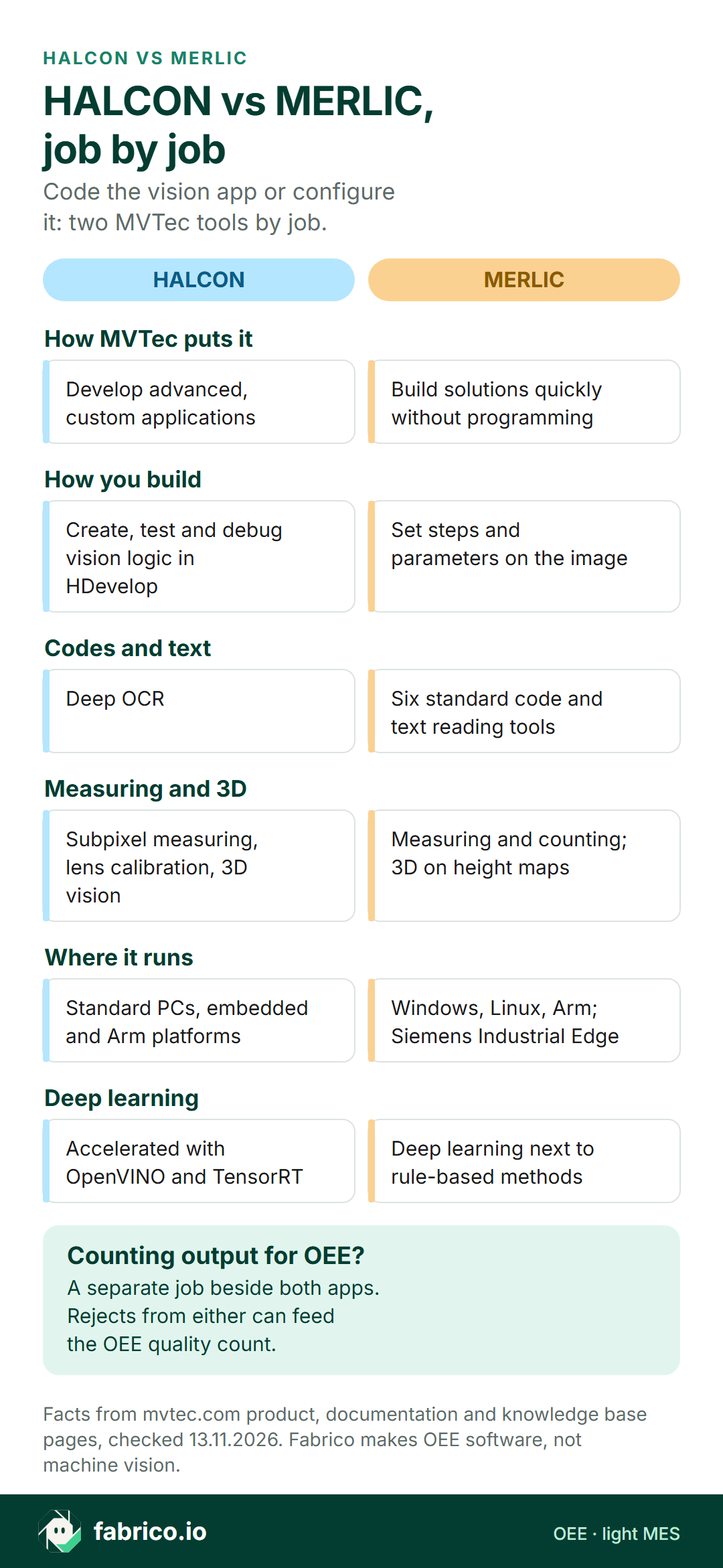
Text version of this infographic
- How MVTec puts it. HALCON: Develop advanced, custom applications. MERLIC: Build solutions quickly without programming.
- How you build. HALCON: Create, test and debug vision logic in HDevelop. MERLIC: Set steps and parameters on the image.
- Codes and text. HALCON: Deep OCR. MERLIC: Six standard code and text reading tools.
- Measuring and 3D. HALCON: Subpixel measuring, lens calibration, 3D vision. MERLIC: Measuring and counting; 3D on height maps.
- Where it runs. HALCON: Standard PCs, embedded and Arm platforms. MERLIC: Windows, Linux, Arm; Siemens Industrial Edge.
- Deep learning. HALCON: Accelerated with OpenVINO and TensorRT. MERLIC: Deep learning next to rule-based methods.
- Counting output for OEE: a separate job beside both; rejects from either app can feed the OEE quality count.
Match the first job
- If the first job is a date, lot code or label read on a standard pack, owned by a line or quality engineer, look at MERLIC.
- If it needs logic of its own, such as several measurements under custom rules, or vision inside a larger machine application, look at HALCON.
- If the PLC must switch the check at each product change, look at MERLIC recipes, and ask how a HALCON app would do the same.
- If the target is a Siemens Industrial Edge device, look at MERLIC on Edge; for an embedded board inside a machine, ask how each deploys there.
- If many small checks fall on a small team, look at who maintains each after go-live.
Planning a vision station? Book a demo to see where its halts and rejects enter OEE.
When a plant moves from one to the other
Toward HALCON: checks that keep needing custom steps, vision inside a machine builder's software, or logic kept under version control with other code.
Toward MERLIC: a queue of small checks waiting on one developer, SKU changes that keep that developer at the line, or shift engineers who could adjust a check if the tool let them.
Related libraries do not move an app across. Ask MVTec what carries over, such as images, models and settings, and what must be rebuilt.
Inspection and measuring are not OEE counting
A vision app answers a question per pack: is it good, is the code readable, is it in tolerance. OEE asks about the whole shift: minutes stood and the reason, running speed, and the good count. Our page on where label vision ends and the OEE camera add-on begins goes deeper.
They meet twice. Rejects from your HALCON or MERLIC app belong in OEE quality, most simply fed from the reject counter or a PLC reject bit. And when the vision station halts the line, through repeated fails or a new setup, that is lost availability. A vision app can count objects too; before using that count for OEE, compare it with a manual count over a full shift, as how accurate is camera OEE? explains.
Worked example: a new SKU's label check, set up two ways
Sample figures. A pouch line has a 435 minute planned shift at an ideal 40 pouches a minute: 17,400 possible. A new SKU brings a new label, and the outfeed check must learn it before the run. In setup A the line engineer adds the SKU in a no-code tool. In setup B the plant's vision developer, called over from another line, changes a coded app. Both shifts also carry a 25 minute changeover and 20 minutes of other stops.
Setup A, line engineer. The line stood 18 minutes for the setup. Stops total 25 + 20 + 18 = 63 minutes, so it ran 372 and availability is 372 / 435 = 85.5%. The ideal in 372 minutes is 14,880; the filler counted 13,392, so performance is 90.0%. The check rejected 268, leaving 13,124 good: quality 13,124 / 13,392 = 98.0%. OEE is 85.5% x 90.0% x 98.0% = 75.4%, or 13,124 of 17,400.
Setup B, developer. The line stood 51 minutes: waiting, editing, testing. Stops total 96 minutes, so it ran 339 and availability is 339 / 435 = 77.9%. The ideal is 13,560; the filler counted 12,204, so performance is 90.0%. The check rejected 244, leaving 11,960 good: quality 98.0%. OEE is 77.9% x 90.0% x 98.0% = 68.7%, or 11,960 of 17,400. The formula, step by step, is in our OEE calculation guide.
The gap is 33 minutes and 1,164 good pouches on one shift. It reflects people and setup, not either product; an engineer new to the tool, or a check needing logic the developer already wrote, can flip it. What matters is that the halt is measured, as a stop from the machine signal with a reason such as "label check setup, new SKU" tagged by the operator.
Where Fabrico fits beside an MVTec station
Fabrico sells cloud OEE with light MES (see the OEE and MES overview). It runs next to a HALCON or MERLIC station, never instead of it, and Fabrico does no inspection.
- Run, stop and count signals come from a PLC, sensor or counter; operators pick the reason for a stop at the line, on a phone or tablet.
- The reject count or signal from your vision app goes into OEE quality.
- OEE and downtime per line and shift, with each loss shown as money, on web, iOS and Android.
- On request, the camera add-on counts output where a station has no usable signal, such as a hand packing table, and judges no pack. Video from the camera add-on is streamed when you ask for it and is not stored in Fabrico in the standard setup; camera add-on hints for stop reasons are still Roadmap work, not live.
- Exports: REST API, webhooks, Excel and CSV.
More on the computer vision OEE page and in the guide to computer vision in FMCG. Tempted to write counting screens on top of your vision app? Read build vs buy for computer vision OEE first, and compare OEE tools in the OEE software guide.
Questions to ask MVTec and your integrator
- Who changes the check at a new SKU? Name the person and the tool they can use alone.
- Does it pass on our samples? Good packs and real faults through each, false rejects counted.
- Which PC or device runs it? Operating system, board and camera interface, per product.
- How does the PLC switch it? Show a product change by recipe or by code.
- How does a reject reach the PLC? As a signal or count that can feed OEE quality.
- What carries over if we move? Images, trained models, settings, or a rebuild.
- Where do images go? Storage, retention and access; if people are in view, involve the works council first.
What people ask next
How do HALCON and MERLIC differ?
Both are MVTec products. MVTec's products page says to use HALCON to develop advanced, custom applications and MERLIC to build solutions quickly without programming. A HALCON app is written by a developer; a MERLIC app is configured on the image by an engineer who may not code.
Does MERLIC use HALCON inside?
Yes, per the MERLIC 26.10 release notes, which say the HALCON libraries used by MERLIC were upgraded to HALCON 26.05 Progress. The processing underneath is related; the way you build an app differs.
Can MERLIC run on embedded or edge devices?
MVTec says MERLIC is available for Windows and Linux PCs and for Arm-based embedded platforms, and MERLIC on Edge runs MERLIC apps directly on Siemens Industrial Edge devices. The app itself is built on Windows in the MERLIC Creator.
Can a plant use HALCON and MERLIC side by side?
MVTec presents them as separate products for different uses, so a plant can choose per station. Ask MVTec how apps from each are supported when both run in one plant.
Can HALCON or MERLIC measure OEE?
They are built for vision jobs such as inspection, measuring and code reading. An app on either can count objects, and its rejects can feed OEE quality. OEE also needs planned time, stop times, stop reasons and the ideal rate, per line and per shift, and OEE software holds those.
Does Fabrico inspect labels or parts?
No. Fabrico makes OEE software with light MES and does no inspection. Its camera add-on counts output; camera add-on stop reason hints are on the Roadmap, not live. Judging packs stays with your HALCON or MERLIC app.
Want to see where a label check's halts and rejects land in shift OEE? Book a demo.
Related articles


Latest from our blog



Real Fabrico tiles, sample data.