


 Login
 Blog
Ignition vs Ignition Edge: Gateway, Edge IIoT and Edge Panel Compared

In short: Ignition vs Ignition Edge is a choice about where the software sits and what it keeps. The standard Ignition gateway is the central server that talks to PLCs and SQL databases; Ignition Edge is a lightweight version that goes onto a device at the line or a remote site, keeps up to 35 days of history there, and syncs it to a central gateway. For OEE, both can carry the machine tags; stop causes and planned time still need a home.
- Edge comes as two product options: Edge IIoT moves data, Edge Panel adds local screens.
- During a network drop, Edge uses its local storage as a store and forward buffer and sends the backlog in batches afterwards.
- Vendor facts are from inductiveautomation.com and docs.inductiveautomation.com, as of 13.11.2026, linked in place.
One Ignition gateway sits in the server room; a filling line sits at a site an hour away, on a cellular router. Does that line need an Edge device, or will a PLC the central server polls do? Below: both products by job, from Inductive Automation's pages, then the effect on OEE and stop causes.
Ignition vs Ignition Edge at a glance
Summarised from Inductive Automation's site and user manual on 13.11.2026. Each row is sourced in the sections below.
| Job | Standard Ignition gateway | Ignition Edge |
|---|---|---|
| Role | Central server for plant-floor data and SQL | Lightweight version for field devices and OEM hardware |
| Where it runs | Servers, laptops, embedded devices | Embedded and panel PCs, ARM devices, cloud VMs, Docker |
| History | Logged to SQL databases | Up to 35 days or 10 million points on the device |
| Network drop | Store and forward buffers writes to the database | Local storage becomes the buffer, then syncs |
| Tags and devices | Data tags, PLCs, databases and devices | Unlimited tags and device connections for included drivers |
| Scripts and APIs | Designer with drawing and scripting tools | Python scripts and REST APIs on the Edge Gateway |
| Local screens | Vision and Perspective modules | Edge Panel: Perspective (2 sessions) or Vision (1 local, 1 remote client) |
What the standard Ignition gateway does
Inductive Automation (IA), of Folsom, California, makes both products. Per its Ignition overview and modules page, as of 13.11.2026:
- Machines and IT together. The overview says the gateway talks to plant-floor equipment "just as naturally as it talks to SQL databases". Under the hood it uses open standards, SQL and Python among them alongside OPC UA and MQTT, and it installs onto servers, laptops and embedded devices.
- Build once, open anywhere. The Designer brings a component library, data binding, and tools for drawing and scripting. Projects launch as web clients from an on-premise or cloud-based server onto desktops, industrial displays and phones.
- Modules. Two visualization modules (Vision, and Perspective for mobile-responsive HTML5 apps), SQL Bridge to log data and call stored procedures, and a historian suite pairing the Historian Core and SQL Historian modules.
- Store and forward. The manual's store and forward page calls it "a reliable way for Ignition to store data to the database", with one engine per database connection. Data stays queued, in order, until the database write succeeds.
What Ignition Edge does: Edge IIoT and Edge Panel
The Ignition Edge page says Edge "consists of two powerful product options: Edge IIoT and Edge Panel", and the manual's Ignition Edge section calls it a lightweight version of Ignition for field devices and OEM hardware. As of 13.11.2026:
- Edge IIoT works with standard Ignition to bridge device data between remote sites and the plant floor, publishing it to an MQTT server or another endpoint, and can send to any MQTT broker using the Sparkplug specification.
- Edge Panel includes everything in Edge IIoT and adds HMI screens on a panel PC: Perspective (2 sessions) or Vision (one local and one remote client). Behind a central gateway, it keeps local visualization and control when the network fails.
- Tags and drivers. Both include "unlimited tags and device connections for included drivers" and act as an OPC UA server. Allen-Bradley, Siemens, Mitsubishi, Modbus, Omron, DNP3, BACnet and IEC 61850 are among the drivers listed.
Edge ships with a predefined set of modules, is meant for one Ignition project and one tag provider at a time, and works in tandem with a central Ignition system. For local needs beyond that, IA recommends a standard Ignition server.
Ignition vs Ignition Edge, job by job
Where each runs. The standard gateway is the central server, in a server room, a data centre or a cloud account. Edge sits on a device beside the machine, polling data at the source: the Edge FAQ lists embedded PCs, servers, AWS and Azure VMs, Docker and ARM boards such as Raspberry Pi. Its spec list names 1024 MB of RAM and 1 GB of free disk.
What each holds. The standard gateway writes history into SQL databases. Edge's built-in historian keeps up to 35 days or 10 million data points, whichever comes first, plus a week of alarm and audit data, and syncs it to a central Ignition server that is communicating with a SQL database.
Buffer and store and forward. Both buffer, on different legs. The standard gateway buffers between itself and its database, in memory and in a disk cache. Edge buffers between the device and the central gateway: per the sync services page, the Edge Gateway uses its 35 days of storage as the buffer while that link is severed. Once the link is back, it sends data by max batch size and data frequency until the queue is empty.
Tags and devices. Edge works as an OPC UA server and client; the OPC Foundation describes OPC UA as "a platform independent service-oriented architecture". On the standard gateway, drivers arrive as modules.
Scripts and REST APIs. On the standard gateway, scripting lives in the Designer project. On Edge, Python scripts run on gateway or scheduled events and on tag changes, and REST APIs let outside systems talk to the Edge Gateway.
Local screens. The standard gateway web-deploys Vision and Perspective clients across the plant. Edge IIoT is the data-transmission option; Edge Panel carries the screens, as a standalone HMI or as a local client fallback.
Central management. Both Edge products can act as agents for a central gateway running the Enterprise Administration Module (Edge architectures).
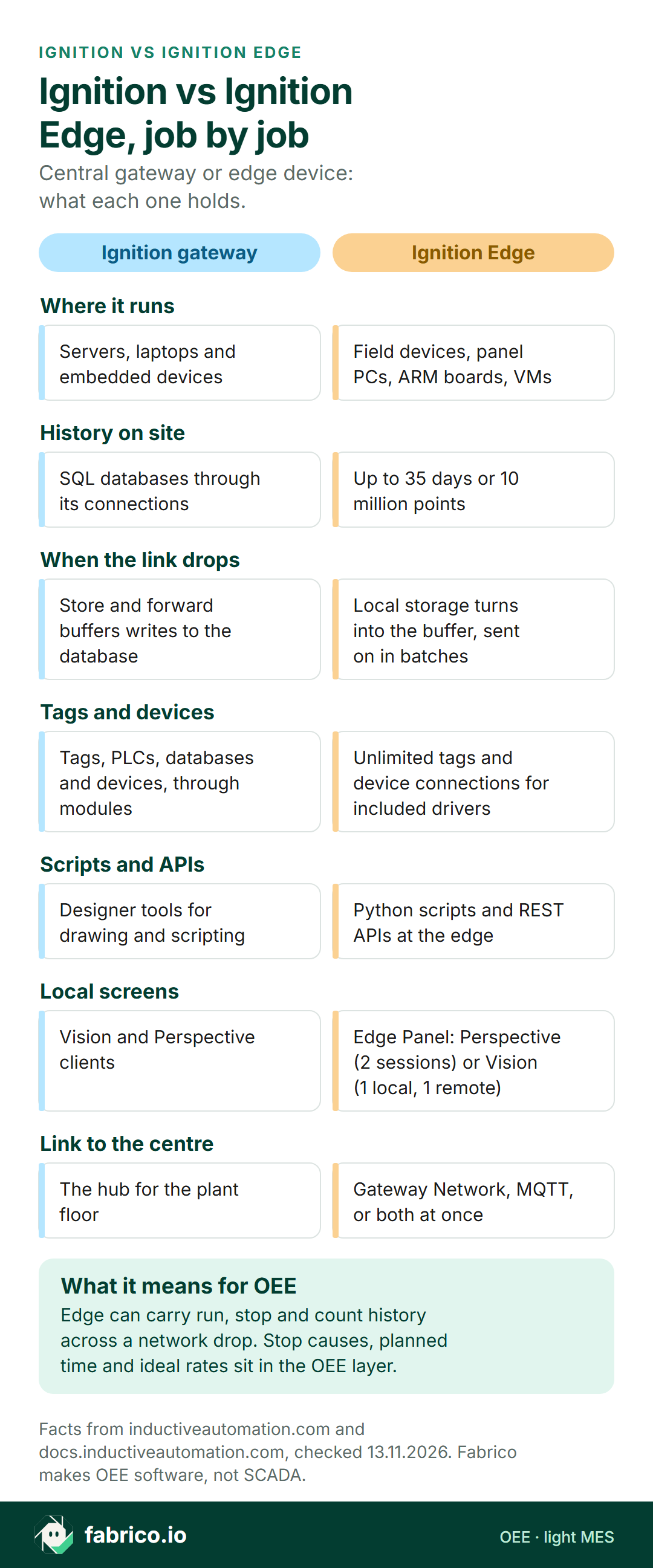
Text version of this infographic
- Ignition vs Ignition Edge, job by job: central gateway or edge device, what each one holds.
- Where it runs. Ignition gateway: Servers, laptops and embedded devices. Ignition Edge: Field devices, panel PCs, ARM boards, VMs.
- History on site. Ignition gateway: SQL databases through its connections. Ignition Edge: Up to 35 days or 10 million points.
- When the link drops. Ignition gateway: Store and forward buffers writes to the database. Ignition Edge: Local storage turns into the buffer, sent on in batches.
- Tags and devices. Ignition gateway: Tags, PLCs, databases and devices, through modules. Ignition Edge: Unlimited tags and device connections for included drivers.
- Scripts and APIs. Ignition gateway: Designer tools for drawing and scripting. Ignition Edge: Python scripts and REST APIs at the edge.
- Local screens. Ignition gateway: Vision and Perspective clients. Ignition Edge: Edge Panel: Perspective (2 sessions) or Vision (1 local, 1 remote).
- Link to the centre. Ignition gateway: The hub for the plant floor. Ignition Edge: Gateway Network, MQTT, or both at once.
- What it means for OEE: Edge can carry run, stop and count history across a network drop. Stop causes, planned time and ideal rates sit in the OEE layer.
- Facts from inductiveautomation.com and docs.inductiveautomation.com, checked 13.11.2026. Fabrico makes OEE software, not SCADA.
How Edge syncs to a central gateway
IA's Edge FAQ names two routes to a central Ignition server, the Gateway Network and MQTT, and both can be configured together. The Gateway Network links several Gateways over a wide area network. mqtt.org describes MQTT as "an extremely lightweight publish/subscribe messaging transport" for remote devices on minimal bandwidth, and notes that persistent sessions shorten reconnects to the broker.
Sync services move tag history, audit records and alarm journal entries to a standard gateway, past Edge's internal limit. Three details matter:
- The centre must accept it. The remote system needs the Tag Historian module and must allow remote storage, set per security zone. Tag history sync starts switched off.
- Batches and schedules. Each data type gets a max batch size, a send frequency and an optional schedule of time ranges, so a backlog can go out after busy hours.
- Versions. 8.3 Edge sync data goes to an 8.3 central gateway; the manual recommends upgrading the central server before remote 8.1 Gateways.
Live values travel separately, through a remote tag provider on the central gateway.
What the choice means for OEE data and stop causes
OEE needs four inputs: when the line ran and stopped, how many units it made, how many were good, and the planned time and ideal rate to judge them against. PLC tags that either product reads can give the first three. The fourth, and the reason behind a stop, come from people and from whichever system does the OEE sums.
Complete minutes. With Edge on the line, run state and counter history ride out a drop and arrive late but whole. A central gateway polling the PLC over the same link has a hole for the minutes it could not read; its store and forward guards a different leg.
Lag. Sync runs by batch and schedule, so a central OEE screen can trail the line until the backlog lands.
Which limit bites first. Sample arithmetic: 50 tags stored every 10 seconds make 432,000 points a day, so 10 million points last about 23 days, sooner than the 35 day mark. Run state stored on change uses far fewer points.
Stop causes. A PLC seldom knows why a line stopped; an operator types it in. Where that entry screen runs (Edge Panel, a central session or a separate OEE app) decides whether a cause typed during a drop is kept. Edge IIoT, as the data option, needs the entry screen elsewhere.
See also edge vs cloud for shop floor data and OPC UA vs MQTT.
Match the first job
Start from the job that has to work first. One plant can sit on several rows.
| First job | Look at first |
|---|---|
| Screens, alarms and history for a whole site from one server room | A standard Ignition gateway |
| A remote line or site on a slow or patchy link, data needed centrally | Edge IIoT syncing to a central gateway |
| A local HMI that keeps running when the network drops | Edge Panel, standalone or as fallback |
| Line OEE with stop causes and losses by shift | An OEE or light MES layer reading the same machine signals |
If a connectivity product is also in the plan, Ignition vs Kepware and Litmus Edge vs Ignition compare those pairs.
Where Fabrico fits for this buyer
Fabrico does not sell SCADA, HMI, edge gateways or connectivity software, so it replaces neither product. It is a cloud OEE and light MES platform, set out in our MES and OEE overview.
- Signals. Run, stop and count reach Fabrico through a PLC, a sensor or a line counter. Our connectivity page lists OPC UA and MQTT among its protocols. It also says the Fabrico gateway can keep up to 30 days of machine data while offline.
- Causes at the line. Operators pick the cause on a phone or tablet, and Fabrico reports OEE, downtime and losses by line and shift, with losses also priced in money.
- Manual stations. There, the camera add-on counts output only, a camera that suggests a stop reason is Roadmap, and video is streamed on request rather than kept in Fabrico.
- Data out. Webhooks, a REST API, and Excel or CSV export.
Beside Ignition: the gateway and Edge keep screens, alarms and history; Fabrico measures OEE and stop causes. Decide up front where the official OEE number lives. Packaged goods plants can see camera add-on placement on our FMCG computer vision page.
See stop causes and OEE in Fabrico in a short online demo: book a demo.
Worked example: a remote line and a 95 minute network gap
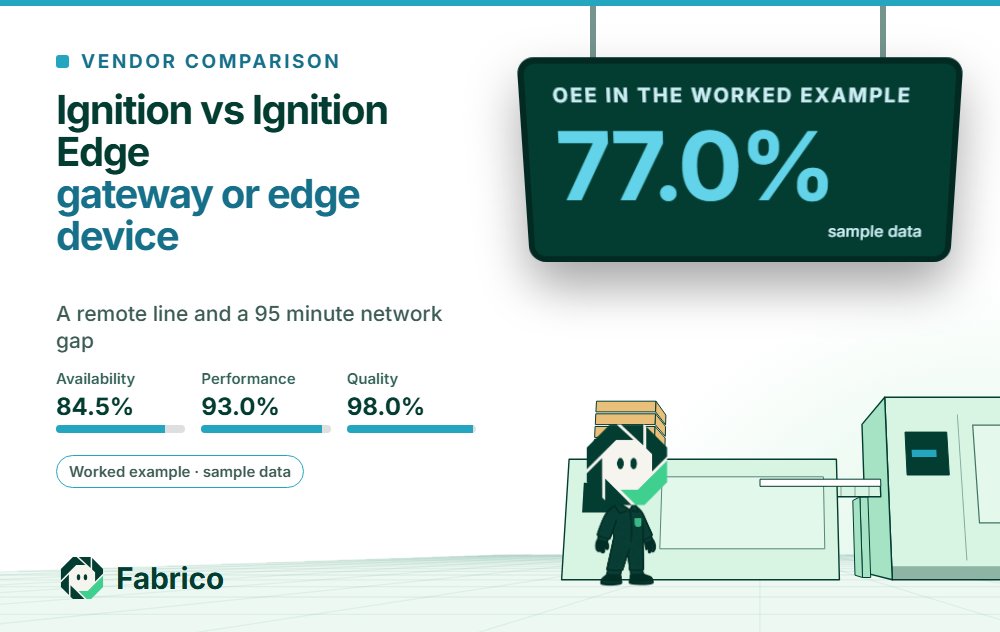
All figures here are sample data, invented for this page. A bottling line at a spring site, 40 km from the main plant, runs on a cellular link. Its shift is 420 minutes with a 20 minute break, so planned time is 400 minutes. At an ideal 30 bottles a minute, the line could make 12,000. Partway through the shift the link drops for 95 minutes.
The line stops for 62 minutes: changeover 18, waiting for preforms 15, a capper jam 13, a label reel change 8 and short stops 8. The capper jam and the reel change, 21 minutes together, fall inside the gap. The PLC counter is cumulative, so the 9,430 bottles made come through on either path; 188 are rejected, leaving 9,242 good.
Edge IIoT on the line. Run state history waits on the device during the gap and goes up in batches afterwards, so all 62 stop minutes arrive. Run time is 400 minus 62, or 338 minutes, so availability is 338 / 400 = 84.5%. The ideal for 338 minutes is 10,140 bottles; 9,430 made gives performance of 93.0%. Quality is 9,242 / 9,430 = 98.0%. OEE is 84.5% x 93.0% x 98.0% = 77.0%, which matches 9,242 good of 12,000 possible (OEE calculation).
Central gateway polling the PLC over the link, no buffer at the line. The 21 gap minutes never reach history, and a report that counts the gap as running sees 41 stop minutes. Run time becomes 359 minutes and availability 89.75%. The ideal for 359 minutes is 10,770 bottles, so performance falls to 87.56%. OEE is 89.75% x 87.56% x 98.0% = 77.0% again.
The OEE figure matches, and that is the trap. Without the buffer, 21 minutes of stops pass as slow running, the capper jam and the reel change vanish from the stop Pareto, and the morning meeting chases line speed instead of the capper.
Questions to ask before you choose
- How long can the link to this line be down, and for our tag list, does 35 days or 10 million points run out first?
- Where will operators enter stop causes, and is an entry made during a drop kept and synced?
- Which version runs on the central gateway, and does it match the Edge version for sync?
- Do we need a screen at the line, which points to Edge Panel, or data alone, which points to Edge IIoT?
- Gateway Network, MQTT or both, and who runs the MQTT broker?
- Which system calculates OEE, and where do planned time, shift calendars and ideal rates live?
What people ask next
How is Ignition Edge different from standard Ignition?
Per Inductive Automation, the standard gateway is the central server for a plant and talks to SQL databases. Ignition Edge is a lightweight version for field devices and OEM hardware: it keeps up to 35 days or 10 million points of history on the device and syncs data to a central Ignition server.
How do Edge IIoT and Edge Panel differ?
IA's Edge page says both include unlimited tags and device connections, MQTT publishing, scripts, REST APIs and sync to a central server. Edge Panel adds local visualization and control, with Perspective (2 sessions) or Vision (1 local client, 1 remote client).
Does Ignition Edge have store and forward?
Yes. Per IA's user manual, the Edge Gateway uses its 35 days of storage as a store and forward buffer while the link to the central gateway is down, then sends the backlog in batches once the link is back.
Can Ignition Edge write to a SQL database?
IA's Edge FAQ says Edge is designed to synchronize data to a central Ignition server that is communicating with a SQL database. The SQL work happens on that central server.
Where should stop causes live on a line with Ignition Edge?
Wherever operators can enter them during a network drop and the OEE calculation can read them: an Edge Panel screen, a screen on the central gateway, or a separate OEE system such as Fabrico, where operators pick the cause on a phone or tablet.
Want to see stop causes and OEE side by side in a short online demo? Book a demo.
Related articles
Latest from our blog


Real Fabrico tiles, sample data.