
Key Takeaways
The problem: when production runs OEE software and maintenance runs a separate CMMS, the same stop gets two different stories, and someone has to reconcile them by hand.
What integrated should mean: one asset registry, stops that become work with an owner, and parts recorded against that work.
How to read this page: the five platforms are listed alphabetically, not ranked. Each one comes with the trade-off you accept when you choose it, including Fabrico, which publishes this page.
For years, plants bought two systems for one problem. Production used an OEE tool to see where line time went. Maintenance used a CMMS to plan and record the repairs. Both were right about their own half, and neither could see the other.
The result is familiar. Production reports downtime that maintenance does not recognise. Maintenance closes work orders that never show up in the OEE trend. Every weekly review starts with an argument about whose numbers are right.
The platforms below close that gap in different ways. Some start from production and add maintenance, one starts from lean dispatch, one starts from the ERP. None of them is the right answer for every plant, so this page puts the trade-offs next to the strengths.
Where the data comes from: machine signals, operator input, cameras, or a mix.
How production and maintenance connect: one platform, a built-in module, or two tools joined by an API.
What stays in the ERP: orders, scheduling, bills of materials and genealogy, or does the platform take some of them over?
What the rollout asks of the plant: a new way of working, a new ERP, or a line by line start.
Where it fits: plants that want a focused OEE tracker and are happy to keep maintenance in a separate CMMS.
Evocon is OEE software built around simple machine counting and clear production dashboards. It is in this comparison because many plants pair it with a CMMS through its API. That is what people call best of breed: one specialist tool for OEE, another for maintenance, joined together.
Strengths:
A narrow scope that is quick to understand on the shop floor.
Stop events can be pushed to other tools through the API.
Trade-off: two vendors, two logins and two contracts, and the connection between the OEE tool and the CMMS is yours to build and maintain.
Where it fits: plants that want OEE, downtime tracking and production monitoring first, with maintenance in the same platform, and that intend to keep their ERP.
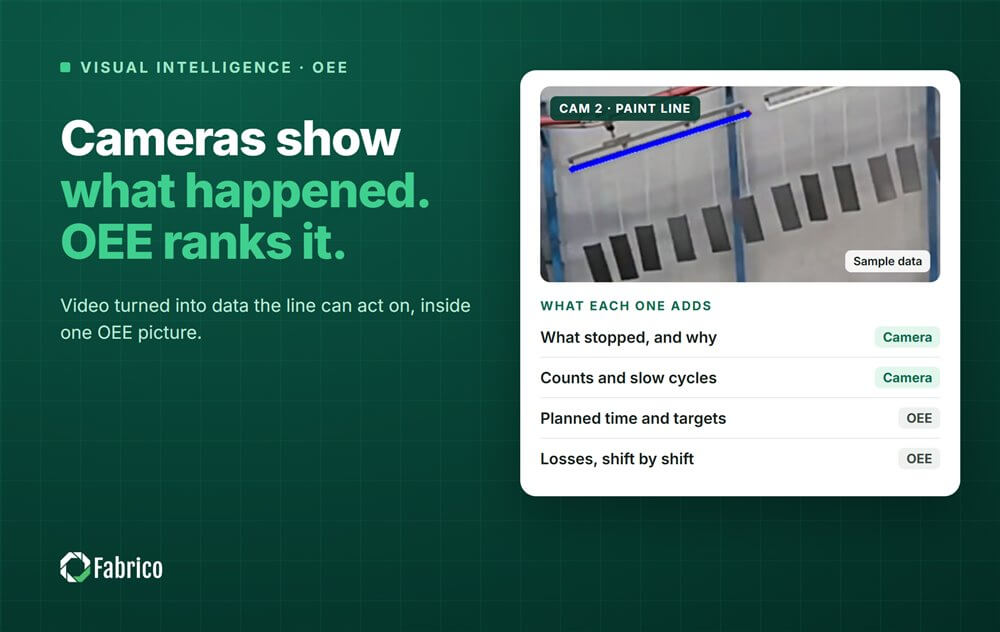
Fabrico is a light MES: machine data collection, production monitoring, OEE and downtime analytics, and integration with SAP and other ERP systems, with maintenance built in. Stops are recorded from the PLC, IoT sensors or a camera, and the team opens the work order from the logged stop, on the same machine record. Fabrico's vision AI connects camera data with operator activity, work orders and machine states, so the clip, the machine record and the operator's reason sit in one place.
Strengths:
Production and maintenance work from one asset registry, so a stop and its repair are on the same machine.
Machines without a readable PLC, and manual stations, can be covered by IoT devices or cameras.
A bidirectional SAP PM sync including S/4HANA, plus a REST API and webhooks, where the ERP stays in the picture.
Trade-offs:
It is not a full MES or an ERP. Job dispatching, bills of materials, routings and genealogy stay in your ERP.
Installing the devices and connecting the machines takes about one month, and full rollout across the lines you choose takes 3 to 4 months.
Production and maintenance have to agree on one list of stop reasons and review it together. The software makes that easier; it does not do it for them.
Where it fits: high-volume plants that run on lean methods and want issues dispatched to the right team as they happen.
L2L is built around lean manufacturing principles. Its dispatch module sits at the centre: when a line goes down, the issue is routed to maintenance, quality or material handling. Production tracking against hourly targets and a maintenance module run in the same flow.
Strengths:
Real-time routing of issues to the team that owns them.
Strong visual management for plants that already work this way.
Trade-off: the rollout is methodology driven. It works best when the plant adopts L2L's lean way of working, which is a bigger change than installing software.
Where it fits: manufacturers who are choosing a new cloud ERP anyway and want MES, quality and maintenance in the same system.
Plex is a cloud ERP with MES, OEE and maintenance in one database, from the customer order to scheduling and shipping.
Strengths:
Production, finance and supply chain share one data model.
Scheduling sits next to machine data.
Trade-off: Plex MES can connect to another ERP, but the platform does the most when Plex is also your ERP. If you are keeping SAP, scope which Plex modules you actually need.
Where it fits: plants where the first goal is frontline engagement: huddles, shared targets and operators who own their line.
Redzone combines production tracking with team communication. Operators and technicians use the same tablet interface, live scoreboards show progress against production goals, and operator-led asset care checklists bring basic maintenance into the flow of work.
Strengths:
A strong focus on culture, huddles and frontline participation.
One simple interface for operators.
Trade-off: it is a connected worker platform: the value comes from daily huddles and operator participation, so it asks the plant to change how teams work, not only to install software.
| Evocon | Fabrico | L2L | Plex | Redzone | |
| Starts from | OEE tracking | OEE and MES, maintenance built in | Lean dispatch | ERP | Frontline engagement |
| Maintenance | Separate CMMS through the API | Same platform, same asset registry | Module in the dispatch flow | Part of the Plex platform | Preventive maintenance and operator asset care |
| Your ERP | Stays | Stays (SAP PM sync, REST API) | Stays | Stays, or moves to Plex | Stays |
| The trade-off | Two vendors to connect | Not a full MES; dispatching and genealogy stay in the ERP | A lean methodology to adopt | Most value with Plex as the ERP | A change in how teams work |
Stop: the machine stops, and the stop is logged from the PLC, a sensor or a camera.
Reason: the operator confirms why it stopped, from a short list both teams agreed on.
Work: if it needs a repair, the technician opens the work order from the logged stop.
Fix: the technician repairs the machine, records the parts used and closes the work order.
Result: the machine restarts, and the OEE trend shows whether the fix held.
Whichever platform you shortlist, ask the vendor to show this path live, on one of your own machines.
Before IT signs off, every shortlisted vendor has to clear a security review. The CMMS and OEE vendor security questionnaire lists the 12 questions to send them all at once.
Integrated has to mean three concrete things: one asset registry, downtime that becomes work, and parts consumed against that work order. A product that only does the first is a dashboard sitting next to a CMMS. One asset registry, so the machine that stopped and the machine with the work order are the same record, not two names to reconcile. Downtime that becomes work, meaning a recorded stoppage can raise a task with an owner rather than being retyped by a planner. Parts consumed against that work order, so a year later you can connect a failure to what went into the repair.
Show me a stop on one of our machines turning into a work order, without retyping.
Which of our machines connect through the PLC, which need a device, and which need a camera?
What stays in our ERP, and what does your platform take over?
Who on our side has to own the stop reasons and the daily review?
What does the rollout look like, line by line, and what do you need from us at each step?
Curious what honest, real-time OEE looks like on your floor? Request a demo










 Login
Login
 Blog
Blog