


 Login
 Blog
How to Connect Line Cameras to MES for Accurate Downtime Codes

Key takeaways
- A PLC tells you when a line stopped and for how long. It rarely tells you why, so most downtime codes are chosen later, from memory.
- Build the reason code tree first. A camera cannot fix a bad code list.
- Put cameras only where the machine signal is blind: manual stations, machines with no PLC, conveyors that can run empty.
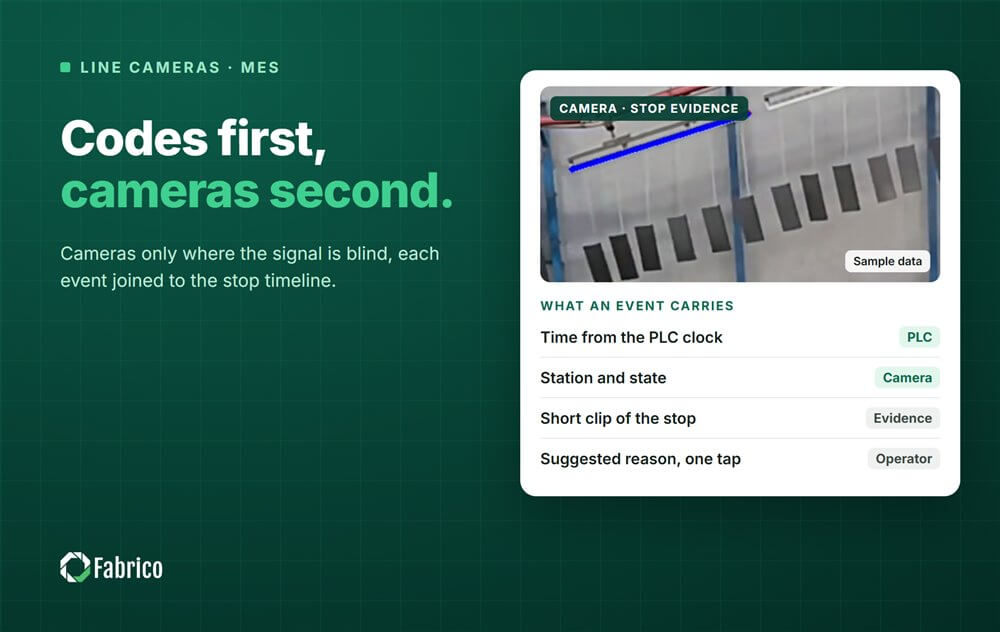
- Each camera event should carry a time, a station, a state, a short clip and a suggested reason.
- Join the camera events to the stop timeline with the PLC as the clock and the camera as the witness.
- The operator confirms the reason in one tap, and the clip stays as evidence.
- Put a price on each stop and rank the losses by money, so the costly one gets fixed first.
The downtime Pareto in most plants has a tall bar called "Other" and a few more bars that nobody quite believes. The PLC knew exactly when each stop started and ended. The reason was picked later, from a dropdown, by whoever restarted the line. Connecting line cameras to the MES is how you close that gap: the machine keeps the time, the camera keeps the evidence, and the downtime code is checked against what actually happened before it reaches the OEE report.
This guide is written from the MES and OEE side, in the order the work should happen. The camera comes in at step 2, not step 1. If you want the background on what cameras can and cannot see first, start with computer vision in manufacturing.
The PLC says "stopped", not why
A controller knows the machine's state. The OPC UA for Machinery standard gives a clean vocabulary for it:
- NotAvailable: switched off.
- OutOfService: available but unable to work, for example because of an error. This is a breakdown.
- NotExecuting: available but waiting for an order. This is starvation, a changeover or no order.
- Executing: working.
That already separates a machine problem from a plant problem. It still does not say what jammed, what ran out or who was missing. Three gaps remain.
- The cause. "Stopped" is a fact. "Labeller film tore" is the part you can fix.
- The short stops. Many PLCs sample a run signal between 100 milliseconds and 5 seconds, as our micro-stop detection guide explains. A 10 second jam may show up as one or two samples, or not at all.
- The empty line. A conveyor can run with no product on it. The run bit says "running" and the line makes nothing. That is starved or blocked, not running.
Operators fill the first gap by hand, often minutes later and under pressure to restart the line. That is how "Other" grows, and how the Pareto ends up ranking guesses.

PLC as the clock, camera as the witness
Each source is good at one thing. The design lets each one do that thing.
| Question | PLC or machine signal | Camera | Operator |
|---|---|---|---|
| When did it stop, and for how long? | Yes, at scan rate | Yes, where there is no PLC | No |
| Was product actually moving? | Not always | Yes, in its field of view | Sometimes |
| What happened just before the stop? | A fault code at best | The clip | Memory |
| Why did it stop? | No | Suggests a likely reason | Confirms the reason |
| What happened inside the closed machine? | Fault codes | No | Sometimes |
So the PLC sets the start and the length of the stop. The camera adds the clip and a suggested reason. The operator confirms. Where there is no PLC, the camera also supplies the start and the length.
Step 1: build the downtime reason code tree before any camera
A camera makes a good code list better and a bad one worse. Fix the list first.
Start from the six big losses. Equipment failure and setup are Availability losses. Idling, minor stops and reduced speed are Performance losses. Process defects and reduced yield are Quality losses. Split each into a few codes your operators recognise.
Keep it short. Ten to twenty codes per line is typical. More than thirty makes operator selection unreliable.
Split machine problems from plant problems at the top. A breakdown (OutOfService) is a job for maintenance. A wait for material, an order or a changeover (NotExecuting) is a job for planning, logistics or the line lead.
Fix each code's OEE bucket in the configuration, not in the operator's head. A quality stop that halts the line is Availability loss; the rejected units are Quality loss.
Set the minor stop threshold. No standard sets it, so the plant does. A common rule: stops under two minutes that the operator clears alone are classed automatically as minor stops, and the operator is asked for a reason only above that. Agree the number with the people who run the line.
Treat changeovers carefully. The standard changeover time is planned. Every minute over the standard is unplanned and gets its own reason code.
Test the list. Show three operators the same five stops. If they disagree on more than one, find the pair of codes they confuse and rewrite it.
Watch "Other". If it climbs into your top five codes, the tree is missing categories. Read the free text once a month and turn the common answers into codes.
A starting tree, to adapt to your line (sample, not a standard):
| Level 1 | Level 2 examples | Usual OEE bucket |
|---|---|---|
| Equipment | Breakdown, jam, sensor fault | Availability; short jams below the threshold go to Performance |
| Process | Changeover over standard, cleaning over standard, stop for a quality check | Availability |
| Material | No material, wrong material, bad material | Availability |
| People | No operator, waiting for maintenance | Availability |
| External | Blocked downstream, starved upstream | Availability |
Our guides to downtime reason code design and operator-friendly OEE reason codes go deeper on each rule.
Step 2: pick the stations where the signal is blind
Not every station needs a camera. Put one where the machine signal cannot answer the question, and nowhere else.
| Station | Signal you already have | What is missing | Camera? |
|---|---|---|---|
| Automated machine with a usable PLC | Run, stop, count, fault code | The cause of short stops, the clip | Only where short stops or disputed causes are frequent |
| Older machine with no PLC | Nothing, or an add-on sensor | State and count, or the cause | A sensor for state and count; a camera where the cause matters |
| Conveyor between machines | Motor running | Whether product actually moves | Yes, where starved or blocked time is a suspected loss |
| Manual or packing station | Nothing | State, count and cause | Yes |
| Enclosed process, such as an oven | Process signals | Nothing a camera could see | No |
Start at the bottleneck. A stop at the constraint costs the whole line's output. A stop on a station with spare capacity often costs nothing until the buffer in front of the next machine runs dry.
Think in scenes, not in machines. One camera can cover a stretch of conveyor or a packing table. A long machine may need more than one view. The question for each view is the same: can a person watching this picture tell whether the line is producing?
For machines with no PLC at all, our guide to OEE monitoring without a PLC compares the options.
Step 3: what a camera event carries
A camera that only raises alerts is a doorbell. For downtime codes you need a record. A good camera event carries at least these fields.
| Field | Example (sample data) | Why it matters |
|---|---|---|
| Start and end time | 10:42:07 to 10:42:31 | Joins the PLC timeline |
| Station or machine | Line 3, case packer infeed | Puts the loss on the right asset |
| State | Stopped, or running but empty | Separates down from starved or blocked |
| Source | Camera, PLC or both | Shows which system said what |
| Clip | A short clip that starts a few seconds before the stop | The evidence |
| Suggested reason and confidence | Jam, 0.8 | A starting point, not a verdict |
| Confirmed reason | Jam at the infeed guide | The code that counts |
| OEE bucket | Performance, minor stop | Set by the code, not by hand |
| Cost | Lost units x contribution per unit | Lets you rank the losses |
Two rules make the record trustworthy.
Timestamp at the source. Stamp each event with the clock where it happened, not with the time it reached the database. Keep the PLC, the camera system and the MES on the same time source (NTP). Otherwise the stop boundaries drift and a camera event lands next to the wrong stop.
Keep the clip about the machine. The clip should show the machine and the product. Keep it short, tied to the stop, and on a retention rule agreed before go live.
Step 4: join camera events to the stop timeline
Now the two streams meet. The rules are short.
- One stop, one record. If the PLC and the camera both see a stop at the same station at the same moment, it is the same stop. The PLC's start and end win. The camera adds the clip and the suggested reason.
- Camera only. If the camera sees a stop the PLC did not, such as a conveyor running empty or a manual station standing still, the camera creates the stop. Mark the source, so anyone reviewing it knows where it came from.
- PLC only. If the PLC sees a stop the camera did not, keep it. The cause may sit inside the machine, out of the camera's view.
- Planned time comes from the plan. A camera does not know the schedule. Breaks, standard changeovers and planned cleaning come from the shift plan, not from the picture.
The result is one record per stop, with the time from the machine and, where a camera covers the station, the clip as evidence. Fabrico describes it as "a single timeline of events that combines PLC data, sensor signals and video-based detections". In ISA-95 terms this is Level 3 work: the MES layer that works in shifts, hours, minutes and seconds, reading from the controllers at Level 2 that answer in sub-seconds.
Step 5: the operator confirms the reason in one tap
This is the step that makes the code accurate. The operator at the line sees the stop, the suggested reason and, where it helps, the clip. If the suggestion is right, one tap confirms it. If it is wrong, the operator picks the right code from the short list built in step 1.
Why keep a person in the loop:
- A model learns from past stops. A new failure, a new product or a moved jig can fool it.
- The operator often knows what the camera cannot see: the material lot, the setting someone changed on the last shift.
- A record that people confirmed is a record people trust in the morning meeting.
Two rules protect the data and the people.
- Ask only above the threshold. Minor stops below it are classed automatically. Asking about each short stop teaches operators to tap anything.
- The clip defends the operator. It shows what the machine and the material did. Never use it to time or rank named people.
Track reason coverage once a week: the stop minutes that have a confirmed reason, divided by all stop minutes.
Sample line (illustrative numbers): a shift has 52 stop minutes, and 41 of them carry a confirmed reason. Reason coverage is 41 / 52 = 78.8%. That one figure tells the plant manager how far to trust the Pareto.
Step 6: put a price on each stop and rank the losses
A downtime code tells you what happened. A price tells you what to fix first.
Price a stop at the contribution the line lost, not at a machine hour rate that includes depreciation. Agree the rule with the plant's controller once, then apply it to every line the same way.
Sample line (illustrative numbers, in dollars; the arithmetic is the same in euros):
- The line is rated at 600 units an hour.
- Contribution is $2.40 a unit.
- The line loses 52 minutes to stops in one shift.
- 52 / 60 x 600 x $2.40 = $1,248 of lost contribution in one shift, before scrap and overtime.
Then rank. The Pareto sorted by minutes and the Pareto sorted by money often differ. A short stop that repeats all day at the bottleneck can cost more than one long breakdown on a machine with spare capacity. Fix the top two or three, each with an owner, and look at the same Pareto after the fix to see whether the bar moved.
The stakes add up at plant level. Siemens' True Cost of Downtime 2024 report found that an average large plant loses 27 hours a month to unplanned downtime, and that FMCG is the only sector whose downtime hours went up since 2019.
What to agree with IT and the works council first
Two groups decide whether cameras on the line go live: IT and OT, and in many EU plants the works council. Bring both in before the first camera goes up.
With IT and OT:
- Read-only access to the PLC. Nothing writes to the controller.
- Where the cameras, any gateway and the video sit on the network, and which connections leave the plant.
- One time source for the PLC, the cameras and the MES.
- Who can see which clips, and for how long they are kept.
With the works council and the data protection officer:
- The purpose: the machine and the process, not the people.
- Reporting by line and shift, never by named operator.
- Retention. The EDPB video guidelines (3/2019, para 121) say footage should ideally be erased automatically after a few days, and keeping it beyond 72 hours needs stronger justification.
- In Germany, a works agreement under section 87(1) no. 6 BetrVG. A device suited to monitor behaviour or performance needs one, even if it records nothing.
- A data protection impact assessment where the processing is likely to be high risk (GDPR Article 35), and signs at the line.
This is general information, not legal advice. Our guides to works council approval for OEE monitoring and production line cameras without surveillance go further. On Fabrico projects, network placement, retention and security questions are answered by our technical team for each plant.
Where Fabrico fits
Fabrico is a computer vision enabled Manufacturing Performance Platform: OEE and light MES first, with cameras where machine signals fall short. Our machine downtime tracking software and the camera layer work as one system.
- Stops log themselves from the machine. Fabrico reads the run and stop state from the signal, stamps the start time and counts the duration. One plant can mix three sources per machine: a PLC connection, an IoT sensor or a camera.
- Cameras on manual and hybrid lines. Computer vision watches the line and recognises when it stands still, including a line that is switched on but not producing.
- The operator tags the cause on a tablet at the line, from a list of reasons agreed with your team. The start and length come from the machine signal, so the operator only adds the reason.
- The camera suggests, the operator confirms. AI models suggest a likely reason, such as no material, a jam or a broken part. The operator confirms it in one tap, and the clip stays as evidence.
- The moment of the stop. Footage is synchronised with machine and timeline data. For a vision event, Fabrico keeps a short clip that starts a few seconds before the event.
- Losses in money. Downtime shows up by cause, line, machine and shift, with losses shown in money and ranked. OEE is live by line and shift.
- Maintenance as the last step. When the confirmed code is a breakdown, the technician opens the work order from the stop, with its cost.
- Cameras sized to the line. Fabrico installs one or more industrial-grade cameras per line, set up to cover the key process areas. The number per line, and which machines use a PLC, an IoT device or a camera, is agreed after a review of your process and machines.
Each plant gets a quote after a review of its lines. The computer vision for OEE page shows how the cameras work with OEE data, and our guide to computer vision for OEE covers which losses a camera can resolve. To see how other camera tools handle downtime, read our comparison of video analytics for manufacturing.
Frequently asked questions
How do you connect line cameras to an MES?
Join the camera events to the MES stop timeline by station and time. Where a PLC exists, it sets the start and length of the stop; the camera adds a clip and a suggested reason. Where there is no PLC, the camera creates the stop itself. The operator confirms the reason. Keep every system on one time source.
Do cameras replace downtime reason codes?
No. They make the codes accurate. The code list still comes from your team. The camera suggests a reason, the operator confirms it, and the clip shows what happened.
Which stations need a camera?
Only those where the machine signal is blind: manual and packing stations, machines with no PLC, conveyors that can run empty, and stations with frequent short stops or disputed causes. Start at the bottleneck.
Can a camera detect micro stops?
Yes, where they happen in its field of view. A camera can see short stops that are too brief to write down and that a PLC may miss between two samples. Whether they count as minor stops or as Availability loss depends on the threshold your plant sets.
How accurate is camera-based downtime tracking?
Ask for two numbers measured on your own line: recall, the share of real stops it caught, and precision, the share of its alerts that were real stops. In a sample week with 100 real stops, catching 95 of them with 15 false alarms gives a recall of 0.95 and a precision of 0.86. The clip lets a person check each event quickly.
What does the operator have to do?
Confirm the suggested reason with one tap, or pick the right one from the short list. Stops below the minor stop threshold are classed automatically, so nobody is asked about them.
Is it allowed under GDPR and works council rules?
Yes, when it is designed for the process: cameras on the machine and the product, short retention, no metrics on named people, a DPIA where it is needed and, in Germany, a works agreement before go live. Check your plan with your data protection officer.
Does this work without a PLC?
Yes. On a station with no PLC, the camera supplies the state and the count. Older machines can also get an add-on sensor for the run signal.
Plan a camera on one line
Bring one line, its current downtime log and its reason code list. In the demo we map where the PLC already covers you, where a camera would add evidence and what the losses cost. On the demo form, tick the box for camera based OEE.






