


 Login
 Blog
Tervene Alternatives: Daily Management Plus OEE, Compared by Job

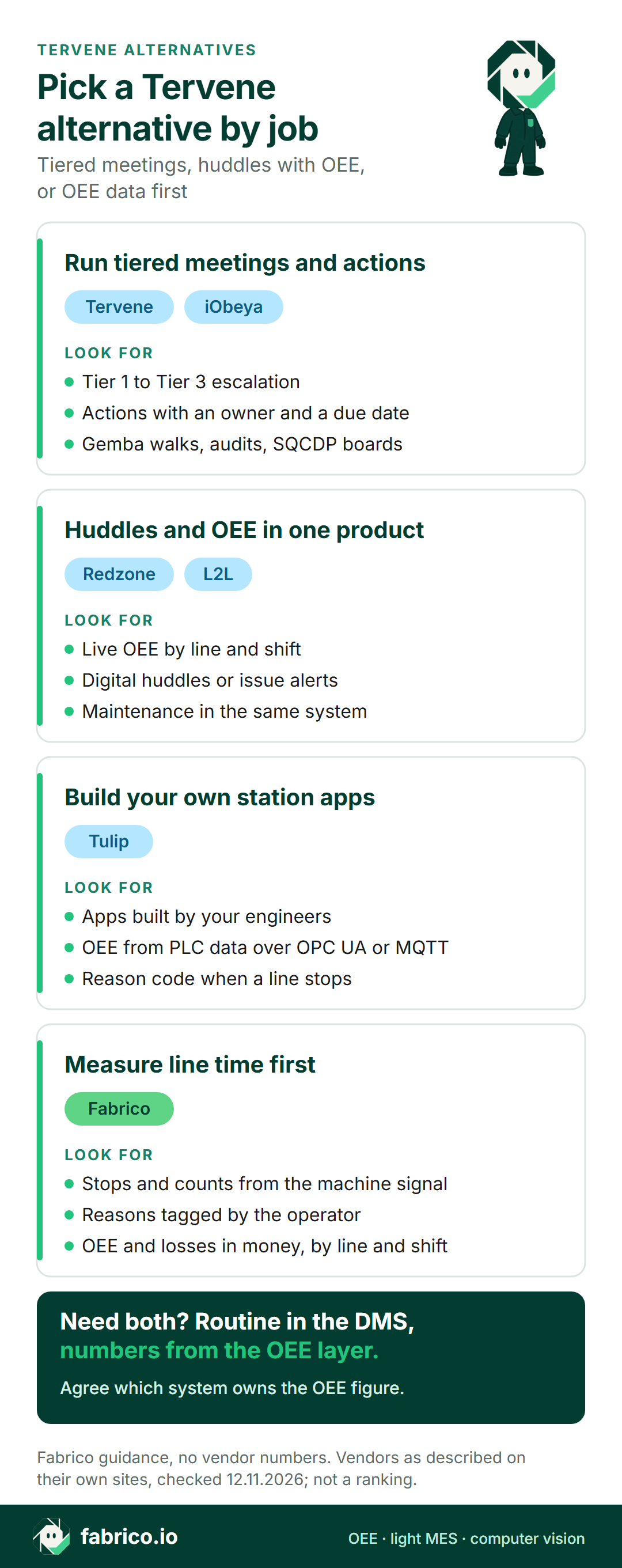
In short: the right Tervene alternative depends on which layer you need. For tiered meetings, actions and audits, compare Tervene with other daily management tools such as iObeya. For huddles and OEE in one product, look at Redzone or L2L. If the numbers on your Tier 1 board are still typed in by hand, an OEE layer such as Fabrico measures the line and feeds the meeting.
- Tervene describes itself as software for daily management and operational excellence in manufacturing.
- Its pages put tiered meetings, escalation, actions, Gemba walks, audits and leader standard work first.
- OEE is a different job: stops, counts and reasons from the line, turned into one figure per line and shift.
- Vendor descriptions link to each vendor's own pages, as of 12.11.2026. No prices, and no winner.
It is 6:45 on a Tuesday. The Tier 1 board on Line 3 shows a red Delivery letter, and the team leader is copying last night's output figure from a printout. The meeting runs on time. Nobody is sure why the line made fewer cases than planned.
That gap is the reason buyers look past Tervene, or next to it. A daily management tool runs the routine: agenda, actions, escalation. An OEE tool measures the line the routine talks about. The rest of this page covers what Tervene's own site says it does, when it fits, and five alternatives sorted by the job they do. Fabrico publishes this page and appears among the five, unranked like the others. For a wider list, see our daily management system software review.
What Tervene is (as of 12.11.2026, per its own site)
Tervene's homepage calls it software for daily management and operational excellence in manufacturing and industrial environments, built to standardize operations and keep teams aligned across shifts, sites and functions. Its about page says Tervene was born in 2015 and that the platform runs on iOS, Android, Windows and the web. What its pages say, as of 12.11.2026:
- Tiered meetings. Its tiered meetings page describes a communication cascade through Tier 1, Tier 2 and Tier 3 meetings, with standard information flow and issue escalation between frontline teams and leadership. Meeting types include daily huddles, start-of-shift meetings, daily production meetings, KPI reviews and shift handovers.
- Daily management. Its daily management system page covers key metrics such as Safety, Quality, Cost, Delivery and People, an escalation process, and corrective and preventive actions with priority levels and due dates.
- Leader standard work. Managers' schedules are set as daily, weekly and monthly routines.
- Gemba walks, audits and improvement. Its platform overview says supervisors run Gemba walks, audits and shift handovers from a phone or tablet, and every issue they log gets an owner and a due date. The continuous improvement page names 5S audits, PDCA, improvement projects and DMAIC.
- Dashboards. Teams build forms, agendas and dashboards without code, and can embed dashboards and KPIs from tools such as Power BI, Tableau+, Excel and Looker Studio.
- Security and services. Tervene states ISO 27001 certification, and offers implementation and coaching services.
Its solutions list also names layered process audits, health and safety, quality and compliance, and shop floor management. Its pages also quote customer results; those are the vendor's claims, so we leave them out.
Ask in the demo: which production data sources feed the Tier 1 board, and which system calculates the OEE figure shown there.
When Tervene fits
Tervene belongs on the shortlist when most of these hold:
- The routine is the problem. Meetings run late, actions get lost, and escalation depends on who remembers.
- Supervisors walk the floor and need Gemba walks, audits and layered process audits on a phone.
- Several sites should work one way, with the same agendas, boards and standard work.
- The numbers already exist in another tool, and the board needs to show them.
If most are true, a daily management tool fits; see our guide to tier meetings. If the first question is why the line stopped and what it cost, read on.
Daily management and OEE are two layers
A tiered meeting needs two things: a routine and the facts. The routine is the agenda, the action list and the escalation path. The facts are what the line did: its run time, its stops and their causes, and the cost of the lost time. Daily management software runs the first. OEE software measures the second. Our SQDC board guide shows where the two meet on one board.
Comparison table: Tervene and five alternatives
Each row restates the vendor's own pages as of 12.11.2026, with links in the sections below. Rows are not ranked; Fabrico is listed first because this is Fabrico's page. Ask each vendor about anything the table leaves out.
| Tool | Built around, per its site | Daily routine it names | Ask in the demo |
|---|---|---|---|
| Tervene (for reference) | Daily management and operational excellence | Tier 1 to 3 meetings, actions, audits | Where do board numbers come from? |
| Fabrico | Line signal plus operator reasons | OEE and losses by line and shift | How does a manual station report? |
| iObeya | Digital Obeya rooms and visual management | SQCDP boards, linked tiers | Which data connector fits our MES? |
| Redzone | Connected workforce for frontline teams | Digital huddles, live OEE | How are machines connected? |
| L2L | Connected manufacturing operations | Issue alerts, downtime, OEE | How is OEE calculated? |
| Tulip | Composable apps for frontline work | Reason code when a line stops | Who builds and maintains the apps? |
Want to see what an OEE layer would put on a Tier 1 board? Book a demo with a week of downtime notes in hand.
Fabrico: OEE data for the tier meeting
Fabrico is our product: cloud OEE and light MES software. Tervene organises the management routine; Fabrico supplies the line facts that routine discusses, meaning the stops, their length, their causes and their cost. From our MES and OEE overview:
- Where the numbers come from. A PLC where the line has one (OPC UA, Modbus, PROFINET, EtherNet/IP and MQTT are among the listed protocols, see machine connectivity), older machines fitted with a Fabrico IoT device and external sensors, or the camera add-on at stations with no machine signal.
- Short stops and causes. Micro-stops are detected from the machine signal, including ones too short to write down, and operators pick the cause on a phone or tablet, from the plant's own reason list.
- A figure ready at shift start. OEE updates while the line runs and is reported by line and shift, with losses in money, in the browser and the iOS and Android apps. Shift results show the incoming team where the last shift ended.
- Camera add-on. At manual stations the camera add-on counts output, and video for any moment on the shift timeline can be opened. Camera add-on video is not stored in Fabrico in the standard setup; it streams when someone requests it (camera add-on overview).
- Repairs. A stop that needs maintenance becomes a work order on that machine's record.
- Getting figures to the board. REST API, webhooks and Excel or CSV export, so a daily management board or a BI tool can show the same OEE figure. See our Power BI OEE dashboard guide.
- Rollout. Devices connected in about a month; full rollout in 3 to 4 months.
- Roadmap, not live: scheduling and production planning, plus stop detection by the camera add-on with a suggested reason.
Ask in the demo: how the top losses of a shift reach the Tier 1 meeting, and how a manual station reports its output.
Fits plants that already hold tiered meetings but argue over the numbers, on lines mixing PLC-controlled machines, older equipment and manual stations. EU customers are hosted on AWS in Frankfurt. A one-line pilot is a common first step; our OEE software guide has more.
iObeya: digital Obeya rooms and SQCDP boards
iObeya says it is purpose-built for operational excellence, around the Obeya room, and that it digitizes the SQCDP system to give every shift and site real-time visibility. As of 12.11.2026, its pages say:
- Its daily management page says tier boards are linked, and an issue that cannot be closed at Tier 1 gets escalated to the Tier 2 review. iObeya connects the board to the systems that hold the data.
- On its SQCDP page, each letter holds indicators with targets and thresholds, and a value crossing a threshold changes the colour on its own.
- Its integrations page lists Power BI, SAP, Jira, Azure DevOps, CSV import and export, TrakSYS and Poka.
- Industries named include pharmaceutical, aerospace and defence, logistics and energy.
Compared with Tervene: both run tiered daily management on digital boards. iObeya builds around Obeya rooms and strategy deployment; Tervene's pages put meetings, actions, Gemba walks and audits in one platform.
Fits plants that want visual boards from the line up to strategy rooms, fed by existing data systems.
Redzone: huddles and OEE in one platform
Redzone's product overview describes Redzone as a connected workforce platform where production, quality and maintenance teams collaborate in real time, sold as five products: Productivity, Compliance, Reliability, Learning and Scheduling. As of 12.11.2026, its Productivity page says:
- Live OEE is tracked per line, cell and shift.
- Downtime and throughput are collected automatically, with timestamps, and tied to the line, the run and the assets.
- Digital huddle routines keep each shift aligned on targets, top issues and interventions, and incoming shifts see handover notes right away.
- Operators can add context from the line in seconds, and the product overview says it is optimised for iOS and Android.
Industries named on its homepage include food and beverage, consumer packaged goods, life sciences, plastics and packaging, automotive and chemicals.
Compared with Tervene: both structure shift meetings. Redzone's pages put huddles next to live OEE and downtime; Tervene's put tiered meetings next to audits, Gemba walks and standard work.
Fits plants that want the huddle and the OEE figure in the same frontline product.
L2L: connected operations with OEE and issue alerts
L2L describes itself as a connected manufacturing operations platform; automotive, industrial materials and packaging are among the industries it lists. As of 12.11.2026, its MES page says:
- Production metrics include OEE, yield, downtime, run rate, scrap, operational availability and status by site.
- Staff get real-time notice of issues that are still open.
- Downtime tracking, maintenance work, production goals and frontline skills sit in one place, along with step-by-step visual work instructions.
- Integrations cover ERP, QMS, PLM, SCM and CMMS systems; the homepage names browser, Windows, Mac, iOS and Android access.
Compared with Tervene: both escalate issues to the right people. L2L's pages tie that to downtime, OEE and maintenance; Tervene's tie it to tiered meetings and leader standard work.
Fits plants that want issue alerts, maintenance and skills tracking next to OEE.
Tulip: composable apps, OEE with operator reason codes
Tulip describes a composable platform linking frontline workers, equipment and enterprise systems (OEE tracking page); industries on its homepage include pharmaceutical, aerospace and defense, industrial manufacturing and medical devices. As of 12.11.2026, the OEE page says:
- Machine and PLC data, read natively over OPC UA or MQTT, supply availability and performance.
- When a line stops, the operator picks a reason code, and both feed one OEE number per line and shift.
- A Pareto view ranks causes by the time they cost.
Compared with Tervene: Tervene describes a ready platform for management routines. Tulip describes apps your engineers compose, including OEE. See our Tulip alternatives.
Fits plants whose engineers want to build their own station apps and OEE views.
Which Tervene alternative fits your plant
- Tiered meetings, actions, Gemba walks and audits in one management platform: Tervene.
- Visual boards from the line up to strategy rooms, fed by existing systems: iObeya.
- Huddles and live OEE in the same frontline product: Redzone.
- Issue alerts, maintenance and skills next to OEE: L2L.
- Station apps and OEE views your engineers build themselves: Tulip.
- Measured stops, reasons and OEE by line and shift, ready for the meeting: Fabrico.
A daily management tool and an OEE layer often run side by side. See implementing a daily management system and short interval control. Plants making food or consumer goods can also read computer vision for FMCG manufacturing.
Worked example: from one shift to a Tier 1 meeting
Illustrative numbers only: one 8 hour shift on a packaging line, with no customer and no product screen behind them. The shift has 450 planned minutes. The ideal rate is 40 units a minute, so the ideal output is 18,000 units.
Stops took 63 minutes, so run time was 387 minutes and availability 86.0%. In 387 minutes the ideal is 15,480 units. The line made 14,100, so performance is 91.1%.
240 units were rejected, leaving 13,860 good: quality is 98.3%. OEE is 86.0% x 91.1% x 98.3% = 77.0%, the same as 13,860 good units over an ideal 18,000.
At the Tier 1 meeting, the team does not debate the figure. It reads the top loss, 24 minutes of changeover over standard, and raises one action with an owner and a due date. Case packer jams have now shown up on three shifts, so the team leader escalates them to the Tier 2 review. The OEE layer supplied the facts; the daily management layer carried the action. Our OEE calculation page walks through the formula, and micro-stops covers the short stops a paper log never shows.
Questions for every vendor on the shortlist
Take one representative line to every demo, ours included, and ask:
- Which layer is it for? Running the meeting, measuring the line, or both.
- Where do the board's numbers come from? PLC, sensor, operator entry, an embedded dashboard or a spreadsheet.
- How is OEE calculated? Which ideal rate, how changeovers are treated, and who supplies the stop reasons.
- How does an issue move up a tier? Who sees it, and how is the action closed.
- Which system owns the OEE figure if two tools show it.
- Who sets it up and changes it? Your team, the vendor or a partner.
What people ask next
What is Tervene used for?
Per its own site, Tervene is software for daily management and operational excellence in manufacturing and industrial environments. Its pages describe tiered meetings from Tier 1 to Tier 3, issue escalation, actions with owners and due dates, Gemba walks, audits, leader standard work and dashboards, on phones, tablets and desktops.
Does Tervene calculate OEE?
The Tervene pages we read describe meetings, actions, audits and dashboards, and say Tervene can embed dashboards and KPIs from tools such as Power BI, Tableau+, Excel and Looker Studio. Ask Tervene directly how OEE figures reach its boards and which system calculates them.
Can Tervene and an OEE system run side by side?
Tervene's platform page says it embeds dashboards and KPIs from existing tools. Fabrico sends data out through a REST API, webhooks and Excel or CSV export. Ask both vendors to show the same OEE figure on a Tier 1 board before you commit, and agree which system owns that figure.
How is iObeya different from Tervene?
Both describe digital daily management with tiered boards and escalation, per their own sites. iObeya builds around the Obeya room and digital SQCDP boards, and lists connectors for Power BI, SAP, TrakSYS and others. Tervene puts meetings, actions, Gemba walks, audits and leader standard work in one platform.
How is Fabrico different from Tervene?
Per its site, Tervene runs the management routine: meetings, actions, audits and escalation. Fabrico supplies the line data: stops and counts from machine signals, causes tagged by operators, and OEE per line and shift with lost time priced. Many plants run both, so ask how the two connect.
Which Tervene alternatives put huddles and OEE in one product?
Per their own sites, Redzone describes structured digital huddle routines next to live OEE for every line, cell and shift, and L2L tracks downtime and OEE next to real-time notification of ongoing issues. Ask each one to run a Tier 1 meeting from a sample shift.
Want to see OEE figures ready for a Tier 1 meeting? Book a demo or contact us.
Related articles



Latest from our blog



Real Fabrico tiles, sample data.