


 Login
 Blog
cronetwork MES Alternatives: Planning-Board MES or OEE First

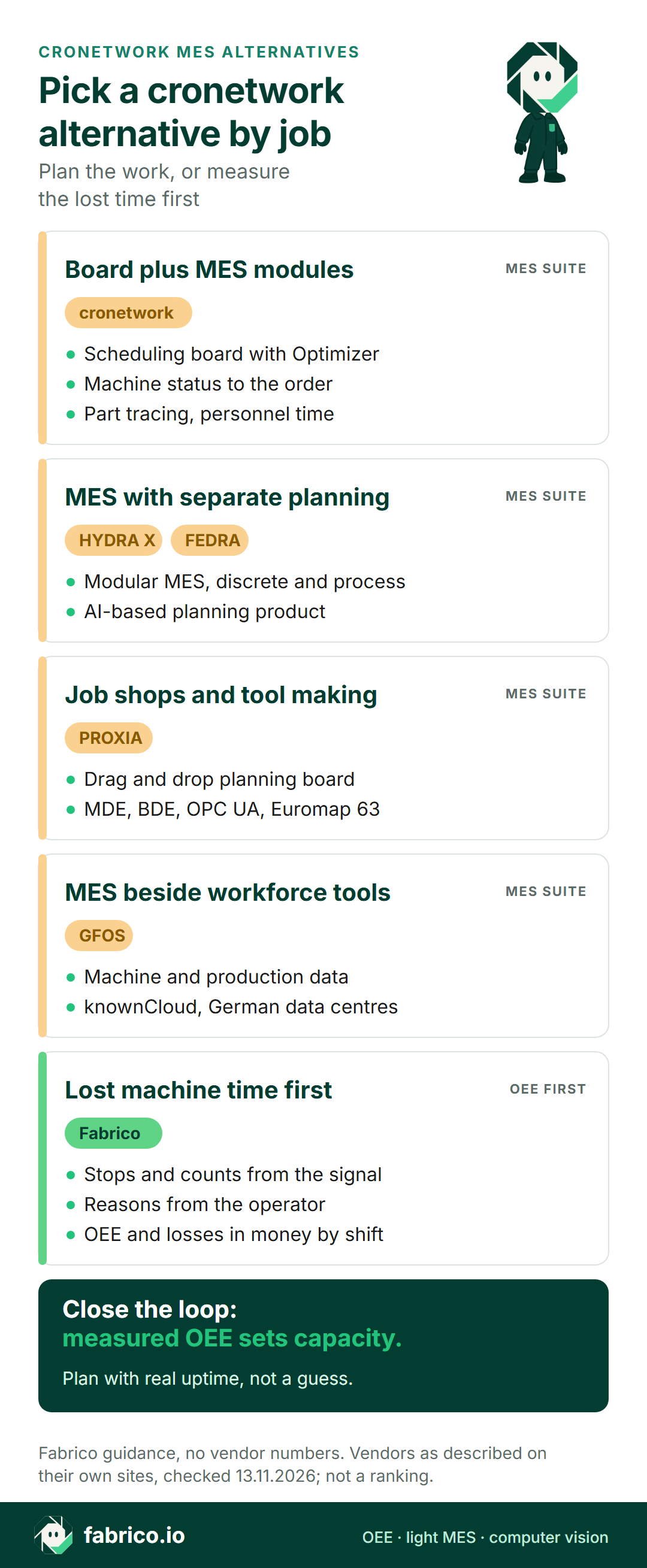
In short: a good cronetwork MES alternative is the one that matches the job you need done first. If you want an MES suite with a scheduling board, shop floor data, traceability and personnel time from one vendor, compare cronetwork with MPDV HYDRA X, PROXIA and GFOS. If the first question is why machines miss the plan, an OEE-first light MES such as Fabrico measures stops and leaves orders and scheduling where they are.
- cronetwork is the MES from Industrie Informatik, founded in Linz, Austria, in 1991.
- Its module list puts detailed scheduling with an optimizer next to plant data, machine data, traceability and time and attendance.
- A planning board plans with capacity figures, and those should come from measured stops and speed.
- All vendor facts: their own websites as of 13.11.2026, linked where used. No prices, no ranking.
Picture an Austrian machine builder with forty machining centres, a sheet metal shop and an assembly hall. Orders come from SAP. A planner moves magnets on a pegboard each morning, and by noon the plan is already wrong because two machines were down for an hour that nobody wrote down.
That plant can buy a better planning board, a better view of lost time, or both. Here is what cronetwork is, per Industrie Informatik's pages, where it fits, and four alternatives grouped by job. This page is written by Fabrico, which is also on the list, so nothing is ranked. A wider field is in our MES software guide.
What cronetwork MES is (as of 13.11.2026, per Industrie Informatik)
cronetwork is sold by Industrie Informatik GmbH. Its history page says the company was founded in 1991 in Linz as a system house for industrial applications, and that the cronetwork product family was introduced in the second half of the 1990s. Its homepage calls cronetwork connected manufacturing and real-time MES. What its pages say, as of 13.11.2026:
- Modules. The MES overview lists detailed scheduling (APS with an Optimizer), shop floor and plant data, machine and process data, tracing and logistics, BI and big data, and personnel time, with a portal, a gateway and the cronetworld platform around them. Modules can be introduced one after another.
- Scheduling board. The detailed scheduling page says it takes production orders and planned orders from the ERP, weighs capacity limits and knock-on effects on later orders, and simulates scenarios. Its Optimizer keeps creating simulations against target functions that you weight.
- Machine data. The machine and process data page says machine status is recognised automatically and turned into feedback on the production order. It lists OPC UA, fieldbus, SCADA and SQL connections, process values such as temperature and pressure, and energy use assigned to orders and articles.
- Plant data. Operators are guided through configurable steps in the cronetwork Portal, and its plant data page says combining MES and ERP data supports material logistics and final costing.
- Traceability and people. Single part tracing with a two-way ERP interface for stock checks (traceability page), and personnel time that produces payroll data and links to the scheduling board (time and attendance page).
- Company. Its about page lists 130 employees and more than 500 installations, in discrete manufacturing, and says it provides standard software that customers can release in full. These are vendor-stated figures.
Ask in the demo: how the scheduling board gets the real capacity of each machine, and whether that figure updates from the collected machine data.
When cronetwork is the right pick
Keep cronetwork on the list if most of these describe your plant:
- Planning is the pain. Orders, setups and staff have to be sequenced across many machines, and Excel or a pegboard no longer copes.
- You want one MES vendor for scheduling, shop floor feedback, machine data, part tracing and personnel time.
- The plant is discrete, such as machinery, components or metalworking, with the ERP holding orders and costs.
- You prefer a vendor close by, with offices in Austria and Germany, according to its history page.
If that is you, a full MES suite is the right tool family; see signs you have outgrown a light MES. If the first question is lost machine time, keep reading.
Planning board or OEE layer: two different jobs
A scheduling board answers "what should run next?". An OEE layer answers "why did we fall behind?". They feed each other: if the board assumes a machine runs 95% of the shift and it really runs 85%, every plan starts late. The light MES vs full MES guide explains the wider split, and OEE vs MES covers the terms.
cronetwork and four alternatives at a glance
Rows paraphrase the vendors' websites as of 13.11.2026; the sections below link the pages. Topics we did not find on the pages we read are left for you to ask about, not marked missing. Fabrico is listed first because we wrote the page, not as a ranking.
| Tool | Plans with | Collects from the floor | Question for the demo |
|---|---|---|---|
| cronetwork (for reference) | Scheduling board with Optimizer | Machine status, OPC UA, process data | Where does capacity come from? |
| Fabrico | Stays in your ERP or planning tool | PLC signal, IoT box, camera add-on | What about machines without a PLC? |
| MPDV HYDRA X | FEDRA, its planning product | Order and machine data mApps | Which mApps start phase one? |
| PROXIA MES | Drag and drop planning board | MDE, BDE, OPC UA, Euromap 63 | How is the usage factor set? |
| GFOS.Smart Manufacturing | Shopfloor control module | Machine and production data | How does it link to GFOS workforce? |
Want to see where machine time goes on a line like yours? Bring a week of stop notes and book a demo.
Fabrico: measure the lost time first, plan where you plan today
We make Fabrico: cloud software for OEE and light MES, built performance first. cronetwork starts from the plan and the order. Fabrico starts from the machine: when it stopped, for how long, for what reason, and what the loss is worth. From our MES and OEE overview:
- Signal from the machine. Straight from the PLC; on older machines, from an IoT box supplied by Fabrico that reads external sensors; and where no signal exists, from AI cameras sold as an add-on (how machines connect).
- Micro-stops included. Stops too short for anyone to note down are picked up from the machine signal, and operators tag the cause on a tablet or phone.
- Shift view in money. OEE refreshes live during production, losses carry a money value, and output, stops and OEE are reported per shift, on web, iOS and Android.
- Camera add-on. At hand-fed or manual stations the camera add-on does the counting, and a planner can pull up footage from the camera add-on for a chosen point on the shift timeline. That footage is streamed on request, not stored in Fabrico, in the standard setup (computer vision add-on).
- Repairs on the same record. A technician can open a work order from a stop, and the fix is saved on that machine's history.
- Open data. REST API, webhooks, Excel and CSV export; a link to SAP or another ERP is scoped with each customer.
- Not in Fabrico: job dispatching, BOMs, routings and genealogy stay in your ERP. Roadmap, not live today: planning and scheduling inside Fabrico, plus stop detection by the camera add-on with a proposed cause.
- Rollout. Devices connected in about a month; full rollout in 3 to 4 months.
A good match if you want real availability and speed per machine and shift before you buy or tune a planning board, on a floor that mixes new PLCs, old machines and manual work. EU customers are hosted on AWS in Frankfurt. A one-line pilot is the usual start; our OEE software guide has the background.
MPDV HYDRA X: modular MES, with planning in FEDRA
MPDV describes HYDRA X as a modular MES for all production areas, serving discrete manufacturing and the process industry. As of 13.11.2026:
- Its Order Management page says these mApps form the basis for the whole production control system, and that quantities and status messages can be entered by hand at a shop floor terminal.
- Further HYDRA X categories include resources, materials, assembly, quality and HR, and MIP, MPDV's integration platform, is what makes it extensible.
- Planning has its own product page: FEDRA is described as platform-based software for production planning that uses reinforcement learning in complex scenarios, with detailed scheduling and workforce planning among its categories.
Compared with cronetwork: each pairs a modular MES with scheduling. cronetwork lists its scheduling board as a module of the MES; MPDV presents FEDRA as a separate product next to HYDRA X. Ask both how plan and feedback stay in sync.
Fits plants that want one MES across discrete and process areas, with an AI-based planning product from the same vendor. Our MPDV HYDRA X alternatives page compares it with other suites.
PROXIA MES: planning board and shop floor data for job shops
PROXIA MES is modular standard software that its site calls the link between management and production. Its group page says PROXIA has been a business unit of Shoplogix, within Constellation Software, since the end of 2022. As of 13.11.2026:
- Its planning board page describes a graphical board for simulating and planning by drag and drop, with orders taken over from the ERP and machine capacity set by the shift model and a usage factor.
- Modules are grouped into planning, evaluation (including OEE and KPIs in real time), data collection and extensions. Its machine data page names OPC UA and Euromap 63 among the supported standards.
- Its sector page names machinery and plant engineering, contract manufacturing, automotive, tool and mould making, plastics and chemicals.
Compared with cronetwork: both pair a planning board with shop floor data collection and personnel time. PROXIA's sector page includes contract manufacturing and tool and mould making. See our Shoplogix alternatives for its parent's platform.
Fits plants that plan many small orders on a graphical board and want MDE and BDE from the same supplier.
GFOS.Smart Manufacturing: MES from a workforce software house
GFOS says on its homepage that it has been in the market for over 35 years and that more than 4,500 customers use its solutions, a vendor-stated figure across its products. Its manufacturing software page, as of 13.11.2026, says:
- The modular manufacturing execution software digitises manufacturing processes, with machine data acquisition and real-time production data acquisition.
- A Shopfloor control module steers production in depth, a quality management module supports quality standards, and a KPI module calculates and documents standard key figures.
- It runs in GFOS's own ISO 27001-certified knownCloud, with data centres in Germany, and the homepage lists Workforce Management and Access Control as separate GFOS products.
Compared with cronetwork: both combine MES functions with people data. cronetwork lists time and attendance as an MES module; GFOS sells workforce management as its own product beside the MES.
Fits plants that already run or want GFOS for time and workforce, and would like the MES from the same house.
Which cronetwork alternative fits your plant
- Scheduling board with optimizer inside a modular MES, plus part tracing and personnel time: cronetwork.
- A modular MES for discrete and process areas, with planning as a separate AI-based product: MPDV HYDRA X with FEDRA.
- Many small orders on a drag and drop board, with MDE and BDE, in job shops and tool making: PROXIA.
- MES functions from the vendor that also runs your time and workforce software: GFOS.
- Real stop causes and OEE per machine and shift first, with planning left where it is: Fabrico.
A planning MES and an OEE layer can work side by side when one system owns the OEE figure and the other uses it for capacity. Metalworking plants can also read our MES page for metal fabrication.
Worked example: why the plan slipped by 66 parts
The numbers below are invented for illustration; they come from no customer and no product screen. A machining centre works an 8-hour shift with a half-hour break, which leaves 450 planned minutes. The ideal cycle is 1.0 minute a part, and the scheduling board planned 420 good parts, which assumes the machine turns about 93% of the shift into good parts.
Stops took 58 minutes, so the machine ran 392 minutes: availability 87.1%. At the ideal cycle that is 392 parts, and it made 360, so performance is 91.8%. Six parts were scrap, leaving 354 good: quality 98.3%. OEE is 87.1% x 91.8% x 98.3% = 78.7%, the same as 354 good minutes over 450.
The board was 66 parts out. The stop log says why: 24 minutes of setup over standard and 16 minutes waiting for material are planning questions, while 11 minutes of tool breakage is a shop floor one. If the board planned with the measured 78.7% instead of 93%, tomorrow's plan would start closer to reality. The formula is in OEE calculation, and the brief stops a handwritten log tends to miss are covered under micro-stops.
Questions to put to every vendor
Use one machine group and the same questions for each vendor, Fabrico included.
- Plan, measure or both? Which job the first phase covers.
- Where does capacity come from? A fixed factor typed in once, or availability and speed measured on the machine.
- How does each machine report? OPC UA, digital signals, an edge box or terminal entry, including machines with no usable controller.
- Who enters stop reasons, and how long the list of reasons is.
- Which records stay in the ERP, such as orders, routings and costs, and what flows back.
- Who changes it later? In-house engineers, the vendor, or an integrator.
What people ask next
Who makes cronetwork MES?
Industrie Informatik GmbH. Its history page says the company was founded in 1991 in Linz, Austria, as a system house for industrial applications, and its about page lists 130 employees.
Does cronetwork include production scheduling?
Yes, per its site. The Detailed Scheduling APS and Optimizer module takes orders from the ERP, plans against capacity limits, simulates scenarios and optimises against weighted targets.
Does cronetwork collect machine data?
Yes. Its machine and process data page describes automatic machine status, feedback to the production order, OPC UA and other connections, and process values such as temperature and pressure.
How does PROXIA compare with cronetwork?
Both are modular MES suites with a planning board, shop floor data collection and personnel time, per their own sites. PROXIA has been part of Shoplogix since the end of 2022, and its sector page includes contract manufacturing and tool and mould making.
Can Fabrico run next to cronetwork?
It can, as long as every record has a single owner. cronetwork can keep the schedule, orders and part tracing, while Fabrico keeps stops, reasons and OEE by machine and shift. Decide up front which system reports the official OEE.
What does Fabrico do differently from cronetwork?
Per its site, cronetwork plans and tracks orders across the shop floor. Fabrico records lost machine time: the signal gives stops and counts, the operator adds the cause, and the loss gets a money value, while scheduling and orders remain in the ERP.
Want a look at stop data from a plant like yours? Book a demo, or write to us.
Related articles



Latest from our blog




Real Fabrico tiles, sample data.