


 Login
 Blog
Predator MDC Alternatives, Sorted by How Each Machine Reports

In short: the right Predator MDC alternative depends on how your machines can report. Newer CNCs with MTConnect, FANUC FOCAS or OPC UA suit tools that read the control, such as Scytec DataXchange or Memex MERLIN. Older machines with no network port suit wired adapters or non-invasive sensors, such as Amper's. If the goal is knowing why machines stopped and what that cost per shift, Fabrico pairs the machine signal with the operator's reason.
- Predator MDC is machine monitoring and data collection software from Predator Software, with 70+ listed protocols, wired adapters and manual entry.
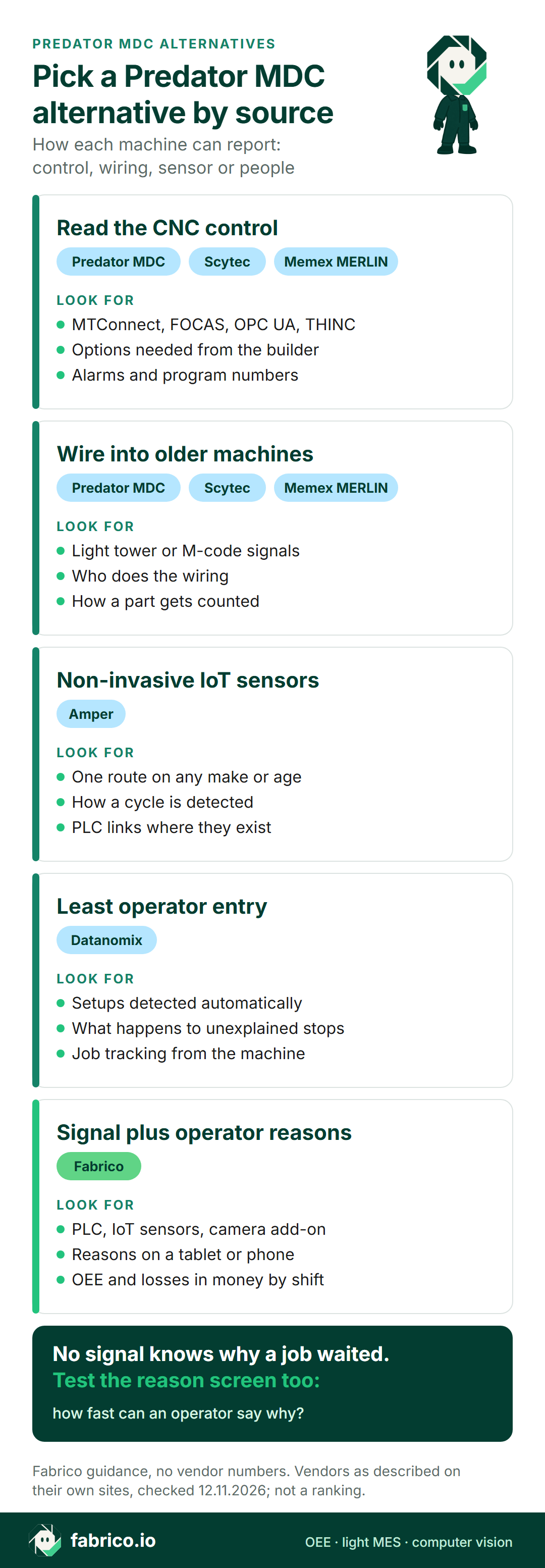
- Most shops mix four data sources: control protocols, wired signals, sensors and operator input.
- This page sorts the alternatives by data source.
- Facts on each tool link to its maker's site, as of 12.11.2026. Nothing here is a price or a ranking.
Walk through a typical job shop: two new five-axis machines with network-ready controls, a row of 1990s lathes with a serial port at best, a saw, a deburring bench and a CMM. One data collection system has to cover all of it, or the morning report will have holes.
So start with the data source. First, how Predator MDC collects data according to its own pages; then five other tools, grouped by how each one reads a machine. Fabrico, which publishes this page, is among the five and is not ranked against them.
What Predator MDC is (as of 12.11.2026, per predator-software.com)
Predator Software has made shop floor software since 1994, from Beaverton, Oregon. Its homepage lists MDC among its digital factory applications, next to DNC and tool, gage and fixture tracking. The Predator MDC page describes real-time machine monitoring that collects OEE, cycle, idle, setup and teardown time, and says it collects data four ways:
- Control protocols. Interfaces including MTConnect, FANUC FOCAS, FANUC Robot, Okuma THINC, Modbus TCP/IP, OPC and Haas, part of 70+ protocols that also cover serial links such as DPRNT.
- Wired adapters. DIN rail Predator MDC Adapters are wired into signal lamps, light towers, extended M functions or any digital input or output, in editions from 5 to 230 volts.
- Other hardware. Wired and wireless Ethernet, RS-232, digital and analog I/O, data recorders and sensors.
- People. Operators log on and off and enter downtime and scrap reasons through Remote Request, barcodes, touch screen tablets or PCs, with screens for one person running two or three machines.
It runs on Oracle, Microsoft SQL Server or Microsoft Access, monitors up to 4096 machines per PC, and includes Predator DNC for program transfer. A footnote on the page says some features need options from the equipment manufacturer.
Ask in the demo: for each machine you name, the connection route and any control option it requires.
Control protocol, wired signal, sensor or operator: what each source tells you
Every tool on this page uses one or more of the same four sources. The richer the source, the less you ask of the operator, but no machine signal knows why a job waited for material.
| Source | Fits | Typical data | Ask |
|---|---|---|---|
| Control protocol | Newer CNCs on the network | Status, program, parts, alarms | Which controls, which options? |
| Wired signal | Older CNCs, saws, presses | Run or stop, cycle pulses | Who wires it in? |
| Clip-on sensor | Any powered machine | On, idle or cutting | How are cycles counted? |
| Operator input | Reasons no signal carries | Stop reason, job, scrap | How many taps per stop? |
Our MTConnect guide covers the control side in more depth.
Comparison table: Predator MDC and five alternatives
Each row sums up the maker's own pages as of 12.11.2026, with the links in the sections that follow. Fabrico sits on top because Fabrico wrote the page, not because of a score. Anything you don't see here, put to the vendor in the demo.
| Tool | How it reads machines, per its site | Built around, per its site | Ask in the demo |
|---|---|---|---|
| Predator MDC (for reference) | 70+ protocols, wired adapters | Data collection, reports, DNC | Which control options are needed? |
| Fabrico | PLC, IoT device with sensors, camera add-on | Stop reasons, losses in money | How is each machine connected? |
| Scytec DataXchange | MTConnect, OPC UA, native, PLC module | Control data, own counting rules | How are counting rules set? |
| Memex MERLIN | FOCAS, OPC, MTConnect, adapters | Monitoring and OEE dashboards | How are older machines wired? |
| Amper | IoT sensors, PLC integrations | Monitoring, ERP and MES links | How is a cycle detected? |
| Datanomix | Major CNC makes, MTConnect | Job tracking, No Operator Input goal | How are setups detected? |
Want to see a machine signal and an operator reason side by side on a line like yours? Book a demo and bring a machine list with the controls named.
Fabrico: machine signal plus operator reasons
We make Fabrico, a cloud OEE and light MES system. Predator MDC brings many protocols into one database you host; Fabrico takes a signal from the machine, asks the operator for the reason, and puts a money value on the time lost. Based on our machine connectivity page and MES and OEE overview, there are three routes in and one person in the loop:
- Through the PLC. Listed protocols are OPC UA, Modbus, PROFIBUS, PROFINET, MQTT, EtherNet/IP, EtherCAT, IO-Link and HTTP. Projects start with a machine review that agrees the route for each one, so bring the CNC control models to that review.
- Through sensors. A machine without a usable PLC gets a Fabrico IoT device wired to external sensors.
- Through the camera add-on. Where no signal exists, for example at a manual station or a transfer between machines, the camera add-on counts output. Its video is streamed on request in the standard setup and not stored in Fabrico (about the camera add-on).
- The operator. The machine signal records when a stop starts and how long it lasts, micro-stops included; the operator picks the cause on a tablet or phone, and enters good parts and scrap where nothing counts them.
- What you get. OEE, downtime by cause and losses in money per machine and per shift, in the browser and the iOS and Android apps. For a stop that needs a repair, a work order opens from the logged stop in one tap, on the same machine record.
- Data and hosting. REST API, webhooks, Excel or CSV export. EU customers are hosted on AWS in Frankfurt.
- Rollout. Devices connected in about a month; full rollout in 3 to 4 months.
- Not in Fabrico: program transfer, which stays with your DNC. Roadmap, not live: stop detection by the camera add-on with a likely reason, and production planning.
Fits shops that want to know why machines stopped and what it cost, across CNCs, older machines and manual stations. Begin with a one-line pilot; the OEE software guide explains the category.
Scytec DataXchange: control protocols, plus a module for old machines
Scytec, which Minitab has acquired, offers DataXchange as monitoring for CNCs, PLCs, robots, welders and manual machines (DataXchange overview). On its highlights page, as of 12.11.2026, the data-source story runs like this:
- Network-ready controls report over MTConnect, OPC UA or Modbus TCP, or over the control maker's own protocol, with FANUC, Haas, Heidenhain, Mazak, Okuma and Siemens named.
- Machines too old for that get the DataXchange SRC, which Scytec describes as a PLC-based module that ships preprogrammed; it can read voltage, current, light-sensor and vibration inputs.
- Shops set their own rule for whether tool changes, optional stops, feed hold or a reduced feed override count as running.
- Downtime reasons come from the Operator Data Interface on PCs and tablets.
Against Predator MDC: each has a control route, hardware for old machines and an operator screen. Hosting differs: Scytec sells DataXchange hosted or installed (cloud vs on-premise), while Predator's page describes a database you run.
Fits shops that want detailed control data and to set their own rules for what counts as running.
Memex MERLIN: native protocols and adapters
Memex is the developer of MERLIN, which its site calls an IIoT technology platform with machine monitoring tools and configurable dashboards for OEE. As of 12.11.2026, the homepage says:
- MERLIN connects to machines through native protocols such as FOCAS, OPC and MTConnect, or hardware connector adapters for older machines.
- It describes an open platform with an expandable architecture for enterprise-wide deployment.
- It offers live shop floor visibility, a shop floor viewer and continuous improvement tools.
The page also quotes productivity and payback figures; those are the vendor's own, so they stay out of this page.
Compared with Predator MDC: both pair control protocols with adapters for older machines. Ask both how operator reasons are entered and how a shop of mixed controls is wired.
Fits shops that want control data from newer machines and adapters on older ones, across a whole plant.
Amper: non-invasive IoT sensors, now from ECI
ECI Solutions now lists Amper among its products and describes it as a platform for production monitoring and intelligence. As of 12.11.2026, that page says:
- IoT sensors record uptime, downtime and cycle counts without anyone typing them, and the FAQ says the sensors suit nearly any machine, whatever its age or make.
- Data comes from non-invasive sensors, aggregators, PLC integrations and linked assets that need no hardware.
- Ready-made ERP and MES integrations tie jobs, parts and production standards to the machine signal.
- Live machine data can open tickets so issues get routed and resolved.
Compared with Predator MDC: Predator's adapters wire into the machine's own signals; Amper leads with sensors that read the machine from outside. Ask both how a cycle and a part are counted on an older lathe.
Fits shops that have many older machines of different makes and want the same sensor route on all of them.
Datanomix: built to need no operator input
Datanomix sells production monitoring for precision shops and says it connects to all the major CNC makes and models, plus fabrication equipment. As of 12.11.2026, its homepage lists:
- No Operator Input, as a design goal, with automated setup and changeover detection.
- Part number and job tracking from the machine, with cycle time and part count benchmarks.
- Web, mobile app and TV app access with unlimited users.
- ERP sync for work orders, quantities and due dates, and clock-in and clock-out automation.
Compared with Predator MDC: Predator offers several ways for operators to enter data; Datanomix aims to infer as much as possible from the machine. Ask both what happens to a stop the machine leaves unexplained.
Fits shops that want to keep screen time at the machine as low as possible.
Which Predator MDC alternative fits your shop
- Many protocols, wired adapters, manual entry and DNC on your own database: Predator MDC.
- Control protocols plus an SRC module, hosted or installed, with your own running rules: Scytec DataXchange.
- Native protocols on newer machines, adapters on older ones, across a plant: Memex MERLIN.
- The same sensor approach on old and new machines of mixed makes: Amper.
- As little operator entry as possible: Datanomix.
- A machine signal with the operator's reason, lost time priced per shift, and repair orders from the stop: Fabrico.
Worked example: one shift, and who names the stops
Illustrative numbers for a single CNC lathe over one shift, not taken from a customer or a product screen. The shift plans 450 minutes. The lathe stopped for 150 minutes in five blocks. The ideal cycle is 3.6 minutes a part; it made 78 parts and 76 passed.
Run time is 300 minutes, so availability is 300 / 450 = 66.7%. The ideal time for 78 parts is 280.8 minutes, so performance is 280.8 / 300 = 93.6%. Quality is 76 / 78 = 97.4%. OEE is 60.8%, the same as 76 good parts x 3.6 minutes over 450 minutes.
Now look at who can name the 150 minutes. A control protocol can name the feed hold and the alarm: 32 minutes. A wired light-tower signal or a clip-on sensor sees 150 minutes of not cutting, but names none of it. Setup, waiting for material and the first-article check, 118 minutes, need a reason from a person whatever the source.
So test two things in any demo: how well the system reads the machine, and how quickly an operator can give a reason. For the arithmetic, see OEE calculation; for stops too short to write down, see micro-stops.
Data source questions for each vendor
Hand every vendor, Fabrico too, the same machine list with controls and build years, and ask:
- How does each machine connect? Control protocol, wired signal, sensor or operator only.
- Which control options are needed, and who buys them from the machine builder?
- How is a part counted on a machine with no network port?
- Who wires the hardware in? The vendor, a partner, or your maintenance team.
- How does an operator give a reason? Count the taps on a tablet, and try it with gloves on.
- How are rules set for feed hold, optional stops and warmup?
- Can you get your data out? Ask for the API, the export formats or a database link.
For more on reading machines, see our CNC machine monitoring overview and MES for metal fabrication.
What people ask next
Which protocols does Predator MDC support?
Its page lists 70+ machine monitoring protocols, including MTConnect, FANUC FOCAS, FANUC Robot, Okuma THINC, Modbus TCP/IP, OPC and Haas, plus serial links. It also lists wired adapters, digital and analog I/O, and manual entry.
How do Predator MDC alternatives connect to older CNC machines?
Per their own sites, Scytec uses a PLC-based module called the DataXchange SRC, Memex uses hardware connector adapters, and Amper uses IoT sensors. Fabrico uses an IoT device with external sensors, or the camera add-on to count output where there is no usable signal.
Do I need operator input if the machine is connected?
For reasons, usually yes. A control can name alarms and feed holds, but setup, waiting for material and inspection need a person to say why. Datanomix aims to infer as much as possible from the machine, so ask how it treats an unexplained stop.
Does Predator MDC run in the cloud?
Its page describes software on an Oracle, Microsoft SQL Server or Microsoft Access database, with a browser dashboard and access over the internet and VPN. Ask Predator Software how hosting would work for your shop.
How is Fabrico different from Predator MDC?
Predator MDC brings data from many protocols and adapters into a database you host, and includes DNC. Fabrico runs in the cloud and joins the machine signal to the operator's reason, then prices the lost time by shift; repairs open as work orders from the stop.
Can I keep Predator DNC and add another monitoring tool?
Often, yes, if each system owns its own records. DNC keeps program transfer, and the monitoring or OEE tool keeps stops, reasons and machine time. Ask both vendors how the two share machine and job numbers.
Want to watch a machine signal get its reason from an operator? Book a demo or contact us.
Related articles



Real Fabrico tiles, sample data.