


 Login
 Blog
Guidewheel Alternatives: Power Sensors, PLC or Camera Counts for OEE

In short: the right Guidewheel alternative depends on where your machine data should come from. Guidewheel reads run, idle and down from sensors on a machine's power cable. The alternatives below take the signal from a sensor wired into a device on the line, from the PLC, or from a camera that counts output.
- Guidewheel calls itself a practical operating platform for manufacturing, and pairs its software with its own manufacturing experts.
- Its industry pages include food and beverage, consumer goods, and plastics and packaging.
- A run state is not a count. Whichever tool you pick, ask how good output gets into OEE.
- Compared here: Fabrico, Factbird and Vorne XL, by data source, operator input and how data leaves.
- Vendor facts come from each vendor's own site, as of 11.11.2026, linked in place. No prices, no verdicts.
A toothpaste tube filler can cycle for twenty minutes and fill nothing, because the tube magazine ran empty. A machine state, a photo-eye count, a PLC tag and a camera can each book those minutes differently. The booking decides which loss your team works on next.
Below: what Guidewheel (guidewheel.com) offers according to its own site, when it fits, and three alternatives grouped by data source. Factbird and Vorne XL are here because each, like Guidewheel, pairs its software with its own data capture device, per its site. Fabrico wrote this page and is one of the three, so read it as you would any vendor's page. For a wider field, see our production monitoring software review.
What Guidewheel offers (as of 11.11.2026, per Guidewheel's site)
Guidewheel says it connects your machines and pairs AI-powered software with manufacturing experts, per its homepage. Its about page says the company started with energy management, and that CEO Lauren Dunford worked in food production before founding it.
- Machine data. Sensors connect to a machine's power conductor to capture its electrical activity, so a team can start with live run, idle and down data without a PLC integration as the first step. The homepage also lists temperature, pressure, humidity, flow or production inputs, added where the application calls for them.
- Software. Downtime with team-entered reasons, OEE by machine and plant, planned against actual production, cycle times against targets, AI-powered anomaly alerts, and machine-level energy (homepage). Its downtime page adds scoreboards, an uptime view, mobile alerts and Pareto analysis.
- Operators. An operator dashboard for requesting support, logging downtime reasons and recording scrap at the line (homepage).
- Food and consumer goods. Its food and beverage page lists fillers, sealers, ovens, freezers, blenders and packaging lines, monitored without touching their controls. Its consumer goods page names fillers, cappers, labelers and high-volume packaging lines.
- Integrations. Its integrations page lists MaintainX and Limble as live CMMS integrations, SAP Digital Manufacturing, and an open API with runtime, downtime, cycle and energy data.
The site also shows customer results, such as uptime and OEE gains. Those are vendor-reported, so we don't repeat them here.
Ask in the demo: which sensor and signal Guidewheel would fit on your filler and case packer, and how good counts and rejects reach its OEE.
When Guidewheel fits
Put Guidewheel on your shortlist if most of these are true:
- You want machine states before any PLC work. Its pages say a PLC integration need not be the starting point.
- You run old and new equipment side by side and want one way to connect it. Its downtime page says it connects old and new equipment.
- Energy per machine matters next to runtime, which the homepage covers under energy insights.
- You want the vendor's people in your daily reviews, not only software. Its about page says the team works by your side.
The alternatives below each start from a different signal on their own sites: a sensor wired to a device, the PLC, or a camera.
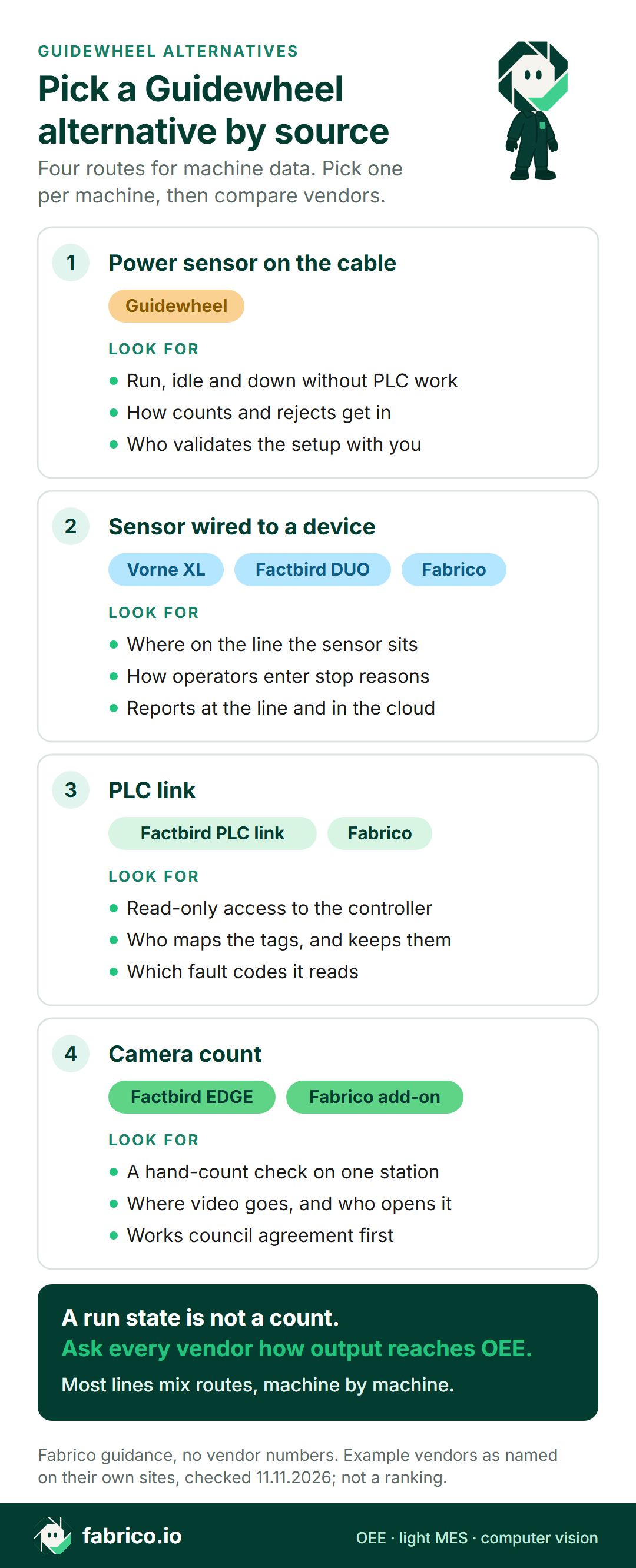
Four routes for machine data, and what each reads
Every OEE tool needs two things from a line: when it ran, and how much good output it made. The route decides how each one arrives. For more depth, read OEE monitoring without a PLC and camera or sensor by machine.
| Route | What it reads | What to ask |
|---|---|---|
| Power sensor on the cable | Run, idle and down from electrical activity | How counts and rejects get in |
| Sensor wired to a device | Packs or cycles passing a photo-eye or switch | Where on the line the sensor sits |
| PLC link | States, counts and fault codes the program holds | Who maps the tags, and is access read-only |
| Camera count | Units crossing a zone in view | Hand-count check, and where video goes |
| Operator at the line | Stop reasons, scrap, context | Taps per stop, length of the reason list |
Most lines end up with a mix, so the real question is which route each machine gets.
Want to see how the routes would mix on a line like yours? Book a demo and bring your station list.
Comparison table: Guidewheel and three alternatives
Facts as of 11.11.2026, each from the vendor's own site and linked in its section below.
| Tool | Machine data, per its site | Operator input | How data leaves |
|---|---|---|---|
| Guidewheel (for reference) | Sensors on the power cable; added inputs such as flow | Reasons, scrap, support requests | Open API; CMMS and ERP integrations |
| Fabrico | PLC, IoT device with sensors, AI camera add-on | Stop reasons on tablet or phone | REST API, webhooks, Excel, CSV |
| Factbird | DUO sensor gateway, PLC data, AI visual counter | Stop causes in Operator View | GraphQL API, webhooks, MQTT, OPC UA |
| Vorne XL | One or two sensor inputs per XL device | Barcode scans of downtime reasons | Excel export; optional cloud |
Fabrico: the machine signal first, a camera add-on where no signal counts
Fabrico wrote this page. It is a cloud OEE and light MES platform. Where Guidewheel starts from the power cable, Fabrico starts from whatever signal each machine already has, per its machine connectivity page:
- Machines with a PLC connect through it, over protocols such as OPC UA, Modbus, PROFINET and EtherNet/IP.
- Older machines get a Fabrico IoT device with external sensors. If the network link drops, the gateway can store machine data for up to 30 days.
- Stations with no usable signal, such as a hand-pack table or a bagging station, can use an AI camera that counts output, an add-on on request. With the camera add-on, you can open the video for any moment on the shift timeline; in the standard setup it is streamed on request, not stored in Fabrico (computer vision OEE).
- Rollout: devices connected in about a month; full rollout in 3 to 4 months, with data import, setup and on-site training.
- Operators add the stop reason at the line, on a tablet or phone. OEE, downtime and losses show by line and shift, with losses in money, on the web, iOS and Android.
- Your data leaves through a REST API, webhooks, or Excel and CSV export.
- Roadmap, not live today: camera add-on features that detect stops on their own, mark jam zones, or suggest a likely stop reason for the operator to confirm.
- Not what Fabrico sells: pack inspection, such as seal, label or fill checks.
A customer data point, with a disclosure first. Ficosota, a Bulgarian maker of hygiene, tissue and household products, is also an investor in Fabrico, as we said in the investment announcement. Across its 16 lines in Fabrico, between June and September 2026, its OEE went from 53.11% to 59.62%, good output from 10.49 million to 12.92 million units a month, and unclassified time, the share of production time with no recorded reason, from 3.20% to 0.40%. The approved figures cover OEE, output and stop reasons; they make no claim about how each line is connected. Read the Ficosota story.
Ask in the demo: which machines would connect by PLC, which by IoT device and which by the camera add-on, and how a camera add-on count compares with a hand count on one station.
Fits plants that run a mix of PLC machines, older machines and manual stations, and want losses in money by line and shift. Our OEE software guide lists what to compare.
Factbird: sensor gateways, PLC data and an AI visual counter
Factbird (factbird.com) sells a manufacturing intelligence suite with its own data capture hardware, per its homepage. As of 11.11.2026, its edge devices page says:
- Factbird DUO is a data collection device that reads the sensors of your choice. Any digital sensor with an NPN or PNP output is supported, and by default two sensors can connect to one DUO.
- Data can go to the cloud from IIoT devices or straight from your PLCs, including over MQTT, and its PLC integrations take data from a variety of controller inputs.
- Factbird EDGE runs AI vision, and its AI Visual Counter identifies and tracks units on the line from video.
Operators log and categorise stops in Operator View, per its OEE software page. The homepage lists OPC UA, MQTT, a GraphQL API and webhooks among its protocols, and names food and beverage, CPG, and packaging and containers among seven industries.
Compared with Guidewheel: Guidewheel's pages start from a sensor on the power cable. Factbird's pages start from sensors wired to its DUO device or from PLC data, with camera counting on its EDGE device.
Ask in the demo: which sensor or camera Factbird would fit at each of your stations, and who installs it.
Fits plants that want sensor, PLC and camera data from one supplier's own hardware, as its edge devices page describes.
Vorne XL: a device per process, with CIP targets and reject stations
As of 11.11.2026, Vorne's homepage describes XL as a standalone device with I/O, an operator scoreboard and built-in reporting: you wire one or two existing sensors to it, operators scan downtime reasons with a barcode scanner, data exports to Excel, and an optional cloud, XL Enterprise, adds alerts and emailed shift reports. Its food and beverage page adds the food angle:
- It names fillers, cappers, labelers, checkweighers and case packers.
- Teams can set targets for completing CIP, sanitization or allergen wash events.
- Reject stations, such as a kick-off valve, checkweigher, metal detector or AOI camera, feed quality loss data.
Compared with Guidewheel: both list operator scoreboards. Vorne's homepage describes a device on each process with an optional cloud; Guidewheel's pages describe cloud software fed by power sensors, with its team working alongside yours.
Ask in the demo: which sensor input each line needs, and who on site sets the scoreboard targets.
Fits plants that want a counter and scoreboard at each line, wired to a sensor the machine already has, as its homepage describes.
Which one fits your plant
- Guidewheel fits plants that want run, idle and down from the power cable, with the vendor's experts helping to make the data part of daily reviews, as its homepage describes.
- Factbird fits plants that want sensors, PLC data and camera counts from one supplier's hardware, per its edge devices page.
- Vorne XL fits plants that want a device and scoreboard on each line reading an existing sensor, per its homepage.
- Fabrico fits plants that want OEE and losses in money by line and shift, from the PLC where there is one and the camera add-on where there is no signal, per its connectivity page.
Worked example: one shift, two ways to book the same minutes
Sample data for one shift on a toothpaste tube filler, not a customer's line or a product screen. The shift is 8 hours with a 30 minute break, so planned time is 450 minutes. At an ideal 120 tubes a minute, the shift could make 54,000 tubes.
The filler's run signal, whether a PLC bit, a stack light or a power reading, shows 400 minutes running and 50 stopped. The cartoner counted 42,600 tubes. The checkweigher rejected 600, leaving 42,000 good.
View A, run signal alone. Availability is 400 of 450 minutes, or 88.9%. In 400 minutes the ideal is 48,000 tubes, so performance is 42,600 / 48,000 = 88.8%. Quality is 42,000 / 42,600 = 98.6%. OEE is 88.9% x 88.8% x 98.6% = 77.8%.
View B, run signal checked against the count. For 20 of those running minutes the count stayed flat: the filler cycled while the tube magazine was empty. Book them as a stop with a reason, and run time is 380 minutes. Availability is 84.4%, performance is 42,600 / 45,600 = 93.4%, and quality stays at 98.6%. OEE is still 77.8%, the same as 42,000 good of 54,000 possible.
OEE did not move, because good output did not change. What moved is where the loss sits: in view B, 20 of the 45 "slow" minutes are a stop called "magazine empty", and the fix is upstream of the filler.
Ask each vendor how its system books time when a machine runs and the count stays flat. Check any count against a hand count before you trust the split; see how accurate camera OEE is and the micro-stops guide.
Questions to ask any vendor on this list
Put the same questions to every vendor, us included, on one real line.
- Which signal, per machine? Power, a sensor on the product flow, the PLC or a camera, and why.
- Where do good counts and rejects come from? A sensor, a checkweigher signal or the operator.
- How short a stop does it record? And how micro-stops show in reports.
- How do operators add reasons? Count the taps per stop.
- How does it feed your daily meetings? Shift reports, scoreboards and tier board meetings should show the same numbers.
- Who installs, and what does IT need? Network, access rights, and who changes the setup after a machine upgrade.
- What does the pilot prove? One line, a fixed period, a hand count to compare against, and the same station list for every quote.
Cameras at manual stations see people, so agree where each one points with the works council first; see production line cameras without surveillance. For live numbers during the shift, see real-time OEE. For consumer goods lines, see computer vision for household products and our FMCG computer vision guide.
What people ask next
Does Guidewheel need PLC access?
Its pages say no PLC integration is needed to start: sensors connect to a machine's power cable and give run, idle and down states. Its experts work alongside your team to validate the setup, per its homepage.
Can Guidewheel count output?
Its homepage lists production inputs among the measurements you can add, and its software compares planned and actual production. Ask which signal it would use for the count on each of your machines.
Is Guidewheel an MES?
Guidewheel calls itself a practical operating platform for manufacturing. Its integrations page lists CMMS integrations, SAP Digital Manufacturing and an open API, and its food and beverage page says those integrations connect live machine data with ERP, MES, CMMS and BI tools.
How is Fabrico different from Guidewheel?
Guidewheel's pages start from sensors on the power cable, with its experts working alongside your team. Fabrico is an OEE and light MES platform: stops and counts from the PLC, a sensor or a counter, an AI camera add-on where no signal counts, and losses in money by line and shift.
Can a camera replace a power sensor?
They answer different questions. A power sensor reads electrical activity, which gives run, idle and down; a camera counts the units it can see. Fabrico's camera add-on counts output where a station has no usable signal.
Want to see the OEE side of a line like yours? Book a demo or contact us.
Related articles





Real Fabrico tiles, sample data.