


 Login
 Blog
MES vs MRP: Where the Plan Meets the Line in a Food Plant

In short: MRP plans which materials and production orders a plant needs and by when; an MES runs those orders on the line and records what really happened. You need both, and the link between them matters most: actual output, scrap and real run rates have to flow back, or MRP keeps planning on nameplate speed.
- MRP works on planned data in days and weeks. The MES works on line data in minutes and shifts.
- Down to the line: orders, quantities, dates, bills of materials, planned rates.
- Back to the plan: good output, scrap, stop time and the real rate per SKU.
- A plan built on nameplate speed misses by the gap between nameplate and OEE.
- If plans keep missing on the line, measure first; if materials run short, fix MRP first.
A food plant can have a clean MRP run every night and still miss half its weekly orders. The plan is usually right about what customers want. It is wrong about how fast the line really makes it.
Fabrico, which publishes this guide, makes OEE and light MES software. Read the section on where it fits with that in mind.
MES vs MRP: what each one owns
MRP is a planning calculation. It takes demand, stock and the bill of materials, and works out which materials to buy and which production orders to open, in what quantity and by which date. It assumes the rates and lead times in its master data are true.
An MES sits at the line. It runs the orders the plan released and records what happened: when the line ran, when it stopped and why, how many good units it made and how many it scrapped. It works on line data, not on assumptions.
Many teams compare all three, so here they are side by side.
| Question | ERP | MRP | MES |
|---|---|---|---|
| Main job | Runs the business | Plans materials and orders | Runs and records the line |
| Time scale | Weeks to years | Days to weeks | Minutes to shifts |
| Key data | Sales, stock, cost, finance | Demand, BOM, rates, lead times | Runs, stops, counts, scrap |
| Used by | Finance, sales, buyers | Planners, buyers | Operators, shift leads, CI |
MRP often runs as a module of the ERP. For that split, see ERP vs MRP. For the step from MRP to finite capacity scheduling, see MRP vs APS. For the business layer against the line layer, see ERP vs MES, and if maintenance is part of the question, CMMS vs MES vs ERP.
Where the plan meets the line
The ISA-95 standard is the usual map for this boundary. ISA describes ISA-95 as standards for integrating logistics systems with manufacturing control systems. It puts MES at level 3 and the activities that run the business, planning among them, at level 4, and the standard deals mainly with the interface between those two levels. The international standard IEC 62264-1 (2013) covers the interface content and transactions between Level 3 and Level 4.
In practice, two kinds of data cross that interface.
- Down to the line: the order, the SKU, the quantity, the due date, the bill of materials and the planned rate in the routing.
- Back to the plan: good output and scrap per order, stop time, the real run rate, materials used where they are measured, and when the order actually closed.
The first arrow is the one a planning system is set up for: orders reach the line, by screen or by paper. The second arrow is where the link tends to break. Quantities get typed in at the end of the shift, scrap gets rounded, and nobody updates the rate in the routing after the first trial run. So the next MRP run uses the same numbers again.
What goes wrong when MRP plans on nameplate speed
Nameplate speed is what the filler, the flow wrapper or the cartoner can do when nothing stops it. A food line rarely runs like that for a full shift. Time goes to changeovers, CIP and washdowns, allergen clean-downs, short stops at the packer, waits for material and slow running after a restart.
Unplanned stops add to that, and they change from week to week. None of these losses sit in a nameplate rate, so a routing built on it allows too few hours every week.
When the routing holds nameplate speed, three things follow:
- Orders run late. The plan allows too few hours, so the week overflows into the next and the plan gets rebuilt by hand.
- Materials run short or pile up. If the scrap allowance in the BOM is zero or a guess, buying is wrong in the same direction every week.
- Trust goes. Planners add their own buffers in a spreadsheet, and the MRP output becomes a starting point that nobody follows.
The fix is not a better MRP calculation. It is better inputs: measured rates, measured scrap, and planned time for changeovers and cleaning. Those come from the line.
Worked example: one week on a yogurt cup line
Sample figures for illustration only. A cup filler and sealer has a nameplate rate of 12,000 cups an hour. The weekly order is 480,000 good cups. The routing uses nameplate speed, so the plan allows 480,000 / 12,000 = 40 hours, five shifts of 8 hours. The BOM has no scrap allowance for cups and lids.
Here is what the MES records over the 40 planned hours:
- Availability: changeovers, CIP and stops take 8 hours, so the line runs 32 hours. 32 / 40 = 80%.
- Performance: while running, the line averages 10,500 cups an hour. 10,500 / 12,000 = 87.5%. It makes 32 x 10,500 = 336,000 cups.
- Quality: 8,400 cups are rejected, so 327,600 are good. 327,600 / 336,000 = 97.5%.
- OEE: 0.80 x 0.875 x 0.975 = 0.6825, or 68.25%. Check: 327,600 / (40 x 12,000) = 0.6825.
Now the effect on the plan. The week ends 480,000 minus 327,600 = 152,400 cups short. At the real rate the line makes 12,000 x 0.6825 = 8,190 good cups per planned hour, so the order needs 480,000 / 8,190 = 58.6 hours, about 7.3 shifts, not 5. The plan was short by 18.6 hours.
Materials miss too. To get 480,000 good cups at 97.5% quality, the line has to start 480,000 / 0.975 = 492,308 cups. With no scrap allowance, MRP orders 12,308 too few cups and lids for this order alone.
What should flow back: a planned rate near 8,190 good cups per hour for this SKU on this line, or availability and speed planned separately, plus a scrap allowance near 2.5% in the BOM. One week is not a rate. Use several weeks per SKU and line, and plan changeovers and CIP as their own time if your MRP can hold them. If the filler is the constraint, value the lost hours there; the packer downstream cannot make up what the filler never filled. The OEE math is the same as in our OEE calculation guide.
Pick MRP first, MES first, or both
Pick MRP first if materials run short or arrive too early, buying works from spreadsheets, and the bills of materials are not under control. No line record helps if the plan has no clean structure to receive it.
Pick an MES or OEE layer first if MRP already runs and plans look right on paper but keep missing on the line. You need measured rates, scrap and stop time before any change to the planning logic. ERP is common in larger firms. In its 2025 EU survey on ICT usage in enterprises, Eurostat found ERP software in use at 41% of small and 89% of large enterprises (EU, enterprises with at least 10 employees, financial sector excluded). If your plant already plans in an ERP, ask whether the rates in its routings come from the line or from nameplate.
Do both if you run a mid-size food or FMCG plant with many SKUs and frequent changeovers. Let MRP own the plan and the MES own the record of what happened. Use one set of order, SKU and line IDs, and agree how often measured rates and scrap go back into master data.
| What you see | Start with | Why |
|---|---|---|
| Material shortages, late buying | MRP | The material plan is the gap |
| Plans fine on paper, missed on the line | MES or OEE | Planned rates are guesses |
| Orders closed with typed-in totals | MES or OEE | Actual output must come from the line |
| Scrap allowance never updated | Both | The MES measures, MRP master data uses it |
| Spreadsheets for plan and record | Both, in steps | Clean BOMs, then measure the constraint line |
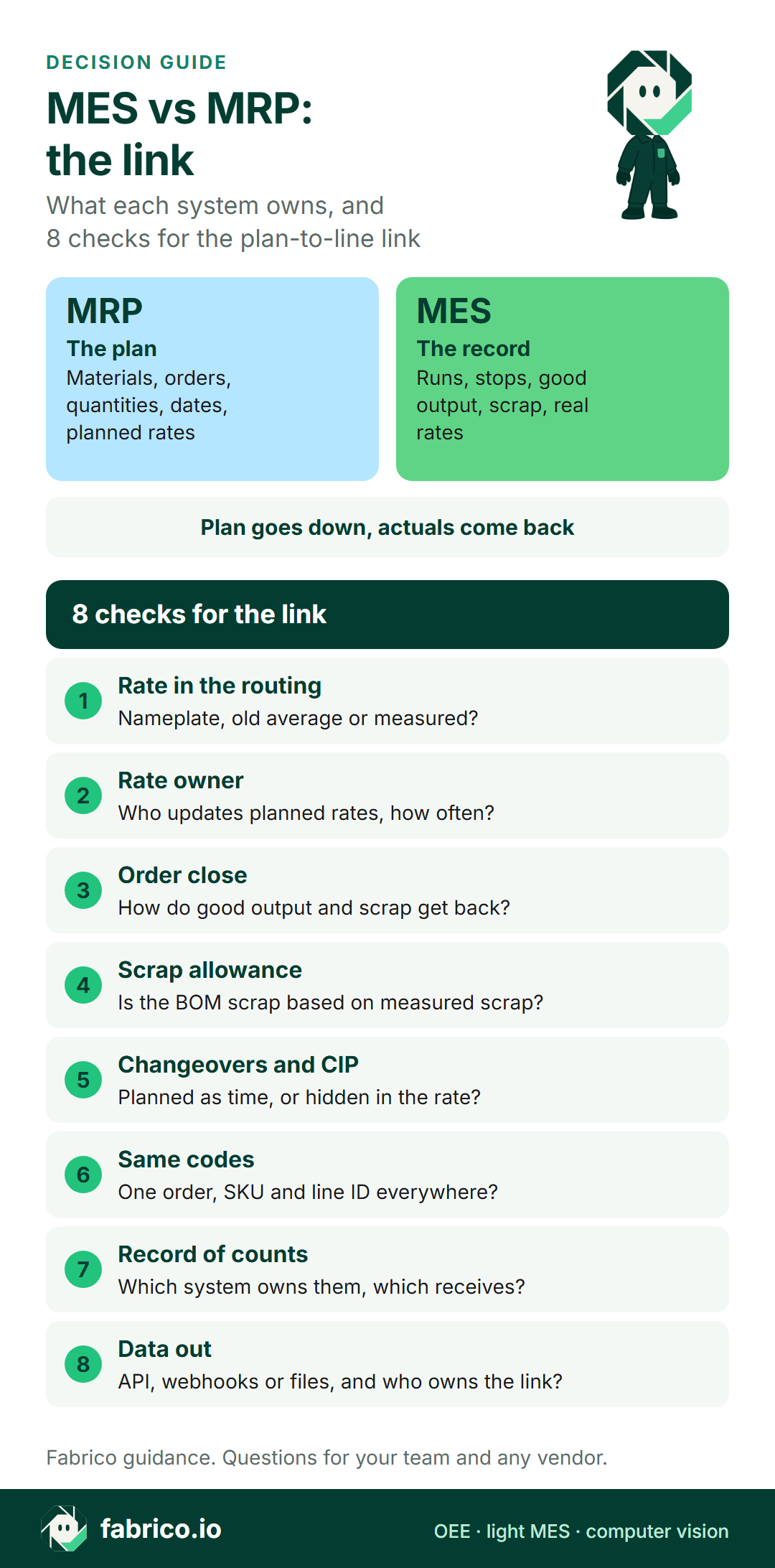
Text version of this infographic
- Decision card titled MES vs MRP, the link.
- Two lanes:
- MRP plans materials and orders, MES runs and records the line.
- The plan goes down, actuals come back.
- Then 8 checks for the link between plan and line.
Want to see measured rates and scrap from a food line? Book a demo with the routing and bill of materials for one SKU at hand.
What a food plant needs first
Whatever you pick, the order of work tends to be the same.
- Clean master data. One SKU code, one line code, one bill of materials per pack format. Without that, nothing that flows back has a place to land.
- Measure the constraint line. Start where the plan misses most, often the filler or the packer on the busiest line. Record runs, stops, good output and scrap from the machine signal, not from a shift sheet.
- Close orders with actuals. Good output and scrap per order go back first. That alone corrects stock and order totals.
- Update rates on a cadence. Monthly per SKU and line is a reasonable start. Then decide whether to plan changeovers and cleaning as separate time.
For sector detail, see MES for food manufacturing, MES for dairy processing, MES for snack food manufacturing and MES for mid-size FMCG plants.
Eight checks for the link between plan and line
Put these to your planners, your IT/OT team and any MES vendor.
- Which rate does each routing use today: nameplate, an old average, or a measured rate per SKU and line?
- Who owns the planned rates, and how often are they updated?
- How do actual good output and scrap reach the order when it closes?
- Is the scrap allowance in each bill of materials based on measured scrap?
- Are changeovers, CIP and allergen clean-downs planned as time, or hidden inside the rate?
- Do MRP, ERP and the line use the same order, SKU and line IDs?
- Which system is the record for counts, and which only receives them?
- How does data leave the MES: API, webhooks or files, and who owns the link?
If the answer to the first check is "nameplate", start there. In the example above, it is the input that moves the plan most.
Where Fabrico fits
Fabrico is a cloud-based MES and OEE platform. On this split it sits on the record side: it measures what the line did, so the plan can use real numbers. For a planner whose MRP runs on nameplate rates, that means:
- A measured rate to set against the routing: Fabrico reads cycles, stops and output from the line's PLC. On older or semi-automated machines, a Fabrico IoT device with external sensors collects the production signal. Performance compares actual output with what the ideal cycle time allows.
- Scrap to check the BOM allowance: operators tag stop causes on a tablet or phone, and good parts and scrap are entered on a tablet where no sensor counts them.
- The hours the plan did not get: live OEE by line and shift, with losses shown in money. See the solution overview, our guide to OEE software and what a light MES covers.
- Actuals back to the MRP: a REST API, webhooks, and Excel or CSV export of any list. A connection to SAP or another ERP can be scoped per customer. Job dispatching, BOMs and routings stay in your ERP.
- Camera add-on: at manual stations with no machine signal, the camera add-on counts output. In the standard setup, camera add-on video is streamed when someone opens it, not stored in Fabrico. Stop-reason suggestions from the camera add-on are on the roadmap. See the camera add-on for OEE and the camera add-on in food plants.
Production planning and scheduling are not part of Fabrico today. For the wider FMCG picture, see FMCG lines with the camera add-on.
What people ask next
What is the difference between MES and MRP?
MRP calculates which materials and production orders you need, how much and by when. MES runs those orders on the line and records what actually happened: output, stops, scrap and real run rates.
Do we need an MES if we already have MRP?
If plans look right on paper and keep missing on the line, you need the feedback an MES or OEE layer gives. MRP only knows the rates and scrap allowances in its master data. The line measures the real ones.
Can MRP replace an MES?
No. MRP works in days and weeks on planned data. It is not built to record stops, counts and scrap at the line during the shift, which is the job of an MES.
What should flow from the MES back to MRP?
Good output and scrap per order first, then stop time, the real run rate per SKU and line, and material use where it is measured. Good output and scrap alone already correct stock and order totals.
How often should planned rates be updated?
Agree a cadence, for example monthly per SKU and line, based on several weeks of measured data. Update sooner after a new line, a new pack format or a change to the changeover routine.
Where do ERP, MRP and MES sit?
ERP runs the business. MRP is the planning calculation for materials and orders, often a module of the ERP. The MES sits at the line, between the plan and the machine control.
Does Fabrico plan production?
Production planning and scheduling are not part of Fabrico today. Fabrico measures OEE, stops, output and scrap at the line, and data leaves through a REST API, webhooks and Excel or CSV export. How those actuals would reach your MRP or ERP is a question to test with one routing in hand.
Want to see real run rates next to the plan? Book a demo.
Related articles





Real Fabrico tiles, sample data.