


 Login
 Blog

Excel vs. Dedicated OEE Software: The "Hidden Cost" of Spreadsheets

Key Takeaways
-
The "Free" Illusion: Excel feels free because you already have the license, but the cost of manual data entry and "Data Janitor" work adds up fast, compared with OEE software that collects the data for you.
-
Latency Kills: Excel is a "Post-Mortem" tool. It tells you what happened yesterday. Dedicated software tells you what is happening now, allowing you to save the shift.
-
Data Integrity: Manual logs are rarely exact. Operators round numbers, guess timestamps, and "fudge" downtime codes to look good.
-
The Breakpoint: With several machines or more than one shift, OEE gets hard to keep current in Excel.
The biggest competitor to Fabrico isn't another software company. It’s Microsoft Excel.
For decades, the standard way to track OEE (Overall Equipment Effectiveness) has been:
-
The Operator writes numbers on a paper log sheet.
-
The Supervisor collects the papers at the end of the shift.
-
An Admin spends 2 hours the next morning typing those numbers into Excel.
-
A report is printed and put on a bulletin board 24 hours later.
This process is comfortable. It is also obsolete.
While Excel is an incredible tool for financial analysis, it is a terrible tool for real-time operations. If you are debating whether to stick with spreadsheets or upgrade to a dedicated OEE platform like Fabrico, here is the brutally honest comparison of the two approaches.
1. The Speed Gap: "Autopsy" vs. "Pulse Check"
The Excel Reality (Post-Mortem): Excel is backward-looking. By the time you see the OEE report for Tuesday, it is Wednesday afternoon.
If Line 4 was running slow due to a bad raw material batch, you can't fix it. The shift is gone.
The money is lost. You are performing an autopsy on the day's production.
The Software Advantage (Real-Time): Dedicated OEE software is forward-looking.
-
Live Dashboards: Fabrico shows the OEE of every machine right now.
-
The Result: You fix the issue during the shift, recovering the volume before it's lost.
2. The Accuracy Gap: "Best Guess" vs. "Machine Truth"
The Excel Reality (Subjective): Paper logs are notoriously unreliable.
-
Rounding: An operator stops for 12 minutes but writes "10 minutes."
-
Bundling: The machine stops 5 times for 2 minutes each (Micro-Stops). The operator ignores them until lunch, then writes "10 min - Cleaning."
-
Bias: No operator writes "I was texting" as a downtime reason. They write "Material Issue."
The Software Advantage (Objective): Fabrico connects directly to the machine (PLC, IoT or the camera add-on).
-
Precision: It logs a 12-second stop as exactly 12 seconds.
-
Micro-Stops: It catches the tiny jams that operators ignore.
-
Truth: The data is binary. The machine was either running or it wasn't. There is no room for "creative accounting."
3. The "Action" Gap: "Reporting" vs. "Workflow"
The Excel Reality (Passive): Excel is a database. It sits on a server. It does not send emails. It does not assign tasks. It requires a human to open the file, interpret the data, close the file, open an email, and type a command to the maintenance team.
The Software Advantage (Active): Fabrico is a cloud-based MES and OEE platform for manufacturers, with maintenance management (CMMS) built in, so production data and maintenance work sit in one system instead of in a file someone has to open.
-
Stops Can Open Maintenance Tasks: A stoppage reason can be configured to open a maintenance task automatically in the built-in CMMS, and people can also create tasks by hand.
-
Video Evidence: You don't just see a number; with the computer vision add-on you can replay a clip of what happened on the line.
The "Cost of Free" Calculator
You think Excel is free. Let’s do the math on the "Data Janitor" Tax.
-
Scenario: You have 5 lines running 3 shifts.
-
Manual Entry: The Production Clerk spends 1 hour per day collecting sheets and typing data.
-
Clerk Cost: your fully-loaded hourly rate (fully burdened).
-
Annual Cost: x 5 days x 52 weeks = your annual cost of manual data entry.
That full annual sum pays for typing data, not analyzing it. And that data is late and often inexact.
An automated system can give you machine data as it happens.
The Breakpoint: When should you switch?
We are not saying you need software for everything. Use this checklist to decide.
Stick with Excel if:
-
You have very few machines.
-
You run a single shift (8 hours).
-
Your cycle times are long (e.g., 1 hour per part).
-
You are okay with data being 24 hours late.
Switch to Fabrico if:
-
You have several machines.
-
You run multiple shifts (handover communication is critical).
-
Your cycle times are fast (seconds), making manual logging impossible.
-
You want stop and output records from the machine, not from memory.
Conclusion: Stop being a Data Janitor
Your engineers were hired to solve problems, not to format pivot tables.
Every hour spent manually wrestling with OEE data is an hour not spent fixing the machine. Excel was a great bridge from the clipboard era, but today it is an anchor slowing you down.
See Fabrico live. Book a demo.
Book a demoRelated articles







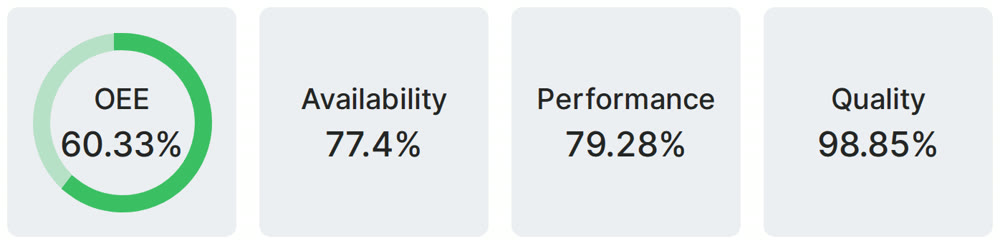
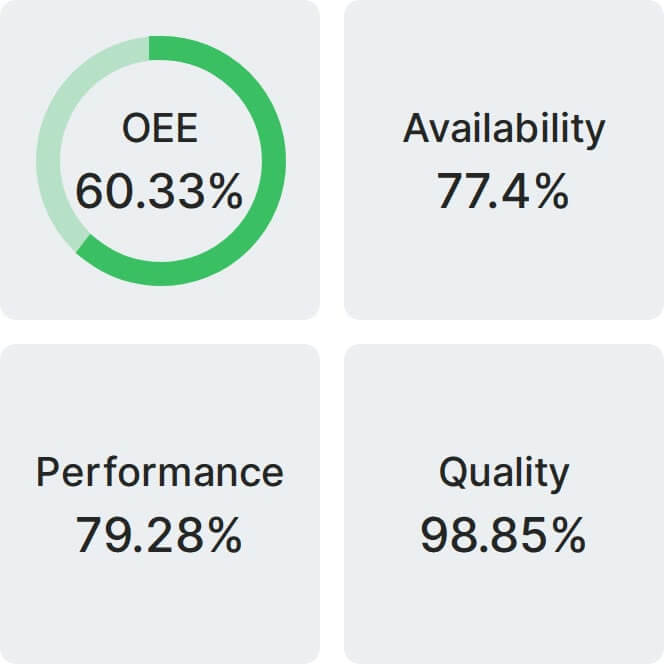
Real Fabrico tiles, sample data.