


 Login
 Blog
OSI PI vs Ignition: A Data Layer or the System Operators Use?

In short: OSI PI vs Ignition is a choice of layer more than a choice of brand. If you need one archive for years of data from many systems and sites, start with the PI System; if operators need screens, alarms and control on the line with history on the same server, start with Ignition; many plants run both. The PI System, built by OSIsoft and now part of AVEVA, carries no public price and is quoted through AVEVA's reps, whereas Ignition's platform licence sits at USD 1,200 on Inductive Automation's own price list (checked 15.11.2026).
- Worked example: two feed mills run the same bagging line design, and a template-based comparison finds a gap of 715 good sacks a shift, about EUR 679 at a sourced margin.
Key takeaways
- Ask who reads the data first: analysts comparing sites lean towards a data layer such as PI, shift teams running the line towards Ignition.
- Asset Framework and UDTs both template equipment: AF for comparisons across sites, UDTs for screens.
- In the sample below, North runs at 81.4% OEE and South at 74.1% on the same line design; 37 extra stopped minutes at South explain most of it.
- Neither archive knows why a line stopped until someone records it, so settle where stop reasons live first.
The process engineers at a feed group want every signal in PI so they can compare mills. The controls team at each mill runs Ignition on the bagging floor. Both are right about their own job. For AVEVA System Platform against Ignition as SCADA platforms, read AVEVA vs Ignition instead.
Data layer or the system operators use
Each cell sums up the vendor's own pages; links follow in the sections below.
| Question | AVEVA PI System | Ignition |
|---|---|---|
| Built for | Operations data across lines, plants and cloud | Control, screens and data on the plant floor |
| History lives in | The PI Server archive, pitched for decades of data | Core Historian, or SQL Historian into an external database |
| Collects through | PI Interfaces, PI Connectors, AVEVA Adapters | Drivers installed with it, OPC UA, SQL, MQTT |
| Equipment templates | Asset Framework: models, hierarchies, templates | UDTs: parameterized data templates |
| People look at it in | PI Vision displays; PI DataLink in Excel | Perspective (HTML5) and Vision clients |
| Events and OEE | Event frames that log shifts, start-ups and downtime | Sepasoft OEE Downtime Module, a partner product |
| Price, as published (checked 15.11.2026) | Quote on request through an AVEVA rep; nothing published | USD 1,200 platform licence, USD 3,500 Industrial Historian suite, USD 11,225 Perspective, at list |
The split is about who the system serves. AVEVA's PI System page describes "an integrated portfolio of solutions that enables industrial operations to collect, cleanse, store, enrich and visualize real-time operations data", delivered through a PI Data Infrastructure that "spans industrial edge, multiple plants and cloud" (read 15.11.2026). That is a layer under many systems, read mostly by engineers and analysts. Inductive Automation's Ignition SCADA page says Ignition lets you "easily control your processes, and track, display, and analyze all your data" (read 14.11.2026): the system a shift team works in all day, with history on the same gateway.
What AVEVA and Inductive Automation each claim
AVEVA PI System. The OSI in OSI PI comes from OSIsoft; AVEVA's 2021 blog on the merger calls Dr. J. Patrick Kennedy the "founder of OSIsoft and pioneer of the PI System". The PI Server page promises to "Archive decades of operations data", holds "data models, hierarchies, and templates" in Asset Framework and logs event frames with a start and an end "such as batch processes, shifts, start-ups, and downtime" (read 14.11.2026). PI Vision builds browser displays "without programming or domain knowledge".
Ignition. The SCADA page says Ignition "includes built-in OPC UA to connect to practically any PLC", and the 8.3 manual's drivers page says "A few Ignition drivers are included on install in the form of modules". The Historian modules page pairs a Core Historian that "requires no configuration" with a SQL Historian Module for external databases. Perspective builds HTML5 applications "for monitoring and controlling your process", and Vision covers "HMI, historical trending, and alarming screens" (all read 14.11.2026).
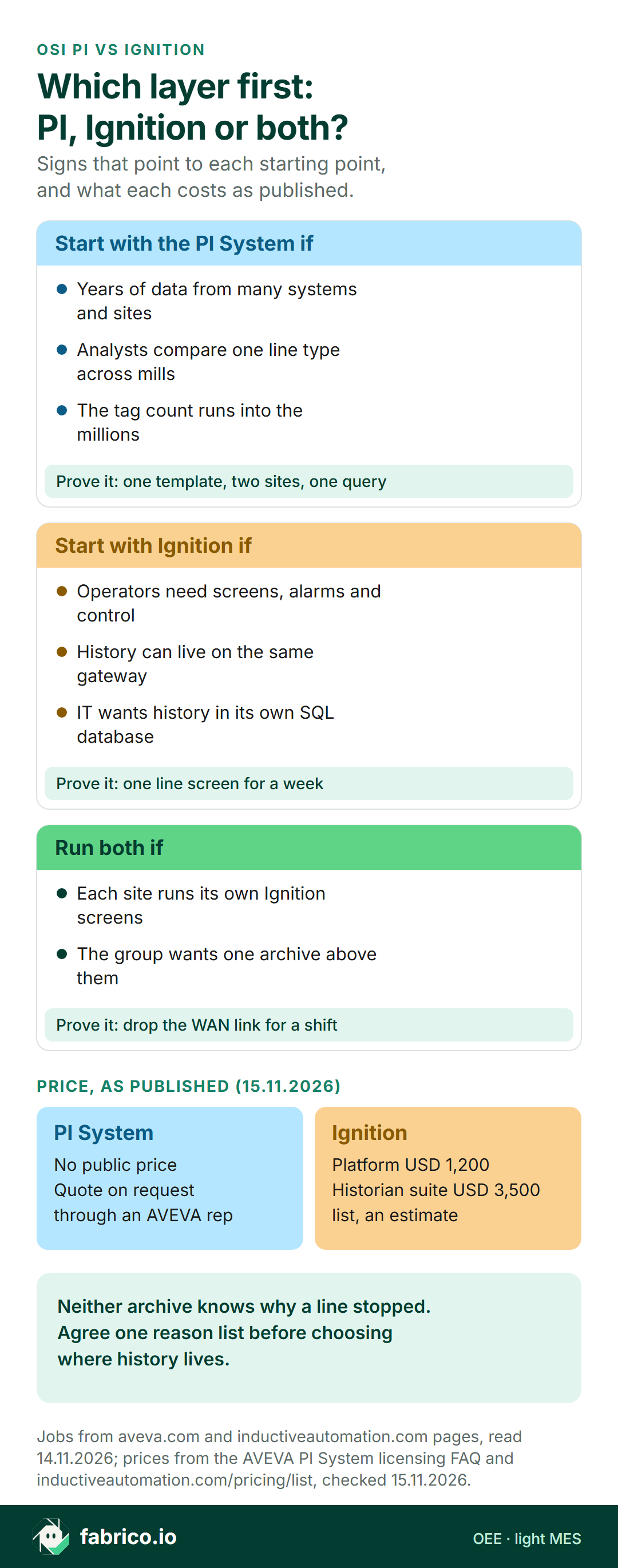
Text version of this infographic
- Which layer first: the PI System, Ignition or both?
- Start with the PI System if: Years of data from many systems and sites; Analysts compare one line type across mills; The tag count runs into the millions. Prove it: one template, two sites, one query.
- Start with Ignition if: Operators need screens, alarms and control; History can live on the same gateway; IT wants history in its own SQL database. Prove it: one line screen for a week.
- Run both if: Each site runs its own Ignition screens; The group wants one archive above them. Prove it: drop the WAN link for a shift.
- Price, as published (15.11.2026). PI System: no public price; quote on request through an AVEVA rep. Ignition: Platform USD 1,200; Historian suite USD 3,500; list, an estimate.
- Neither archive knows why a line stopped. Agree one reason list before choosing where history lives.
Asset Framework or UDTs: who the template serves
Both products let you describe a machine once and reuse the description, but for different readers. Per the PI Server page, Asset Framework models "familiar equipment, assets, and other objects in production processes, including the process flow between them", next to the archive. An analyst can build one bagging line template, apply it at three mills and compare them with one query. Ignition's UDT page describes parameterized "data templates" that let you "Create objects that match your real world devices or the existing structures in your PLCs." Edit the definition and each instance on that gateway follows, and the same template drives the screens. One is an enterprise data model for comparisons; the other is an engineering template for the people building the HMI.
Pilot test: build the bagging line once as an AF template and once as a UDT, apply each at two sites, change one attribute and see what follows.
Worked example: two feed mills, one bagging line design
Sample data, invented for this page; the group, mills and figures are illustrations. A feed group runs the same valve-sack bagging line at two mills, North and South, packing 25 kg sacks. Both run a 480 minute shift with 30 minutes of breaks, so planned time is 450 minutes. The ideal rate is 22 sacks a minute, so a perfect shift makes 450 x 22 = 9,900 sacks. Each mill's Ignition gateway stores run state and the sack counter. A group analyst wants the two lines side by side.
| One shift | North | South |
|---|---|---|
| Stopped minutes (changeover, empty sack magazine, placer jam, scale tare checks) | 46 (18, 12, 9, 7) | 83 (37, 21, 14, 11) |
| Run minutes and availability | 404, so 404 / 450 = 89.78% | 367, so 367 / 450 = 81.56% |
| Sacks made against the ideal for run time | 8,120 of 404 x 22 = 8,888, so 91.36% | 7,410 of 367 x 22 = 8,074, so 91.78% |
| Rejected at the checkweigher and quality | 65, so 8,055 / 8,120 = 99.20% | 70, so 7,340 / 7,410 = 99.06% |
| OEE | 89.78% x 91.36% x 99.20% = 81.36% | 81.56% x 91.78% x 99.06% = 74.14% |
Each OEE figure matches good sacks over the 9,900 possible: 8,055 / 9,900 = 81.36% at North and 7,340 / 9,900 = 74.14% at South (method in OEE calculation).
What the comparison needed. The run-state tags gave 46 and 83 stopped minutes. They did not say that 37 of South's minutes were changeovers; that split exists because operators gave a reason when the line stood. With the reasons in hand, the gap reads plainly: changeover 19 minutes longer, sack magazine 9, placer jam 5 and tare checks 4, so 37 extra stopped minutes, worth 37 x 22 = 814 sacks at the ideal rate. South runs slightly faster while it runs, 91.78% against 91.36%, which wins a little back, so the net gap is 8,055 minus 7,340 = 715 good sacks a shift.
Which layer did the work. The comparison rested on three things: the same template at both mills, the same definitions of planned time and ideal rate, and a reason list that means the same at both sites. PI's Asset Framework is designed for the first across sites. Per-site Ignition history covers each mill well, and bringing two gateways together is a design job for the integrator, through a central database or a gateway network. The reason list belongs to whichever system operators type reasons into, so agree it at group level before either archive is built. For how groups roll OEE up fairly, see multi-site OEE roll-up and single-plant vs multi-site OEE.
The gap between the mills in EUR
Assume a contribution margin of EUR 0.95 a sack on a sample price of EUR 10.40, 9.1% of the price, which the sector's published margins bracket: NYU Stern's January 2026 margin data (accessed 15.11.2026) shows 35 US farming and agriculture firms at a gross margin of 13.09% and a pre-tax operating margin of 5.45%, and a contribution margin usually lies between those. Feed is a thin-margin trade, so a small per-sack figure is the honest starting point; use your own.
| South against North | Sacks | EUR per shift | EUR per month (63 shifts) | EUR per year (750 shifts) |
|---|---|---|---|---|
| Longer changeovers, 19 minutes at 22 a minute | 418 | 397.10 | 25,017.30 | 297,825 |
| Net gap in good sacks | 715 | 679.25 | 42,792.75 | 509,437.50 |
The calendar is illustrative: the mill bags on three shifts, 21 days a month and 250 days a year, so 63 shifts a month and 750 a year. The year figure holds only if South closed the whole gap to North and every extra sack sold. Even so, the changeover row alone is the case for the group's first project, and it came from reasons typed at the line, not from any tag in either archive. The OEE guide for animal feed mills covers ideal rates on pellet and bagging lines.
Exception, compression and deadband on a counter
Both systems filter values before they reach history, and a counter that feeds OEE needs those filters set with care. In AVEVA's slide deck from its 2023 AVEVA World session on exception and compression, exception is a "Simple deadband to filter noise" applied before the snapshot, and compression uses a "swinging door" algorithm "to eliminate data that can safely be recreated with interpolation". The deck warns that "Default values are NOT zero" and suggests, for non-critical tags, at least compression on with a compression deviation of zero. Ignition's tag history manual sets a sample mode per tag (On Change, Periodic or Tag Group) and a deadband style; for a tag that is not a float or a double, Auto picks Discrete, and a discrete value "will not be interpolated".
| Setting | Where it sits | For a counter feeding OEE |
|---|---|---|
| Exception deviation (ExcDev) | PI, at the PI Interface (AVEVA Adapters apply their own deadband and ignore tag exception settings) | Zero, so every step reaches the snapshot |
| Compression deviation (CompDev) | PI, before the archive | Zero; a looser value lets interpolation rebuild values the line never had |
| Sample mode | Ignition, per tag | On Change, so each step is stored |
| Deadband style and value | Ignition, per tag | An integer tag with a discrete style and a deadband of zero |
The risk shows at a shift change: a report reading the counter at 22:00 gets an interpolated or a last recorded value, and with loose compression the two can differ by hundreds of units when a stop runs over the handover. The broader physics of deadbands is in deadband and hysteresis, and the trade-offs of keeping history in a historian or a plain database in historian vs database.
Archive scale and buffering
Scale is where the PI System makes its strongest claim: the PI Server page offers up to twenty million tags or data streams on one server and analytics that recalculate on demand. Ignition's SQL Historian writes to an external SQL database through a JDBC driver, which suits plants whose IT team already runs and backs up such databases. For sites on weak links, the PI System page says its data collection includes buffering, and Ignition Edge keeps 35 days of internal data storage for history and events on devices at the machine (read 14.11.2026). Test both by dropping the WAN link for a full shift and checking what arrives. A plant with three lines and a few hundred tags rarely needs twenty million; a group with a dozen sites may need that scale from day one.
Price, as published
AVEVA PI System: no public price, quote on request (checked 15.11.2026). The PI System page and its licensing FAQ show no figure. The FAQ says "Like most software companies, AVEVA is transitioning to a subscription-based commercial model", that subscriptions "can be designed to include software components that run on-premises, as well as in the cloud", and ends "Contact your local rep for more details."
Ignition: published figures. Read on 15.11.2026, Inductive Automation's list prices the platform licence at USD 1,200 and the Industrial Historian suite at USD 3,500; Perspective costs USD 11,225, Vision USD 8,330 and Ignition Edge IIoT USD 945, every figure labelled an estimate. For OEE on Ignition, Sepasoft's pricing page puts its OEE Downtime Module at USD 22,700 per site, perpetual (read the same day).
Budget too for the work around the licence: mapping tags into AF templates or UDTs, building displays, and keeping filters and templates right as lines change. Ask AVEVA to quote the same tag, user and site count you give the Ignition integrator.
Decision matrix: OSI PI or Ignition for your plant
Price: AVEVA quotes the PI System through its reps, while an Ignition platform licence lists at USD 1,200 with modules extra (both checked 15.11.2026). Pick the rows that describe your site this year; each points to the product whose own page claims that job, and many groups tick rows on both sides.
| If this is you | Look first at | Why (vendor page) | Prove it in the pilot by |
|---|---|---|---|
| Analysts compare the same line type across several sites | PI Asset Framework | Models, hierarchies and templates beside the archive | Building one bagging line template and querying two sites with it |
| The tag count runs into the millions | AVEVA PI Server | Twenty million tags or streams per server | Loading the real tag list and timing a one month query |
| Data from many existing systems belongs in one store | AVEVA PI System | One store fed by many systems | Feeding two existing systems in and checking a full shift of values |
| Operators need screens, alarms and control at the line | Ignition | SCADA with built-in OPC UA | Running one line screen for a week with the shift team |
| Shift leads want the line on a phone | Ignition Perspective | HTML5 apps for monitoring and control | Opening the line screen on a shift lead's own phone |
| History should sit in a database IT already runs | Ignition SQL Historian | External SQL databases through a JDBC driver | Asking IT to restore one shift from a backup copy |
| The budget needs a published figure before procurement | Ignition | Public price list | Pricing the module list against an AVEVA quote for the same scope |
| Shifts and downtime need start and end times | Both, plus an owner for reasons | PI event frames; Sepasoft OEE Downtime Module | Logging a week of stops beside the operator log |
Where SCADA ends and a historian begins is set out in SCADA vs historian, and the general case for a historian in the manufacturing data historian guide.
Fabrico beside a historian or a SCADA gateway
The North and South comparison worked because both mills used one reason list that meant the same thing. Fabrico keeps that shared list for a group as OEE software in the cloud with a light MES built in. Operators choose why the line stood on a handheld screen, and OEE, downtime and lost output in money come out per line, shift and site (MES and OEE solution overview). Fabrico reads run, stop and count from the machine's PLC; see the OPC UA and OEE guide. PI keeps the long archive, Ignition the screens; results go back by REST API, webhooks or CSV files, and a ready connector to either is not claimed, so test the hand-off on one line (OEE software next to a PI historian).
At a station with no usable signal, such as a hand-stacked pallet point, the camera add-on does the counting, of output and nothing else; having a camera propose the stop reason is Roadmap work for that add-on. Where a camera covers the line, the video for the minute of a stop can be opened from the shift timeline; it is streamed on request and not stored. See computer vision for OEE. To see two lines on one reason list, book a demo.
What to ask AVEVA and the Ignition integrator
- Which filters sit between the PLC counter and history, and what value does each one get on counters?
- When a report reads the counter at a shift change, does it get an interpolated value or the last recorded one?
- How is one line template applied at a second site, and what follows when the template changes?
- What buffers data when the WAN drops, and how does it backfill?
- What is the quote, or list price, for our tag, user and site count, and what support plan sits on top?
- Where do the shift plan, the ideal rates and the stop reasons live, and whose OEE figure goes to the morning meeting?
A one-week test before you sign
- Pick one line at two sites with the same machine design, so a template has something to prove.
- Agree three definitions: planned time, the ideal rate per product, and one reason list.
- Write down the counter's filter settings: ExcDev, CompDev and CompMax in PI; sample mode and deadband in Ignition.
- Log a week of handovers: the PLC counter beside what history returns for that minute.
- Price the gap with finance's margin and the two-site arithmetic above. The ISA-95 standard assigns manufacturing execution systems to Level 3 (accessed 14.11.2026); plan, rates and reasons are Level 3 work, so name their owner first.
PI System and Ignition: questions engineers ask
Is OSI PI the same as AVEVA PI System?
Yes. OSIsoft built the PI System, and AVEVA's own 2021 blog introduces the founder of OSIsoft as the pioneer of the PI System. AVEVA's product pages now use the name AVEVA PI System.
How much does the PI System cost?
AVEVA publishes no price for it. Its licensing FAQ says AVEVA is moving to a subscription-based commercial model and asks buyers to contact their local rep (checked 15.11.2026). Ask for a quote on the same tag, user and site count you price for Ignition.
Does Ignition have its own historian?
Yes. Ignition's Historian modules include a Core Historian on the gateway and a SQL Historian Module that writes to an external SQL database. Sample mode, deadband style and deadband are set per tag.
How does PI Asset Framework compare with Ignition UDTs?
Both template equipment. Asset Framework keeps models, hierarchies and templates beside the PI Server archive, which suits comparing one line type across sites. UDTs are parameterized data templates on an Ignition gateway that create tags and drive screens.
Can PI or Ignition calculate OEE?
Both can hold the inputs. PI Server event frames can log shifts and downtime, and Sepasoft's OEE Downtime Module runs on Ignition. The shift plan, the ideal rates and the reasons for stops still need an owner, whichever system stores the history.
Want two sites compared on one reason list? Book a demo.
Related articles
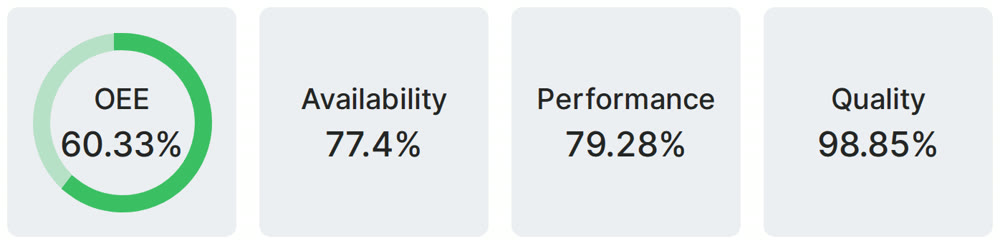
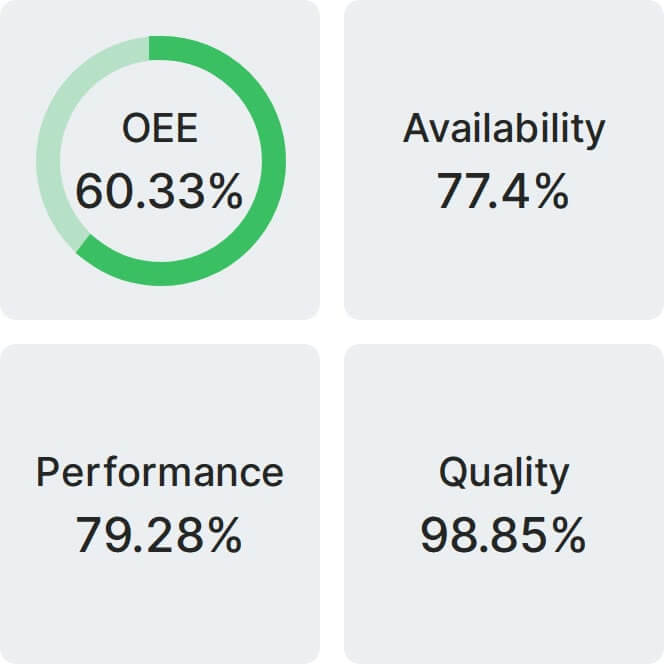
Real Fabrico tiles, sample data.